Entwodiksyon
This manual provides essential information for the safe and efficient operation of your Motocaddy M7 GPS Remote Electric Golf Caddy. Please read it thoroughly before first use and retain it for future reference.
The Motocaddy M7 GPS REMOTE Electric Caddy is designed to enhance your golfing experience by providing advanced features such as a 3.5" LCD touchscreen GPS system with 40,000 pre-loaded courses, accurate shot measurement, real-time updates, and advanced analytics tracking. It offers remote control functionality, 9 speeds, downhill control, anti-tip rear wheels, and all-terrain tires for smooth navigation on any course.

Image: The Motocaddy M7 GPS Remote Electric Golf Caddy in black, showcasing konsepsyon elegant li yo ak wou solid li yo.
Ki sa ki nan bwat la
Your Motocaddy M7 GPS Remote Electric Golf Caddy package includes the following components:
- Push cart
- Remote kontwòl
- Cell phone device cradle
- Detantè Bwè
- Detantè parapli
- Detantè skor
- USB chaje kab
- Long-lasting battery and charger

Image: Various accessories included with the Motocaddy M7 GPS, such as a cell phone cradle, drink holder, umbrella holder, and scorecard holder.
Enstalasyon ak premye itilizasyon
1. Debalaj ak Asanble
- Ak anpil atansyon retire tout eleman nan anbalaj la.
- Unfold the main cart frame. Ensure all locking mechanisms click into place securely.
- Attach the wheels if they are not pre-installed. Refer to the quick-start guide for specific wheel attachment instructions.
- Install the anti-tip rear wheel for enhanced stability, especially on uneven terrain.
2. Chaje batri
- Connect the provided charger to the battery.
- Ploge plato a nan yon priz miray estanda.
- Allow the battery to fully charge before first use. The charging indicator on the charger will typically change color or turn off when charging is complete.
- Ensure the battery is securely placed in its compartment on the caddy.
3. Initial GPS Setup
- Power on the caddy.
- The 3.5" LCD touchscreen will guide you through the initial setup, including language selection and course downloads.
- Asire w ou nan yon zòn ouvè ki klè view nan syèl la pou akizisyon siyal GPS optimal.
- Connect to your phone via Bluetooth for notifications and updates as prompted.

Imaj: Gwo plan view of the Motocaddy M7 GPS touchscreen display showing course information, along with the remote control.
Enstriksyon Operasyon
1. Powering On / Off
- Press and hold the main power button on the handle to turn the caddy on or off.
2. Sèvi ak kontwòl remote la
- The remote control allows operation from up to 150+ feet.
- Use the directional buttons (forward, left, right, reverse) to maneuver the caddy.
- Press the pause button to stop the caddy and resume to continue movement.
- Ensure the remote control is charged and paired with the caddy.
3. Touchscreen GPS Functions
- Seleksyon kou: Select your desired course from the pre-loaded database.
- Shot Measurement: Use the touchscreen to measure shot distances accurately.
- Enfòmasyon sou danje: View details on course hazards.
- Dinamik vèt View: Adjust pin positions by dragging and dropping on the screen.
- Suivi nòt: Input and track your scores directly on the device.
- Notifikasyon Smartphone: Receive calls, texts, and emails when connected via Bluetooth.
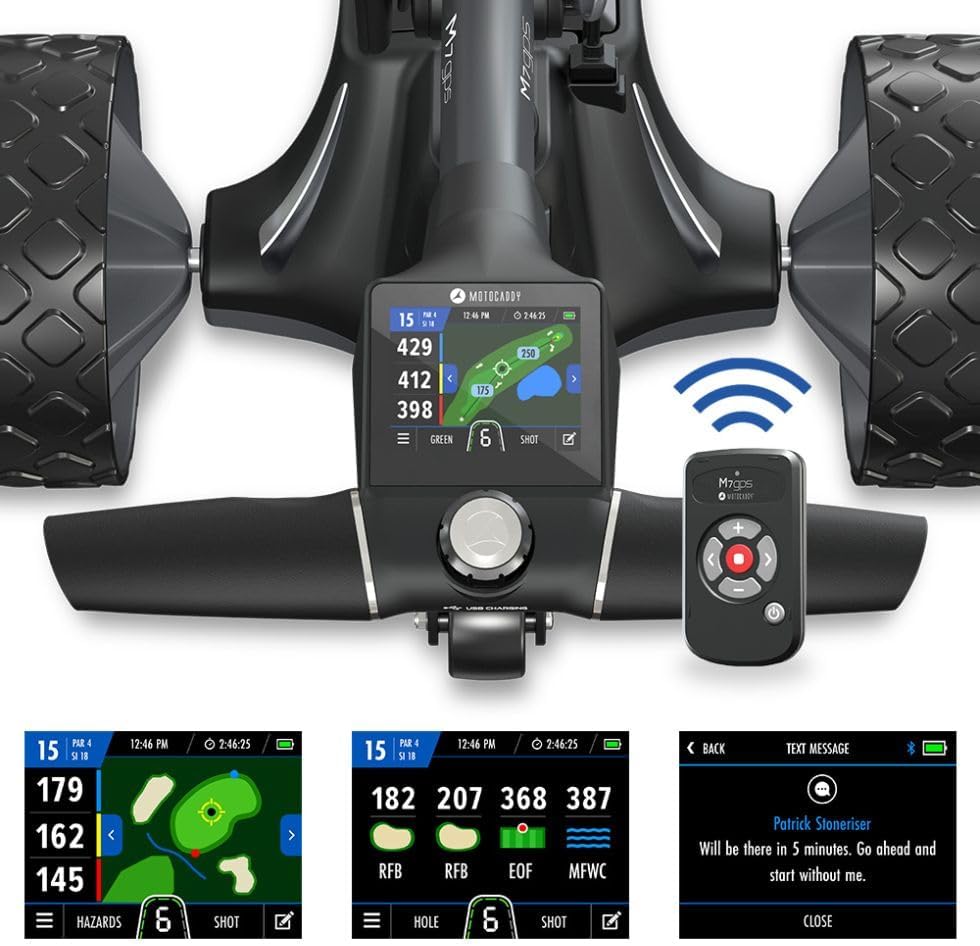
Imaj: Detaye view of the Motocaddy M7 GPS touchscreen showing various golf data and the remote control.
4. Speed Control and Downhill Control (DHC)
- The caddy features 9 speed settings. Adjust the speed using the controls on the handle or remote.
- Downhill Control (DHC) automatically maintains a consistent speed when descending slopes, preventing the caddy from running away.
5. Pliye ak Depo
- To fold the caddy, follow the instructions in the quick-start guide. The simple folding mechanism allows for compact storage and transportation.
- Always remove the battery before folding or storing the caddy for extended periods.

Image: The Motocaddy M7 GPS Electric Caddy in its compact folded state, ready for storage or transport.
Antretyen
- Netwayaj: Wipe down the caddy with a damp cloth after each use to remove dirt and debris. Avoid using harsh chemicals or abrasive cleaners.
- Swen batri: Store the battery in a cool, dry place. Charge the battery regularly, even when not in use, to maintain its lifespan. Do not allow the battery to fully discharge for extended periods.
- Enspeksyon wou: Periodically check the wheels for wear and tear. Ensure they are free of debris that could impede movement.
- Depo: Store the caddy in a dry environment, away from extreme temperatures.
Depanaj
| Pwoblèm | Kòz posib | Solisyon |
|---|---|---|
| Caddy does not power on. | Batri a pa chaje oswa li pa byen konekte. | Ensure battery is fully charged and securely connected. Check power button. |
| Kontwòl remote la pa reponn. | Batri telekòmand lan fèb oswa li pa konekte. | Charge remote control. Re-pair remote with caddy according to pairing instructions in the full manual. |
| GPS la pa pran siyal. | Obstrue view of sky or initial setup incomplete. | Move to an open area. Ensure initial GPS setup is completed. |
| Caddy not moving smoothly. | Debris in wheels or low tire pressure (if applicable). | Inspect and clean wheels. Check tire pressure if your model has pneumatic tires. |
Espesifikasyon
| Karakteristik | Detay |
|---|---|
| Non modèl | M7 GPS Remote |
| Pwa atik | 16 liv |
| Dimansyon pake | 30.5 x 20.55 x 18.5 pous |
| Gwosè ekspozisyon | 3.5 pous |
| Kòmandman vwa | Touchscreen |
| Gwosè ekran | 3.5 pous |
| Karakteristik espesyal | Bluetooth, Ekran taktil |
| Koneksyon Teknoloji | Bluetooth |
| Kalite kat jeyografik | Amerik di Nò |
| Espò | Gòlf |
| Kalite aliye | Panel Mount |
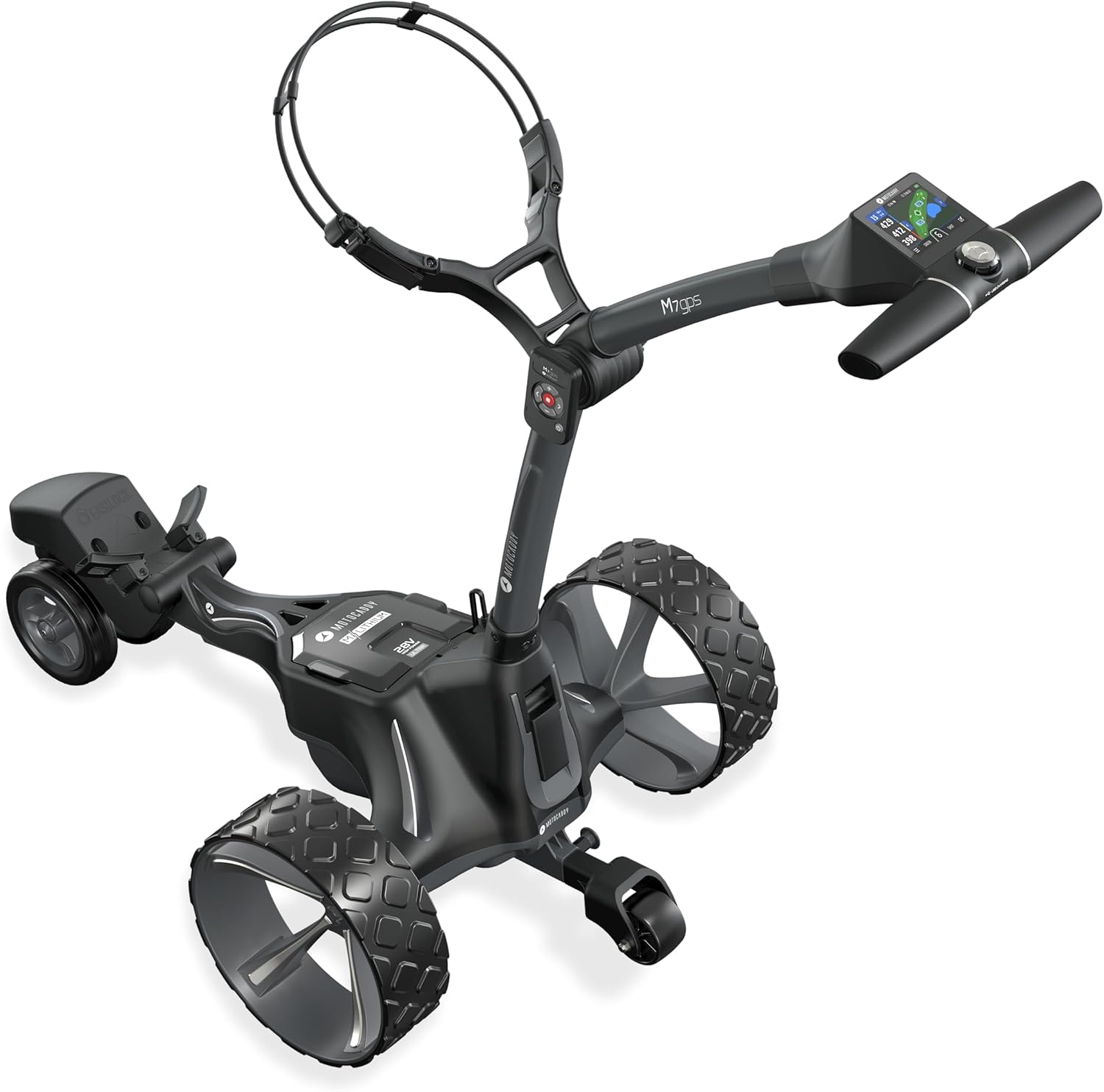
Image: Technical diagram illustrating the folded dimensions (25.5in x 18.5in) and weight (32 pounds) of the Motocaddy M7 GPS.
Enfòmasyon sou Garanti
The Motocaddy M7 GPS Remote Electric Golf Caddy comes with a manufacturer's warranty. Based on product specifications, the warranty period is 24 mwa soti nan dat acha a.
For detailed warranty terms, conditions, and claim procedures, please refer to the official Motocaddy websit la oubyen kontakte sèvis kliyan yo dirèkteman. Kenbe prèv acha ou pou reklamasyon garanti.
Sipò ak Kontakte
Should you require technical assistance, have questions about your product, or need to report an issue, please contact Motocaddy customer support.
- Manifakti: Motocaddy
- Websit: Refer to the official Motocaddy websit pou resous sipò, FAQ, ak enfòmasyon pou kontakte yo.
- Sèvis Kliyan: Contact details can typically be found on the manufacturer's website or in the packaging.


