1. Pwodwi souview
The Taiahiro Low Profile Mechanical Keyboard is an ultra-slim 87-key keyboard designed specifically for Mac users, offering a compact 80% layout. It features ultra-low profile brown switches for a tactile and responsive typing experience. This wired keyboard provides full support for Mac function keys and customizable white backlighting.
Karakteristik kle
- Low Profile Brown Switches for tactile feedback.
- 87-key (TKL) compact design.
- Full Mac Function Keys Support.
- Detachable Type-C connection.
- 18-Modes LED White Backlighting with 4 adjustable brightness levels.
- Durable Aluminum Alloy Panel construction.
- Double Shot Injection Keycaps for comfortable typing.
- Ergonomic design for comfortable angle.
Kontni pake
- Taiahiro Low Profile Klavye mekanik
- USB-C pou USB-A kab
- Manyèl itilizatè
Dyagram pwodwi

Figi 1: Plis paseview of the Taiahiro Low Profile Mechanical Keyboard, highlighting its compact design and key layout.
2. Gid Enstalasyon
Konekte klavye a
- Jwenn pò USB-C a sou dèyè klavye a.
- Konekte yon bout kab USB-C ki vini ak li a nan pò USB-C klavye a.
- Connect the other end of the USB-C cable to an available USB-A port on your computer (MacBook Pro/Air, iMac, Mac Mini, or PC).
- Klavye a se yon fonksyon plug-and-play epi sistèm operasyon ou an ta dwe rekonèt li otomatikman.
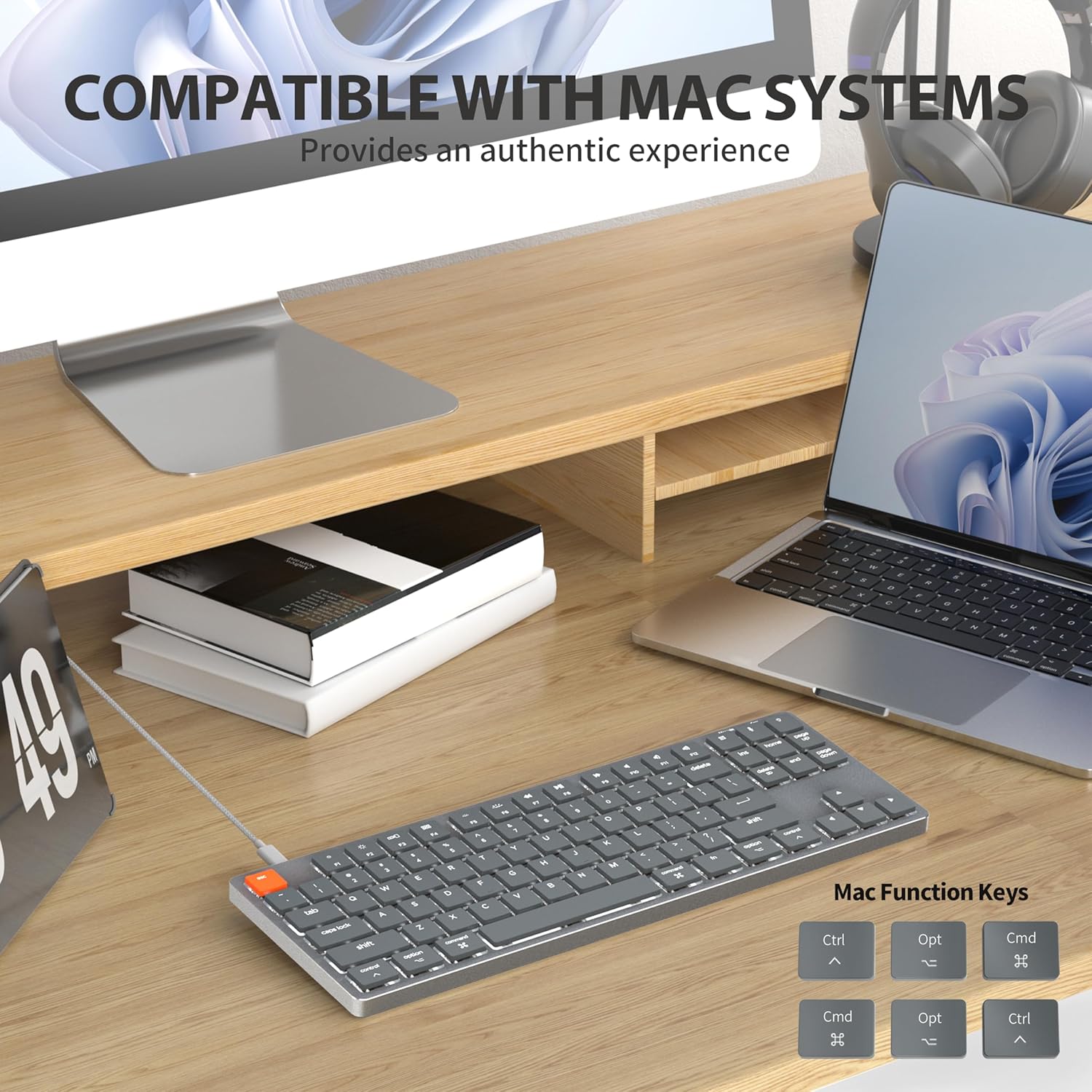
Figure 2: Connecting the detachable Type-C cable to the keyboard for convenience and efficiency.
Sistèm konpatibilite
This keyboard is designed for full compatibility with Mac OS and Windows operating systems. It supports Mac Mini, MacBook Air, MacBook Pro, PC, and iMac devices.

Figure 3: The keyboard seamlessly integrated with a Mac system, providing an authentic user experience.
3. Operasyon Enstriksyon
Tape debaz
Ba-pro afile brown switches provide a quiet yet responsive typing experience with satisfying tactile feedback. The ultra-thin design and high-quality keycaps enhance fingertip comfort during extended use.
Kontwòl ekleraj dèyè
The keyboard features 18 distinct LED white backlighting modes. You can cycle through these modes and adjust brightness levels using the dedicated function keys. Refer to the keyboard's layout for specific key combinations, typically involving the 'Fn' key combined with other keys (e.g., Fn + F1/F2 for brightness, Fn + arrow keys for modes).

Figure 4: The keyboard's 18-modes LED white backlighting, offering customizable illumination.
Mac Function Keys Support
The keyboard is specifically designed to support Mac function keys, allowing you to easily control system functions such as screen brightness, volume, and media playback directly from the keyboard. These functions are typically accessed by pressing the 'Fn' key in combination with the corresponding F-keys (F1-F12).
Kle chemen kout
The keyboard includes multifunctional shortcut keys for enhanced productivity. These keys provide quick access to various commands, including multimedia controls. Consult the keycap legends for specific shortcut functions.

Figure 5: The keyboard's multifunctional shortcut keys, providing 100% fully loaded functionality.
4. Antretyen ak Swen
Netwaye klavye a
- Dekonekte klavye a nan òdinatè w la anvan ou netwaye li.
- Sèvi ak yon ti moso twal mou, ki san pèl dampRense avèk dlo oswa yon solisyon netwayaj dou pou siye bouchon kle yo ak sifas la.
- Pou pousyè ak debri ant kle yo, sèvi ak lè konprese oswa yon ti bwòs.
- Evite itilize pwodui chimik ki fò, pwodui netwayaj abrazif, oswa imidite twòp.
Depo
When not in use for extended periods, store the keyboard in a cool, dry place away from direct sunlight and extreme temperatures to prevent damage.
NAN. Depanaj
Klavye pa reponn
- Tcheke Koneksyon: Asire w kab USB-C a byen konekte ak klavye a ak òdinatè w la.
- Eseye yon lòt pò: Plug the keyboard into a different USB port on your computer.
- Rekòmanse òdinatè: Pafwa, yon senp rekòmanse sistèm nan ka rezoud pwoblèm koneksyon.
- Tcheke kab: If possible, try using a different USB-C cable to rule out a faulty cable.
Backlight Issues
- Enable Backlight: Ensure the backlight is not turned off. Use the designated function keys (e.g., Fn + backlight key) to toggle it on/off.
- Ajiste klète: Cycle through brightness levels using the appropriate function keys (e.g., Fn + F1/F2) to ensure it's not set to the lowest level.
- Chanje mòd: Try cycling through different backlight modes to see if the issue persists across all modes.
Mac Compatibility Concerns
- Vèsyon sistèm operasyon: Ensure your Mac OS is up to date or meets the minimum requirements for peripheral compatibility.
- Kalite processeur: While designed for Mac, some specific processor architectures (e.g., M2/ARM) might require updated drivers or system settings. Check Taiahiro's official support page for any specific driver downloads or compatibility notes.
- Mòd klavye: If your keyboard has a physical switch or key combination to toggle between Mac/Windows mode, ensure it is set to Mac mode.
6. Espesifikasyon teknik
| Karakteristik | Detay |
|---|---|
| Nimewo Modèl | 201 |
| Mak | Taiahiro |
| Kalite klavye | Low Profile Klavye mekanik |
| Chanje Kalite | Brown Switch |
| Kantite kle | 87 |
| Koneksyon | Filaire (USB-C) |
| Ekleraj | 18-Modes LED White Backlighting |
| Materyèl | Aluminum Alloy Panel |
| Koulè | Black-Gray |
| Dimansyon pwodwi | 12.5 x 1.8 x 34.59 cm (4.92 x 0.71 x 13.62 pous) |
| Pwa atik | 971 g |
| OS konpatib | Mac OS, Windows |
Dimensions and Profile

Figure 6: Detailed dimensions of the 87-key ultra-thin mechanical keyboard, illustrating its compact and slim profile.
Chanje Teknoloji

Figure 7: Comparison of Ultra Low Profile Brown Switch with standard mechanical switches, highlighting shorter actuation point for faster and more precise input.
Keycap Design

Figure 8: The ultra-thin double shot injection keycaps, designed for comfortable and durable typing.
Ergonomi
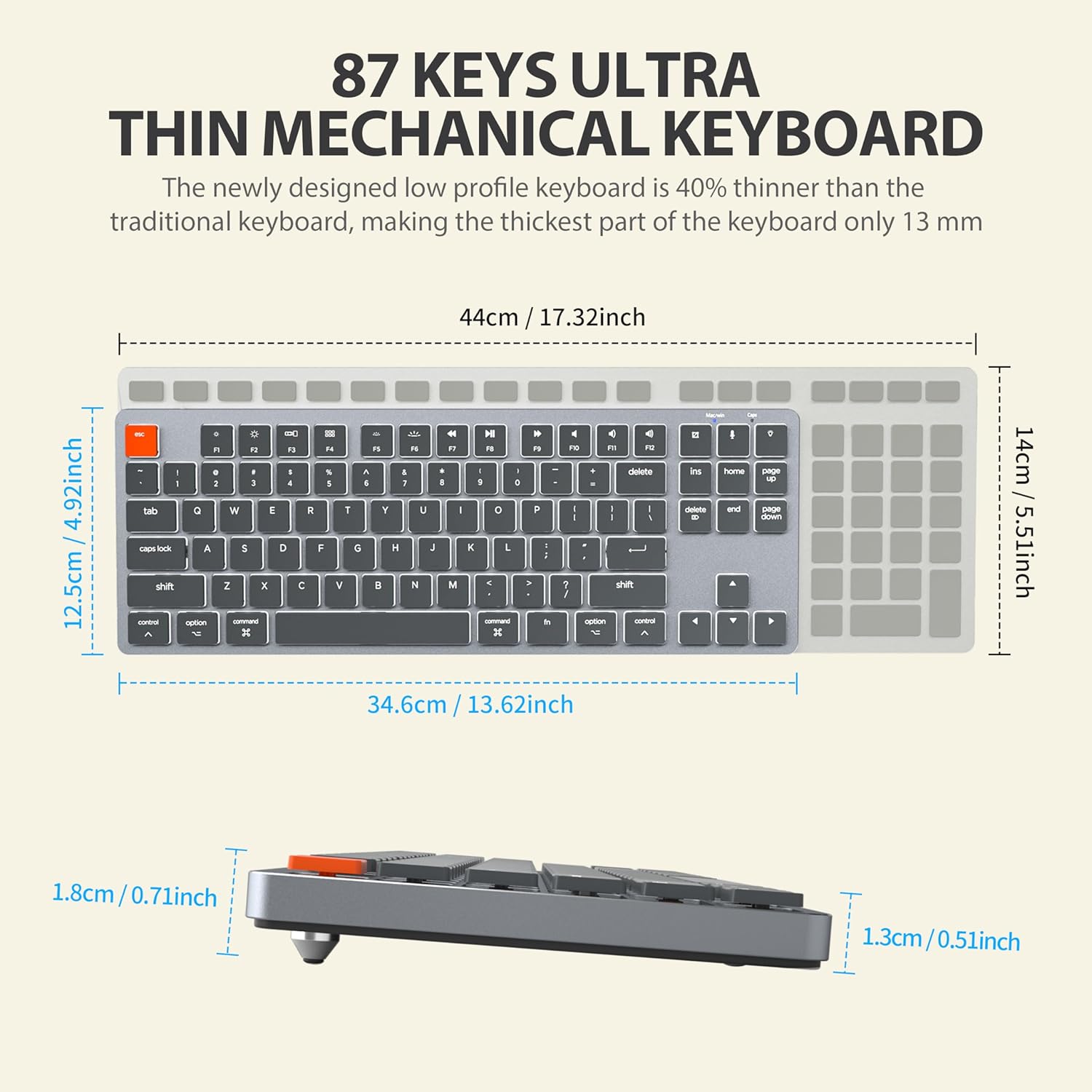
Figure 9: The ergonomic design of the keyboard, providing a comfortable angle for extended typing sessions.
7. Garanti ak sipò
Enfòmasyon sou Garanti
This Taiahiro product comes with a standard manufacturer's warranty. Please refer to the product packaging or the official Taiahiro website for specific warranty terms and conditions, including coverage period and claim procedures.
Sipò pou Kliyan
For technical assistance, troubleshooting, or any product-related inquiries, please visit the official Taiahiro websit entènèt la oubyen kontakte depatman sèvis kliyan yo. Anjeneral, ou ka jwenn enfòmasyon pou kontakte yo sou anbalaj pwodwi a oubyen sou prezans ofisyèl mak la sou entènèt.


