Enfòmasyon enpòtan sou sekirite
Tanpri li tout avètisman ak enstriksyon sekirite yo ak anpil atansyon anvan ou itilize pwodui sa a. Si ou pa swiv enstriksyon sa yo, sa ka lakòz chòk elektrik, dife oswa blesi grav.
- Kenbe aparèy la lwen dlo ak imidite.
- Pa eseye demonte oswa repare aparèy la tèt ou. Konfye tout antretyen bay pèsonèl kalifye.
- Sèvi ak sèlman volim chaj espesifye atage (DC 5V) and Type-C cable.
- Avoid exposing the device to extreme temperatures (hot or cold) or direct sunlight.
- Do not block the microphone hole or lens during operation.
- Jete batri a ak aparèy la dapre règleman lokal yo.
Pwodwi souview
The Jectse HD 1080P WiFi Body Camera is a compact and versatile video recorder designed for personal security and documentation. It features a 1080P HD image sensor, 180-degree rotatable lens, built-in WiFi hotspot for real-time viewing, and one-button operation for ease of use. Its compact design with a back clip allows for convenient portability.

Image: The Jectse HD 1080P WiFi Body Camera shown alongside its USB Type-C charging cable.
Karakteristik kle
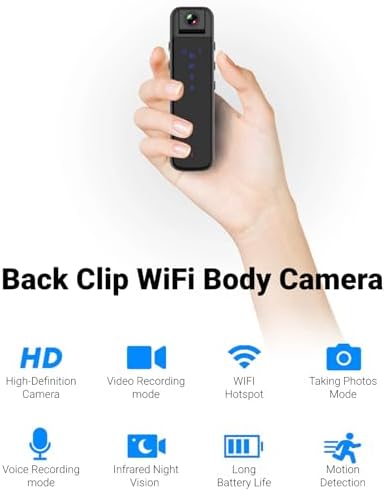
Image: Visual representation of the camera's main features including HD recording, video mode, WiFi hotspot, photo mode, voice recording, infrared night vision, long battery life, and motion detection.
- HD 1080P Image Sensor: Equipped with a high-definition sensor for clear image quality.
- Built-in WiFi Hotspot: Connect to a mobile app for real-time video playback and control.
- Compact Back Clip Design: Easily attach to clothing for portable use.
- Lantiy ki ka vire 180 degre: Adjust the lens angle for flexible recording.
- Operasyon yon sèl bouton: Simple controls for recording video, taking photos, and voice recording.
- HD Noise Cancelling: Advanced microphone technology for clearer audio.
- Vizyon lannwit enfrawouj: Capable of recording in low-light conditions without auxiliary lights.
- Pwolonje lavi batri: Approximately 5 hours of continuous recording.
- Depo dilatabl: Supports up to 256GB small memory card (TF card, not included).
Eleman ak Kontwòl
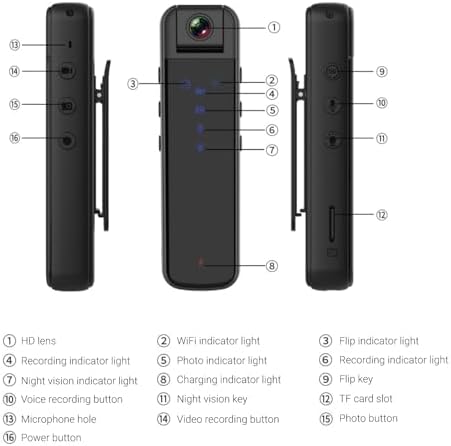
Image: Detailed diagram illustrating the various parts and controls of the body camera, including the lens, indicators, buttons, and ports.
| Non. | Konpozan/Kontwòl |
|---|---|
| 1 | HD lantiy |
| 2 | Limyè endikatè WiFi |
| 3 | Flip indicator light |
| 4 | Anrejistreman limyè endikatè |
| 5 | Photo indicator light |
| 6 | Anrejistreman limyè endikatè |
| 7 | Limyè endikatè vizyon lannwit |
| 8 | Chaje endikatè limyè |
| 9 | Flip kle |
| 10 | Bouton anrejistreman vwa |
| 11 | Kle vizyon lannwit |
| 12 | TF kat plas |
| 13 | Twou mikwofòn |
| 14 | Bouton anrejistreman videyo |
| 15 | bouton foto |
| 16 | Bouton pouvwa |
Enstalasyon
1. Chaje Aparèy la
Before first use, fully charge the body camera. Connect the provided Type-C USB cable to the camera's Type-C interface and the other end to a DC 5V power source (e.g., computer USB port, USB wall adapter). The charging indicator light (8) will illuminate during charging and turn off when fully charged. A full charge provides approximately 5 hours of continuous recording.
2. Inserting/Removing Memory Card
The camera supports small memory cards (TF cards) up to 256GB (not included). Locate the TF card slot (12) on the side of the camera. Gently insert the memory card with the gold contacts facing down until it clicks into place. To remove, push the card in slightly until it springs out.
Note: Ensure the device is powered off before inserting or removing the memory card to prevent data loss or damage.
3. Initial Setup and App Connection (WiFi)
The camera features a built-in WiFi hotspot for real-time viewing and control via a mobile application. Follow these steps to connect:
- Power on the camera by pressing and holding the Power button (16).
- On your phone or tablet, go to your WiFi settings.
- Chèche pou a WiFi network named "CS05" (e.g., CS05 CE01) and connect to it.
- Once connected, open the "Sports Camera" application on your mobile device.
- From the main interface of the app, enter the real-time preview interface. You can now view viv footage and control recording/photo functions from the app, or continue to use the physical buttons on the camera.
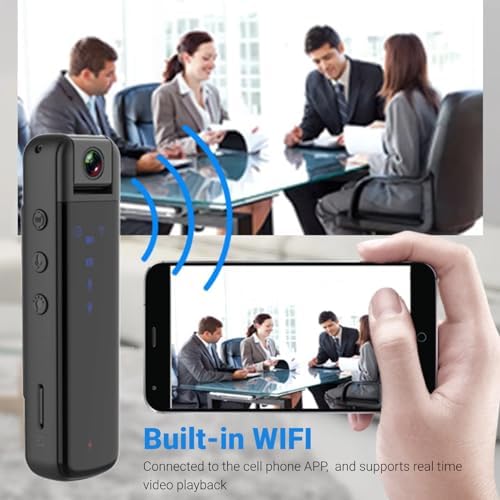
Image: Illustration of the camera's built-in WiFi functionality, allowing connection to a smartphone app for real-time video playback.
Enstriksyon Operasyon
1. Power On/Off
- Pouvwa sou: Press and hold the Power button (16) until the indicator lights illuminate.
- Pouvwa Off: Press and hold the Power button (16) again until the indicator lights turn off.
2. Anrejistreman Videyo
The camera supports 1080P video recording.
- Kòmanse anrejistreman: Press the Video recording button (14) once. The recording indicator light (4) will flash to indicate recording is in progress.
- Sispann anrejistreman: Press the Video recording button (14) again. The recording indicator light will stop flashing.
3. Pran Foto
Capture still images with a single press.
- Pran foto: Press the Photo button (15) once. The photo indicator light (5) will flash briefly.
4. Anrejistreman Vwa
Record audio only using the dedicated voice recording function.
- Kòmanse anrejistreman vwa: Press the Voice recording button (10) once. The recording indicator light (6) will illuminate.
- Stop Voice Recording: Press the Voice recording button (10) again. The recording indicator light will turn off.

Image: Visual guide to the camera's one-key control system, highlighting the buttons for starting video recording, taking photos, and voice recording.
5. 180-Degree Lens Rotation
The camera lens can be manually rotated up to 180 degrees to capture footage from various angles (forward, backward, upward). Adjust the lens (1) to your desired orientation before recording.
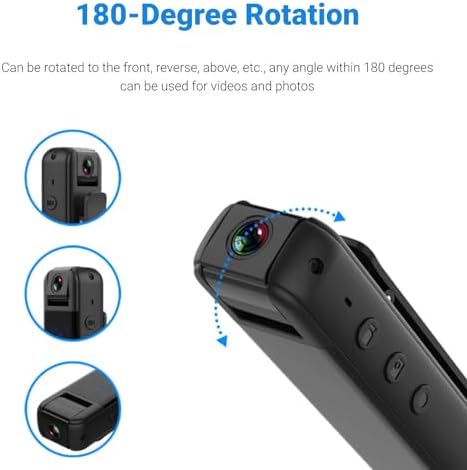
Image: Diagram demonstrating the camera's 180-degree rotatable lens, showing how it can be adjusted for different recording perspectives.
6. Vizyon lannwit
The camera is equipped with infrared night vision for recording in low-light or dark environments without the need for external illumination.
- Activate Night Vision: Press the Night vision key (11) once. The night vision indicator light (7) will illuminate.
- Deactivate Night Vision: Press the Night vision key (11) again. The night vision indicator light will turn off.

Image: A split image demonstrating the effectiveness of HD infrared night vision, showing a scene in normal light and the same scene clearly visible in darkness.
7. Using the Back Clip
The integrated back clip allows for convenient attachment to clothing, such as a jacket pocket, making it easy to carry and record discreetly.
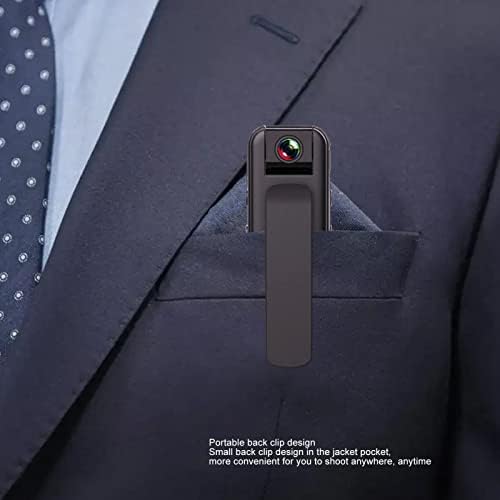
Image: The compact body camera shown clipped into the breast pocket of a suit jacket, demonstrating its portable and discreet design.
Antretyen
Netwayaj
To maintain the performance and appearance of your camera:
- Siye kò kamera a ak yon twal mou epi sèk.
- Pou lantiy la, sèvi ak yon twal espesyal pou netwaye lantiy ak yon solisyon pou evite reyur.
- Pa sèvi ak pwodui chimik piman bouk, solvang netwayaj, oswa detèjan fò.
Depo
When not in use, store the camera in a cool, dry place, away from direct sunlight and extreme temperatures. Ensure the battery is partially charged (around 50%) if storing for extended periods to prolong battery life.
Depanaj
| Pwoblèm | Kòz posib | Solisyon |
|---|---|---|
| Kamera a pa limen. | Batri ki ba. | Chaje kamera a nèt. |
| Cannot connect to WiFi hotspot. | Incorrect WiFi name selected; camera WiFi not active. | Ensure the camera is powered on and its WiFi hotspot is active. Select the correct "CS05" network. |
| Anrejistreman an sispann sanzatann. | Memory card full; low battery. | Check memory card storage and delete unnecessary files or replace card. Charge the camera. |
| Video playback issues. | Koripsyon file; incompatible playback software. | Try playing on a different device or using standard video playback software. Ensure memory card is not corrupted. |
| Move kalite imaj/videyo. | Dirty lens; insufficient lighting (if night vision is off). | Clean the lens. Activate night vision in low-light conditions. |
Espesifikasyon
| Karakteristik | Spesifikasyon |
|---|---|
| Kalite pwodwi | WiFi Kò Kamera |
| Materyèl | Plastik |
| Rezolisyon videyo | 1920x1080P |
| Kodaj videyo | M-JPEG |
| Fòma videyo | AVI |
| Rapò imaj | 16:9 |
| Fòma anrejistreman | WAV |
| Kapasite batri | 3.7V 1000mAh Lithium Battery (Built-in) |
| Tan travay | Approx. 5 hours continuous recording |
| Ajisteman Lantiy | 180-degre wotasyon |
| Sipò pou Depo | Up to 256GB small memory card (TF card, not included) |
| Kalite entèfas | Kalite-C |
| Chaje Voltage | DC 5V |
| Lojisyèl lèktur | System comes with conventional sound and video playback software |
| Dimansyon (Pake) | 13 x 9 x 5 cm |
| Pwa (Pakè) | 165 g |
| Nimewo Modèl | Jectse6eao57zprw |
Garanti ak sipò
Jectse is committed to providing high-quality products and customer service. While specific warranty details are not provided in this manual, please retain your proof of purchase for any warranty claims.
For further assistance, technical support, or inquiries, please visit the official Jectse brand store or contact their customer service through the platform where you purchased the product.
You can visit the Jectse store here: Jectse Official Store