1. Entwodiksyon
Mèsi pou acha aasing the SOAR XL ShockBox BTH6 Wireless Bluetooth Speaker. This speaker is designed to provide high-quality audio with versatile connectivity options, including Bluetooth 5.0, AM/FM radio, USB, and Aux inputs. Its portable and shockproof design, combined with dynamic multicolor LED lights, makes it suitable for various environments. Please read this manual carefully to ensure proper use and maintenance of your device.
2. Pwodwi souview
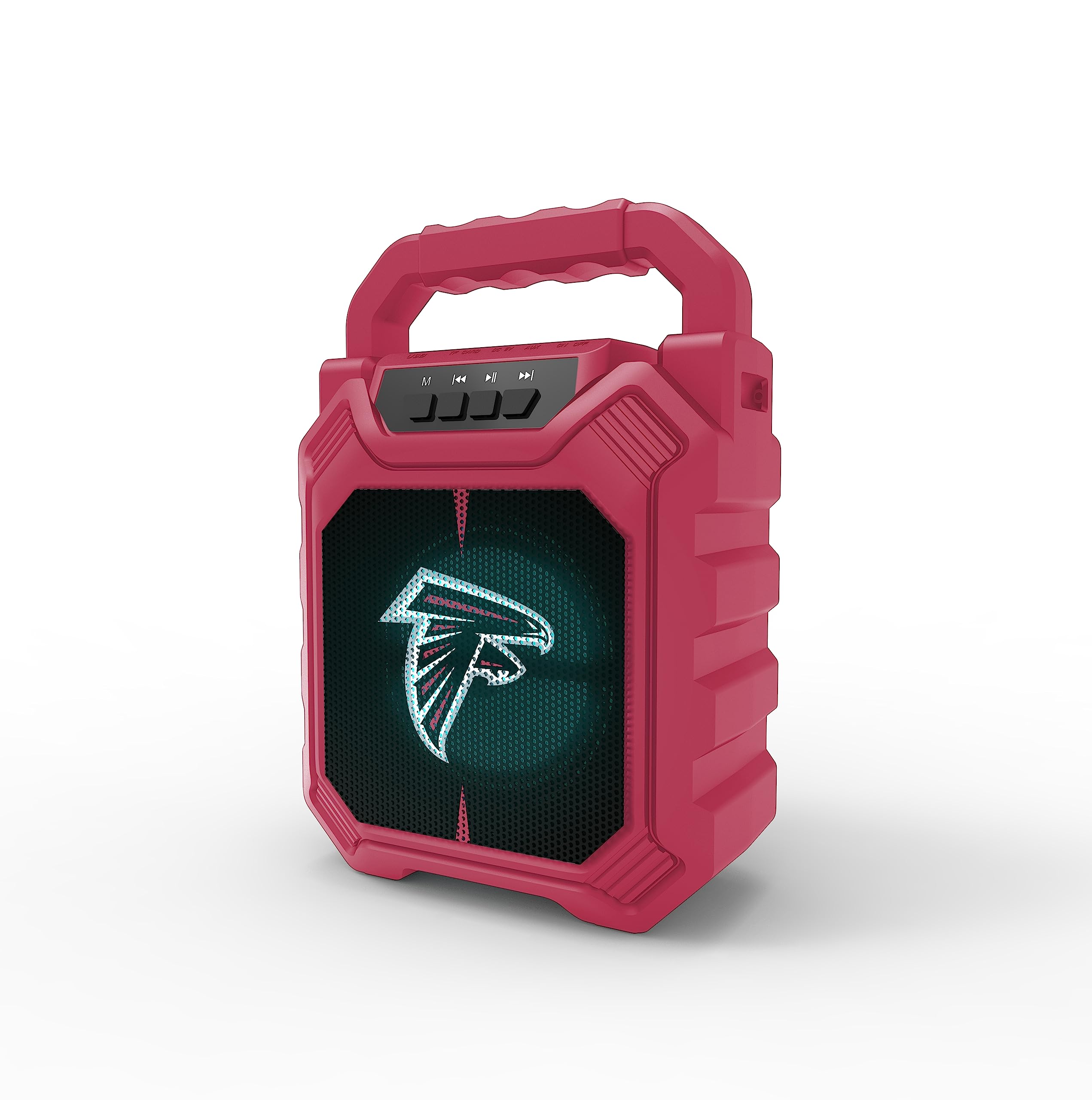
Imaj 1: Devan view of the SOAR XL ShockBox BTH6 Wireless Bluetooth Speaker, featuring the Atlanta Falcons logo.
Karakteristik kle:
- Koneksyon Bluetooth 5.0: For seamless wireless audio streaming.
- Antre odyo miltip: Supports AM/FM radio, USB, and Aux connections.
- Konsepsyon pòtab: Features a convenient top handle and shockproof construction.
- Long lavi batri: Provides over 5 hours of playback on a single charge.
- Limyè ki ap dirije dinamik: Multicolor LED lights pulse with the music.
- True Wireless Stereo (TWS): Connect two speakers for enhanced stereo sound.
3. Kontwòl ak pò

Image 2: Top panel of the speaker, illustrating the control buttons and various input ports.
Fonksyon bouton:
- Bouton pouvwa: Press and hold to turn the speaker ON/OFF. Short press to switch modes (Bluetooth, FM, USB, Aux).
- Bouton 'M' (Mòd): Short press to cycle through input modes (Bluetooth, FM Radio, USB, Aux).
- Tras anvan / Diminye volim: Short press for previous track (in Bluetooth/USB mode). Press and hold to decrease volume.
- Bouton jwe/poz: Short press to play or pause audio. In FM mode, short press to auto-scan and save stations.
- Pwochen mizik / Ogmante volim: Short press for next track (in Bluetooth/USB mode). Press and hold to increase volume.
Pò Antre:
- Mikwo-USB chaje pò: Pou chaje oratè a.
- Pò USB: Pou jwe odyo ki soti nan yon kle USB.
- Aux-in Port (3.5mm): For connecting external audio devices via an auxiliary cable.
- MicroSD Kat plas: For playing audio from a MicroSD card.
4. Enstalasyon ak operasyon
4.1 Chaje Oratè a
- Connect the provided micro-USB cable to the charging port on the speaker.
- Konekte lòt bout kab la nan yon adaptè kouran USB (pa enkli) oubyen nan yon pò USB òdinatè.
- Limyè endikatè chaj la ap limen. Yon fwa li fin chaje nèt, limyè a ka chanje koulè oswa etenn.
- A full charge provides over 5 hours of playback time.
4.2 Limen/Etenyen
- To turn ON, press and hold the Power button until you hear an audible prompt.
- To turn OFF, press and hold the Power button again until the speaker powers down.
4.3 Bluetooth Pairing
- Limen oratè a. Li pral antre otomatikman nan mòd koneksyon Bluetooth, sa ap endike pa yon limyè LED ki ap flache ak yon mesaj sonab.
- Sou aparèy ou an (telefòn entelijan, tablèt, elatriye), aktive Bluetooth epi chèche aparèy ki disponib yo.
- Select "SOAR BTH6" from the list of devices.
- Yon fwa li konekte, oratè a ap emèt yon konfimasyon sonab, epi limyè LED la ap sispann flache.
- Oratè a ap rekonekte otomatikman ak dènye aparèy ki konekte a lè li limen, si aparèy la nan zòn li epi Bluetooth la aktive.
4.4 Operasyon Radyo FM
- Turn on the speaker and press the 'M' (Mode) button until you enter FM Radio mode.
- To auto-scan and save available FM stations, short press the Play/Pause button. The speaker will scan and store stations automatically.
- Use the Previous Track and Next Track buttons to navigate between saved stations.
4.5 USB and Aux Input
- USB Antre: Mete yon kle USB nan pò USB a. Oratè a ap chanje otomatikman an mòd USB epi li pral kòmanse jwe odyo. files.
- Aux Antre: Connect an external audio device (e.g., MP3 player) to the Aux-in port using a 3.5mm audio cable. Press the 'M' button to switch to Aux mode.
4.6 Mòd Ekleraj LED

Image 3: The speaker displaying its dynamic LED lights in a vibrant setting.
The speaker features dynamic multicolor LED lights that pulse to the rhythm of the music. These lights activate automatically when the speaker is in use. There are no user-adjustable modes for the LED lights; they are designed to enhance the audio experience visually.
4.7 Vrèman san fil stereo (TWS) koneksyon

Image 4: Two SOAR XL ShockBox BTH6 speakers paired together for True Wireless Stereo (TWS) sound.
Pou reyalize yon son ki pi lajtage, you can pair two SOAR XL ShockBox BTH6 speakers together using the TWS function:
- Ensure both speakers are turned OFF.
- Turn ON both speakers. They will enter Bluetooth pairing mode.
- On one of the speakers (this will be your primary speaker), double-press the 'M' (Mode) button. The speakers will attempt to connect to each other.
- Once successfully paired, you will hear an audible confirmation. The LED lights on both speakers will synchronize.
- Kounye a, konekte aparèy ou a ak oratè prensipal la atravè Bluetooth jan sa dekri nan seksyon 4.3. Odyo a ap jwe nan tou de oratè yo an stereo.
5. Antretyen
- Netwayaj: Sèvi ak yon twal mou epi sèk pou netwaye deyò oratè a. Pa sèvi ak pwodui netwayaj abrazif oswa solvan.
- Depo: Sere oratè a nan yon kote ki fre epi sèk, lwen limyè solèy dirèk ak tanperati ekstrèm.
- Swen batri: Pou pwolonje lavi batri a, chaje oratè a regilyèman, menm si ou pa itilize l souvan. Evite dechaje batri a nèt pandan yon bon bout tan.
- Rezistans dlo: While designed to be durable, avoid submerging the speaker in water.
NAN. Depanaj
| Pwoblèm | Solisyon posib |
|---|---|
| Oratè pa limen. | Ensure the battery is charged. Connect the speaker to a power source using the micro-USB cable. |
| Pa ka konekte atravè Bluetooth. | Make sure the speaker is in Bluetooth mode and within range (approx. 10 meters). Turn off and on your device's Bluetooth. Forget "SOAR BTH6" from your device's Bluetooth list and try pairing again. |
| Pa gen son oswa volim nan ba. | Tcheke nivo volim yo sou oratè a ak aparèy ki konekte a. Asire w ke ou chwazi mòd antre ki kòrèk la. |
| Resepsyon radyo FM lan pa bon. | Adjust the speaker's position. Ensure you are in an area with good signal strength. |
| Koneksyon TWS la echwe. | Ensure both speakers are fully charged and not connected to any other Bluetooth devices. Follow the TWS pairing steps carefully. |
7. Espesifikasyon
| Karakteristik | Detay |
|---|---|
| Nimewo Modèl | BTH6 (Variant: NFL-BTH6-DLPH) |
| Bluetooth vèsyon | 5.0 |
| Entrain Audio | Bluetooth, AM/FM Radio, USB, Aux-in, MicroSD |
| Jwe Tan | Over 5 hours (per charge) |
| Port chaje | Mikwo-USB |
| Manifakti | Gwoup Premye Mak Inc |
| Dat Premye Disponib | 6 septanm 2023 |
8. Videyo pwodwi ofisyèl la
Videyo 1: Yon prezantasyon videyo pwodwi ofisyèlasing the features and dynamic LED lights of the SOAR BTH6 Wireless Bluetooth Speaker.
9. Garanti ak sipò
For warranty information and customer support, please refer to the documentation included with your product or contact the manufacturer, Prime Brands Group Inc., directly. Details regarding specific warranty periods and support procedures are typically provided at the point of purchase or on the manufacturer's official websit.


