1. Entwodiksyon
This manual provides comprehensive instructions for the Bkiyougo Universal Duplicator Garage Door Remote. This device is designed to copy existing fixed and rolling code remote controls operating at 433.92 MHz, offering a convenient solution for managing various gate and electric gate systems. Please read this manual thoroughly before operation to ensure proper use and optimal performance.
2. Enfòmasyon sou Sekirite
- Ensure the remote is used within its specified frequency range (433.92 MHz).
- Verify compatibility with your existing remote control's chip type before attempting duplication. Compatible chips include 2264, 2260, 1527, FP527, 2240, SMC918, and others.
- Kenbe aparèy la lwen dlo ak tanperati ekstrèm.
- Do not attempt to disassemble or modify the remote control, as this may void the warranty and cause malfunction.
- Store the remote in a safe place, out of reach of children.
3. Pwodwi souview
The Bkiyougo Universal Duplicator Remote is a compact and durable keychain-style device featuring four control buttons (A, B, C, D). It is designed for easy portability and convenient operation of compatible systems.

Figure 1: Four Bkiyougo Universal Duplicator Garage Door Remotes. Each remote is black with four grey buttons labeled A, B, C, D, and a red D button. They feature a metal keyring attachment.
Dimansyon:
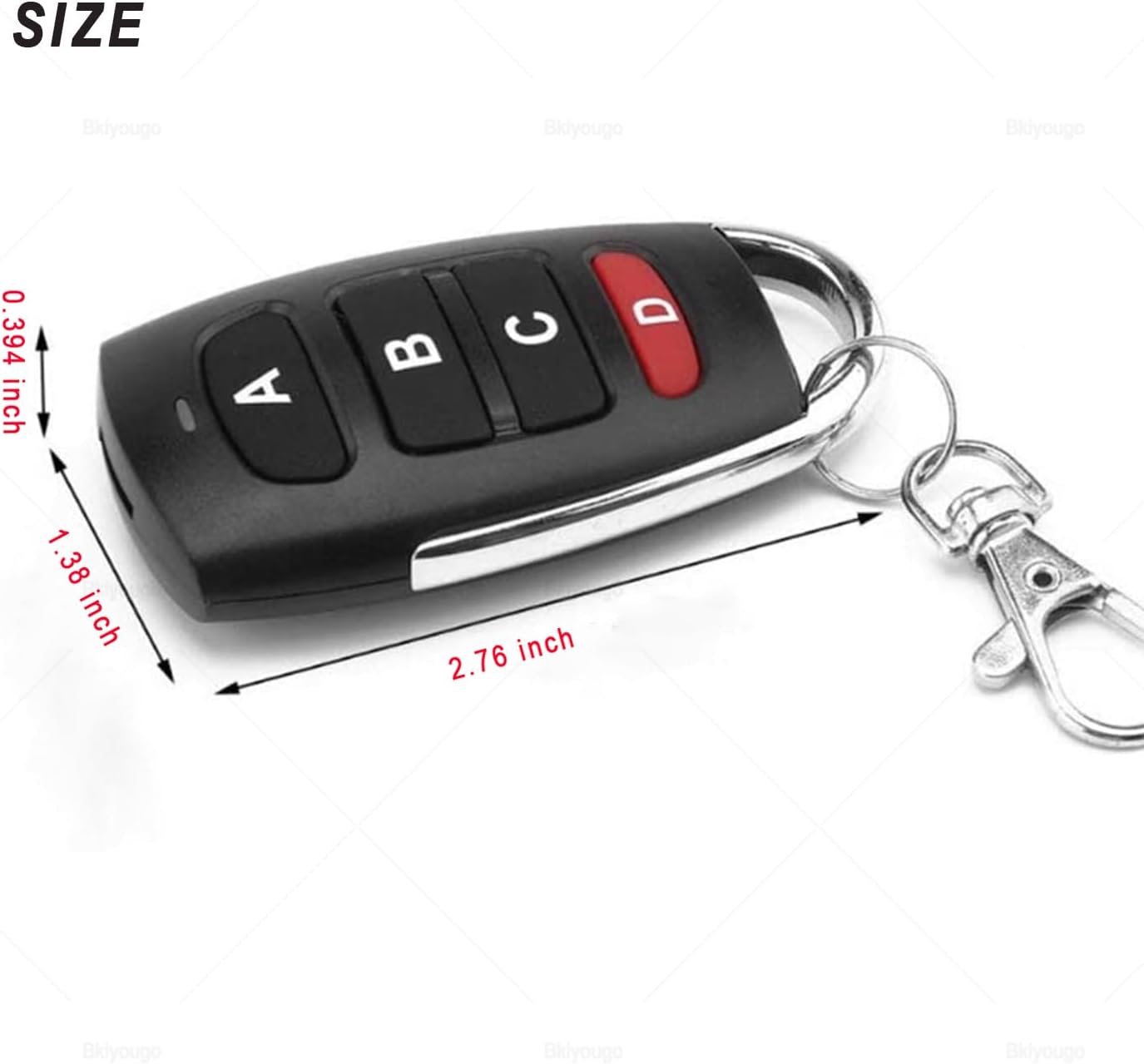
Figure 2: The remote measures approximately 2.76 inches in length, 1.38 inches in width, and 0.394 inches in thickness.
4. Enstalasyon ak Pwogramasyon
Follow these steps carefully to clear existing codes and duplicate your original remote control.
4.1. Clearing Old Code
- Peze epi kenbe bouton yo A epi B simultaneously on the duplicator remote.
- Continue holding until the LED indicator flashes continuously (typically 3 times initially, then continuously).
- Release both buttons. The code has now been cleared.
- To test if the code is cleared, press any button. If the LED indicator flashes once and then goes off (instead of blinking continuously), the code has been successfully cleared.
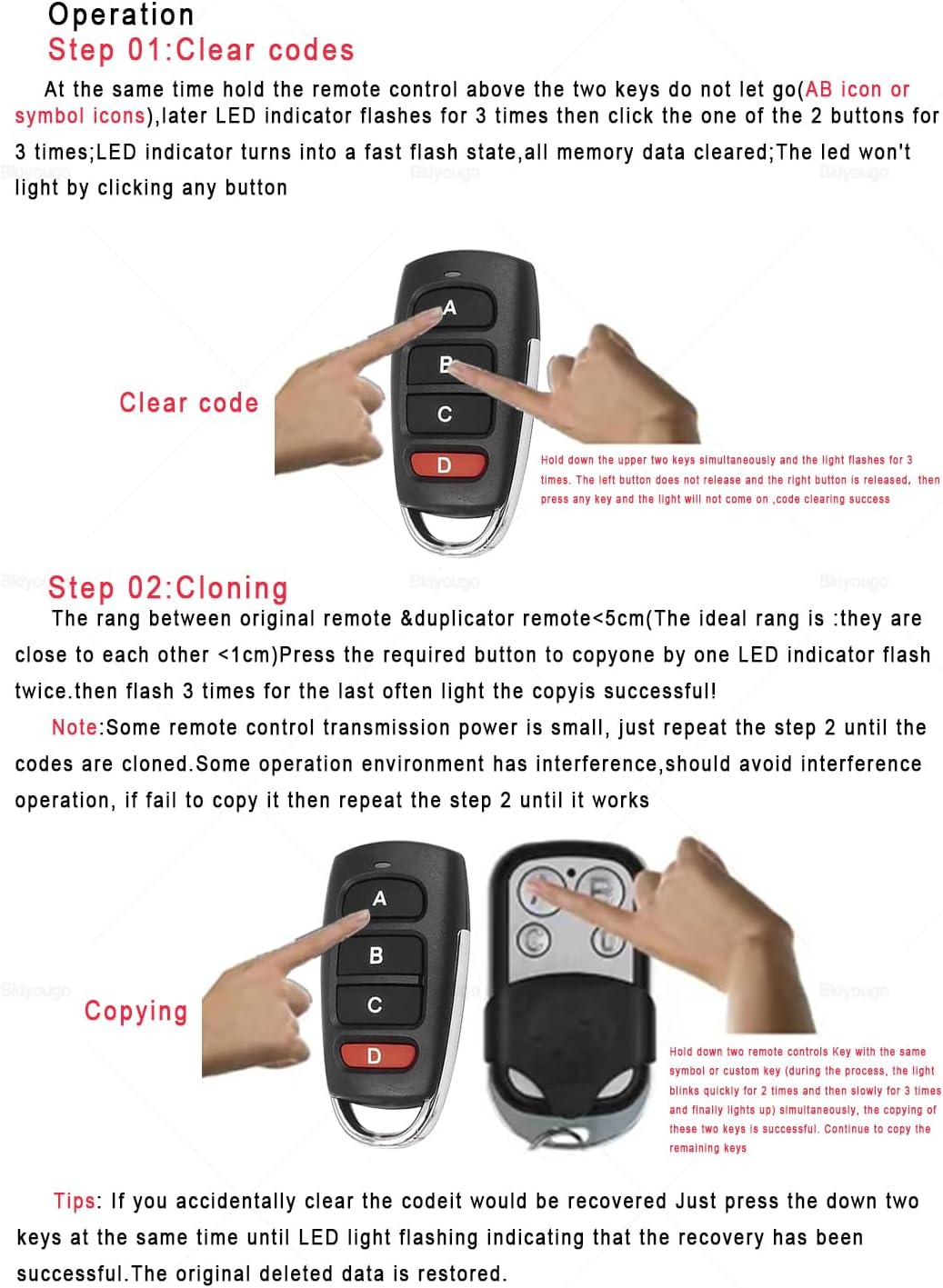
Figure 3: Visual guide for clearing the old code by pressing buttons A and B simultaneously until the LED flashes continuously. This image also shows the cloning process.
4.2. Duplicating/Cloning
- After clearing the old code, place the duplicator remote and your original remote side-by-side, ideally within 1cm of each other.
- Press and hold a button on your original remote.
- While still holding the button on the original remote, press and hold the corresponding button on the duplicator remote.
- The LED indicator on the duplicator remote will flash 3 times, then release. This indicates successful duplication for that button.
- Repeat this process for all other buttons you wish to duplicate.
- Nòt: Some remote control transmission power is small. If duplication fails, repeat step 2 until it works. Ensure there is no interference during the cloning process.
- Konsèy: If you accidentally clear the code, it can be recovered. Just press and hold the two keys (A and B) at the same time until the LED light flashes, indicating recovery. The original deleted data is restored.
4.3. Video Guide: How to Program the Duplicator Remote Control
Video 1: A detailed video demonstration on how to program the Bkiyougo Universal Duplicator Remote Control, including clearing existing codes and cloning new ones from an original remote. This video shows the process with various remote types.
5. Compatible Chips and Brands
This duplicator remote is compatible with 99.99% of common fixed and learning code remote controls. Please ensure your existing remote's chip type is compatible before purchase. Compatible chips include:
- 2264
- 2260
- 1527
- FP527
- 2240
- SMC918
- And many others.
To identify the transmission frequency and chip, you may need to open the main board of your remote control. The frequency and chip model number are typically printed on the components.
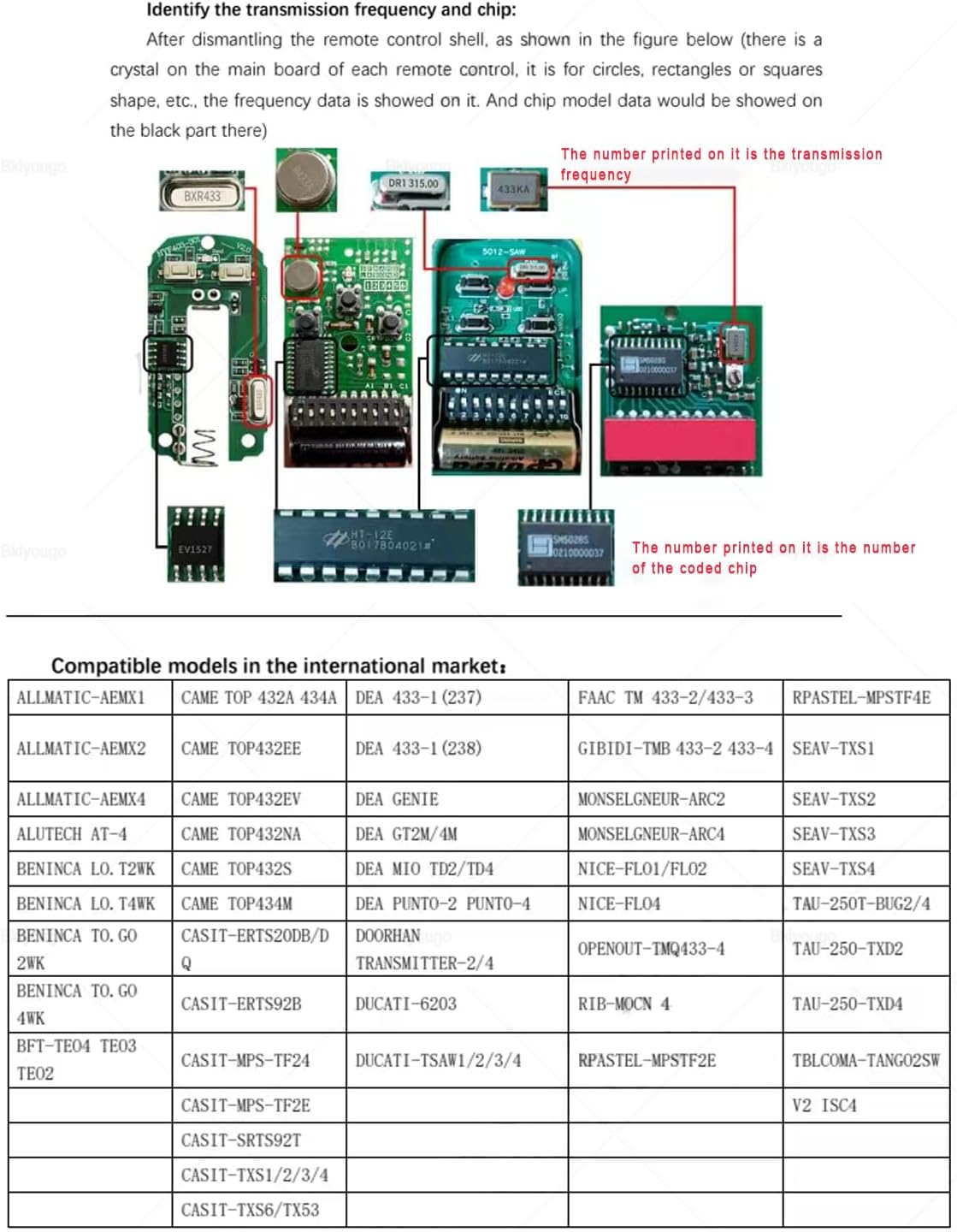
Figure 4: Illustration of a remote control's internal components, highlighting where to find the transmission frequency and coded chip number for compatibility verification.
5.1. Compatible Brands in the International Market
The Bkiyougo duplicator remote is compatible with various 433MHz fixed code and some rolling code brands. Below is a table of some compatible models:

Figure 5: A list of compatible remote control brands and models, including Prastel, Gibidi, and Allmatic, indicating 433MHz fixed code and 433.92MHz 100% compatibility.

Figure 6: Additional compatible remote control brands and models, such as Casit, Nice, Ducati, Tau, and Beninca, with visual examples of their remotes and compatibility notes for fixed and rolling codes.
If your remote control model is not found in the provided compatibility lists, please contact customer support for assistance before purchasing.
6. Aplikasyon
The Bkiyougo Universal Duplicator Remote can be used for a wide range of applications, including but not limited to:
- Shutter door and shutter window controllers
- Road gate and telescopic door controllers
- Bus door control systems
- General remote control systems
- Sistèm kay entelijan
- Remote control door openers
- Wireless security alarms
- Remote control curtains
- Wireless industrial controllers
- RGB lamp strip and lighting lamp kontwòl
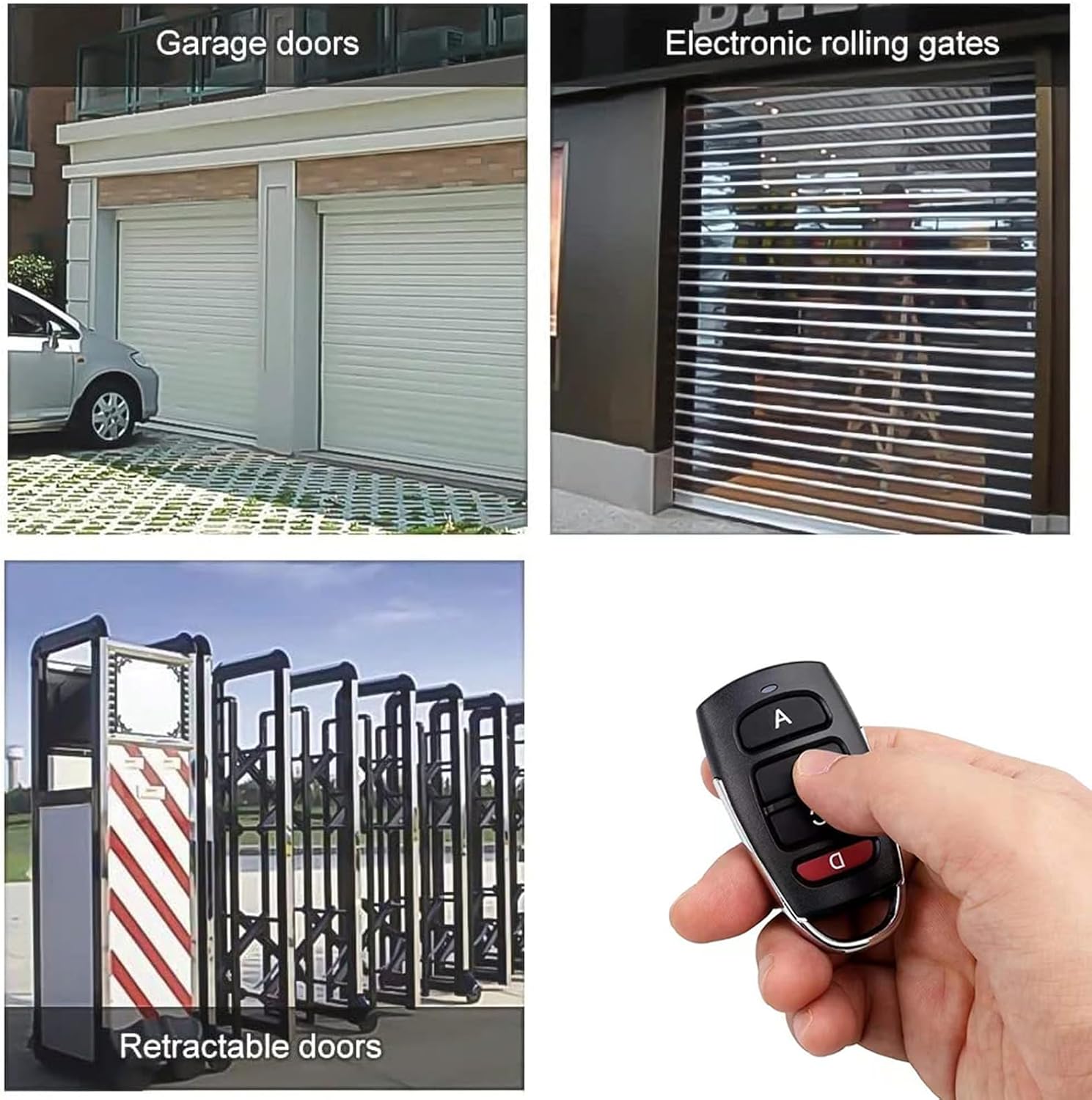
Figi 7: Egzanp vizyèlamples of the remote control's applications, including garage doors, electronic rolling gates, and retractable doors.

Figure 8: Further visual examples demonstrating the use of the 433MHz remote control for electric garage doors and other automated systems.
7. Espesifikasyon
| Karakteristik | Detay |
|---|---|
| Mak | Bkiyougo |
| Nimewo Modèl | KSTHD*4 |
| Pwa atik | 3.53 ons |
| Dimansyon pwodwi | 0.39 x 0.79 x 0.39 pous |
| Batri | 4 pil CR2032 (enkli) |
| Koulè | 4 PCS (referring to the pack quantity) |
| Style | Modèn |
| Koneksyon Teknoloji | Radio Frequency (433.92 MHz) |
| Kantite bouton | 4 |
8. Antretyen
The Bkiyougo Universal Duplicator Remote requires minimal maintenance. Ensure the device is kept clean and dry. If the remote's range or responsiveness decreases, it may be an indication that the CR2032 batteries need replacement. Refer to the product's internal design for battery access, typically involving a small screw or clip to open the casing.
NAN. Depanaj
- Remote not programming:
- Ensure the old code is completely cleared before attempting duplication.
- Verify that your original remote's frequency and chip type are compatible with the duplicator.
- Place the original and duplicator remotes as close as possible (within 1cm) during the cloning process.
- Repeat the duplication steps multiple times if the first attempt is unsuccessful, as some remotes have lower transmission power.
- Check for any potential signal interference during programming.
- Duplicated remote has short range or intermittent function:
- This could indicate low battery in the duplicator remote. Replace the CR2032 batteries.
- Asire w pa gen okenn obstak ant telekòmand lan ak reseptè a.
- Accidentally cleared code:
- Peze epi kenbe bouton yo A epi B simultaneously until the LED light flashes, indicating the original data has been restored.
10. Garanti ak sipò
Bkiyougo is committed to providing high-quality products and excellent customer service. For any questions, technical support, or warranty inquiries, please visit the official Bkiyougo store on Amazon or contact their customer service directly. Information regarding warranty terms and conditions can be found on the product listing or by contacting the seller.
Bkiyougo Store: Vizite Magazen an


