1. Enfòmasyon enpòtan sou sekirite
Tanpri li tout enstriksyon yo ak anpil atansyon anvan ou monte epi itilize li. Kenbe manyèl sa a pou referans pita.
- Pa kanpe sou chèz la.
- Pa sèvi ak chèz la si gen nenpòt pyès ki domaje oswa ki manke.
- Asire w tout boulon ak vis yo byen sere anvan w itilize yo. Tcheke yo detanzantan epi sere yo ankò jan sa nesesè.
- Keep children and pets away during assembly. Small parts may be a choking hazard.
- Pa ekspoze chèz la anba limyè solèy dirèk oswa tanperati ekstrèm.
- The Bluetooth speakers contain a built-in battery. Do not use the speakers while charging.
- Maximum weight capacity: Information not explicitly provided, but general gaming chair limits are usually around 120-150kg. Users should refer to product packaging or official website for exact limits.
2. Pake kontni
Verifye ke tout konpozan yo prezan anvan ou kòmanse asanblaj la. Si gen nenpòt pyès ki manke oswa ki domaje, kontakte sèvis kliyan.
- Dosye
- Kousen chèz
- Akoudwa (Agòch ak Dwat)
- Legs/Base
- Materyèl Asanblaj (Vis, Ronèl, Kle Allen)
- Power Adapter for Bluetooth Speakers
- Lumbar Support Cushion (with vibration function)
- Kousen pou tèt
3. Enstalasyon ak Asanble
Follow these steps to assemble your GTRACING Gaming Chair. It is recommended to have two people for assembly.
- Tache baz la: Secure the chair legs/base to the bottom of the seat cushion using the provided hardware.
- Enstale akoudwar yo: Attach the armrests to the sides of the seat cushion.
- Konekte Dossier: Align the backrest with the seat cushion and secure it using the bolts.
- Important Note for Lumbar Support: If your model includes integrated side speakers, ensure these are properly positioned and connected before fully securing the backrest, as this may affect the fit of the lumbar support cushion. Some users have reported difficulty fitting the lumbar support if the side speakers are not attached first.
- Attach Headrest and Lumbar Support: Place the headrest and lumbar support cushions as desired. The lumbar support cushion has a vibration function.
- Tcheke final la: Asire w tout koneksyon yo sere epi chèz la stab anvan w itilize li.
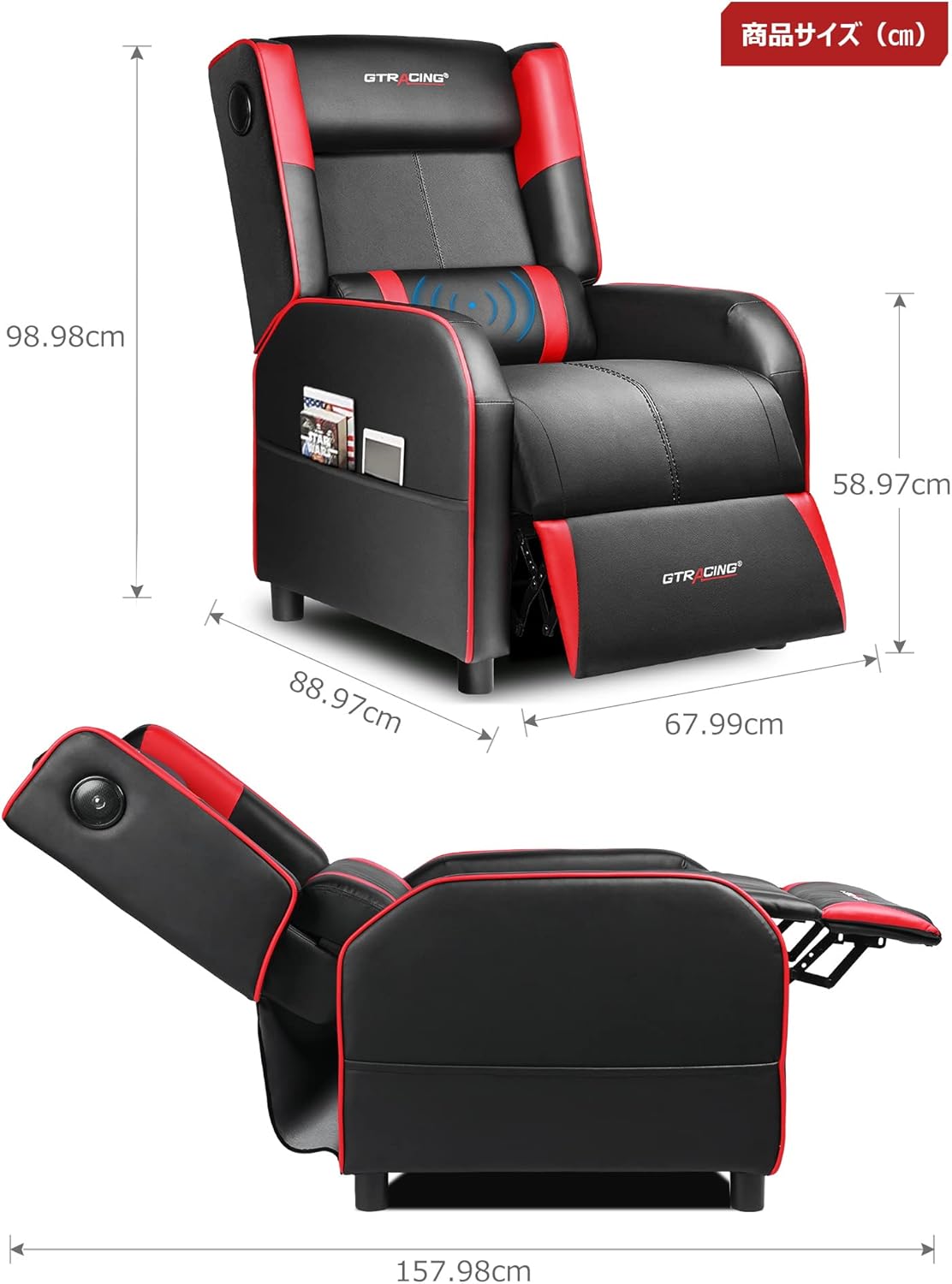
Image: Overall dimensions of the GTRACING Gaming Chair, showing height, width, and depth in both upright and reclined positions.
4. Operasyon Enstriksyon
4.1 Operasyon Oratè Bluetooth la
Your GTRACING Gaming Chair features integrated Bluetooth 5.1 speakers for an immersive audio experience.
- Limen/Etenyen: Locate the power button on the speaker control panel (usually on the side of the chair). Press and hold to power on or off.
- Peyaj: Once powered on, the speakers will enter pairing mode. On your device (PC, smartphone, tablet), search for Bluetooth devices and select "GTRACING Speaker" (or similar name) to connect.
- Ranje koneksyon: The speakers support a wireless connection range of approximately 15 meters (49 feet).
- Lavi batri: The built-in battery provides up to 15 hours of continuous playback on a full charge.
- Chaje: Connect the provided power adapter to the charging port on the speaker control panel. Note: The speakers cannot be used while charging.
- Konpatibilite konsole: For PS4, PS5, XBOX, or SWITCH consoles, a dedicated USB adapter (sold separately) is required for low-latency connection (approx. 0.1 seconds delay).

Image: A user enjoying a game while seated in the GTRACING Gaming Chair, highlighting the integrated Bluetooth speakers located in the backrest for an immersive audio experience.
4.2 Fonksyon Enklinasyon
Adjust the backrest to your preferred angle for various activities.
- Ranje ajisteman: The backrest can recline from 95° to 150°.
- Mekanis pou chita: To recline, push the lever (usually on the right side of the chair) and lean back. Release the lever to lock the position.
- Integrated Ottoman: The ottoman extends and retracts in synchronization with the backrest, providing continuous leg support as you recline.
- Recommended Modes:
- 90° Game/Work Mode: Upright position for focused tasks.
- 115° Entertainment Mode: Slightly reclined for watching movies or casual browsing.
- 150° Nap Mode: Fully reclined for short rests or naps.
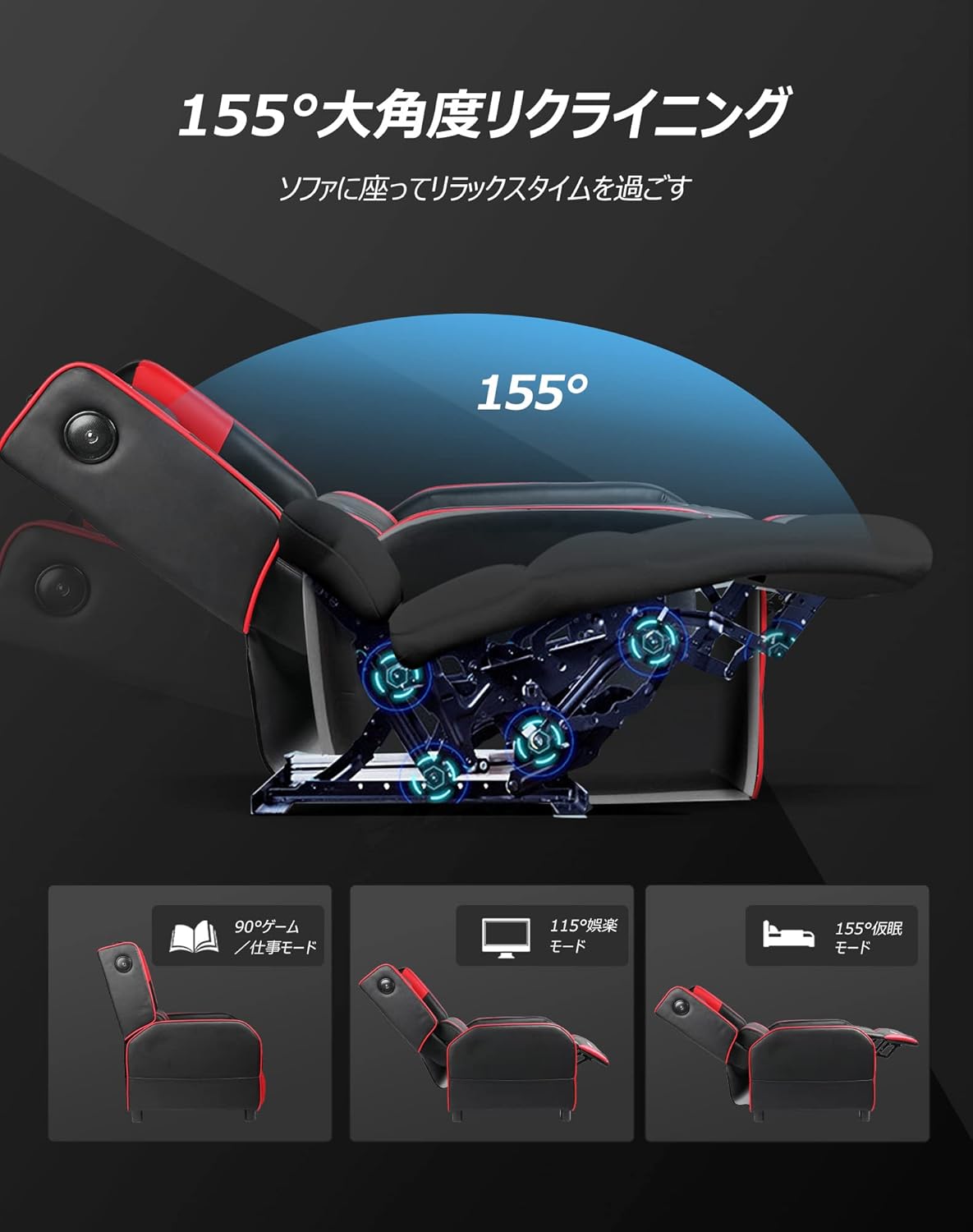
Image: Diagram illustrating the reclining function of the GTRACING Gaming Chair, showing the chair in upright (90°), entertainment (115°), and nap (155°) positions, with the ottoman extending accordingly.
4.3 Vibration Lumbar Support
The lumbar support cushion features a vibration function designed to alleviate lower back discomfort during prolonged sitting.
- Aktivasyon: Connect the lumbar support's USB cable to a power source (e.g., USB port on a computer, power bank, or wall adapter).
- Benefis: The vibration helps to distribute pressure, reducing stress on the pelvis, lumbar spine, and sacrum.
4.4 Seat Comfort Features
The seat cushion is engineered for superior comfort and support.
- Integrated Urethane Cushion: The seat uses a highly elastic, integrated molded urethane cushion.
- Internal Spring System: Springs are incorporated within the urethane for enhanced elasticity and durability.
- Thick Backrest and Seat: The generous padding of both the backrest and seat cradles the body, providing a sofa-like seating experience.

Imaj: Seksyon kwa view of the GTRACING Gaming Chair's seat cushion, detailing the layers of high-quality PU leather, high-rebound urethane, high-density urethane, internal pocket coils, and integrated molded urethane for optimal comfort and support.
5. Antretyen
Proper care will extend the life and appearance of your gaming chair.
- Netwayaj: Siye pwòp ak yon mou, damp twal. Evite pwodui chimik ki agresif oswa pwodui netwayaj abrazif.
- Devèsman: Siye likid ki koule a imedyatman avèk yon twal pwòp e sèk.
- Ekspozisyon limyè solèy la: Evite ekspozisyon pwolonje nan limyè solèy dirèk pou anpeche dekolorasyon ak degradasyon materyèl la.
- Tcheke Materyèl: Tcheke epi sere tout vis ak boulon yo detanzantan pou asire estabilite.
NAN. Depanaj
Si ou rankontre nenpòt pwoblèm, gade solisyon komen sa yo.
- Bluetooth Speakers Not Connecting:
- Ensure the speakers are powered on and in pairing mode.
- Tcheke si Bluetooth aktive sou aparèy ou an.
- Move your device closer to the chair (within 15m).
- Bliye aparèy la nan paramèt Bluetooth ou a epi eseye asosye ankò.
- Ensure the speakers are not currently charging.
- Lumbar Support Not Fitting During Assembly:
- As noted in the assembly section, ensure any integrated side speakers are attached before fully securing the backrest, as this can impact the fit of the lumbar support cushion.
- Reclining Mechanism Not Working Smoothly:
- Check for any obstructions around the reclining mechanism.
- Ensure the lever is fully engaged or disengaged.
- Verify that all assembly bolts related to the backrest are securely tightened.
7. Espesifikasyon
| Nimewo Modèl | GT208M |
| Mak | GTRACING |
| Materyèl | Faux Leather (PU Leather) |
| Koulè | Wouj |
| Dimansyon pwodwi (vètikal) | Apeprè 80 cm (Pwofondè) x 80 cm (Lajè) x 80 cm (Wotè) |
| Pwa pwodwi | 30 kg |
| Dimansyon pake | 77 cm x 69 cm x 52 cm |
| Pwa pake | 28 kg |
| Angle ki chita | 95° pou 150° |
| Bluetooth vèsyon | 5.1 |
| Speaker Battery Life | Jiska 15 èdtan (lèktur kontinyèl) |
| Oratè chaje | Not usable while charging |
| Enstriksyon Swen | Siye pwòp |
8. Garanti ak sipò
For warranty information or technical support, please refer to the official GTRACING websit la oubyen kontakte sèvis kliyan yo dirèkteman.
GTRACING offers after-sales support for their products. Please retain your proof of purchase for any warranty claims.
Ou ka souvan jwenn enfòmasyon kontak pou sipò a sou sit entènèt manifakti a. websit entènèt la oubyen atravè magazen kote ou te achte pwodwi a.


