1. Entwodiksyon
Thank you for choosing the HIKMICRO HEIMDAL H4D Digital Night Vision Monocular. This device is designed for observation in low light and complete darkness, featuring a high-resolution sensor and AMOLED display for clear imaging.
Karakteristik kle:
- 1.39" AMOLED display with 454 x 454 resolution
- High-resolution 2560 x 1440 sensor
- Integrated 850 nm infrared illuminator with smart IR function
- Day/Night/Auto/Defog modes
- Estabilizasyon Imaj Elektwonik (EIS)
- Detection range up to 200 meters
- Replaceable and rechargeable battery with over 4 hours of use
- Compact and portable design, waterproof and dustproof (IP67)
- Integrated 32 GB EMMC for storing recorded videos and photos
- Wireless connection via HIKMICRO Sight app, local album function
Kontni pake:
- HIKMICRO HEIMDAL H4D Digital Night Vision Monocular
- Batri
- Twal pousyè
- Sak pwoteksyon
- Bras ponyèt
- USB-C kab
- Gid rapid
2. Pwodwi souview
Familiarize yourself with the components and controls of your HIKMICRO HEIMDAL H4D monocular.
Layout aparèy
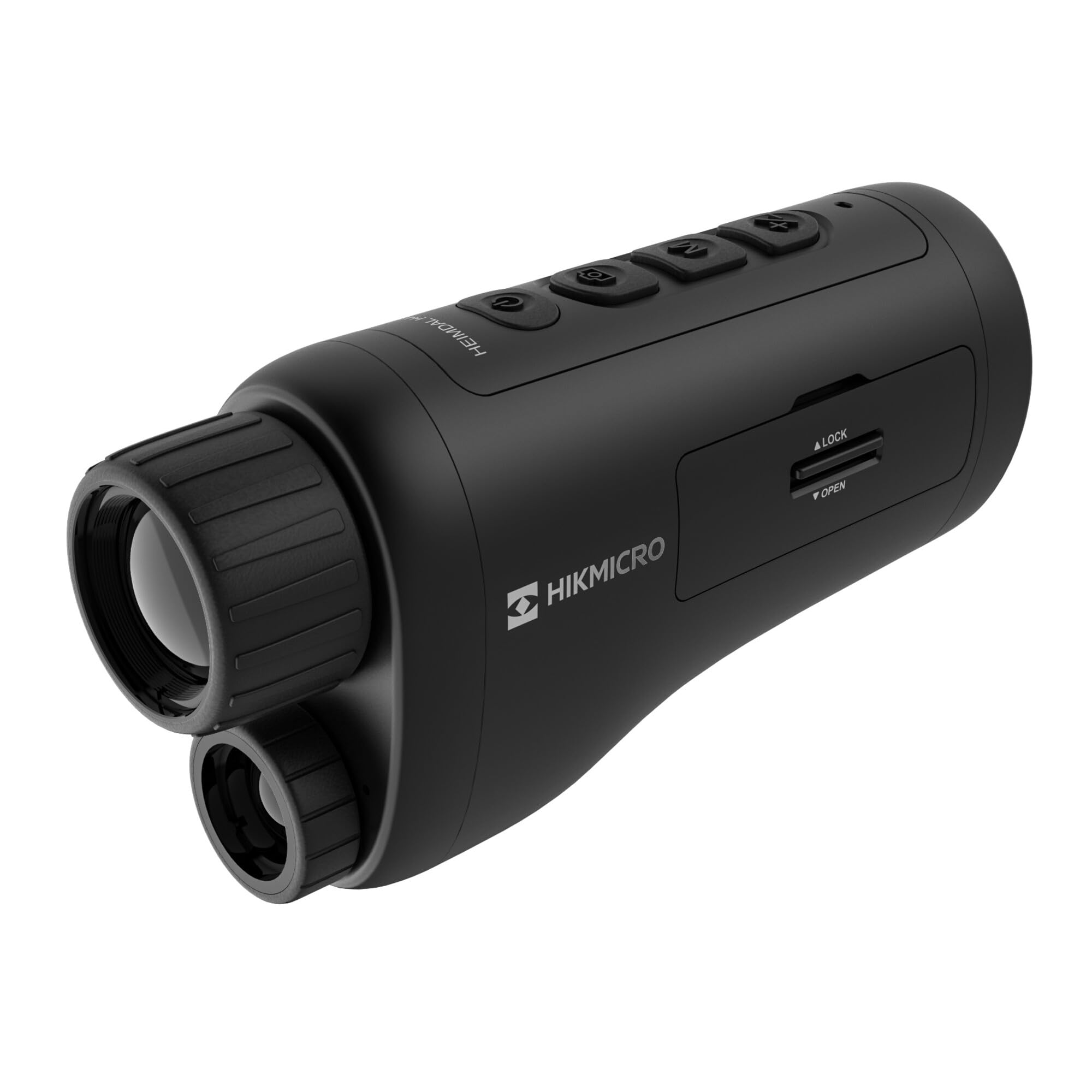
Yon angilè view of the HIKMICRO HEIMDAL H4D monocular, showing its compact, ergonomic design and the main lens.
Kontwòl ak bouton

Top view of the monocular showing the power button, photo/video record button, mode button, and zoom/IR adjustment buttons.
Lenses and Focus

Devan view displaying the objective lens and the integrated infrared illuminator.
Lòj batri

Side view showing the battery compartment with 'LOCK' and 'OPEN' indicators.
3. Enstalasyon
Enstalasyon batri
- Locate the battery compartment on the side of the device.
- Slide the lock mechanism to the 'OPEN' position.
- Mete pil rechargeable la nan plas li, asire w ke polarite a kòrèk.
- Close the compartment and slide the lock mechanism to the 'LOCK' position.
Chaje batri a
Connect the device to a power source using the provided USB-C cable. The charging indicator will show the charging status.
Premye pouvwa sou
Peze epi kenbe bouton pouvwa a (anjeneral make ak Ⓘ) until the HIKMICRO logo appears on the display.
4. Operasyon Enstriksyon
Power On/Off
- Pouvwa sou: Peze epi kenbe bouton pouvwa a pou apeprè 3 segonn.
- Pouvwa Off: Press and hold the power button for approximately 3 seconds until the device shuts down.
Ajisteman Konsantre
Rotate the focus ring on the objective lens to achieve a clear image of your target.
Seleksyon mòd
Press the 'M' (Mode) button to cycle through observation modes: Day, Night, Auto, and Defog.
Zoom and IR Adjustment
Use the '+' and '-' buttons to adjust the digital zoom level. These buttons also control the intensity of the infrared illuminator in night mode.
Photo and Video Recording
- Pran foto: Press the photo/video button (usually marked with 📷) once to capture an image.
- Anrejistre videyo: Press and hold the photo/video button to start recording. Press again to stop.
Connecting to HIKMICRO Sight App
Download the HIKMICRO Sight app from your device's app store. Follow the in-app instructions to connect your monocular for live view, remote control, and media management.
5. Antretyen
Netwayaj
- Use the provided dust cloth or a soft, lint-free cloth to clean the lenses.
- For stubborn dirt, use a lens cleaning solution specifically designed for optics.
- Siye kò aparèy la ak yon twal mou,amp twal. Pa sèvi ak pwodui netwayaj abrazif oswa solvang.
Depo
- Store the monocular in its protective bag in a cool, dry place when not in use.
- Retire batri a si aparèy la pa pral itilize pou yon peryòd pwolonje.
Swen batri
- Charge the battery regularly, even if not in frequent use, to maintain its lifespan.
- Evite tanperati ekstrèm pandan w ap chaje ak estoke.
NAN. Depanaj
Pwoblèm komen ak solisyon yo
| Pwoblèm | Kòz posib | Solisyon |
|---|---|---|
| Aparèy pa limen. | Batri a fin itilize oswa li pa byen enstale. | Chaje batri a. Asire w ke batri a byen mete nan plas li epi li byen polarite. |
| Imaj la twoub. | Focus is not adjusted. | Rotate the focus ring on the objective lens until the image is clear. |
| Poor image quality in darkness. | Limyè IR la etenn oubyen li sou yon entansite ki ba. | Activate the IR illuminator or increase its intensity using the '+' button. Ensure you are in Night mode. |
| Cannot connect to HIKMICRO Sight app. | Bluetooth/Wi-Fi is off on device or phone, or app is not updated. | Ensure Bluetooth/Wi-Fi is enabled on both devices. Restart the app and monocular. Check for app updates. |
| Aparèy la bloke oswa li vin pa reponn. | Pwoblèm lojisyèl tanporè. | Fè yon "soft reset" lè w kenbe bouton pouvwa a peze jiskaske aparèy la rekòmanse. Si pwoblèm nan pèsiste, kontakte sipò teknik. |
7. Espesifikasyon
| Karakteristik | Detay |
|---|---|
| Rezolisyon Sensor | 2560 x 1440 |
| Kalite ekspozisyon | AMOLED |
| Rezolisyon ekspozisyon | 454 x 454 |
| Gwosè ekspozisyon | 1.39 pous (3.5 cm) |
| Enfrawouj ekleraj | Integrated 850 nm |
| Ranje deteksyon | Jiska 200 mèt |
| Depo | 32 GB EMMC (internal) |
| Lavi batri | More than 4 hours (replaceable, rechargeable) |
| Evalyasyon ki enpèmeyab | IP67 |
| Dimansyon | 153 mm x 50 mm x 80 mm (6.02" x 1.97" x 3.15") |
| Pwa | 375 gram (0.83 liv) |
| Materyèl | Plastik |
| Aparèy konpatib | Rifle, Compound Bow |
| Kalite aliye | Picatinny mòn |
| Sport Use | Camping, randone |
| Koulè | Blan |
8. Garanti ak sipò
HIKMICRO products are covered by a limited warranty. For detailed warranty information, please refer to the official HIKMICRO weboswa kontakte konsesyonè lokal ou a.
For technical support, troubleshooting assistance, or service inquiries, please visit the official HIKMICRO support page or contact their customer service department.
Ofisyèl Websit: www.hikmicrotech.com


