Entwodiksyon
This manual provides comprehensive instructions for the safe and efficient operation of your Max Power MPD1238 Portable Karaoke Speaker System. Please read this manual thoroughly before using the product and retain it for future reference. The MPD1238 is designed for powerful audio output, featuring a 15-inch woofer and a tweeter, built-in LED party lights, and versatile connectivity options including Bluetooth, USB, SD card, FM radio, and Aux input. It comes with a wired microphone and a DJ speaker stand, making it ideal for various events.
Ki sa ki nan bwat la
Upon unpacking, please ensure all items listed below are present and in good condition. If any items are missing or damaged, contact your retailer immediately.
- Max Power MPD1238 Karaoke Speaker
- Mikwofòn branche
- Kontwòl Remote
- Aux kab
- Battery Auxiliary Cable
- DJ Speaker Stand

Image: The Max Power MPD1238 portable speaker, showcasing its 15-inch woofer, along with the wired microphone, remote control, and the included DJ stand.
Karakteristik
The Max Power MPD1238 is equipped with a range of features designed for a versatile audio experience:
- Sòti odyo pwisan: Features a 1 x 15” WOOFER and 1 x TWEETER for clear and robust sound.
- Limyè pati ki ap dirije ki entegre: Flashing lights around the woofer add visual effects, with multiple modes and an option to turn off.
- Koneksyon Bluetooth san fil: Easily connect your smartphone, tablet, or laptop for wireless audio streaming.
- Plizyè Opsyon Lekti: Supports USB drive, Micro SD card, FM Radio, and Aux cable input.
- Konsepsyon pòtab: Equipped with a convenient trolley handle and wheels for easy transportation.
- Batri rechargeable: Provides long battery life for extended use, ensuring your party keeps going.
- Antre mikwofòn: Includes 2 MIC inputs and 1 GUITAR input for karaoke and live performances.
- Kontwòl Remote: Full control over volume and playback settings from a distance.
- DJ Speaker Stand: Adjustable tripod stand for optimal sound projection.
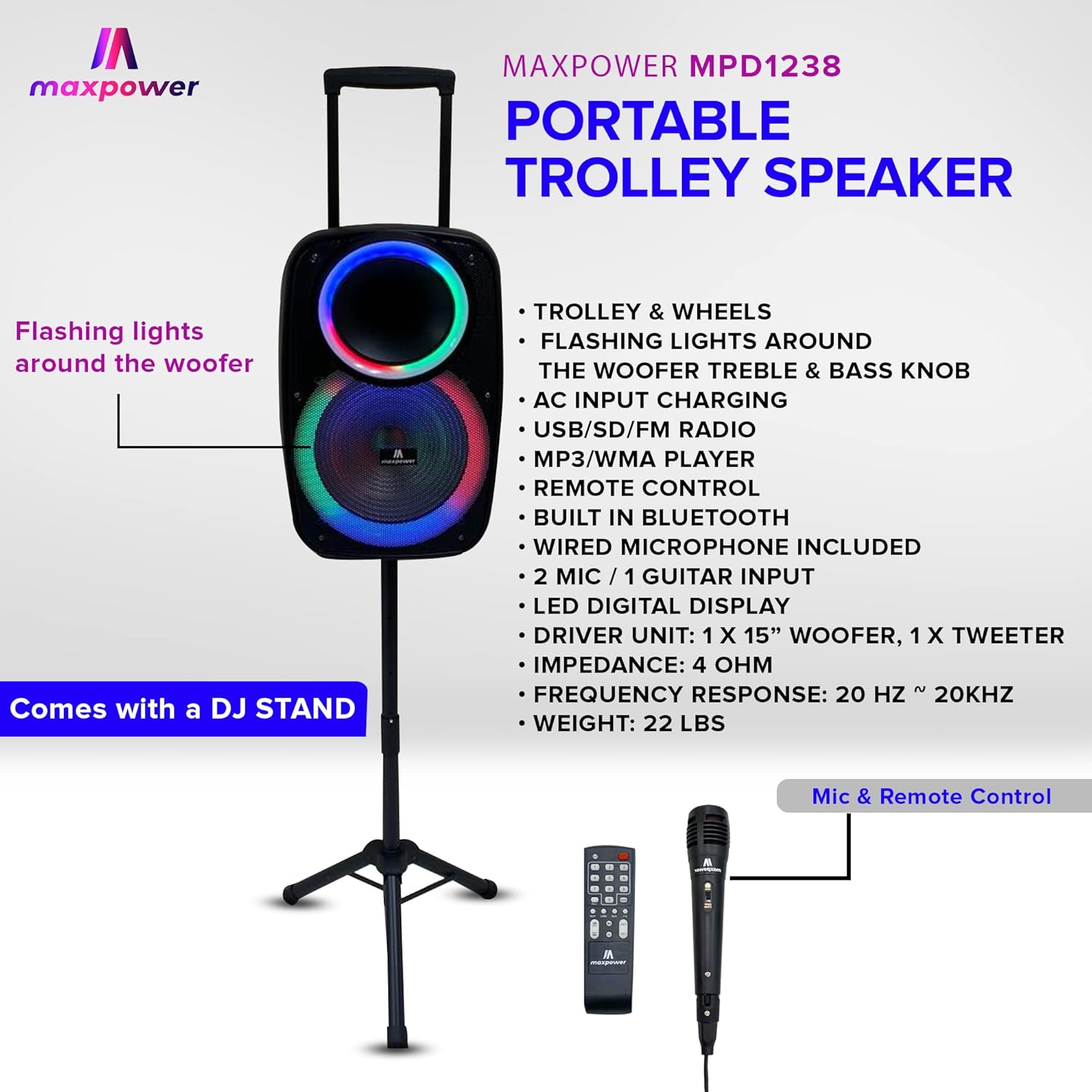
Image: The Max Power MPD1238 speaker positioned on its stand, illustrating its portability with a trolley handle and highlighting features such as flashing lights, AC input charging, USB/SD/FM radio, Bluetooth, wired microphone inclusion, LED digital display, and driver unit specifications.
Enstalasyon
- Debake: Retire tout konpozan yo nan anbalaj la avèk prekosyon. Kenbe anbalaj la pou depo oswa transpò pita.
- Chaje batri a: Before first use, fully charge the speaker's internal battery using the provided AC power cable. Connect the cable to the speaker's AC input and then to a standard wall outlet. The charging indicator will show the status.
- Assembling the DJ Speaker Stand:
- Extend the tripod legs of the DJ stand to a stable position.
- Adjust the height of the stand using the locking pin and knob. Ensure the pin is fully engaged and the knob is tightened.
- Carefully place the Max Power MPD1238 speaker onto the pole of the DJ stand. Ensure it is securely seated.

Image: The Max Power MPD1238 speaker securely mounted on its adjustable DJ stand, demonstrating its elevated position for optimal sound projection.
- Konekte mikwofòn la: Insert the wired microphone's cable into one of the MIC input jacks on the speaker's control panel.
Enstriksyon Operasyon
Power On/Off
Locate the power switch on the speaker's control panel. Toggle it to the "ON" position to power on the unit. Toggle to "OFF" to power off.
Bluetooth mòd
- Power on the speaker. The speaker will automatically enter Bluetooth pairing mode or you can select Bluetooth mode using the Mode button.
- Sou aparèy ou ki gen Bluetooth la (telefòn entelijan, tablèt, òdinatè pòtab), aktive Bluetooth epi chèche aparèy ki disponib yo.
- Select "Max Power MPD1238" (or similar name) from the list of devices.
- Once paired, the speaker will emit a confirmation sound, and you can begin streaming audio wirelessly.
Lektur kat USB/SD
- Insert a USB flash drive or SD card (pre-loaded with MP3/WMA audio files) into the respective port on the speaker's control panel.
- The speaker will automatically detect the media and switch to USB or SD mode, beginning playback. If not, press the Mode button to select.
- Use the playback controls (Play/Pause, Next/Previous Track) on the speaker or remote control to manage your music.
FM Radyo Mode
- Press the Mode button until "FM" is displayed on the LED screen.
- Peze bouton Jwe/Pòz la pou kòmanse yon rechèch otomatik pou estasyon FM ki disponib yo. Oratè a ap sove estasyon yo detekte yo.
- Sèvi ak bouton Track Pwochen/Anvan an pou navige ant estasyon FM ki anrejistre yo.
Antre Oksilyè (AUX)
- Connect one end of the provided Aux cable to the AUX input port on the speaker.
- Connect the other end of the Aux cable to the audio output jack of your external device (e.g., MP3 player, computer).
- Press the Mode button until "AUX" is displayed. Audio from your external device will now play through the speaker.
Antre mikwofòn ak gita
- Plug your wired microphone into one of the "MIC IN" jacks.
- Plug your guitar into the "GUITAR IN" jack.
- Adjust the individual volume controls for the microphone and guitar on the speaker's control panel to achieve the desired mix with your music.
Dirije Limyè Pati
The speaker features dynamic LED lights around the woofer. Use the dedicated light mode button on the control panel or remote to cycle through different light patterns or to turn the lights off.
Antretyen
- Netwayaj: Sèvi ak yon twal mou epi sèk pou netwaye deyò oratè a. Pa sèvi ak pwodui netwayaj likid oswa materyèl abrazif.
- Depo: Lè w pa itilize oratè a pou yon bon bout tan, sere l nan yon kote ki fre epi sèk, lwen limyè solèy dirèk ak tanperati ekstrèm.
- Swen batri: To prolong battery life, fully charge the speaker before long-term storage and recharge it every 3-6 months if not in use.
- Evite dlo: This speaker is not waterproof. Keep it away from water and moisture to prevent damage.
Depanaj
| Pwoblèm | Kòz posib | Solisyon |
|---|---|---|
| Pa gen pouvwa | Batri a fini; Entèriptè a etenn. | Chaje oratè a; Asire w ke switch pouvwa a nan pozisyon "ON". |
| Pa gen son ki soti nan oratè | Volim nan twò ba; Mòd ki pa kòrèk la chwazi; Aparèy la pa byen konekte. | Increase master volume; Press Mode button to select correct input (Bluetooth, USB, AUX, FM); Reconnect device. |
| Bluetooth pa asosye | Speaker not in pairing mode; Device too far; Bluetooth disabled on source device. | Ensure speaker is in Bluetooth mode; Move device closer to speaker; Enable Bluetooth on your device and rescan. |
| Mikwofòn pa mache | Microphone not plugged in correctly; Microphone volume too low; Microphone faulty. | Ensure microphone is fully inserted into MIC IN jack; Increase microphone volume knob; Test with another microphone if available. |
| Kat USB/SD a pa ap jwe | Pa kòrèk file fòma; Kat/kondwi a pa byen mete; Kowonpi files. | Asire w files are MP3/WMA format; Reinsert USB/SD card; Try a different USB/SD card. |
Espesifikasyon
| Karakteristik | Spesifikasyon |
|---|---|
| Modèl | MPD1238 |
| Inite chofè | 1 x 15” WOOFER, 1 x TWEETER |
| Enpedans | 4 Ohm |
| Repons Frekans | 20 Hz ~ 20KHz |
| Koneksyon Teknoloji | Bluetooth, USB, SD Card, Aux |
| Antre | 2 x MIC, 1 x GUITAR, 1 x AUX |
| Sous pouvwa | Battery Powered (Rechargeable) / AC Input |
| Aparèy konpatib | Laptop, tablèt, Smartphone |
| Kalite aliye | Pole Mount (DJ Stand included) |
| Dimansyon (Apeprè) | 12" (lajè) x 12" (pwofondè) x 23.2" (wotè) |
| Pwa (Apeprè) | 22 liv |
| Batri (pou aleka) | 1 pil AAA obligatwa (enkli) |
| UPC | 647625216050 |

Image: A diagram illustrating the dimensions of a Max Power portable speaker, showing height, width, and depth. Note: The model number shown in this diagram (MPD3116) may differ from the product model (MPD1238), but the general dimensional representation is similar.
Garanti ak sipò
For warranty information and technical support, please refer to the documentation provided with your purchase or visit the official Max Power websit la. Kenbe resi acha ou kòm prèv acha pou reklamasyon garanti.
For further assistance, you may contact Max Power customer service through their official channels.


