Pwodwi souview
The Antec Performance Series P20C ARGB is a mid-tower E-ATX PC case designed for high-performance builds, offering excellent cooling capabilities and flexible configuration options. It features a massive metal mesh front panel for optimal airflow, pre-installed ARGB fans, and comprehensive compatibility for various components, including large radiators and dual CPU motherboards. The case prioritizes ease of assembly and clean cable management.

Figure 1: Antec P20C ARGB PC Case - Front and Side View
Karakteristik kle
- Massive Metal Mesh Front Panel: Designed for superior airflow and cooling performance.
- 3 x 120mm ARGB Fans & ARGB Hub: Three pre-installed 120mm ARGB fans in the front ensure efficient cooling and customizable lighting. An integrated ARGB hub simplifies fan and lighting control.
- Type-C 3.2 Gen 2 Ready: Front I/O panel includes a USB Type-C 3.2 Gen 2 port for high-speed data transfer.
- Extensive Radiator Support: Capable of simultaneously supporting two 360mm radiators at the front and top for advanced liquid cooling setups.
- Removable GPU Holder Included: Provides stable support for graphics cards, preventing sag.
- Back-Mounted PSU: Facilitates easier power supply installation and improved cable management.
- 9 Fans Simultaneously: Supports up to nine fans for maximum cooling potential.
Gid enstalasyon
Chassis Layout and Component Placement
The P20C ARGB case offers a spacious interior designed for easy component installation. Understanding the layout is crucial for an efficient build. The case supports E-ATX, ATX, Micro-ATX, and ITX motherboards.

Figure 2: Internal Component Layout Overview
Enstalasyon sistèm refwadisman
The front panel is easily removable for fan and radiator installation or cleaning. The case comes with three 120mm ARGB fans pre-installed in the front, providing excellent intake airflow.
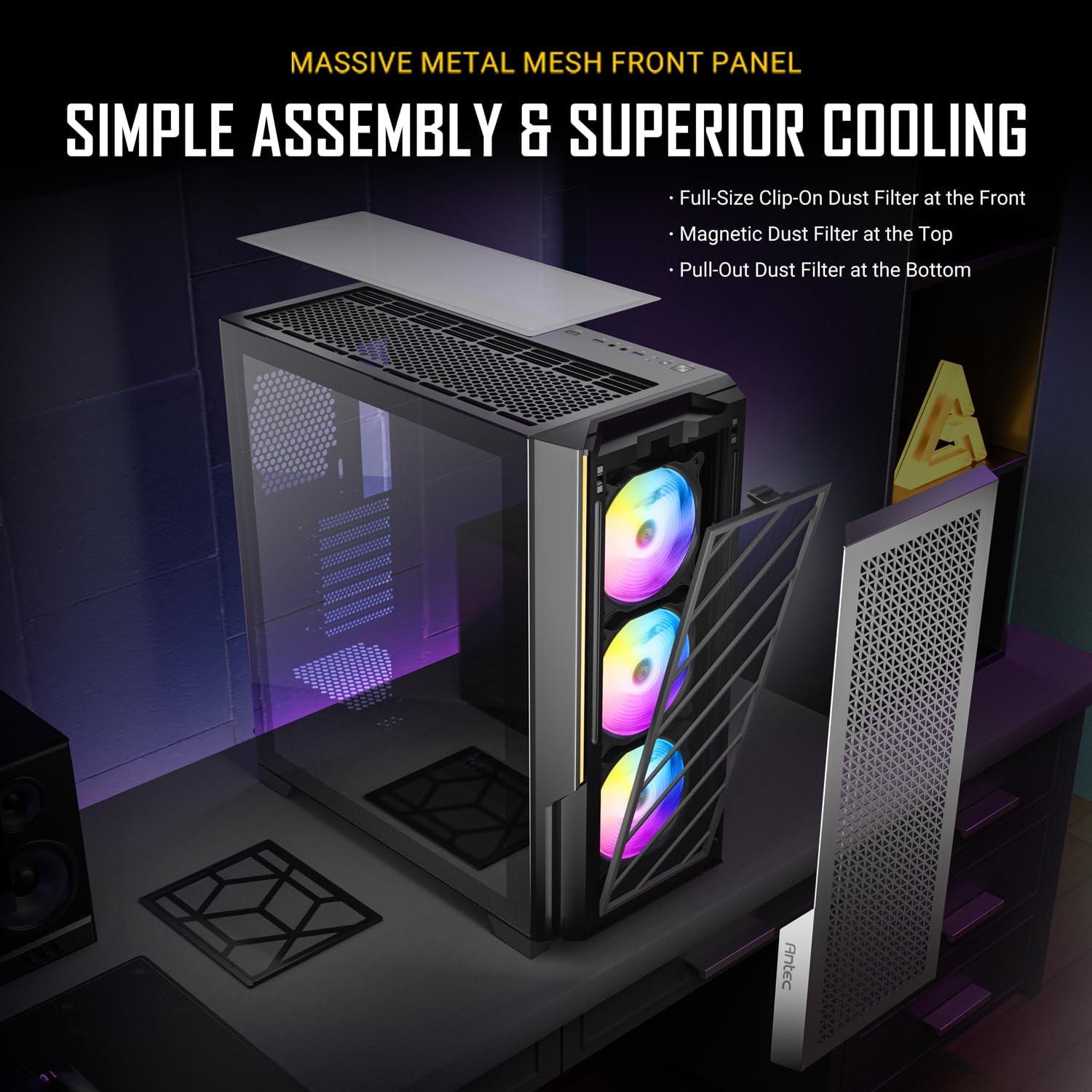
Figure 3: Simple Assembly and Superior Cooling Features

Figure 4: Pre-installed 120mm ARGB Fans
The P20C ARGB offers extensive fan and radiator compatibility. It supports up to nine fans and can accommodate large radiators for custom liquid cooling loops.

Figure 5: Fan and Radiator Compatibility Chart
Motherboard and GPU Installation
The case supports a wide range of motherboard sizes, including E-ATX, ATX, Micro-ATX, and ITX. It also features support for dual CPU motherboards with a width of up to 330mm.

Figure 6: Dual CPU Motherboard Compatibility
The P20C ARGB includes a removable GPU holder to prevent graphics card sag. Additionally, it supports vertical GPU installation using the 7 reusable PCI-E slots (vertical install module available separately).

Figure 7: Supports Vertical GPU Installation
Power Supply and Storage Installation
The power supply unit (PSU) is mounted at the rear of the case, which simplifies installation and contributes to better cable management. The case provides dedicated bays for storage drives, including a removable hard drive mount in front of the PSU for two drives (HDDs or SSDs) and options for SSDs behind the motherboard tray.
Jesyon kab
The P20C ARGB features well-designed cable routing channels and numerous openings with rubber grommets, making it easy to achieve a clean and organized build. This improves airflow and aesthetics.

Figure 8: Rear Cable Management Area

Figure 9: Detailed Features including GPU Holder, Cable Ties, and Grommets
Enstriksyon Operasyon
ARGB Lighting and Fan Control
The pre-installed ARGB fans can be controlled via the built-in LED mode button on the top I/O panel. This allows you to cycle through various lighting effects. For more custom light effects and synchronized control, you can connect the ARGB hub to your motherboard's ARGB header and use the motherboard's software.

Figure 10: Built-in LED & PWM Fan Controller
Itilizasyon Panèl Antre/Sòti Devan an
The top I/O panel provides convenient access to essential ports. It includes a power button, reset button, audio jacks, USB 3.0 ports, and a USB Type-C 3.2 Gen 2 port for high-speed data transfer up to 10 Gbps.

Figure 11: Top I/O Panel with Type-C 3.2 Gen 2 Port
Antretyen
Netwayaj Filtè Pousyè
To maintain optimal airflow and prevent dust buildup, regularly clean the dust filters. The P20C ARGB features a full-size clip-on dust filter at the front, a magnetic dust filter at the top, and a pull-out dust filter at the bottom. These are easily accessible for cleaning.
- Filtre devan: Unclip and remove the front mesh panel to access the filter for cleaning.
- Filtè anwo a: The magnetic filter on top can be easily lifted off for cleaning.
- Filtè anba a: Slide out the filter located beneath the power supply for cleaning.
Use a soft brush or vacuum cleaner to remove accumulated dust. Ensure filters are completely dry before re-installing.
Depanaj
Pwoblèm komen ak solisyon yo
- Odinatè a pa limen:
- Check all power connections, including the PSU to wall outlet, PSU to motherboard (24-pin and CPU 8-pin), and front panel power switch header to motherboard.
- Asire w ke switch PSU a nan pozisyon 'ON'.
- Fans Not Spinning / ARGB Not Lighting Up:
- Verify fan power cables are securely connected to the ARGB hub or motherboard fan headers.
- Check ARGB signal cables from the hub to the motherboard's ARGB header.
- Ensure the ARGB hub is receiving power (usually via SATA power connector).
- Pò Antre/Sòti Devan yo pa Ap Travay:
- Confirm that the USB 3.0, USB Type-C, and audio headers from the front panel are correctly connected to the corresponding headers on your motherboard.
- Twòp bri:
- Check if all fans are securely mounted and free from obstructions.
- Ensure cables are properly managed and not interfering with fan blades.
If issues persist, consult your motherboard manual for specific header locations and troubleshooting steps, or contact Antec support.
Espesifikasyon
| Karakteristik | Detay |
|---|---|
| Mak | Antec |
| Non modèl | P20C ARGB |
| Kalite Ka | Mid Tower |
| Mèr konpatibilite | E-ATX, ATX, Micro-ATX, ITX |
| Dimansyon (LxWxH) | 18.46 x 8.66 x 19.29 pous |
| Pwa atik | 20.5 liv |
| Front I / O pò | 1 x USB 2.0, 3 x USB 3.0, 1 x USB Type-C 3.2 Gen 2, Audio In/Out |
| Fanatik pre-enstale | 3 x 120mm ARGB fans (front) |
| Sipò Maksimòm Fanatik | 9 Fanatik |
| Sipò pou radyatè | Front: Up to 360mm, Top: Up to 360mm, Rear: 120mm |
| Power Supply Mounting | Mòn dèyè |
| Materyèl | Metal |
Garanti ak sipò
Antec products are manufactured to the highest quality standards. For warranty information, technical support, or service inquiries, please visit the official Antec website or contact their customer support team directly. Keep your proof of purchase for warranty claims.
Ofisyèl Antec Websit: www.antec.com
Please refer to the Antec website for the most up-to-date warranty terms and conditions, as well as contact information for your region.


