Entwodiksyon
This manual provides detailed instructions for setting up, operating, and maintaining your Kasa Matter Smart Plug KP125M. The Kasa Matter Smart Plug offers advanced features such as energy monitoring, voice control, and broad compatibility with various smart home platforms including Apple Home, Amazon Alexa, Google Home, and Samsung SmartThings, thanks to Matter protocol support. Its compact design ensures it does not block adjacent outlets, and its UL certification provides enhanced safety.
Karakteristik kle
- Matter: All-Round Compatibility: Works with all certified smart home platforms, including Apple Home, Amazon Alexa, Google Home, and Samsung SmartThings, reducing the need for multiple apps.
- Matter: Smooth LAN Control: Devices operate seamlessly even when your home internet is offline, allowing direct communication between Matter devices on the local network.
- Siveyans enèji: Track energy consumption over time to gain insights into usage patterns and potentially save on energy bills.
- Compact & Flame Retardant Design: Designed to avoid blocking additional outlets and features a UL certified flame retardant construction for safety.
- Aplikasyon ak Kontwòl Vwa: Control your smart plug from anywhere using the free Kasa App or via voice commands with Siri, Amazon Alexa, Google Assistant, or Samsung SmartThings.
Kontni pake
The Kasa Matter Smart Plug KP125M package includes the following items:
- 4 x Matter Wi-Fi Plug KP125M
- 1 x Gid Quick Start

Image: Kasa Matter Smart Plug KP125M 4-Pack packaging, showing four white smart plugs and the product box.
Espesifikasyon
| Atribi | Valè |
|---|---|
| Dimansyon pwodwi | 2.62 x 1.57 x 1.5 pous; 12.63 ons |
| Nimewo Modèl Atik | KP125MP4 |
| Manifakti | TP-Link |
| Mòd operasyon | ON-NONE-ON |
| Rating aktyèl | 15 Amps |
| Opere Voltage | 120 Volts |
| Kalite kontak | Nòmalman Louvri |
| Kalite Connector | Ploge nan |
| Tèminal | Lam |
| Kalite Awondisman | 1-fason |
| Kontakte Materyèl | Kwiv |

Image: Diagram showing the compact dimensions (2.62 x 1.57 x 1.5 inches) of the KP125M plug and its 15A/1800W max rating compared to other plugs.
Gid Enstalasyon
Anvan w kòmanse
Ensure your Wi-Fi network is 2.4GHz. The Kasa Smart Plug KP125M requires a 2.4GHz Wi-Fi connection for initial setup and operation. For Matter compatibility, ensure your smart home hub (e.g., Apple HomePod, Amazon Echo, Google Nest Hub) is updated to the latest firmware.
Step 1: Download the Kasa App
Download the Kasa Smart app from the Apple App Store or Google Play Store. This app is essential for initial setup and managing your smart plugs.
Step 2: Plug In Your Smart Plug
Plug your Kasa Matter Smart Plug into an available electrical outlet. The LED indicator on the plug will begin to blink, indicating it is ready for setup.
Step 3: Connect to Wi-Fi and Pair
Open the Kasa Smart app and follow the on-screen instructions to add your new device. The app will guide you through connecting the plug to your 2.4GHz Wi-Fi network and pairing it with your Kasa account.
Enstalasyon matyè
The Kasa Matter Smart Plug KP125M supports Matter for enhanced interoperability. You can set up the plug using the Kasa Smart app via Bluetooth onboarding, or by scanning the Matter code with any Matter-compatible app such as Apple Home, Amazon Alexa, or Google Home. This allows for seamless integration into your existing smart home ecosystem.

Image: Chart illustrating selected platforms (Apple Home, Alexa, Google Home, SmartThings) that require a Matter-compatible hub for full functionality.

Image: QR code for setup videos and troubleshooting, with links to setup guides for Amazon Alexa, Apple Home, Google Home, and SmartThings.
For more detailed setup instructions and troubleshooting, visit the Kasa Matter FAQ page.
Itilizasyon Priz Entelijan ou an
Kontwòl Debaz
Once set up, you can turn the connected device on or off directly from the Kasa Smart app. You can also manually toggle the power using the physical button on the side of the smart plug.
Kontwòl vwa
Integrate your Kasa Smart Plug with voice assistants like Amazon Alexa, Google Assistant, or Apple Siri (via HomeKit) for hands-free control. Simply link your Kasa account within your preferred smart home app and use commands such as "Hey Siri, turn on the light," "Ok Google, turn on the light," or "Alexa, turn on the light."

Image: Illustration of voice commands being used with smart speakers (Google Home, Amazon Echo) to control a device connected to the Kasa Smart Plug.
Siveyans enèji
The Kasa Smart Plug KP125M features energy monitoring. Access the Kasa Smart app to view real-time power consumption and historical data for devices plugged into the smart plug. This feature helps you understand and manage your energy usage more efficiently.

Image: Screenshot of the Kasa app's energy monitoring interface, showing daily, monthly, and yearly energy consumption graphs and real-time wattage.
Planifikasyon ak revèy
Set schedules to automatically turn devices on or off at specific times. You can also use the timer function to turn off a device after a set duration, or create countdown timers for specific tasks.

Image: Smartphone screen displaying Kasa app notifications for scheduled actions, such as "Turn off the phone charger after 2 hours" and "Switch on the fan at 6:10 PM."
Touye mòd
Activate "Away Mode" in the Kasa app to randomly turn connected lights or appliances on and off, simulating occupancy to deter potential intruders when you are away from home.
Local Area Network (LAN) Control
Thanks to Matter, your Kasa Smart Plug can communicate directly with other Matter-certified devices on your local network. This means that even if your internet connection is down, you can still control your smart plug and other compatible devices within your home network.
Antretyen
The Kasa Matter Smart Plug KP125M requires minimal maintenance. Keep the device clean by wiping it with a dry, soft cloth. Do not use liquid cleaners or abrasive materials. Ensure the plug is disconnected from the power outlet before cleaning. Avoid exposing the device to excessive moisture or extreme temperatures.
Depanaj
Pwoblèm komen ak solisyon yo
- Plug not connecting to Wi-Fi: Ensure your Wi-Fi network is 2.4GHz. Move the plug closer to your Wi-Fi router. Restart your router and the smart plug. Verify your Wi-Fi password is correct.
- Kontwòl vwa a pa fonksyone: Ensure your Kasa account is correctly linked to your voice assistant (Alexa, Google Assistant, Siri). Check your internet connection. Verify the device name in the Kasa app matches the name you are using for voice commands.
- Energy monitoring data is incorrect or missing: Ensure the plug is securely inserted into the outlet and the device is properly connected to the plug. Check for any app updates.
- Plug is unresponsive: Try unplugging the smart plug from the wall outlet for 10 seconds and then plugging it back in. If the issue persists, consider resetting the plug to factory defaults (refer to the Quick Start Guide for specific instructions) and re-setting it up.
For more comprehensive troubleshooting and support, please refer to the official Kasa Smart support resources:
Enfòmasyon sou Sekirite
Tanpri li epi swiv tout enstriksyon sekirite yo pou evite blesi oswa domaj:
- Pa sèvi ak aparèy la kote aparèy san fil pa pèmèt.
- Pa ekspoze aparèy la ak dlo oswa imidite.
- Pa eseye demonte, repare, oswa modifye aparèy la.
- Ensure the device is plugged into an appropriate electrical outlet (120V, 15A max).
- Pa twò chaje priz elektrik la.
- Aparèy sa a fèt pou itilize andedan kay la sèlman.
- Kenbe soti nan atenn timoun yo.
- The product features a UL certified flame retardant design for enhanced safety.
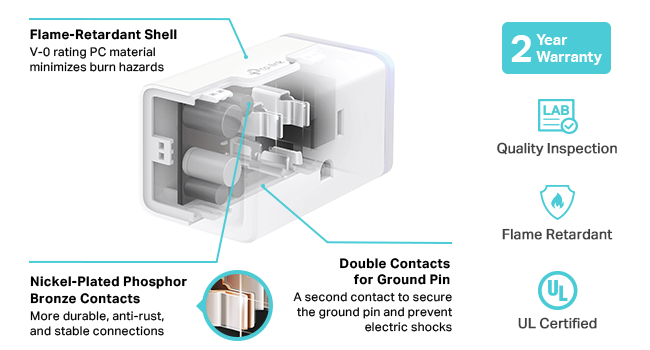
Image: Diagram showing internal components of the Kasa Smart Plug, highlighting the flame-retardant shell, nickel-plated phosphor bronze contacts, and double contacts for the ground pin, along with icons for Quality Inspection, Flame Retardant, and UL Certified.
Garanti ak sipò
The Kasa Matter Smart Plug KP125M comes with a 2-year limited warranty. For warranty claims or technical support, please contact Kasa Smart customer service. You can find contact information and additional support resources on the official Kasa Smart website or through the Kasa Smart app.
For the complete Installation Manual, please download the PDF document:


