1. Entwodiksyon
This manual provides comprehensive instructions for the installation, operation, and maintenance of your ZKTeco MB10-VL Fingerprint and Facial Recognition Attendance System. Please read this manual thoroughly before using the device to ensure proper functionality and safety.
2. Enfòmasyon sou Sekirite
- Pa ekspoze aparèy la nan dlo oswa imidite twòp.
- Evite mete aparèy la nan limyè solèy la dirèk oswa tou pre sous chalè.
- Sèvi ak adaptè pouvwa a sèlman ak aparèy la.
- Pa eseye demonte oswa repare aparèy la tèt ou. Kontakte pèsonèl kalifye pou sèvis.
- Asire bon vantilasyon alantou aparèy la.
3. Pake kontni
Please check the package contents upon unboxing. If any items are missing or damaged, contact your supplier immediately.
- ZKTeco MB10-VL Device
- Adaptè pouvwa
- Mounting Support ak Vis
- Manyèl Itilizatè (dokiman sa a)
4. Enstalasyon
4.1 Enstalasyon Fizik
Choose a suitable location for installation, preferably indoors, away from direct sunlight and strong electromagnetic interference. Ensure the mounting surface is stable and can support the device's weight.
- Fikse sipò montaj la sou miray la avèk vis yo bay yo.
- Carefully align the device with the bracket and slide it into place until it clicks securely.
- Konekte adaptè pouvwa a nan aparèy la epi ploge li nan yon priz kouran.

Figi 1: Devan view of the ZKTeco MB10-VL device, displaying the time on its screen, a numeric keypad, and a glowing green fingerprint scanner.
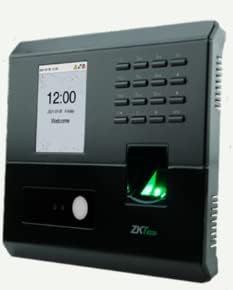
Figi 2: Angle view of the ZKTeco MB10-VL device, highlighting its side ventilation grilles and the illuminated fingerprint scanner.
4.2 Inisyal Konfigirasyon
Upon first power-on, the device will guide you through basic setup. You may need to set the date, time, and network parameters.
- Navigate the menu using the keypad.
- Set the correct date and time for accurate attendance records.
- Configure network settings (TCP/IP) if connecting to a network for data transfer.
5. Operasyon Enstriksyon
5.1 User Enrollment
The MB10-VL supports fingerprint and facial recognition for user identification.
- Access the 'User Management' menu.
- Select 'Add User'.
- Enter the user ID and name.
- For fingerprint enrollment: Place the user's finger on the scanner multiple times as prompted until successful.
- For facial enrollment: Position the user's face within the camera's view as prompted until successful.
- Save the user information.
5.2 Attendance Recording
Users can record their attendance by presenting their registered fingerprint or face to the device.
- When a user presents their biometric data, the device will verify it and record the attendance event.
- A confirmation message will appear on the screen.
5.3 Jesyon Done
Attendance records can be downloaded via USB or TCP/IP connection.
- USB lame: Connect a USB flash drive to the device's USB port. Navigate to the 'Data Management' menu and select 'Download Records to USB'.
- TCP/IP: Connect the device to your network. Use the Bio Time 8 software on your computer to connect to the device and download records.
6. Antretyen
6.1 Netwayaj
Regular cleaning helps maintain the device's performance.
- Wipe the screen and fingerprint scanner with a soft, dry cloth.
- Pa sèvi ak pwodui netwayaj abrazif oswa solvang.
6.2 Mizajou lojisyèl
Tcheke manifakti a regilyèman websit pou mizajou firmwèr pou asire pèfòmans ak sekirite optimal.
NAN. Depanaj
- Aparèy pa soumen: Check the power adapter connection and the power outlet.
- Erè rekonesans anprent/vizaj: Ensure the scanner/camera is clean. Re-enroll the user's biometric data if issues persist.
- Cannot connect via TCP/IP: Verify network cable connection, IP address settings, and firewall configurations.
- Data download issues: Check USB drive format (FAT32 recommended) or network connectivity to the Bio Time 8 software.
Si pwoblèm yo pèsiste, kontakte sipò teknik.
8. Espesifikasyon
| Karakteristik | Deskripsyon |
|---|---|
| Modèl | MB10-VL |
| Kapasite anprent | 100 (1:N) |
| Kapasite figi | 100 (1:N) |
| Kapasite dosye | 50,000 |
| Kominikasyon | USB Host, TCP/IP |
| Konpatibilite lojisyèl | Bio Time 8 (License Required) |
9. Garanti ak sipò
The ZKTeco MB10-VL comes with a standard manufacturer's warranty. Please refer to the warranty card included in your package or visit the official ZKTeco websit la pou wè tèm ak kondisyon garanti detaye yo.
For technical support, troubleshooting assistance, or service requests, please contact your local distributor or ZKTeco customer service. Ensure you have your product model number and purchase details ready when contacting support.


