Entwodiksyon
This manual provides comprehensive instructions for the setup, operation, and maintenance of your XtremeMac Bluetooth Wireless Keyboard and Mouse. Please read this manual thoroughly before using the product to ensure optimal performance and longevity.
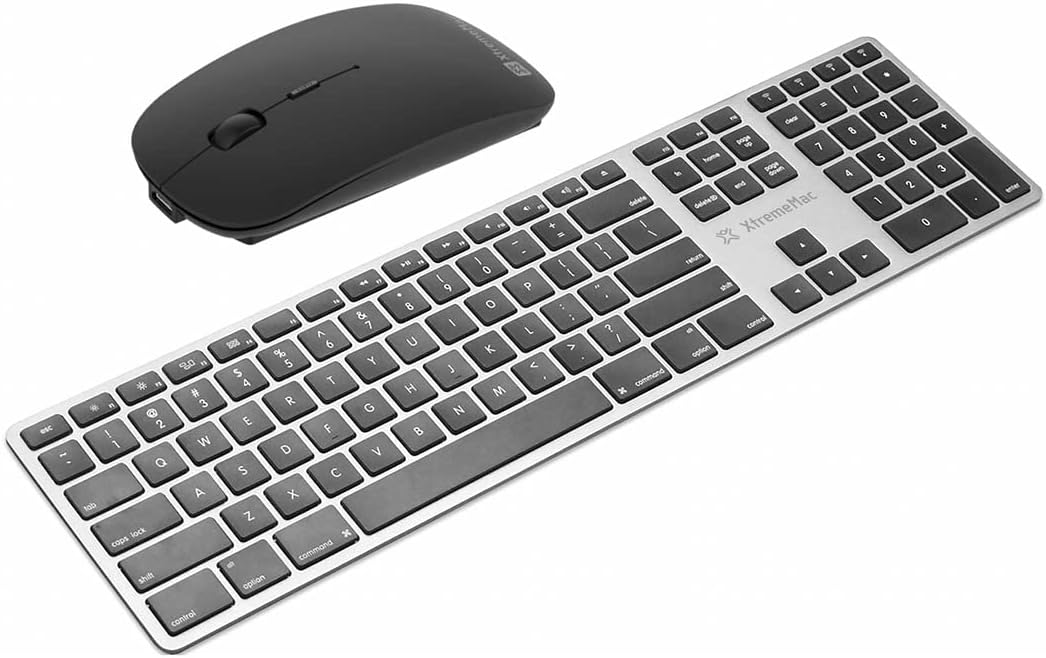
Yon anlè view of the XtremeMac Bluetooth wireless keyboard and mouse. The keyboard is silver with black keys, featuring a full layout including a numeric keypad. The mouse is black and has a sleek, ergonomic design.
Kontni pake
Verifye ke tout atik yo prezan nan pakè a:
- XtremeMac Bluetooth Wireless Keyboard
- XtremeMac Bluetooth Wireless Mouse
Enstriksyon Enstalasyon
1. Limen
Klavye: Locate the power switch, usually on the top edge or underside of the keyboard. Slide it to the "ON" position. An indicator light may briefly illuminate.
Sourit: Locate the power switch on the underside of the mouse. Slide it to the "ON" position. An optical sensor light may activate.
2. Pè Bluetooth
Ensure your Mac's Bluetooth is enabled. Navigate to Anviwònman sistèm (oswa Preferans sistèm sou vèsyon macOS ki pi ansyen yo) > Bluetooth.
Pairing klavye a:
- With the keyboard powered on, press and hold the Bluetooth pairing button (often located on the underside or top edge, sometimes combined with a function key) until the indicator light begins to flash, indicating it is in pairing mode.
- On your Mac, look for "XtremeMac Keyboard" or a similar name in the list of nearby Bluetooth devices.
- Click "Connect" or "Pair." Follow any on-screen prompts, such as typing a code on the keyboard and pressing Enter.
- Yon fwa konekte, limyè endikatè a sou klavye a ap sispann flache epi li ap rete fiks oswa etenn.
Konekte Sourit la:
- With the mouse powered on, press and hold the Bluetooth pairing button (usually on the underside) until the indicator light begins to flash.
- On your Mac, look for "XtremeMac Mouse" or a similar name in the list of nearby Bluetooth devices.
- Click "Connect" or "Pair."
- Once connected, the indicator light on the mouse will stop flashing and remain solid or turn off.
Nòt: The XtremeMac keyboard and mouse are designed for use with Mac OS. Compatibility with other operating systems may vary.
Enstriksyon Operasyon
Itilizasyon klavye
- Tape estanda: Use the keys as you would a standard keyboard.
- Kle Fonksyon: The top row of keys typically includes media controls and system functions. These may require pressing the "Fn" key simultaneously for their secondary function, depending on your Mac's settings.
- Mac-Specific Keys: Utilize the Command (⌘) and Option (⌥) keys for macOS shortcuts.
- Klavye nimerik: The dedicated numeric keypad allows for efficient data entry.
Itilizasyon sourit
- Klike Goch: Aksyon prensipal, seleksyon.
- Klike sou dwa: Meni kontèks.
- wou woulo liv: Defile nan dokiman yo epi web paj.
- Suivi optik: The mouse uses optical technology for precise cursor movement on most surfaces.
Antretyen
- Netwayaj: Sèvi ak yon ti moso twal mou, ki san pèl dampened with water or a mild cleaning solution to clean the surfaces of the keyboard and mouse. Avoid excessive moisture.
- Ranplasman batri: If the devices become unresponsive or the indicator lights dim, it may be time to replace the batteries. Refer to the battery compartment on the underside of each device for battery type and replacement instructions.
- Depo: When not in use for extended periods, turn off both devices to conserve battery life. Store them in a cool, dry place.
Depanaj
Device Not Connecting or Unresponsive
- Tcheke pouvwa: Ensure both the keyboard and mouse are powered on and have sufficient battery charge. Replace batteries if necessary.
- Repare Aparèy yo: Go to your Mac's Bluetooth settings, remove the XtremeMac keyboard and mouse from the list of devices, and then repeat the pairing process as described in the "Setup Instructions" section.
- Bluetooth on Mac: Verify that Bluetooth is enabled on your Mac and that it is not in Airplane Mode.
- Rekòmanse Aparèy: Turn off and then turn on both the keyboard, mouse, and your Mac.
- Entèferans: Move the devices closer to your Mac and away from other wireless devices that might cause interference (e.g., Wi-Fi routers, cordless phones).
Cursor Jumps or Lagging (Mouse)
- Sifas: Ensure the mouse is used on a clean, non-reflective, and opaque surface.
- Batri: Ranplase pil sourit la.
- Optical sensor: Check the optical sensor on the underside of the mouse for any obstructions or dirt.
Espesifikasyon
| Mak: | Xtrememac |
| Nimewo Modèl: | XWH-BBT-13 |
| Koneksyon Teknoloji: | Bluetooth |
| Aparèy konpatib: | Laptop, Personal Computer (Mac OS) |
| Mouse Tracking Technology: | Optik |
| Dimansyon Apeprè (Pakè): | 54.5 x 14.4 x 3.4 cm |
| Approximate Weight (Package): | 690 g |
Garanti ak sipò
XtremeMac products are covered by a limited warranty. For detailed warranty information, product registration, or technical support, please visit the official XtremeMac websit la oubyen kontakte sèvis kliyan yo. Kenbe prèv acha ou pou reklamasyon garanti.
Manifakti: XTREMEMAC


