1. Entwodiksyon
Thank you for choosing the Wicked Audio Growl Bluetooth Speaker. This manual provides essential information for the safe and optimal use of your device. The Growl speaker is designed for portability and durability, featuring IP67 waterproof and dustproof ratings, true wireless stereo pairing, and a built-in power bank function.
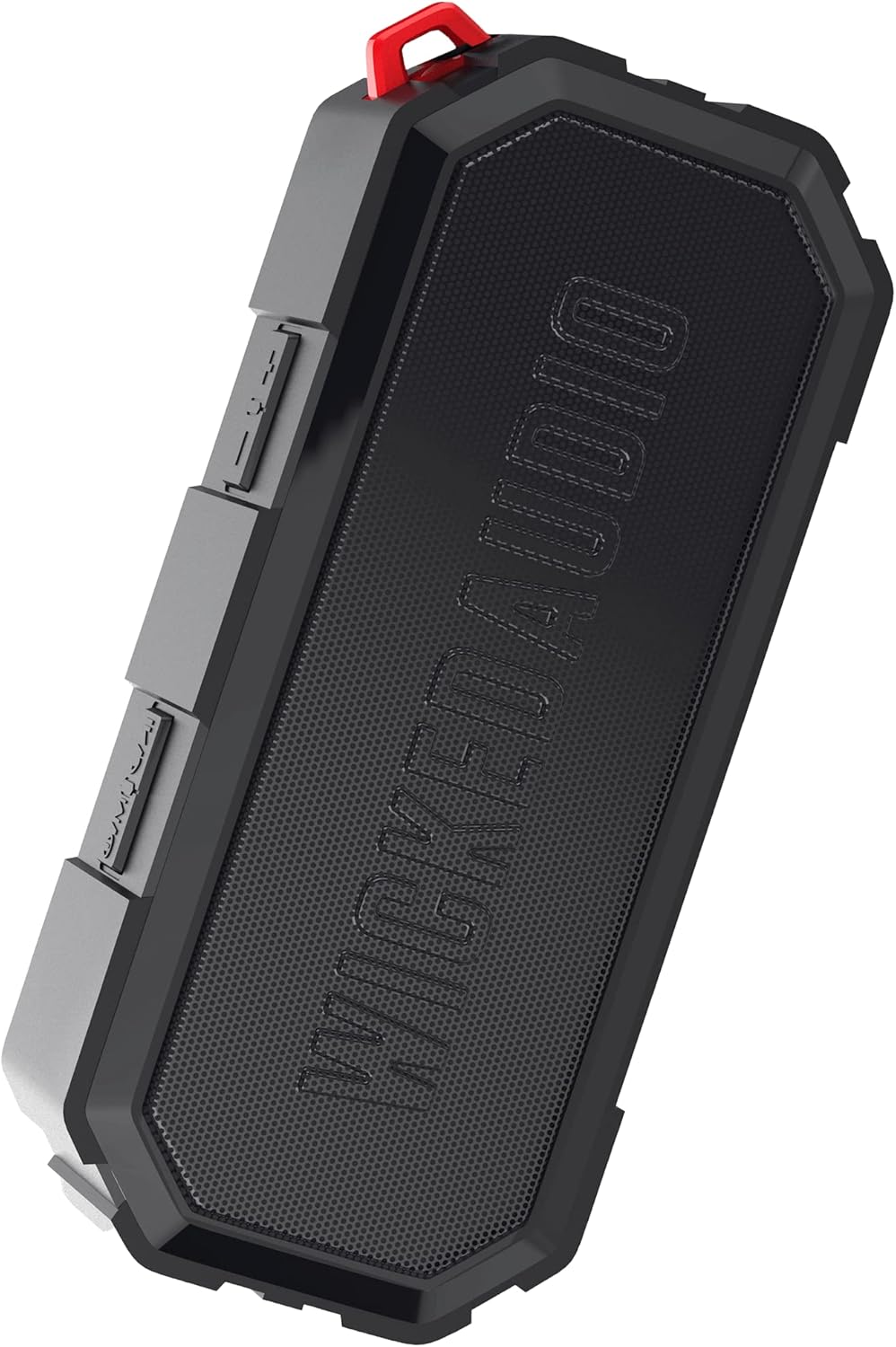
Image 1.1: The Wicked Audio Growl Bluetooth Speaker, showcasing konsepsyon kontra enfòmèl ant ak solid li yo.
2. Pake kontni
Tanpri tcheke kare a pou atik sa yo:
- Wicked Audio Growl Bluetooth Speaker
- Manyèl Itilizatè (dokiman sa a)
- USB-C Chaje Kab
- Auxiliary (AUX) Audio Cable
3. Pwodwi Features
The Wicked Audio Growl speaker offers a range of features designed for an enhanced audio experience:
- IP67 ki enpèmeyab ak pousyè: Provides protection against water immersion and dust ingress, making it suitable for various environments.
- Rugged & Durable Design: Constructed with a durable silicone case and protective covers for buttons and ports.
- True Wireless Stereo (TWS) Linkable Tech: Connect two Growl speakers wirelessly for a stereo sound experience.
- Bank pouvwa entegre: Features a 2600mAh battery that can be used to charge other devices via its USB-A output port.
- Tan pou jwe pwolonje: Jiska 40 èdtan lavi batri sou yon sèl chaj.
- Deep Bass & Dynamic Sound: Equipped with dual 52mm drivers for powerful audio with enhanced bass, rich mids, and clear highs.
- Koneksyon Bluetooth 5.0: Offers a stable wireless connection up to 32 feet (10 meters).

Image 3.1: Visual representation of the speaker's waterproof, dustproof, and rugged characteristics.

Image 3.2: The Growl speaker highlighting its IP67 waterproof and dustproof rating.

Image 3.3: Key features of the Growl speaker including extended battery, dual drivers, and linkable tech.

Image 3.4: Close-up emphasizing the enhanced bass and dual 52mm drivers for superior sound.
4. Enstalasyon
4.1 Chaje Oratè a
Before first use, fully charge your Growl speaker. The speaker has a USB-C charging port located under a protective cover.
- Open the protective cover on the side of the speaker to access the ports.
- Konekte kab chaje USB-C ki vini ak li a nan pò USB-C oratè a.
- Konekte lòt bout kab la nan yon adaptè kouran USB (pa enkli) oubyen nan yon pò USB òdinatè.
- Limyè endikatè chaj la ap limen. Yon chaj konplè anjeneral pran apeprè 3 èdtan.
- Once fully charged, disconnect the cable and securely close the protective cover to maintain IP67 rating.

Image 4.1: Illustration of the speaker's 40-hour battery life and 3-hour charging time.
4.2 Limen/Etenyen
To power on or off the speaker, locate the power button on the control panel.
- Pouvwa sou: Press and hold the Power button for a few seconds until you hear an audible indication.
- Pouvwa Off: Press and hold the Power button again for a few seconds until you hear an audible indication.
4.3 Bluetooth Pairing
Connect your Growl speaker to a Bluetooth-enabled device.
- Asire w ke oratè a limen epi li nan yon distans 32 pye (10 mèt) de aparèy ou an.
- Oratè a ap antre otomatikman nan mòd koneksyon, sa ap endike pa yon limyè LED ki ap flache.
- Sou aparèy ou an (telefòn entelijan, tablèt, elatriye), ale nan paramèt Bluetooth epi aktive Bluetooth.
- Chèche pou available devices and select "Wicked Growl" from the list.
- Yon fwa konekte, endikatè LED la ap sispann flache epi li ap rete fiks, epi w ap tande yon son konfimasyon.
4.4 Vrèman san fil stereo (TWS) koneksyon
For an immersive stereo experience, you can pair two Growl speakers together.
- Ensure both Growl speakers are powered on and not connected to any other Bluetooth device.
- On one speaker (this will be your primary speaker), press and hold the TWS pairing button (refer to button layout in section 5.1).
- Oratè prensipal la ap chèche oratè segondè a.
- Once connected, both speakers will emit a confirmation sound, and their LED indicators will synchronize.
- Kounye a, konekte aparèy ou a ak oratè prensipal la atravè Bluetooth jan sa dekri nan seksyon 4.3. Odyo a ap jwe nan tou de oratè yo an stereo.

Image 4.2: Diagram illustrating the process of wirelessly pairing two Growl speakers for dual audio.
4.5 Auxiliary (AUX) Input
You can connect devices without Bluetooth using the 3.5mm AUX input.
- Open the protective cover on the side of the speaker.
- Connect one end of the provided 3.5mm AUX cable to the speaker's AUX port.
- Konekte lòt bout la nan priz kas ekoutè a oswa nan pwodiksyon odyo aparèy ou an.
- Oratè a ap chanje otomatikman nan mòd AUX.
5. Operasyon Enstriksyon
5.1 Fonksyon bouton
The Growl speaker features intuitive controls on its top panel:
| Bouton | Fonksyon (Peze kout) | Fonksyon (Long Press) |
|---|---|---|
| Bouton pouvwa | N/A | Power On/Off |
| Bouton jwe/poz | Jwe/Pòz mizik; Reponn/Fen apèl | Rejte apèl |
| Volim monte (+) | Ogmante Volim | Next Track |
| Volim Dawonn (-) | Diminye Volim | Previous Track |
| TWS bouton | N/A | Inisye TWS Pairing |
5.2 Itilizasyon kòm yon Bank Pouvwa
The Growl speaker can provide a power boost to your other devices.
- Open the protective cover on the side of the speaker.
- Connect your device's charging cable (USB-A end) to the speaker's USB-A output port.
- Konekte lòt bout kab chaje aparèy ou an ak aparèy ou an.
- The speaker will begin charging your device. Note that using the power bank feature will reduce the speaker's playback time.
- Once charging is complete or you wish to stop, disconnect the cable and securely close the protective cover.

Image 5.1: The speaker functioning as a backup power bank for a smartphone.

Image 5.2: The Growl speaker connected via USB to charge a smartphone, demonstrating its power bank capability.
6. Antretyen
Proper care will ensure the longevity of your Wicked Audio Growl speaker.
- Netwayaj: Siye oratè a ak yon mou, damp cloth. Do not use abrasive cleaners or solvents. Ensure all port covers are securely closed before cleaning with water.
- Ekspozisyon dlo: While IP67 rated, avoid prolonged submersion or exposure to high-pressure water jets. Always ensure port covers are sealed when near water.
- Depo: Sere oratè a nan yon kote ki fre epi sèk, lwen tanperati ekstrèm ak limyè solèy dirèk.
- Swen batri: Pou yon batri ki dire pi lontan, evite dechaje batri a nèt souvan. Chaje oratè a regilyèman, menm si ou pa itilize li pandan yon bon bout tan.
NAN. Depanaj
If you encounter issues with your Growl speaker, refer to the following common solutions:
| Pwoblèm | Solisyon posib |
|---|---|
| Oratè a pa limen | Asire w batri a chaje. Konekte l ak yon sous kouran avèk kab USB-C a. |
| Pa ka konekte via Bluetooth | Ensure the speaker is in pairing mode (flashing LED). Turn off and on Bluetooth on your device. Forget "Wicked Growl" from your device's Bluetooth list and try pairing again. Ensure no other devices are connected to the speaker. |
| Pa gen son | Check volume levels on both the speaker and your connected device. Ensure the correct input mode (Bluetooth or AUX) is selected. If using AUX, ensure the cable is fully inserted. |
| Move son kalite | Move the speaker closer to your Bluetooth device to reduce interference. Ensure the speaker is not obstructed. Check the audio source quality. |
| TWS appariement echwe | Ensure both speakers are powered on and not connected to any other Bluetooth device. Try resetting both speakers by powering them off and on, then re-attempt TWS pairing. |
| Batri pouvwa a pa chaje aparèy la | Ensure the speaker has sufficient charge. Check the USB cable and connection. Some devices may require more power than the speaker can provide. |
8. Espesifikasyon
Detailed technical specifications for the Wicked Audio Growl Bluetooth Speaker:
| Karakteristik | Spesifikasyon |
|---|---|
| Non modèl | Gronde |
| Nimewo Modèl Atik | WIBTS70 |
| Bluetooth vèsyon | 5.0 |
| Wireless Range | Jiska 32 pye (10 mèt) |
| Gwosè Oratè | Doub 52mm Chofè |
| Oratè maksimòm pwodiksyon pouvwa | 5 Watts |
| Repons Frekans | 20000 Hz |
| Enpedans | 16 Ohm |
| Kalite batri | 1 batri ityòm Ion |
| Kapasite batri | 2600 mAh |
| Playtime | Jiska 40 èdtan |
| Tan pou chaje | Apeprè. 3 èdtan |
| Port chaje | USB-C |
| Power Bank Sòti | USB-A |
| Evalyasyon ki enpèmeyab | IP67 |
| Dimansyon pwodwi | 20.5P x 5.5W x 15H Santimèt |
| Pwa | 680 g |
| Koulè | Nwa |

Image 8.1: Visual summary of the speaker's sleek design, durability, and key specifications.
9. Garanti ak sipò
Wicked Audio provides a 12 mwa garanti limite for the Growl Bluetooth Speaker from the date of purchase. This warranty covers manufacturing defects and ensures your product performs as expected under normal use.
For warranty claims, technical support, or any inquiries regarding your Wicked Audio Growl speaker, please contact Wicked Audio customer service through their official websit la oswa enfòmasyon kontak yo bay ak dokiman acha ou a.
Tanpri konsève prèv acha ou a pou sèvis garanti a.


