1. Entwodiksyon
This manual provides detailed instructions for the assembly, installation, operation, and maintenance of your AMANSON H07 ATX Mid Tower PC Case. Please read this manual thoroughly before beginning installation to ensure proper setup and safe operation. Keep this manual for future reference.

Figure 1.1: AMANSON H07 ATX Mid Tower PC Case with illuminated internal components.
2. Enfòmasyon sou Sekirite
- Always disconnect the power supply from the wall outlet before performing any installation or maintenance inside the PC case.
- Manyen tout konpozan yo avèk prekosyon pou evite domaj.
- Mete yon braslè ponyèt anti-estatik pou anpeche domaj akòz dechaj elektwostatik (ESD) sou konpozan elektwonik sansib yo.
- Kenbe ti pyès ak materyèl anbalaj lwen timoun yo.
- Ensure proper ventilation around the PC case to prevent overheating.
3. Pake kontni
Verifye ke tout atik yo prezan nan pakè a:
- AMANSON H07 ATX Mid Tower PC Case
- Bwat akseswa (vis, distansè, lyen kab, elatriye)
- Manyèl Itilizatè (dokiman sa a)
4. Konpozan souview
The AMANSON H07 PC case features a panoramic design with tempered glass panels for full visibility of your internal components. It supports various motherboard sizes and extensive cooling configurations.

Figure 4.1: Top I/O Panel with power button, USB 3.0, USB 2.0, and audio ports.
The top I/O panel includes:
- Bouton pouvwa
- Bouton Reyajiste
- 2x USB 2.0 pò
- 1x USB 3.0 Port
- Audio In/Out Jacks
5. Enstalasyon ak Enstalasyon
5.1. Prepare Ka a
The AMANSON H07 features tool-less hinged tempered glass side panels for easy access. Gently open the side panel by pulling it from the rear edge. The panels can also be removed by lifting them off their hinges for full access during installation.

Figure 5.1: Hinged tempered glass side panel for easy access.
5.2. Enstalasyon mèr
The H07 supports E-ATX, ATX, Micro-ATX, and ITX motherboards. Install the necessary standoffs for your motherboard form factor. Carefully align your motherboard with the standoffs and I/O shield, then secure it with screws.
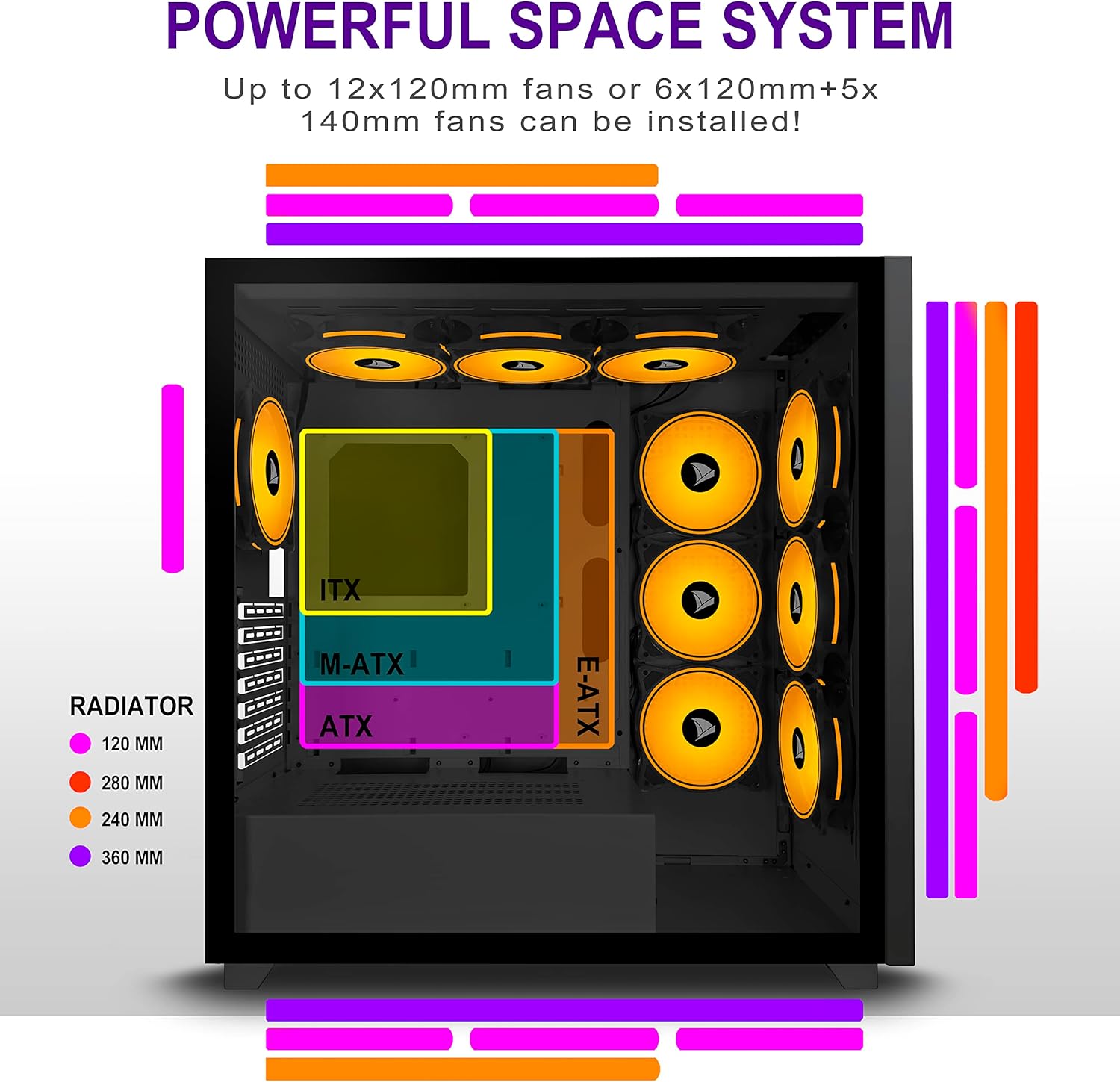
Figure 5.2: Motherboard and cooling component placement options.
5.3. Enstalasyon ekipman pou pouvwa
Install your power supply unit (PSU) into the dedicated compartment at the bottom rear of the case. Secure it with screws from the rear of the case.
5.4. Enstalasyon Aparèy Depo
The case provides multiple mounting points for storage devices. Install your 3.5" HDDs and 2.5" SSDs into the designated trays and mounting locations. Refer to the case diagram for specific locations.

Figure 5.3: Storage drive mounting options for HDDs and SSDs.
5.5. Enstalasyon Kat Ekspansyon (GPU)
Remove the necessary PCI-E slot covers from the rear of the case. Insert your graphics card or other expansion cards into the motherboard's PCI-E slots and secure them with screws.
5.6. Jesyon kab
Utilize the cable routing cutouts and tie-down points behind the motherboard tray to manage cables. This improves airflow and maintains a clean aesthetic.
6. Operasyon Enstriksyon
6.1. Powering On / Off
Press the power button located on the top I/O panel to turn on your PC. To shut down, use the operating system's shutdown function or press and hold the power button for several seconds.
6.2. Itilizasyon Pò Antre/Sòti Devan yo
Connect USB devices to the USB 2.0 or USB 3.0 ports. Use the audio jacks for headphones, microphones, or speakers.
7. Antretyen
7.1. Netwayaj
Netwaye deyò bwat la regilyèman avèk yon twal mou, damp cloth. For internal cleaning, use compressed air to remove dust from fans and components. Ensure the PC is powered off and unplugged before cleaning.
7.2. Filtè Pousyè
The AMANSON H07 may include removable dust filters. Clean these filters periodically to maintain optimal airflow and cooling performance.
NAN. Depanaj
- PC does not power on: Check all power connections, including the PSU to the wall, the PSU to the motherboard, and the front panel power switch cable to the motherboard.
- Overheating issues: Ensure all fans are properly installed and functioning. Verify that dust filters are clean and not obstructing airflow. Check thermal paste application on CPU cooler.
- Pò USB yo pa fonksyone: Confirm that the front panel USB cables are correctly connected to the motherboard headers.
- Audio jacks not working: Verify that the front panel audio cable is correctly connected to the motherboard's audio header.
9. Espesifikasyon
Below are the technical specifications for the AMANSON H07 PC Case:
| Karakteristik | Detay |
|---|---|
| Modèl | H07 |
| Kalite Ka | Mid Tower |
| Mèr konpatibilite | E-ATX, ATX, Micro ATX, ITX |
| Materyèl | Tanpered Glass |
| Dimansyon pwodwi (LxWxH) | 19.69 x 13.78 x 19.69 pous (500 x 350 x 500 mm) |
| Pwa atik | 24.2 liv |
| Kantite USB 2.0 pò | 2 |
| Kantite USB 3.0 pò | 1 |
| Number of Expansion Slots | 8 |
| Metòd refwadisman | Air |
| Kalite montaj ekipman pouvwa | Anba mòn |

Figure 9.1: AMANSON H07 PC Case dimensions (520mm height, 510mm length, 250mm width).
10. Enfòmasyon sou Garanti
Please refer to the product packaging or the official AMANSON websit la pou tèm ak kondisyon espesifik garanti a. Kenbe prèv acha ou pou reklamasyon garanti.
11. Sipò
For technical assistance or customer support, please visit the official AMANSON websit entènèt la oubyen kontakte depatman sèvis kliyan yo. Anjeneral, ou ka jwenn enfòmasyon kontak yo sou anbalaj pwodwi a oubyen sou mak la. websit.


