Entwodiksyon
This manual provides comprehensive instructions for the setup, operation, and maintenance of your Acctim Invicta Digital Alarm Clock. Please read this manual thoroughly before using the device to ensure proper function and longevity.
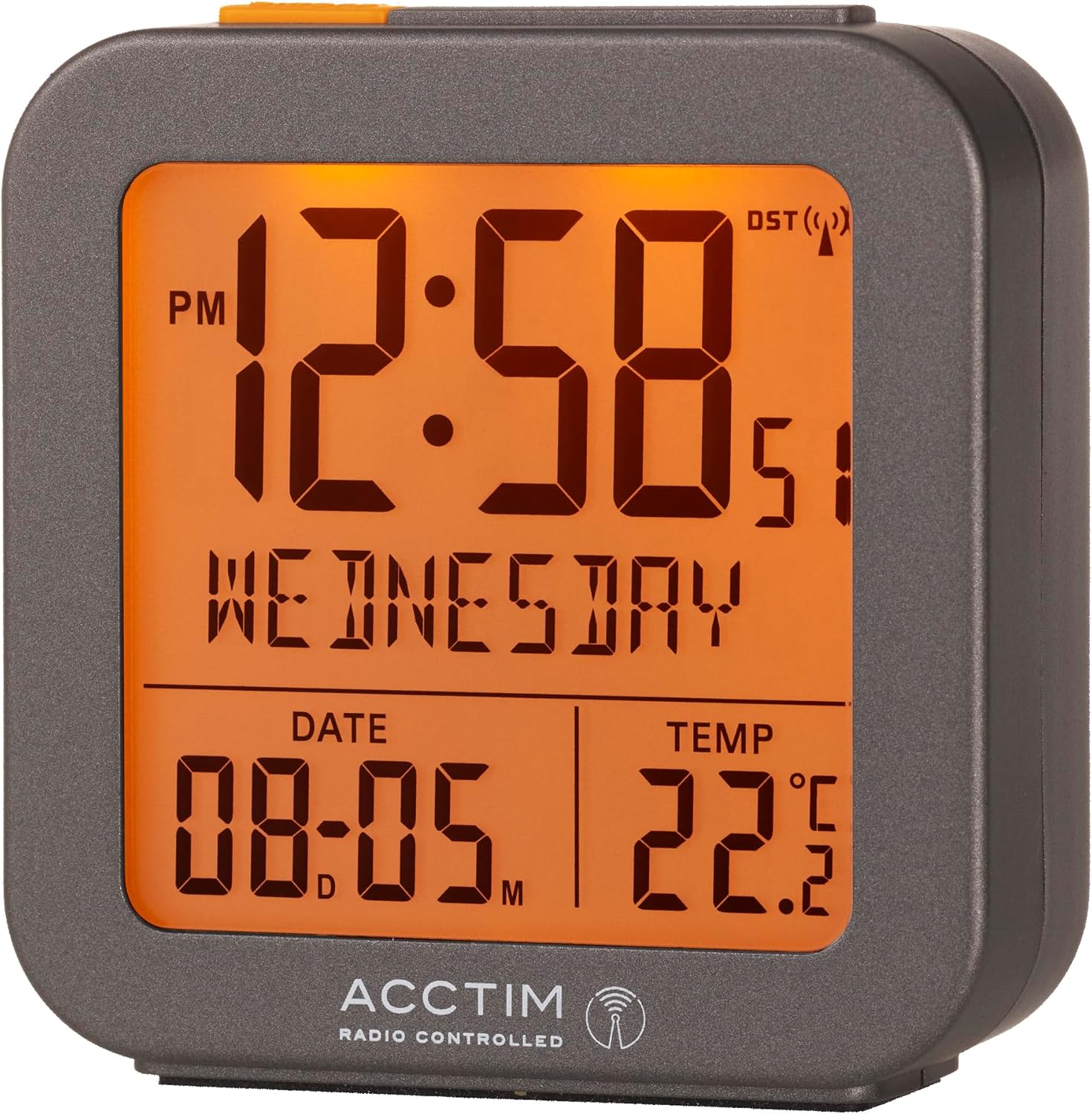
Figi 1: Devan view of the Acctim Invicta Digital Alarm Clock with its illuminated display.
Enfòmasyon sou Sekirite
- Pa ekspoze revèy la nan tanperati ekstrèm, limyè solèy dirèk, oswa imidite ki wo.
- Evite lage revèy la oswa sibi gwo enpak.
- Use only the specified battery type (2x AAA batteries). Ensure correct polarity when inserting batteries.
- Retire pil yo si ou pa pral itilize revèy la pou yon peryòd tan pwolonje pou anpeche li koule.
- Kenbe pil yo pa rive jwenn timoun yo.
- Pa melanje ansyen ak nouvo pil, oswa diferan kalite pil.
Kontni pake
- Acctim Invicta Digital Alarm Clock (Model: 71937)
- Manyèl Itilizatè (dokiman sa a)
Note: 2x AAA batteries are required for operation and are not included in the package.
Karakteristik pwodwi
- Multifunction Digital Display
- Radio Controlled with Automatic Setup for precise timekeeping
- Crescendo Alarm for a gentle wake-up
- Fonksyon Snooze
- LCD Display showing Time, Date, Day, and Indoor Temperature
- Konsepsyon kontra enfòmèl ant ak pòtab
Enstalasyon
1. Enstalasyon batri
- Jwenn lòj batri a sou do revèy la.
- Louvri kouvèti lòj batri a.
- Insert 2x AAA batteries, ensuring the correct polarity (+ and -) as indicated inside the compartment.
- Fèmen kouvèti lòj batri a byen.

Figi 2: Dèyè view of the clock, highlighting the battery compartment and control buttons.
2. Initial Time Synchronization (Radio Controlled)
Upon battery installation, the clock will automatically begin searching for the radio controlled time signal (DCF77 for UK/Europe). This process may take several minutes to a few hours, depending on your location and signal strength. During this time, the radio controlled signal icon (a small antenna symbol) will flash on the display.
- Mete revèy la toupre yon fenèt pou yon resepsyon siyal optimal.
- Evite mete l toupre aparèy elektwonik ki ka lakòz entèferans.
- Once the signal is successfully received, the time and date will automatically set, and the radio controlled signal icon will become solid.
If the signal is not received within 24 hours, you may need to manually set the time (see "Manual Time Setting" in the Operating Instructions section).
Enstriksyon Operasyon
Fonksyon bouton yo souview
Refer to Figure 2 for the location of the buttons on the back of the clock:
- ALARM Button (Clock icon): Used to enter alarm setting mode and activate/deactivate the alarm.
- Bouton MOINS (-): Used to decrease values during setting, or to toggle display modes.
- Bouton PLIS (+): Used to increase values during setting, or to toggle display modes.
- TIME Button (Circle with arrow): Used to enter time/date setting mode.
- SNOOZE/LIGHT Bar (Top of clock): Press to activate backlight or snooze a sounding alarm.
1. Anrejistreman Manyèl Dat ak Lè
While the clock is radio controlled, manual setting may be necessary if the signal is consistently weak or unavailable.
- Peze epi kenbe la TAN button for approximately 3 seconds until the hour digits begin to flash.
- Sèvi ak la PLUS (+) or MOINS (-) bouton pou ajiste lè a.
- Peze a TAN Peze bouton an ankò pou konfime lè a epi ale nan reglaj minit la.
- Repeat the process for minutes, year, month, and day.
- Peze a TAN button one last time to exit setting mode.
2. Mete alam la
- Peze epi kenbe la ALAM button for approximately 3 seconds until the alarm hour digits begin to flash.
- Sèvi ak la PLUS (+) or MOINS (-) bouton pou ajiste lè alam la.
- Peze a ALAM button again to confirm the alarm hour and move to the alarm minute setting.
- Sèvi ak la PLUS (+) or MOINS (-) bouton pou ajiste minit alam la.
- Peze a ALAM button one last time to exit alarm setting mode.
3. Aktive/Dezaktive Alam lan
Nan ekspozisyon tan nòmal la, peze bouton an ALAM button once briefly to toggle the alarm on or off. An alarm icon (bell symbol) will appear on the display when the alarm is active.
4. Crescendo Alarm and Snooze Function
- Crescendo Alam: When the alarm sounds, it will start softly and gradually increase in volume to gently wake you.
- Repetisyon: When the alarm is sounding, press the large SNOOZE / limyè bar on top of the clock. The alarm will pause for approximately 5 minutes and then sound again. You can repeat the snooze function multiple times.
- Sispann alam la: To stop the alarm completely, press any button on the back of the clock (ALARM, PLUS, MINUS, TIME). The alarm will reset for the next day.
5. Backlight/Illumination
Peze gwo a SNOOZE / limyè bar on top of the clock to briefly illuminate the display for easy viewing nan kondisyon limyè ki ba.
6. Ekspozisyon Tanperati
The clock continuously displays the indoor temperature. The unit of temperature (Celsius or Fahrenheit) can typically be toggled by pressing the PLUS (+) or MOINS (-) button briefly when not in setting mode, or by a dedicated switch on the back (refer to Figure 2 for any such switch, though none is explicitly visible in the provided image, this is a common feature).
Antretyen
- Netwaye revèy la avèk yon twal mou epi sèk. Pa sèvi ak pwodui netwayaj abrazif oswa solvan.
- Avoid exposing the clock to water or other liquids.
- Replace batteries promptly when the display becomes dim or the clock stops functioning correctly.
Depanaj
| Pwoblèm | Kòz posib / Solisyon |
|---|---|
| Ekran revèy la vid oswa li fèb. | Pil yo mouri oswa yo pa byen mete. Ranplase pil yo, asire polarite a kòrèk. |
| Lè a pa kòrèk oswa li pa fikse otomatikman. | Weak radio controlled signal. Move the clock closer to a window or to a different location away from electronic interference. Allow several hours for signal acquisition. If issues persist, manually set the time. |
| Alam lan pa sonnen. | Alarm is not activated. Ensure the alarm icon (bell symbol) is visible on the display. Check if the alarm time is set correctly. |
| Fonksyon repetisyon an pa mache. | Ensure you are pressing the large SNOOZE/LIGHT bar on top of the clock when the alarm is sounding. |
| Lekti tanperati a sanble pa egzak. | Ensure the clock is not placed in direct sunlight, near heat sources, or in drafts, which can affect temperature readings. |
Espesifikasyon
| Karakteristik | Detay |
|---|---|
| Nimewo Modèl | 71937 |
| Mak | Acctim |
| Koulè | Gri |
| Dimansyon pwodwi | 6.5 x 3.81 x 7.5 cm (W x P x H) |
| Pwa atik | 110 g |
| Materyèl | Plastik |
| Kalite ekspozisyon | Digital LCD |
| Sous pouvwa | 2x AAA pil (pa enkli) |
| Karakteristik espesyal | Snooze, Illuminated Display, Temperature Display, Alarm, Calendar Display, Radio Controlled |

Figure 3: Dimensions of the Acctim Invicta Digital Alarm Clock.
Garanti ak sipò
For warranty information and customer support, please refer to the official Acctim websit la oubyen kontakte machann ou an. Kenbe resi acha ou kòm prèv acha pou nenpòt reklamasyon garanti.
For further assistance, you may visit the Acctim Store online: Acctim Store on Amazon UK


