1. Entwodiksyon
This manual provides detailed instructions for the ENDORFY Thock Wireless Mechanical Keyboard, model EY5A078. It covers setup, operation, maintenance, and troubleshooting to ensure optimal performance and longevity of your device. Please read this manual thoroughly before using the keyboard.

Image 1.1: The ENDORFY Thock Wireless Mechanical Keyboard EY5A078. This image displays the full QWERTY layout with illuminated keys, showcasing the keyboard's design and RGB capabilities.
2. Pake kontni
Verifye ke tout atik yo prezan nan pakè a:
- ENDORFY Thock Wireless Mechanical Keyboard EY5A078
- USB-C to USB-A Cable (detachable)
- 2.4 GHz USB reseptè
- Keycap Puller
- Chanje Puller
- Manyèl Itilizatè (dokiman sa a)
3. Enstalasyon ak Koneksyon
The ENDORFY Thock Wireless Mechanical Keyboard offers three connection modes: wired, 2.4 GHz wireless, and Bluetooth.
3.1. Filè Koneksyon
- Locate the USB-C port on the keyboard (typically on the back or top edge).
- Connect the provided USB-C to USB-A cable to the keyboard.
- Konekte bout USB-A kab la nan yon pò USB ki disponib sou òdinatè w la.
- Klavye a pral detekte otomatikman epi li pral pare pou itilize.
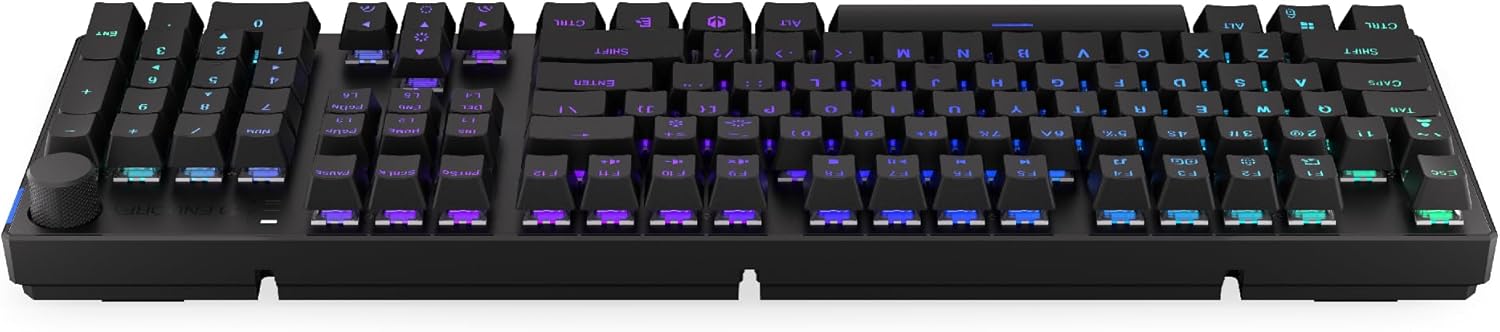
Imaj 3.1: Kote view of the keyboard, highlighting the USB-C port for wired connection and charging.
3.2. Koneksyon san fil 2.4 GHz
- Locate the 2.4 GHz USB receiver. It may be stored in a compartment on the underside of the keyboard.
- Plug the 2.4 GHz USB receiver into an available USB port on your computer.
- On the keyboard, locate the mode switch (usually on the back or side) and set it to the 2.4 GHz wireless mode (often indicated by a specific icon or "2.4G").
- The keyboard should automatically connect. An indicator light may confirm the connection.

Image 3.2: Underside of the keyboard, showing the compartment for storing the 2.4 GHz USB receiver and adjustable feet.
3.3. Bluetooth Koneksyon
- On the keyboard, set the mode switch to Bluetooth mode (often indicated by a Bluetooth icon or "BT").
- The keyboard may have multiple Bluetooth profiles (e.g., BT1, BT2, BT3). Select one by pressing Fn + 1, Fn + 2, or Fn + 3. The corresponding indicator light will flash.
- Sou òdinatè w la oswa aparèy ou an, ouvri paramèt Bluetooth yo epi chèche nouvo aparèy.
- Select "ENDORFY Thock Wireless" (or similar name) from the list of available devices.
- Swiv nenpòt envit ki sou ekran pou konplete pwosesis kouple a.
- Once paired, the indicator light on the keyboard will stop flashing and remain solid.
4. Operasyon
4.1. Fonksyon kle ak rakoursi
The keyboard features various function key combinations (Fn + Key) for multimedia control, lighting adjustments, and other settings.
- Fn + F1-F12: Multimedia and system functions (e.g., volume control, media playback, calculator). Refer to the keycap legends for specific functions.
- Fn + Flèch yo: Adjust RGB lighting effects (e.g., brightness, speed, direction).
- Fn + 1/2/3: Chanje ant Bluetooth pwofesyonèlfiles.
- Fn + 4: Switch to 2.4 GHz wireless mode.
- Fn + 5: Chanje nan mòd filaire.
4.2. Kontwòl ekleraj RGB
The ENDORFY Thock keyboard features programmable RGB backlighting. Use the following combinations to customize the lighting:
- Fn + Right Arrow: Change lighting effect.
- Fn + Left Arrow: Change lighting effect direction.
- Fn + Up Arrow: Ogmante klète.
- Fn + Down Arrow: Diminye klète.
- Fn + Ins: Chanje koulè.
- Fn + Del: Adjust effect speed.
4.3. Volim bouton
The dedicated volume knob located on the top right of the keyboard allows for quick audio adjustments.
- Vire nan sens goch: Ogmante volim.
- Vire nan sans kontrè zegwi mont lan: Diminye volim.
- Peze desann: Aktive/dezaktive odyo a.

Image 4.1: Detail of the volume knob and status indicator lights, located on the upper right side of the keyboard.
4.4. Switch ki ka ranplase a cho
The ENDORFY Thock keyboard features hot-swappable switches, allowing you to change mechanical switches without soldering. This enables customization of typing feel.
- Retire kouvèti kle a: Sèvi ak zouti pou rale bouchon kle yo bay la pou retire bouchon kle ou vle a dousman.
- Retire switch la: Use the provided switch puller to carefully grip the top and bottom clips of the switch and pull it straight up.
- Mete yon nouvo switch: Align the pins of the new switch with the holes on the PCB. Press the switch firmly until it clicks into place. Ensure pins are not bent.
- Ranplase kle a: Mete bouchon kle a tounen sou nouvo tij switch la.

Imaj 4.2: Yon gwo plan view of the Kailh Box Brown mechanical switches, demonstrating the hot-swappable design.
5. Antretyen
5.1. Netwaye klavye a
Netwayaj regilye ede kenbe pèfòmans ak aparans klavye a an bon eta.
- Dekonekte klavye a nan òdinatè w la anvan ou netwaye li.
- Sèvi ak yon zouti pou rale bouchon kle pou retire bouchon kle yo pou yon netwayaj byen pwòp.
- Sèvi ak lè konprese pou retire pousyè ak debri ki ant kle yo.
- Wipe keycaps and the keyboard surface with a soft, damp twal. Evite pwodwi chimik piman bouk yo.
- Ensure the keyboard is completely dry before reconnecting.
5.2. Ranplasman kle ak switch
Refer to Section 4.4 for detailed instructions on replacing keycaps and switches. Use only compatible keycaps and switches to avoid damage.
NAN. Depanaj
| Pwoblèm | Kòz posib | Solisyon |
|---|---|---|
| Klavye a pa reponn (ak fil) | Loose cable connection, faulty USB port. | Ensure USB-C cable is securely connected. Try a different USB port or cable. |
| Klavye a pa reponn (san fil) | Low battery, incorrect mode, receiver not plugged in, pairing issue. | Charge the keyboard. Ensure mode switch is set correctly (2.4G or BT). Re-pair Bluetooth or re-insert 2.4 GHz receiver. |
| Ekleraj RGB pa travay | Lighting turned off, low battery, software issue. | Check lighting controls (Fn + Arrow keys). Charge the keyboard. Restart computer. |
| Kle yo ap tape de fwa oswa yo pa anrejistre | Dust/debris under switch, faulty switch. | Clean under keycaps with compressed air. If issue persists, replace the switch (refer to Section 4.4). |
7. Espesifikasyon
- Modèl: EY5A078
- Mak: ENDORFY
- Koneksyon: Wired (USB-C), 2.4 GHz Wireless, Bluetooth
- Kalite switch: Kailh Box Brown (Hot-swappable)
- Keycaps: PBT doub piki
- Layout: Full-size QWERTY
- Ekleraj: RGB pwogramasyon
- Sistèm operasyon: Linux, Mac OS X 10.12 Sierra, Windows 10
- Koulè: Nwa
- Materyèl: Tereftalat polibutilèn (PBT)
- Karakteristik espesyal: Detachable cable, Volume knob with mute, Hot-swappable switches
- Batri: Lityòm-ion (enkli)
8. Garanti ak sipò
ENDORFY products are covered by a manufacturer's warranty. For detailed warranty information, please refer to the warranty card included with your product or visit the official ENDORFY website. For technical support, product inquiries, or service requests, please contact ENDORFY customer support through their official channels.
Ofisyèl Websit: www.endorfy.com
9. Enfòmasyon sou Sekirite
- Kenbe klavye a lwen likid ak imidite twòp.
- Evite ekspoze klavye a nan tanperati ekstrèm.
- Do not attempt to disassemble or modify the keyboard beyond hot-swapping switches and keycaps, as this may void the warranty and cause damage.
- Sèvi sèlman ak kab chaje ki founi an oswa ki rekòmande a.
- Dispose of the battery and electronic components responsibly according to local regulations.


