This manual provides comprehensive instructions for the installation, operation, and maintenance of the Axis F9114 Main Unit. Please read this manual carefully before using the product to ensure proper functionality and safety.
Pwodwi souview
The AXIS F9114 is a main unit designed for the F-Series surveillance system. It supports up to four F21 or F7 sensor units, providing a flexible and discreet surveillance solution. This unit acts as the central processing hub for connected camera sensors.
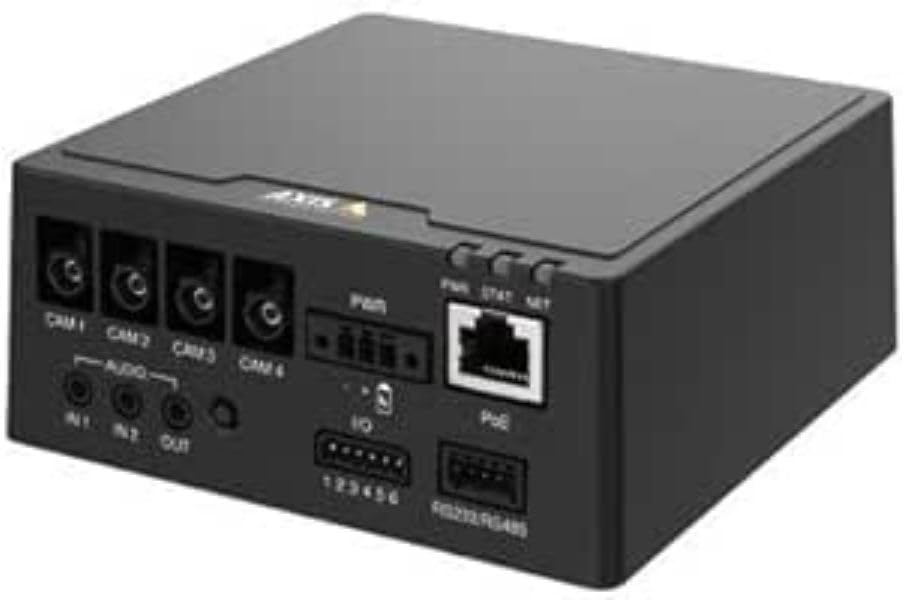
Figi 1: Devan view of the AXIS F9114 Main Unit, showing camera input ports (CAM 1-4), audio input/output, power input, I/O ports, and an Ethernet port with PoE support.
Karakteristik kle:
Supports up to 4 Axis F-Series sensor units (e.g., F21, F7).
Central processing unit for video and audio streams.
Konsepsyon kontra enfòmèl ant pou enstalasyon fleksib.
Integrated Power over Ethernet (PoE) for simplified power and data connectivity.
Multiple I/O ports for external device integration.
Audio input/output capabilities.
Enstalasyon ak Enstalasyon
Kontni pake:
AXIS F9114 Main Unit
Gid enstalasyon
(Power supply and sensor units sold separately, unless specified)
Connecting Sensor Units:
Ensure the main unit is powered off before connecting any sensor units.
Connect the cables from your AXIS F-Series sensor units (e.g., F21, F7) to the designated "CAM 1", "CAM 2", "CAM 3", and "CAM 4" ports on the rear of the F9114 Main Unit. Ensure a secure connection.
Each sensor unit requires a dedicated port.
Alimente inite a:
Pouvwa sou Ethernet (PoE): Connect an Ethernet cable from a PoE-enabled switch or injector to the "PoE" port on the F9114. This will provide both power and network connectivity.
Pwovizyon pou pouvwa ekstèn: If PoE is not used, connect a compatible DC power adapter (not included) to the "PWR" input terminal. Refer to specifications for voltage kondisyon.
Rezo Koneksyon:
Connect an Ethernet cable from your network to the "PoE" port on the F9114. This provides network access for configuration and video streaming.
Koneksyon odyo ak I/O:
Odyo: Connect external microphones to "IN 1" or "IN 2" and speakers to "OUT" if audio functionality is required.
I/O: Use the "IO" terminal block for connecting external devices such as alarm sensors or relays. Refer to the detailed wiring diagram in the full technical documentation for specific connections.
Operasyon
Premye pouvwa-up:
Once all connections are secure and power is supplied, the unit will begin its startup sequence. Observe the LED indicators for status.
Endikatè ki ap dirije:
PWR (pouvwa): Indicates power status. (e.g., Solid green for normal operation).
STAT (Status): Indicates operational status. (e.g., Flashing for network activity, solid for ready).
NET (Rezo): Indicates network connection and activity.
Aksè Aparèy la:
Use the AXIS IP Utility or a network scanner to discover the IP address of the F9114 on your network.
Louvri a web browser and enter the IP address to access the device's web koòdone.
Log in using the default credentials (refer to the installation guide or Axis website for current defaults).
Follow the on-screen instructions to configure network settings, video streams, and other system parameters.
Jesyon videyo:
The F9114 integrates with various video management software (VMS) solutions. Refer to your VMS documentation for adding and managing the device.
Antretyen
Netwayaj: Use a soft, dry cloth to clean the exterior of the unit. Do not use harsh chemicals or abrasive cleaners.
Mizajou mikrolojisyèl: Tcheke kominikasyon Axis yo regilyèman. websit pou mizajou firmwèr. Kenbe firmwèr la ajou asire pèfòmans optimal, sekirite, ak aksè a nouvo fonksyonalite.
Kondisyon anviwònman: Asire w ke aparèy la ap fonksyone nan limit tanperati ak imidite espesifye yo pou anpeche domaj.
Depanaj
Pwoblèm komen ak solisyon:
Pa gen pouvwa:
Verify power cable connection (if using external power).
Ensure PoE switch/injector is active and providing power (if using PoE).
Tcheke sous pouvwa a.
Pa gen koneksyon rezo:
Tcheke koneksyon kab Ethernet la.
Verify network switch/router functionality.
Confirm IP address settings are correct or DHCP is functioning.
No Video from Sensor Unit:
Ensure sensor unit cables are securely connected to the F9114.
Verify the sensor unit is compatible with the F9114.
Check the sensor unit's status indicators (if available).
Access the F9114 web interface to confirm sensor unit detection and configuration.
Modpas bliye:
Refer to the Axis Communications support documentation for password reset procedures, which typically involve a factory reset button or specific software tools.
For more detailed troubleshooting, refer to the comprehensive support resources available on the Axis Communications websit.
Espesifikasyon
Karakteristik
Detay
Mak
Aks Kominikasyon
Nimewo Modèl
01991-001
Pwa atik
1.87 liv
Dimansyon pwodwi (LxWxH)
19.69 x 19.69 x 11.02 pous
Manifakti
AXIS - CAMERA
ASIN
B0BWNS49VS
Dat Premye Disponib
23 fevriye 2023
Note: Specifications are subject to change without notice. For the most current information, please refer to the official Axis Communications websit.
Garanti ak sipò
Enfòmasyon sou garanti:
For detailed warranty information, please refer to the warranty statement provided with your product or visit the official Axis Communications websit la. Kenbe prèv acha ou pou reklamasyon garanti.
Sipò teknik:
If you encounter issues that cannot be resolved using this manual or the troubleshooting section, please contact Axis Communications technical support. Support resources, including FAQs, documentation, and contact information, are available on their official websit.
AXIS Product Comparison Tables Q3 2025: Network Video, Audio, Access Control, and Intercoms This Q3 2025 document from Axis Communications provides comprehensive product comparison tables for their extensive range of network video, audio, access control, and intercom solutions. It details specifications, features, and model information across various product lines, including cameras, recorders, software, and intercom systems.
AXIS FA51 Main Unit Benutzerhandbuch | Enstalasyon ak konfigirasyon Das offizielle Benutzerhandbuch for die AXIS FA51 Main Unit von AXIS Communications. Enthält Anleitungen zur Enstalasyon, Konfigurasyon, Videyo-Streaming, Aufnahme und Systemverwaltung für Überwachungslösungen.
Gid Enstalasyon Seri Kamera Panoramik AXIS M43 la Gid enstalasyon sa a bay enfòmasyon esansyèl pou konfigirasyon seri kamera panoramik AXIS M43 la, ki gen ladan modèl AXIS M4327-P ak AXIS M4328-P yo. Li kouvri pwosedi enstalasyon, sekirite, ak konfòmite règlemantè.
Gid Enstalasyon AXIS High PoE Midspan ak Splitter Gid enstalasyon pou AXIS T8123 High PoE Midspan ak AXIS T8126/T8128 High PoE Splitters, ki kouvri konfigirasyon, espesifikasyon ak depanaj pou solisyon Power over Ethernet.
AXIS Camera Station S20 Appliance Series Installation Guide This installation guide provides essential instructions for setting up and installing the AXIS Camera Station S20 Appliance Series, including models S2008, S2016, and S2024. It covers hardware overview, cable connections, software setup, and network configuration for professional video surveillance systems.