1. Entwodiksyon
The NGTeco PPS500 is a portable power station designed to provide reliable power for various applications, including emergencies, outdoor activities, and home use. With a 519Wh capacity and multiple output ports, it can charge and power a wide range of electronic devices and small appliances. This manual provides essential information for the safe and efficient operation of your PPS500.
2. Enstriksyon Sekirite
- Pa demont, repare, oswa modifye inite a.
- Kenbe aparèy la lwen sous chalè, limyè solèy dirèk, ak materyèl ki ka pran dife.
- Pa ekspoze aparèy la ak dlo oswa lòt likid.
- Asire w ke sistèm nan byen vantile pandan w ap itilize l epi pandan w ap chaje l.
- Sere inite a nan yon kote ki fre, sèk lè li pa itilize.
- Kenbe lwen timoun ak bèt kay.
- Sèvi ak sèlman akseswa orijinal oswa sètifye.
- Nan ka dife, sèvi ak yon aparèy pou etenn dife poud sèk.
3. Pake kontni
Tanpri verifye ke tout atik yo enkli nan pakè ou a:
- 1 x NGTeco PPS500 Portable Power Station
- 1 x Power Adapter (for AC charging)
- 1 x Solar/Car Charging Cable
- 1 x Manyèl Itilizatè (dokiman sa a)
4. Pwodwi souview
The NGTeco PPS500 features a comprehensive set of input and output ports to meet diverse power needs. The front panel includes a display for monitoring battery status and power output/input.

Figi 4.1: Devan view of the NGTeco PPS500 showing its multiple charging ports and display.
4.1. Ports and Features
The PPS500 is equipped with 9 charging ports:
- Sòti AC (x1): 500W continuous, 1000W peak. For powering standard household appliances.
- DC Outputs (x3): Includes two round DC ports and one cigarette lighter port (Max 14V/8A combined). For DC-powered devices.
- Pò USB-C (x1): Power Delivery (PD) 60W. For fast charging compatible smartphones, tablets, and laptops.
- Pò USB-A (x3): Quick Charge 3.0 (QC3.0) support. For charging various USB-powered devices.
- Wireless Charging Pad (x1): 10W maximum. For wirelessly charging compatible devices.
- Limyè ki ap dirije: 300lm with multiple modes (constant, flashing, SOS).

Figi 4.2: Close-up of the NGTeco PPS500 control panel and port layout, illustrating the various output options.
5. Enstalasyon
5.1. Premye Chajman
Before first use, it is recommended to fully charge your NGTeco PPS500. This ensures optimal battery performance and calibration. Use the provided AC power adapter to charge the unit from a wall outlet until the display indicates 100% charge.
5.2. Plasman
Place the power station on a stable, flat surface. Ensure there is adequate space around the unit for ventilation to prevent overheating.
6. Operasyon Enstriksyon
6.1. Charging the PPS500
The PPS500 supports multiple charging methods:
- AC miray priz: Connect the provided power adapter to the AC input port and then to a wall outlet.
- Panèl solè: Connect a compatible 100-200W solar panel (not included) to the solar input port using the provided solar charging cable. The integrated MPPT controller optimizes solar charging efficiency.
- Chargeur machin: Connect the provided car charging cable to the car input port and then to your vehicle's 12V cigarette lighter socket.

Figi 6.1: Various methods to charge the NGTeco PPS500, including solar, car, and AC wall charging.

Figi 6.2: The NGTeco PPS500 utilizing a solar panel for charging, demonstrating its outdoor capability.
6.2. Sèvi ak pò sòti yo
To use any output port (AC, DC, USB), press the corresponding power button for that section. The display will show the active output and power consumption.
- AC Sòti: Press the AC power button. Plug your device into the AC outlet. Ensure the device's power consumption does not exceed 500W (1000W peak).
- DC Sòti: Press the DC power button. Plug your device into any DC or cigarette lighter port.
- Sòti USB: Press the USB power button. Plug your device into any USB-A or USB-C port.
6.3. Wireless chaje
Place your Qi-compatible device on the wireless charging pad located on top of the unit. Ensure the device is centered for optimal charging. The wireless charging supports up to 10W fast charging and works with most phone cases up to 3mm thick.
6.4. Fonksyon Limyè LED
Press the LIGHT button to activate the integrated LED light. Press repeatedly to cycle through different modes: constant illumination, flashing, and SOS signal. The light provides 300 lumens of brightness.

Figi 6.3: The NGTeco PPS500 providing emergency lighting with its built-in LED, useful for outdoor activities.
6.5. Battery Capacity and Usage Examples
The PPS500's 519Wh capacity allows for multiple charges and extended operation of various devices:
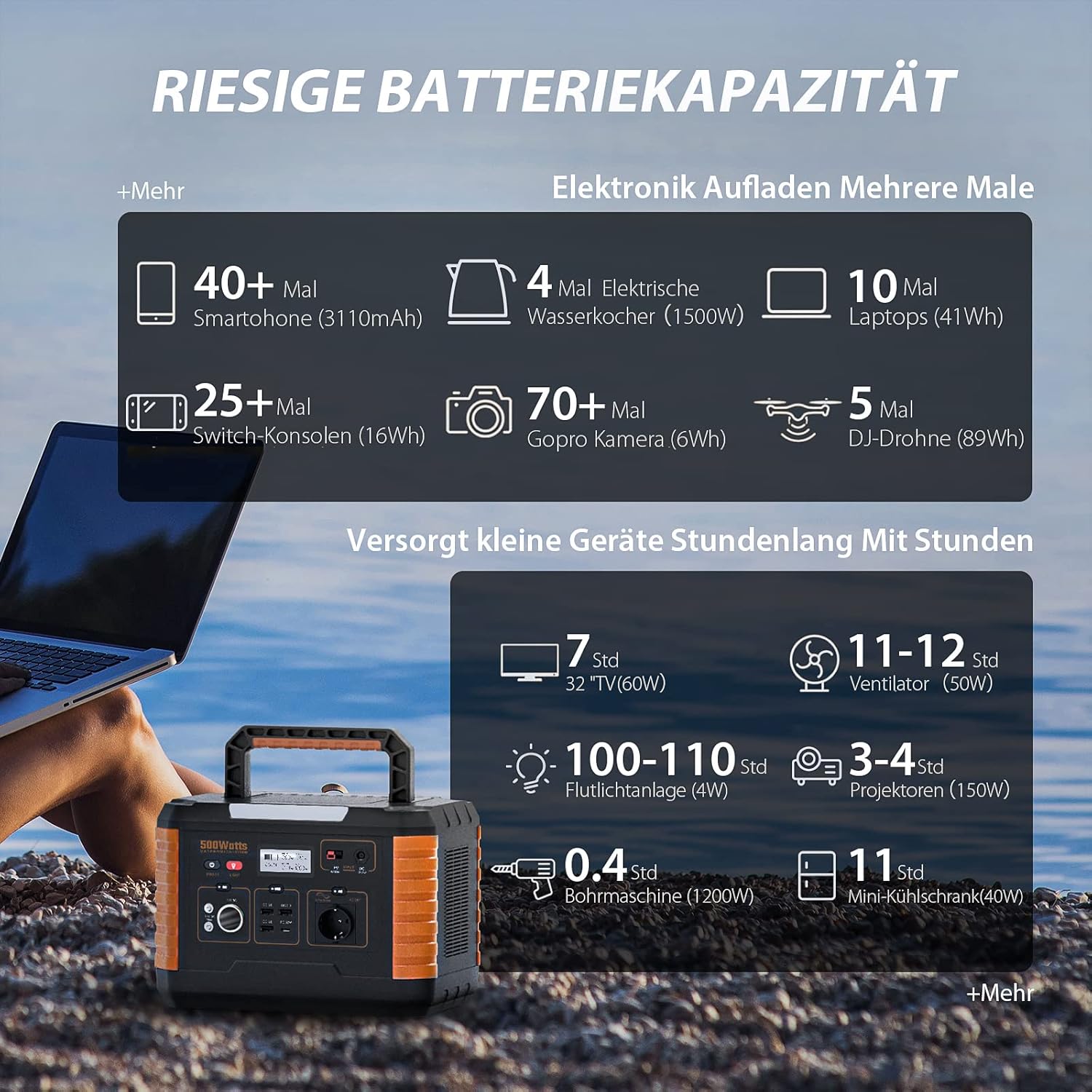
Figi 6.4: Examples of device charging and operating times with the NGTeco PPS500's 519Wh battery.
7. Antretyen
- Netwayaj: Use a dry, soft cloth to wipe the surface of the unit. Do not use abrasive cleaners or solvents.
- Depo: If storing for an extended period, charge the unit to 50-80% every 3-6 months to prolong battery life. Store in a cool, dry environment away from direct sunlight.
- Lavi batri: The PPS500 is designed for over 2500 charge cycles, ensuring long-term reliability.

Figi 7.1: The NGTeco PPS500 battery is designed for over 2500 cycles with overcharge protection.
NAN. Depanaj
| Pwoblèm | Kòz posib | Solisyon |
|---|---|---|
| Inite pa limen | Batri ap vide. | Charge the unit using the AC adapter. |
| AC pwodiksyon pa travay | AC output not enabled; device exceeds 500W. | Press the AC power button; check device wattage. |
| Chaj san fil pa travay | Device not Qi-compatible; misaligned; thick case. | Ensure device is compatible and centered; remove thick case. |
| Chaje dousman atravè enèji solè | Insufficient sunlight; panel not optimally angled. | Adjust solar panel angle; ensure full sun exposure. |
9. Espesifikasyon
| Karakteristik | Detay |
|---|---|
| Nimewo Modèl | NG-PPS500 |
| Kapasite batri | 519 Wh / 140400 mAh |
| AC Sòti Pouvwa | 500 W (1000 W Peak) |
| DC Sòti | 3 x (Max 14V/8A combined, including car port) |
| USB-C Sòti | 1 x (PD 60W) |
| USB-A Sòti | 3 x (QC3.0) |
| Chaje san fil | 10 W Max |
| Dirije limyè | 300 lm |
| Dimansyon | 20.2 x 29.2 x 19.4 cm |
| Pwa | 6.2 kg |
| Voltage | 230 Volts |
| Itilizasyon Rekòmande | Emergency, Outdoor, Camping, Lakay |

Figi 9.1: The NGTeco PPS500 is lightweight and portable, weighing 6.2 kg with dimensions of 20.2 x 29.2 x 19.4 cm.
10. Garanti ak sipò
NGTeco provides a three-year warranty period for the PPS500 Portable Power Station. We also offer lifetime customer support to assist you with any questions or issues.
Enfòmasyon pou kontakte:
- Telefòn: Please refer to the contact details provided in your product packaging or on the official NGTeco websit.
- Imèl: Please refer to the contact details provided in your product packaging or on the official NGTeco websit.
- Orè sipò: Monday - Friday, 6:00 to 18:00 (CET)
For the most up-to-date contact information and support resources, please visit the official NGTeco websit.


