Pwodwi souview
This CHUNGHOP remote control is designed as a direct replacement for various VIZIO Home Theater Soundbar Speaker Systems. It offers immediate functionality without the need for complex programming or setup, providing a convenient solution if your original remote is lost or damaged.
Karakteristik kle yo enkli:
- Konpatibilite dirèk: Specifically designed for VIZIO soundbar models such as SB4021M-B1, SB4020M-B0, SB4021M-A1, SB4021M, SB4020M-A0, SB4021E-A0, SB4021E-B0.
- Pa gen pwogramasyon obligatwa: Ready to use right out of the box after battery installation.
- Pèfòmans reponn: Equipped with an intelligent and upgraded chip for quick command execution.
- Konsepsyon ergonomique: Lightweight and comfortable to hold for extended use.
- Konstriksyon dirab: Made from high-quality ABS material for longevity.

Imaj: Devan ak dèyè view of the CHUNGHOP remote control, showcasing its sleek black design and button layout on the front, and the battery compartment on the back.
Enstalasyon
Enstalasyon batri
The remote control requires two (2) AAA batteries (not supplied). Follow these steps to install them:
- Jwenn lòj batri a sou do a nan kontwòl remote la.
- Peze sou lokèt la epi glise kouvèti batri a anba pou ouvri li.
- Mete de pil AAA ladan l, asire w ke tèminal pozitif (+) ak negatif (-) yo byen aliyen ak mak ki anndan konpatiman an.
- Glise kouvèti batri a tounen nan plas li jiskaske li klike byen.
Once batteries are installed, the remote is ready for immediate use with compatible VIZIO soundbar systems. No pairing or programming is required.

Image: A visual guide illustrating the battery compartment of the remote control and the correct orientation for inserting two AAA batteries.
Enstriksyon Operasyon
This remote control provides intuitive access to your VIZIO soundbar's functions. Ensure a clear line of sight between the remote's infrared emitter and the soundbar's receiver for optimal performance.
Fonksyon bouton:
- Bouton pouvwa (⏻): Limen oswa etenn ba son an.
- Volim moute (+): Increases the soundbar's volume.
- Volim desann (-): Decreases the soundbar's volume.
- Bèbè: Active oswa etenn son.
- Antre: Cycles through available audio input sources (e.g., HDMI, Optical, Bluetooth).
- Meni: Accesses the soundbar's on-screen menu for settings adjustments.
- Playback Controls (⏸, ⏮, ⏭): Play/Pause, Skip Back, Skip Forward for media playback (functionality may vary based on soundbar model and connected device).

Image: The remote control highlighting its ease of use and the integrated smart chip for efficient operation.
Antretyen
Ranplasman batri
Replace batteries when the remote's responsiveness decreases or it stops functioning. Always replace both batteries at the same time with new AAA batteries. Do not mix old and new batteries, or different types of batteries.
Netwayaj
Pou netwaye kontwòl remote la, siye sifas li dousman avèk yon twal mou epi sèk. Pou pousyè tè ki difisil pou netwaye, siye yon ti kras.amp cloth can be used, followed by a dry cloth. Avoid using abrasive cleaners, solvents, or excessive moisture, as these can damage the remote's finish or internal components.
Depo
When not in use for extended periods, it is recommended to remove the batteries to prevent leakage, which could damage the remote.
Depanaj
| Pwoblèm | Kòz posib | Solisyon |
|---|---|---|
| Telekòmand lan pa reponn. | Dead or incorrectly installed batteries. Obstruction between remote and soundbar. Remote out of range. | Replace batteries with new AAA batteries, ensuring correct polarity. Remove any obstructions. Move closer to the soundbar. |
| Bouton yo pa reponn oswa yo kole. | Salte oswa debri anba bouton yo. | Clean the remote's surface. If problem persists, internal damage may be present. |
| Kontwòl a distans lan ap fonksyone pa tanzantan. | Low battery power. Weak signal due to interference or distance. | Replace batteries. Ensure clear line of sight. Reduce distance to soundbar. |

Image: A visual representation of the remote control's effective long-distance operation, highlighting its stable performance even from across a room.
Espesifikasyon
| Karakteristik | Detay |
|---|---|
| Mak | CHUNGHOP |
| Nimewo Modèl | SB4021M Remote |
| Aparèy konpatib | VIZIO Home Theater Soundbar Speaker Systems: SB4021M-B1, SB4020M-B0, SB4021M-A1, SB4021M, SB4020M-A0, SB4021E-A0, SB4021E-B0, etc. |
| Koneksyon Teknoloji | Enfrawouj |
| Sous pouvwa | 2 x AAA pil (pa enkli) |
| Pwa atik | 1.44 ons (apeprè 40.8 gram) |
| Dimansyon pake | 4.49 x 2.09 x 0.87 pous (apeprè 11.4 x 5.3 x 2.2 cm) |
| Karakteristik espesyal | Ergonomik konsepsyon |
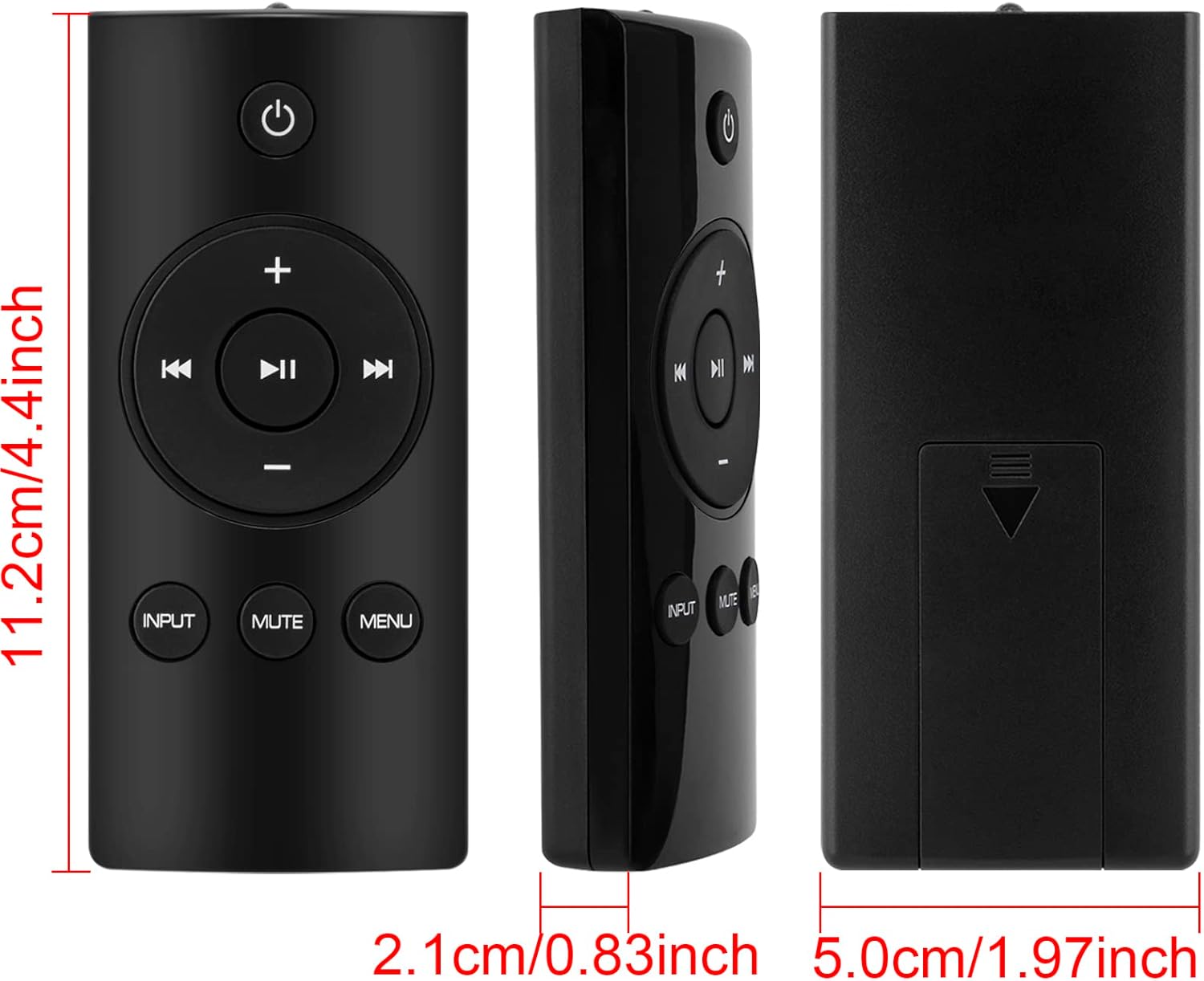
Image: Detailed measurements of the remote control, indicating its length, width, and thickness in both centimeters and inches.
Garanti ak sipò
Specific warranty information for this CHUNGHOP remote control is not provided within this manual. For details regarding warranty coverage, technical support, or service inquiries, please refer to the official CHUNGHOP websit la oubyen kontakte sèvis kliyan yo dirèkteman.
Ou ka jwenn lòt resous sipò tou lè w vizite Magazen CHUNGHOP sou Amazon.


