1. Entwodiksyon
This manual provides detailed instructions for the safe and effective use of your Technaxx TX-219 4-in-1 Multifunction Device. This versatile unit combines a jump starter, an air compressor, a power bank, and an LED light, designed for automotive and portable power needs. Please read this manual thoroughly before operation and retain it for future reference.
2. Enstriksyon Sekirite
Always observe the following safety precautions to prevent injury or damage to the device or vehicle:
- Li tout enstriksyon anvan ou itilize.
- Kenbe soti nan atenn timoun yo.
- Wear eye protection when operating the jump starter.
- Pa ekspoze aparèy la ak lapli oswa imidite.
- Do not operate if the device or cables are damaged.
- Asire bon vantilasyon pandan w ap itilize.
- Konekte so starter clamps correctly: positive to positive, negative to negative. Avoid short-circuiting.
- Pa eseye sote kòmanse yon batri nan frizè.
- Disconnect the jump starter from the vehicle battery within 30 seconds after the engine starts.
- Do not use the air compressor continuously for more than 10 minutes to prevent overheating. Allow it to cool down.
- Sere aparèy la nan yon kote ki fre, sèk lè li pa itilize.
3. Pake kontni
Verifye ke tout atik yo prezan nan pakè a:
- Technaxx Jump Starter TX-219 Unit
- Adapter Cable with Battery Clamps
- AC adaptè
- Compressed Air Hose
- USB kab
- Machin adaptè kab
- Manyèl itilizatè

Figi 3.1: Plis paseview of the Technaxx TX-219 package contents, showing the main unit, battery clamps, various charging cables, and the air hose.
4. Pwodwi souview
Familiarize yourself with the components of your Technaxx TX-219 device.

Figi 4.1: Angle view of the Technaxx TX-219 unit, showing the digital display, control buttons, USB ports, and LED light.
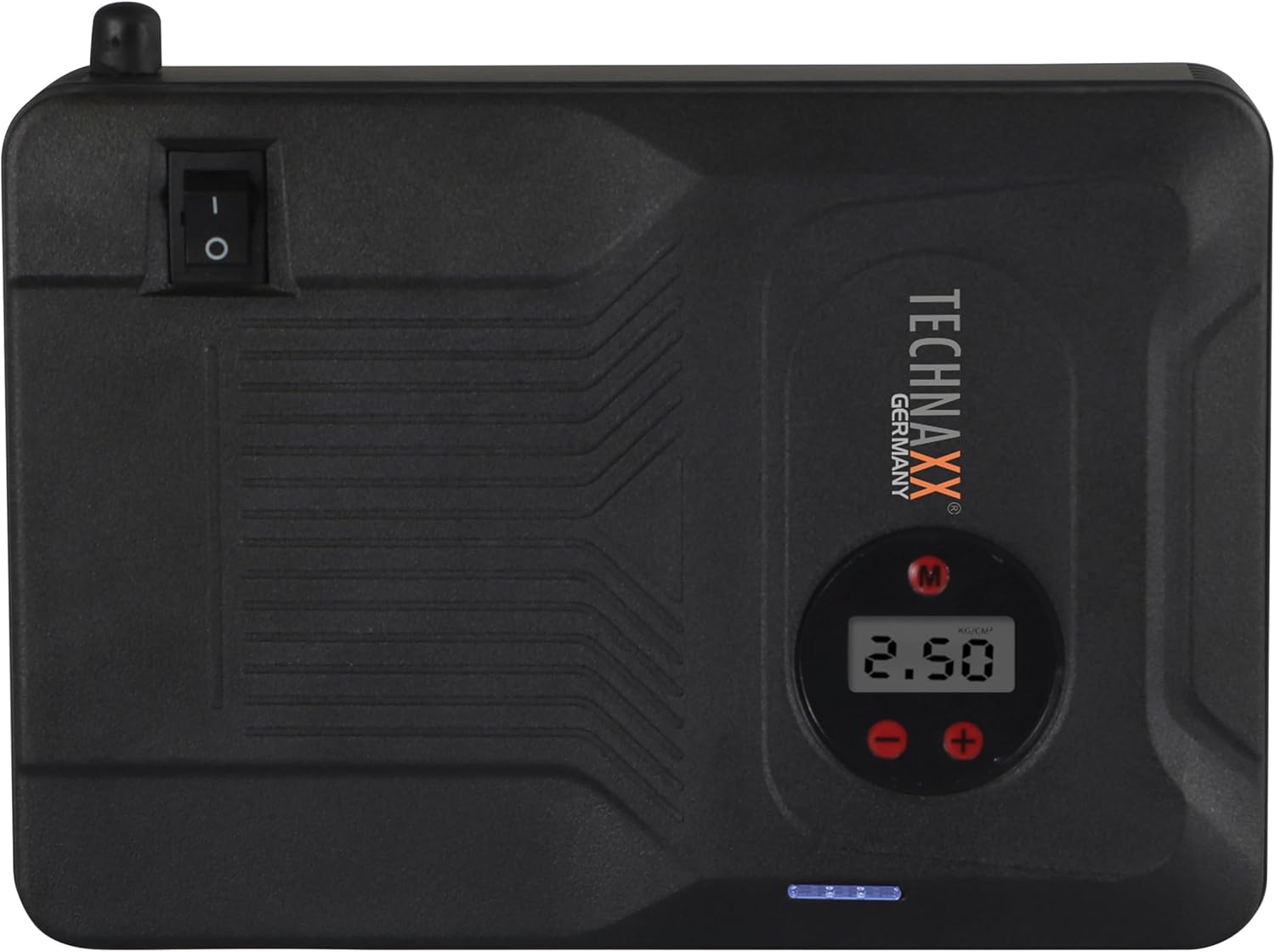
Figi 4.2: Top view of the device, highlighting the power switch and the digital display for pressure readings.

Figi 4.3: Devan view of the device, showing the digital display, pressure adjustment buttons, and the power indicator lights.
Konpozan kle:
- Ekspozisyon dijital: Shows air pressure for the compressor and battery status.
- Bouton kontwòl: For adjusting pressure settings and operating the device.
- USB-A Output Ports (5V/1A, 5V/2A): For charging external electronic devices.
- 15V/0.4A Input Port: For charging the internal battery of the TX-219.
- Jump Start Output Port: Connects to the battery clamp kab.
- Limyè ki ap dirije: Bay ekleraj.
- Pouvwa switch: On/Off control for the device.
- Koneksyon Kawotchou Air: For the air compressor function.
5. Enstalasyon ak Chaje Aparèy la
Before first use, fully charge the Technaxx TX-219 unit. It is recommended to recharge the device every 3 months to maintain battery health.
- Connect the AC adapter to the 15V/0.4A input port on the TX-219.
- Ploge adaptè AC a nan yon priz estanda miray.
- The battery indicator lights on the device will illuminate to show charging progress. All lights will be solid when fully charged.
- Alternatively, use the car adapter cable to charge the device from a vehicle's 12V accessory socket.

Figi 5.1: The Technaxx TX-219 unit being charged or used as a power bank to charge a smartphone.
6. Operasyon Enstriksyon
6.1. Demaraj yon machin ak yon aparèy pou demaraj ak yon sovtaj
The TX-219 can jump start gasoline engines up to 4.0L and diesel engines up to 3.0L.
- Ensure the TX-219 is sufficiently charged (at least 75% battery indicated).
- Etenn ignisyon machin nan ak tout akseswa yo.
- Konekte wouj (+) clamp nan tèminal pozitif (+) batri machin nan.
- Konekte nwa (-) clamp nan yon pati metal pwòp, ki pa pentire nan blòk motè machin nan oswa chasi a, lwen batri a. Do not connect to the negative (-) battery terminal directly unless specified by vehicle manufacturer.
- Connect the adapter cable to the jump start output port on the TX-219.
- Demarre motè machin nan. Si li pa demarre touswit, tann 30 segonn anvan ou eseye ankò. Pa vire motè a pou plis pase 3 segonn pou chak tantativ.
- Once the engine starts, immediately disconnect the adapter cable from the TX-219.
- Apre sa, dekonekte klou nwa a (-)amp, ki te swiv pa wouj la (+) clamp soti nan batri machin nan.

Figi 6.1: The Technaxx TX-219 connected to a vehicle battery using the provided clamps for jump starting.

Figi 6.2: A close-up of the jump starter connected to a car battery, illustrating the process of jump starting.
6.2. Itilizasyon Konpresè Lè a
The integrated air compressor can inflate tires up to 3.5 Bar (approximately 50 PSI) and features an automatic shut-off.
- Connect the compressed air hose to the air hose connection port on the TX-219.
- Attach the other end of the hose to the tire valve.
- Turn on the TX-219. The digital display will show the current tire pressure.
- Use the '+' and '-' buttons to set the desired pressure. The display supports Bar, KPA, kg/cm², and PSI units.
- Press the compressor start button to begin inflation.
- Konpresè a ap sispann otomatikman yon fwa presyon predetèmine a rive.
- Disconnect the air hose from the tire valve and the TX-219.

Figi 6.3: The Technaxx TX-219 being used to inflate a car tire, demonstrating the air compressor function.

Figi 6.4: A user inflating a tire with the TX-219, showing the digital display and the air hose connection.
6.3. Itilizasyon kòm yon Bank Pouvwa
The 14000 mAh battery can charge various USB-powered devices.
- Connect your device's USB charging cable to one of the USB-A output ports (5V/1A or 5V/2A) on the TX-219.
- The TX-219 will automatically begin charging your device.
- Monitor your device's charging status. Disconnect once fully charged.

Figi 6.5: The Technaxx TX-219 connected to a smartphone via USB, illustrating its power bank functionality.

Figi 6.6: The TX-219 acting as a portable power bank, charging a mobile device.
6.4. Sèvi ak limyè LED la
Limyè LED entegre a ka itilize pou ekleraj nan anviwònman ki fè nwa.
- Locate the LED light button on the device.
- Peze bouton an yon fwa pou limen limyè ki ap dirije a.
- Press again to cycle through different light modes (e.g., steady, strobe, SOS, if available).
- Press and hold the button to turn off the LED light.

Figi 6.7: The TX-219's LED light providing illumination in a vehicle's engine compartment.
7. Espesifikasyon
| Karakteristik | Spesifikasyon |
|---|---|
| Modèl | TX-219 |
| Kalite batri | Lityòm Iron fosfat |
| Kapasite batri | 14000 mAh |
| Kòmanse Kouran | 350 A (Max. 600 A) |
| Ale kòmanse Voltage | 12 Volts |
| Konpatibilite Motè (Gazolin) | Jiska 4.0 L |
| Konpatibilite Motè (Dizèl) | Jiska 3.0 L |
| USB-A Sòti 1 | 5 V, 2 A |
| USB-A Sòti 2 | 5 V, 1 A |
| Compression lè | 12 V / 100 W, Max 3.5 Bar (approx. 50 PSI) |
| Chaje Antre | 15 V, 0.4 A (Maksimòm) |
| Dirije limyè | Fonksyon miltip |
| Dimansyon (L x W x H) | 19 x 13 x 5.5 cm |
| Pwa | 1.16 kg |
| Sètifikasyon | CE |
8. Antretyen
- Netwayaj: Siye aparèy la avèk yon twal mou epi sèk. Pa sèvi ak pwodui chimik ki agresif oswa pwodui netwayaj abrazif.
- Depo: Store the TX-219 in a cool, dry place, away from direct sunlight and extreme temperatures.
- Rechaje: Recharge the unit every three months, even if not in use, to prolong battery life.
- Enspeksyon kab: Regularly inspect all cables and clampTcheke pou wè si gen nenpòt siy domaj, itilizasyon, oswa korozyon. Ranplase si sa nesesè.
NAN. Depanaj
| Pwoblèm | Kòz posib | Solisyon |
|---|---|---|
| Aparèy la pa vire. | Batri ap vide. | Charge the TX-219 fully. |
| Machin nan pa ka demarre ak èd. | Pa kòrèk clamp connection; TX-219 battery too low; vehicle battery severely damaged. | Asire clamps are connected correctly (+ to +, - to chassis). Recharge TX-219. Consult a mechanic if vehicle battery is faulty. |
| Konpresè lè a pa gonfle. | Hose not securely connected; desired pressure already reached; device battery low. | Check hose connections. Verify desired pressure setting. Recharge TX-219. |
| Chaje USB a pa fonksyone. | USB cable faulty; device not compatible; TX-219 battery low. | Try a different USB cable. Ensure your device is compatible. Recharge TX-219. |
| Dirije limyè pa travay. | Battery depleted; light button not pressed correctly. | Recharge TX-219. Press the LED button firmly. |
10. Garanti ak sipò
For warranty information and technical support, please refer to the warranty card included with your product or visit the official Technaxx websit la. Kenbe resi acha ou kòm prèv acha.
Manifakti: Technaxx
Nimewo Modèl: 5031


