1. Entwodiksyon
This manual provides essential information for the safe and efficient use of your KERDOM Office Chair Model 931-C. Please read these instructions carefully before assembly and operation. Keep this manual for future reference.

Image 1.1: The KERDOM Office Chair Model 931-C, featuring an orange mesh back and seat with white frame and base, shown in an office setting.
2. Enfòmasyon sou Sekirite
- Asire ke tout eleman yo byen tache anvan ou itilize.
- Pa kanpe sou chèz la.
- Pa depase kapasite pwa maksimòm lan ki se 250 liv (113 kg).
- Kenbe men ak dwèt ou lwen pati k ap deplase yo pandan ajisteman an.
- Sèvi ak chèz la sou yon sifas ki plat pou anpeche li chavire.
3. Pake kontni
Before assembly, verify that all parts are present. Refer to the included installation manual for a detailed list of components. Typically, the package includes:
- Dosye
- Kousen chèz
- Akoudwa (2)
- Gaz Lift Silenn
- Star Sèvi
- Woulo (5)
- Plak Mekanis
- Materyèl (vis, rondelles, kle Allen)
4. Enstriksyon Asanble
For detailed, step-by-step assembly instructions, please refer to the official Installation Manual PDF provided with your purchase. A digital version can be accessed via this link: KERDOM Office Chair Installation Manual (PDF).
Etap asanblaj jeneral yo tipikman enplike:
- Tache wou yo nan baz zetwal la.
- Mete silenn asansè gaz la nan sant baz zetwal la.
- Secure the mechanism plate to the underside of the seat cushion.
- Kole akoudwar yo nan kousen chèz la.
- Connect the backrest to the seat cushion and armrests.
- Mete chèz ki te reyini an sou silenn asansè gaz la.
Ensure all screws are tightened firmly, but do not overtighten.
5. Operasyon Enstriksyon
5.1. Ajisteman Wotè
Pou ajiste wotè chèz la, jwenn levye a sou bò dwat anba chèz la. Pandan w chita, rale levye a anlè pou bese chèz la. Pou monte chèz la, leve kanpe epi rale levye a anlè. Lage levye a nan wotè ou vle a pou bloke l an plas.

Image 5.1: The chair features adjustable height, 360-degree rotation, and flexible casters for various floor types.
5.2. Armrest Adjustment (Flip-up Function)
The armrests are designed to flip up 90 degrees. To raise an armrest, simply lift it upwards until it locks into the vertical position. To lower it, pull it down. This feature allows the chair to be stored under a desk, saving space.
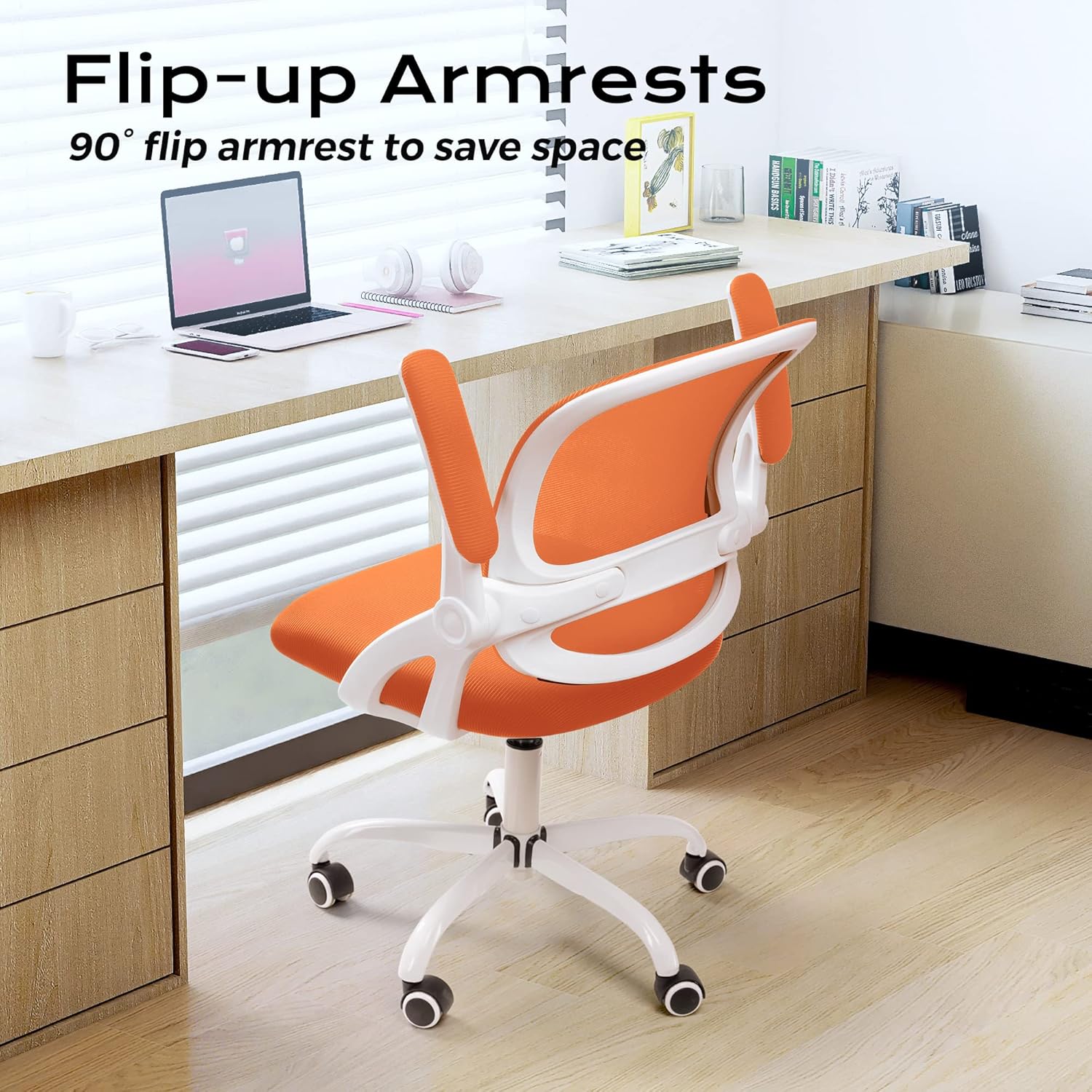
Image 5.2: The flip-up armrests allow the chair to be neatly stored under a desk, optimizing space.
5.3. Tilt/Rocking Function
The chair features a 120-degree tilt tension and rocking function. Locate the lever on the left side beneath the seat.
- Engage/Disengage Rocking: Pull the lever outwards to enable the rocking function. Push it inwards to lock the backrest in an upright position.
- Adjust Tilt Tension: The round knob located at the front center beneath the seat controls the tilt tension. Turn clockwise to tighten the tension (making it harder to recline) and counter-clockwise to loosen it (making it easier to recline).

Image 5.3: Controls for the rocking function and tilt tension adjustment.
5.4. Pivote ak wou
The chair offers a full 360-degree swivel for ease of movement. The flexible casters are designed for smooth rolling on various floor surfaces, including marble, wood, and carpet.

Image 5.4: The S-shaped backrest provides ergonomic support, complemented by a 30-degree back tilt for comfort.
6. Antretyen
6.1. Netwayaj
- Siye pwòp ak anonsamp twal. Evite pwodui chimik ki agresif oswa pwodui netwayaj abrazif.
- For the mesh backrest and fabric seat, use a vacuum cleaner with a brush attachment to remove dust and debris.
- Periodically check and clean the casters to ensure smooth movement and prevent floor damage.
6.2. Swen Jeneral
- Regularly inspect all screws and connections to ensure they remain tight. Retighten as necessary.
- Avoid prolonged exposure to direct sunlight to prevent fading of materials.
- Do not place hot items directly on the chair's surfaces.
NAN. Depanaj
- Chèz k ap kriye: Check all bolted connections and tighten if loose. A small amount of silicone lubricant can be applied to moving parts if the squeaking persists.
- Difikilte pou ajiste wotè: Asire w levye asansè gaz la byen angaje. Si pwoblèm nan pèsiste, ou ka bezwen ranplase silenn asansè gaz la.
- Rou yo pa woule byen: Remove any hair or debris wrapped around the caster wheels. Clean the wheels and their housings.
- Chèz la santi l enstab: Verify that the chair is on a flat surface and all components, especially the base and backrest, are securely attached.
- Seat Cushion Flattening: Over time, seat cushions may compress. While this is normal wear, if it significantly impacts comfort, consider adding a supplementary cushion or contacting customer support for options.
8. Espesifikasyon

Image 8.1: Detailed product parameters including dimensions and weight capacity.
| Karakteristik | Spesifikasyon |
|---|---|
| Mak | KERDOOM |
| Non modèl | 931-C |
| Dimansyon pwodwi (D x W x H) | 21"P x 9"L x 20"H (An jeneral) |
| Chair Height Range | 36.2" - 38.6" (91.9 - 98 santimèt) |
| Lajè chèz | 23.6 pous (59.9 santimèt) |
| Lajè dosye | 18.5 pous (47 santimèt) |
| Wotè Dosye | 18.9 pous (48 santimèt) |
| Cushion Width | 19.3 pous (49 santimèt) |
| Cushion Length | 19.7 pous (50 santimèt) |
| Epesè kousen | 2.6 pous (6.6 santimèt) |
| Longè akoudwar | 10 pous (25.4 santimèt) |
| Wotè akoudwar | 10.2 pous (25.9 santimèt) |
| Dyamèt baz | 23.6 pous (59.9 santimèt) |
| Rekòmandasyon pwa maksimòm | 250 liv (113 kg) |
| Pwa atik | 25 liv (11.3 kg) |
| Materyèl | Mesh, Sponge |
| Karakteristik espesyal | Adjustable Height, Flip-up Armrests, Tilting Function, Swivel, Flexible Casters |
| Retounen Style | Cross Back (Ergonomic S-shape) |
| Itilizasyon Rekòmande | Biwo, Biwo Lakay, Sal Etid |
9. Garanti ak Sipò Kliyan
For warranty information and any product-related inquiries or issues, please contact KERDOM customer service. Our after-sales team is available to assist you.
Please refer to your purchase documentation or the KERDOM official websit la pou jwenn enfòmasyon kontak ak detay sou garanti ki pi resan yo.


