Entwodiksyon
Thank you for choosing the iGear Spectrum Mini Bluetooth Speaker. This portable speaker is designed to deliver a rich, immersive audio experience with dynamic lighting. Please read this manual carefully before use to ensure proper operation and to maximize your enjoyment of the product.
Ki sa ki nan bwat la
- 1 x iGear Spectrum Mini Bluetooth Speaker
- 1 x AUX kab
- 1 x Kab Chaje (Kalite-C)
- 1 x kat garanti
- 1 x Gid itilizatè
Karakteristik pwodwi
The iGear Spectrum Mini Bluetooth Speaker offers a range of features designed for an enhanced audio and visual experience:
- 360-Degree Immersive Sound: Experience audio from all directions with powerful 15W output.
- Limyè ki ap dirije dinamik: Features 9 light modes and 180-degree pulsating lights to complement your music.
- Tan pou jwe pwolonje: Jwi jiska 12 èdtan lekti mizik kontinyèl sou yon sèl chaj.
- Teknoloji True Wireless Stereo (TWS): Connect two Spectrum Mini speakers wirelessly for a stereo sound experience.
- Opsyon Koneksyon miltip: Supports Bluetooth, AUX input, USB input, and TF card slot.
- Vit tip-C chaje: Convenient and quick charging via a Type-C port.
- Konsepsyon pòtab: Lightweight at 650 grams, making it easy to carry.

Image: The iGear Spectrum Mini Bluetooth Speaker showcasing its dynamic lighting effects.

Image: An illustration highlighting the 15W stereo speaker and extra bass feature.
Enstalasyon
1. Premye Chajman
Before first use, fully charge the speaker. Connect the provided Type-C charging cable to the speaker's charging port and the other end to a USB power adapter (not included). The charging indicator will show the charging status. A full charge takes approximately 2 hours.
2. Powering On / Off
Peze epi kenbe bouton pouvwa a (⏻) for 2-3 seconds to turn the speaker on or off. A sound prompt will indicate the power status.
Operasyon
1. Pè Bluetooth
- Limen oratè a. Li pral antre otomatikman nan mòd koneksyon Bluetooth, sa ap parèt ak yon limyè LED k ap flache.
- Aktive Bluetooth sou aparèy ou an (telefòn entelijan, tablèt, elatriye).
- Chèche pou "iGear Spectrum Mini" in your device's Bluetooth list and select it to connect.
- Once connected, the LED light will become solid, and you will hear a confirmation sound.
2. Kontwòl debaz yo
- Jwe/Poz: Peze bouton an Jwe / Pòz (▶‖) yon fwa.
- Volim moute: Peze bouton pou ogmante volim nan (+).
- Volim desann: Peze bouton Diminye Volim nan (-).
- Pwochen Track: Peze epi kenbe bouton pou ogmante volim nan (+).
- Track Previous: Peze epi kenbe bouton Diminye Volim nan (-).
3. Light Mode Control
Press the Light Mode button (💡) to cycle through the 9 available light modes. Press and hold to turn the lights off or on.
4. Koneksyon Vrè Stereo San Fil (TWS)
To pair two iGear Spectrum Mini speakers for TWS stereo sound:
- Ensure both speakers are turned off and not connected to any Bluetooth device.
- Limen tou de moun ki pale yo.
- On one speaker (this will be the primary speaker), double-press the Play/Pause button (▶‖). It will search for the secondary speaker.
- Once paired, you will hear a confirmation sound, and the LED indicators on both speakers will synchronize.
- Connect your device to the primary speaker via Bluetooth as described in step 1.
Opsyon Koneksyon
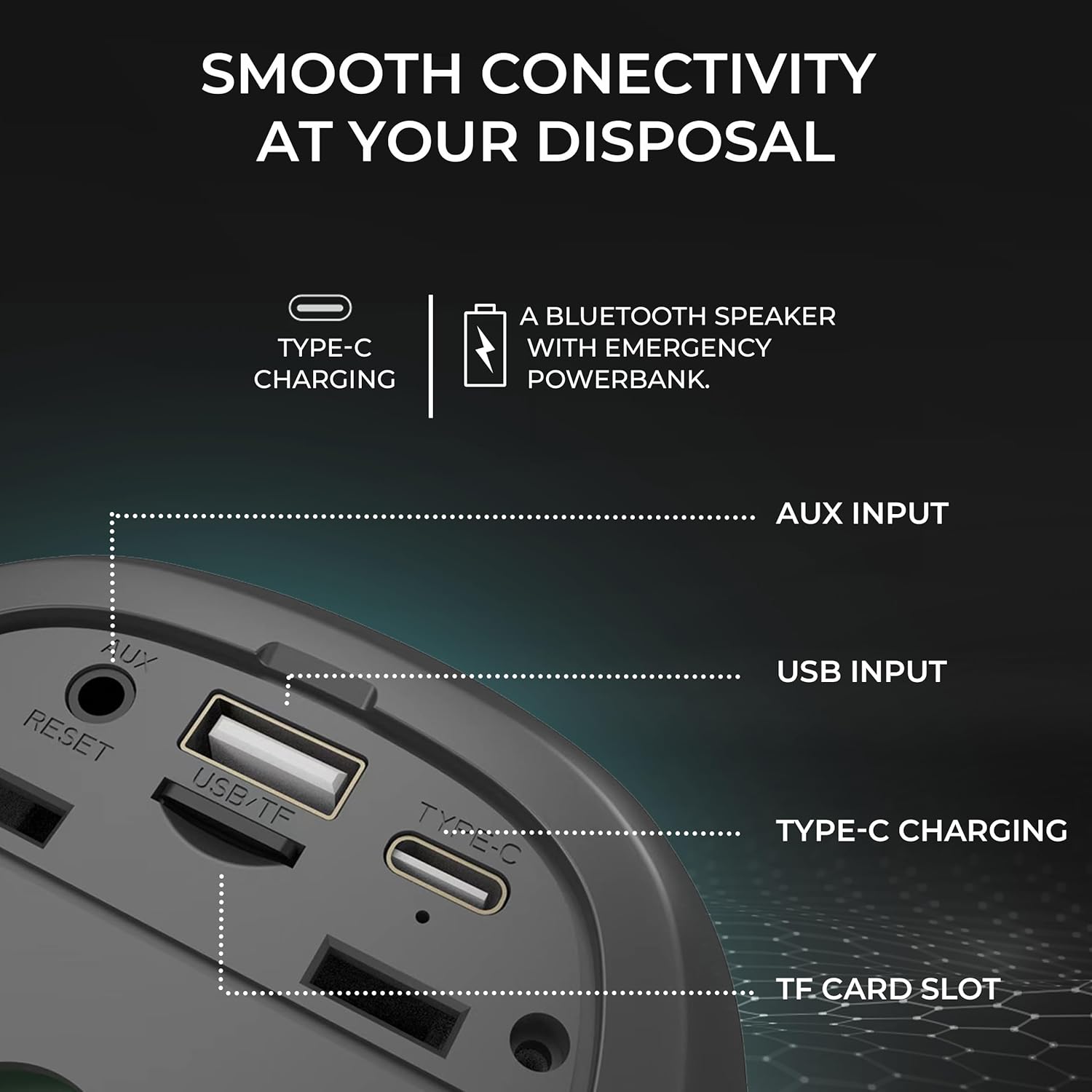
Imaj: Detaye view of the speaker's input ports for various connectivity options.
- Bluetooth: Connect wirelessly to your devices.
- Antre AUX: Use the provided AUX cable to connect to devices without Bluetooth capabilities. Insert the 3.5mm jack into the AUX port on the speaker and your audio source.
- USB Antre: Mete yon kondwi flash USB ak odyo files into the USB port to play music directly.
- TF Kat plas: Mete yon kat TF (MicroSD) ak odyo files into the TF card slot to play music directly.
Chaje
The iGear Spectrum Mini speaker is powered by a built-in Lithium Ion battery. To charge the speaker:
- Connect the Type-C charging cable to the speaker's Type-C port.
- Connect the other end of the cable to a standard USB power source (e.g., wall adapter, computer USB port).
- Tan chaj la se apeprè 2 èdtan pou yon chaj konplè.
- A fully charged speaker provides up to 12 hours of playtime, depending on volume and light usage.

Image: The speaker highlighting its 12-hour playtime capability.
Antretyen
To ensure the longevity and optimal performance of your iGear Spectrum Mini speaker, follow these maintenance guidelines:
- Netwayaj: Sèvi ak yon twal mou epi sèk pou siye sifas oratè a. Pa sèvi ak pwodui netwayaj abrazif, alkòl, oswa solvang chimik.
- Depo: Sere oratè a nan yon kote ki fre epi sèk, lwen limyè solèy dirèk ak tanperati ekstrèm.
- Ekspozisyon dlo: The product is not waterproof. Avoid exposing it to water or high humidity to prevent damage.
- Swen batri: If not used for extended periods, charge the speaker at least once every three months to maintain battery health.
Depanaj
| Pwoblèm | Solisyon posib |
|---|---|
| Oratè pa limen | Ensure the speaker is charged. Connect it to a power source using the Type-C cable. |
| Pa gen son | Check volume levels on both the speaker and your connected device. Ensure the device is properly paired via Bluetooth or connected via AUX/USB/TF card. |
| Aparèy Bluetooth echwe | Ensure the speaker is in pairing mode (flashing LED). Turn off and on Bluetooth on your device. Move the speaker closer to your device. Disconnect from other Bluetooth devices. |
| TWS appariement echwe | Ensure both speakers are off and not connected to any device before initiating TWS pairing. Follow TWS pairing steps carefully. |
| Limyè yo pa travay | Press the Light Mode button (💡) to cycle through modes or turn lights on. |
Espesifikasyon
| Karakteristik | Detay |
|---|---|
| Non modèl | Spectrum Mini |
| Nimewo Modèl Atik | iG-1149 |
| Audio Wattage | 15 Watts |
| Koneksyon Teknoloji | Bluetooth |
| Wireless Range | Jiska 10 mèt |
| Kalite batri | Lityòm Ion |
| Playtime | Jiska 12 èdtan |
| Tan pou chaje | Apeprè 2 èdtan |
| Port chaje | Kalite-C |
| Metòd kontwòl | Manyen |
| Materyèl | ABS + twal |
| Pwa atik | 650 gram |
| Dimansyon pwodwi | 10P x 10W x 12.3H santimèt |
| Ki enpèmeyab | Non |
Garanti ak sipò
The iGear Spectrum Mini Bluetooth Speaker comes with a 1 Year Carry-In Warranty. For warranty claims or technical support, please refer to the contact information provided on your warranty card or visit the official iGear websit.
Manifakti / Importateur: iGear Tech Private Limited, Goregaon west, Mumbai 400063, Contact: 9327667193


