1. Entwodiksyon
This manual provides detailed instructions for the setup, operation, and maintenance of your Adler AD 1196B Digital Alarm Clock. Please read this manual thoroughly before using the device to ensure proper function and longevity.
2. Pwodwi souview
2.1 Karakteristik kle
- Digital time display with 12/24 hour format.
- Ekspozisyon retroeklere pou fasil viewing, automatically turns off after 4 seconds.
- Three independent alarm time settings.
- Three alarm activation settings: 5 days (weekday), 6 days (weekday + Saturday), 7 days (every day).
- Displays current time, date, indoor temperature, and humidity.
- Battery-powered for portability and backup during power outages.
2.2 Kontni pake a
- Adler AD 1196B Digital Alarm Clock Unit
- Manyèl itilizatè
Note: 2x AA batteries are required and not included in the package.

Figi 1: Devan view of the Adler AD 1196B Digital Alarm Clock, displaying 12:00, 26°C, 56% humidity, and the current date.
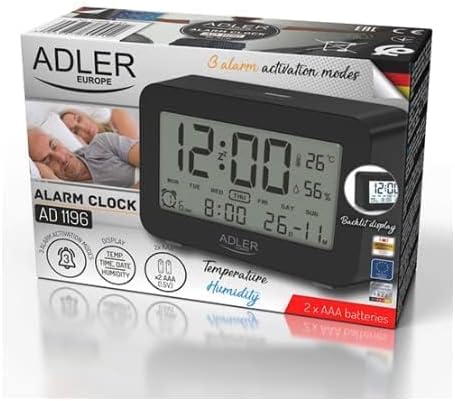
Figure 2: The Adler AD 1196B Digital Alarm Clock shown in its retail packaging, highlighting key features.
3. Enstalasyon
3.1 Enstalasyon batri
- Jwenn kouvèti konpatiman pil la sou dèyè revèy la.
- Leve oswa glise kouvèti a pou ouvri konpatiman an.
- Insert two (2) AA batteries, ensuring the correct polarity (+ and -) as indicated inside the compartment.
- Ranplase kouvèti lòj batri a byen.
The clock will power on automatically once batteries are inserted. The display will show default settings or begin flashing.
3.2 Premye pouvwa sou
Upon successful battery installation, the display will illuminate. You may need to press a button (e.g., "MODE" or "SET") to activate the display if it remains blank after battery insertion. The backlight will activate briefly and then turn off.
4. Operasyon Enstriksyon
Familiarize yourself with the control buttons, typically located on the back or top of the device. Common buttons include: MODE, SET, UP/+, DOWN/-, ALARM.
4.1 Mete tan an
- Peze epi kenbe la SET bouton (oswa MÒD button, depending on model) until the hour digits begin to flash.
- Sèvi ak la LEVE/+ or DESANN/- bouton pou ajiste lè a.
- Peze SET (oswa MÒD) again to move to the minute setting.
- Sèvi ak la LEVE/+ or DESANN/- bouton pou ajiste minit yo.
- Kontinye peze SET (oswa MÒD) to cycle through 12/24 hour format, and then to exit time setting mode.
4.2 Mete Dat la
- Nan ekspozisyon tan nòmal la, peze bouton an MÒD button repeatedly until the date display starts flashing or you enter date setting mode.
- The year digits may flash first. Use LEVE/+ or DESANN/- pou ajiste ane a.
- Peze MÒD to move to the month setting, then adjust with LEVE/+ or DESANN/-.
- Peze MÒD to move to the day setting, then adjust with LEVE/+ or DESANN/-.
- Peze MÒD again to confirm and exit date setting.
4.3 Setting Alarms (Alarm 1, Alarm 2, Alarm 3)
The AD 1196B features three independent alarms. The process is similar for each.
- Peze a ALAM bouton yon fwa nan view Alarm 1. Press again for Alarm 2, and a third time for Alarm 3.
- Pandan ke viewing the desired alarm (e.g., AL1), press and hold the SET bouton an jiskaske chif lè alam lan ap flache.
- Sèvi ak LEVE/+ or DESANN/- pou fikse lè alam la.
- Peze SET to move to the alarm minute setting.
- Sèvi ak LEVE/+ or DESANN/- to set the alarm minutes.
- Peze SET ankò pou konfime lè alam lan.
- To activate/deactivate an alarm, press the ALAM button repeatedly until the alarm icon (e.g., bell symbol) appears or disappears next to the corresponding alarm number (AL1, AL2, AL3).
4.4 Alarm Activation Modes (5, 6, 7 Days)
After setting an alarm time, you can choose its activation frequency:
- While in alarm setting mode (after setting minutes for an alarm), press SET one more time. The display will show a day indicator (e.g., "5 DAY", "6 DAY", "7 DAY").
- Sèvi ak LEVE/+ or DESANN/- to cycle through the options:
- 5 JOU: Alarm sounds Monday to Friday.
- 6 JOU: Alarm sounds Monday to Saturday.
- 7 JOU: Alarm sounds every day of the week.
- Peze SET to confirm your selection and exit alarm setting for that specific alarm.
4.5 Fonksyon ekleraj dèyè
The display features a backlight for improved visibility in low light conditions. The backlight automatically activates when a button is pressed and turns off after approximately 4 seconds to conserve battery power.
4.6 Ekspozisyon tanperati ak imidite
The alarm clock continuously displays the current indoor temperature (in Celsius) and relative humidity percentage. No specific action is required to view these readings; they are shown on the main display.
5. Antretyen
5.1 Netwayaj
To clean the alarm clock, gently wipe the surface with a soft, dry cloth. Do not use abrasive cleaners, solvents, or chemical sprays, as these may damage the display or casing.
5.2 Ranplasman batri
When the display becomes dim or the clock functions erratically, it is time to replace the batteries. Follow the battery installation steps in Section 3.1. Always replace both batteries with new AA batteries of the same type. Dispose of old batteries responsibly according to local regulations.
NAN. Depanaj
| Pwoblèm | Kòz posib | Solisyon |
|---|---|---|
| Ekran an vid oswa li fèb. | Pil yo fèb oswa yo mal enstale. | Ranplase pil yo ak nouvo pil AA, asire polarite ki kòrèk la. |
| Alam lan pa sonnen. | Alam lan pa aktive oswa li pa byen configuré. | Ensure the alarm icon is visible on the display. Verify the alarm time and activation mode (5, 6, or 7 days) are set correctly. |
| Lè/Dat la pa kòrèk. | Time/Date was not set or reset after battery change. | Follow instructions in Section 4.1 and 4.2 to set the correct time and date. |
| Temperature/Humidity readings seem inaccurate. | Yo mete revèy la toupre yon sous chalè, yon vantilasyon, oubyen anba limyè solèy dirèk. | Relocate the clock to a stable environment away from extreme temperature or humidity fluctuations. Allow time for readings to stabilize. |
7. Espesifikasyon
- Modèl: AD 1196B
- Sous pouvwa: 2 x AA pil (pa enkli)
- Kalite ekspozisyon: LCD dijital ak ekleraj dèyè
- Fonksyon: Time, Date, Day of Week, Temperature (°C), Humidity (%), 3 Alarms with 3 Activation Modes
- Dire Limyè dèyè: Apeprè 4 segonn
- Materyèl: Plastik
- Dimansyon (W x P x H): 11 cm x 3.81 cm x 5 cm
- Pwa: 1.6 kg
8. Garanti ak sipò
Pou enfòmasyon sou garanti a oswa pou sipò teknik, tanpri al gade kat garanti ki vini ak pwodwi a oswa kontakte manifakti a dirèkteman. Kenbe resi acha ou kòm prèv acha.
Manufacturer: Adler