1. Entwodiksyon
This manual provides detailed instructions for the amazon basics Wired Gaming Mouse, Model ABIM03. This mouse is designed to enhance your gaming and computing experience with its adjustable DPI, customizable RGB lighting, and programmable buttons. Please read this manual thoroughly before use to ensure proper operation and longevity of your device.
2. Pwodwi Features
- DPI reglabl: Up to 6400 DPI for precise cursor control and quick movements.
- Ekleraj RGB personalizable: Personalize your mouse with various RGB lighting modes and driver customization options for PC.
- Bouton pwogramasyon: Equipped with multiple programmable buttons for assigning custom functions or macros.
- Gaming-Grade Sensor: Ensures accurate tracking and rapid response for gaming.
- Konsepsyon dirab: Features extra durable switches and enhanced build quality for extended use.
- Honeycomb Grip: Ergonomic honeycomb design provides a comfortable and secure grip.

Image: The amazon basics Wired Gaming Mouse highlighting its adjustable DPI settings, ranging from 1200 to 7200 (though product states up to 6400).
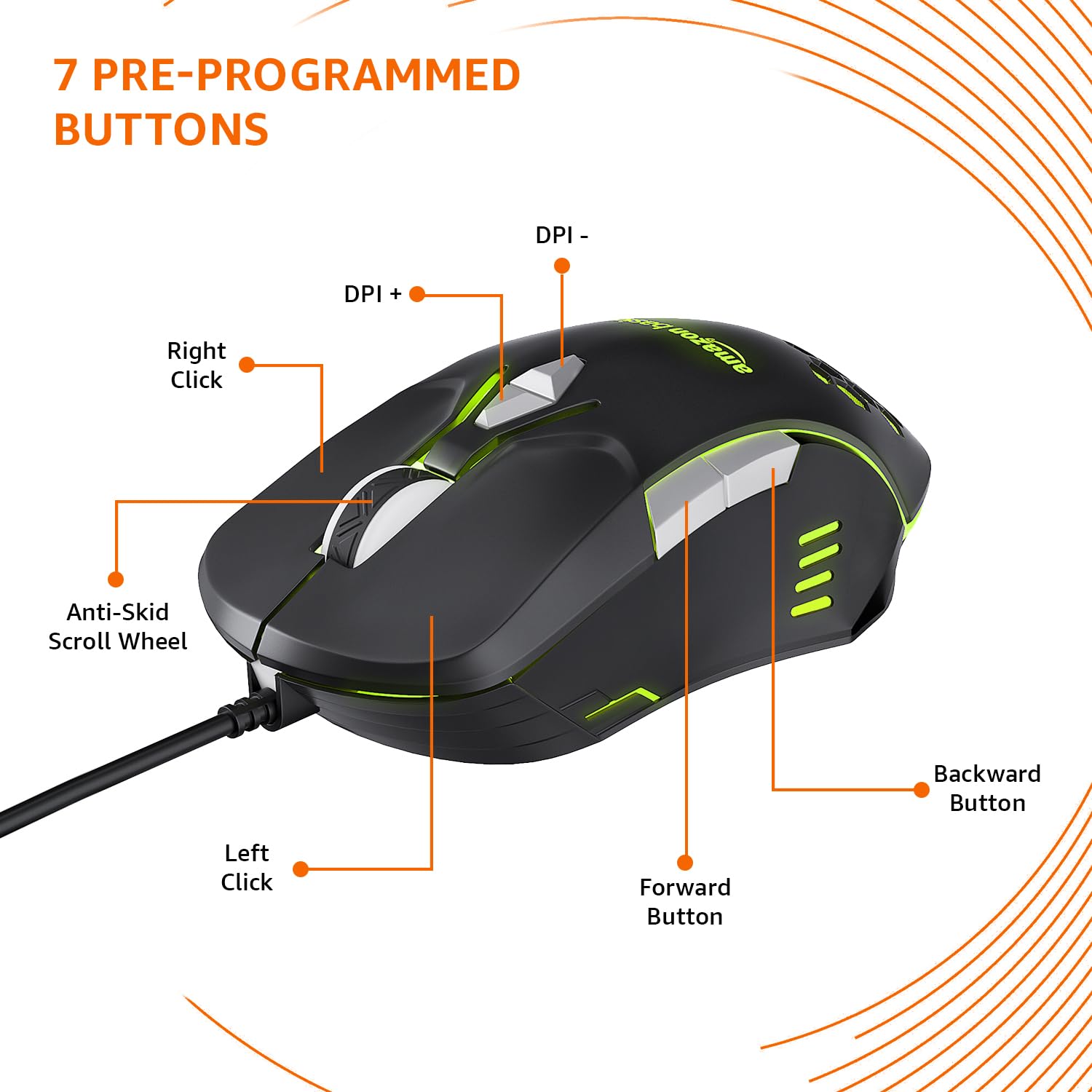
Image: The amazon basics Wired Gaming Mouse showing its 7 pre-programmed buttons, including Left Click, Right Click, Anti-Skid Scroll Wheel, DPI+, DPI-, Forward Button, and Backward Button.

Imaj: Yon imaj anwo-anba view of the amazon basics Wired Gaming Mouse, emphasizing its honeycomb-designed surface for improved grip and airflow.

Image: The amazon basics Wired Gaming Mouse illuminated with red RGB lighting, showcasing its light and comfortable design.
3. Enstriksyon Enstalasyon
- Depake Sourit la: Carefully remove the gaming mouse from its packaging.
- Konekte ak PC: Ploge konektè USB sourit la nan yon pò USB ki disponib sou òdinatè w lan.
- Enstalasyon chofè: Your operating system (Windows, Linux) should automatically detect and install the necessary drivers. If prompted, follow the on-screen instructions. For advanced customization of RGB and programmable keys, refer to the manufacturer's website for specific driver software.
- Plasman: Place the mouse on a flat, clean surface or a mouse pad for optimal performance.
4. Operasyon Enstriksyon
4.1 Fonksyonalite debaz
- Klike Goch: Aksyon prensipal, seleksyon.
- Klike sou dwa: Aksyon segondè, meni kontèks.
- wou woulo liv: Scroll up/down pages. Pressing the scroll wheel often acts as a middle click.
- Bouton Avanse/Aryè: Tipikman itilize pou navigasyon nan web navigatè oswa file eksploratè.
4.2 Ajiste DPI (Pwen Pa Pous)
The mouse features dedicated DPI adjustment buttons (DPI+ and DPI-) to change cursor sensitivity on the fly. Press these buttons to cycle through different DPI levels up to 6400. A higher DPI setting results in faster cursor movement across the screen with less physical mouse movement.
4.3 Customizing RGB Lighting
The mouse includes customizable RGB lighting. Specific lighting modes can often be cycled through using a dedicated button (if present) or through the optional driver software. Refer to the driver software for advanced customization options, including color selection, effects, and brightness.
4.4 Programming Buttons
The mouse is equipped with programmable buttons. To assign custom functions, macros, or key combinations to these buttons, you will need to install and use the specific driver software provided by the manufacturer. This software typically allows you to create profiles pou diferan aplikasyon oswa jwèt.
Video: A short product highlight video demonstrating the key features of the amazon basics Wired Gaming Mouse, including adjustable DPI, RGB lighting, programmable buttons, and durable design.
5. Antretyen
- Netwayaj: Use a soft, dry cloth to clean the exterior of the mouse. For stubborn dirt, a slightly damp Ou ka itilize twal, pou asire pa gen likid ki antre nan sourit la.
- Netwayaj Capteur: Occasionally, use a cotton swab lightly dampened with isopropyl alcohol to gently clean the optical sensor on the underside of the mouse. Ensure the mouse is disconnected before cleaning.
- Evite likid: Do not immerse the mouse in water or any cleaning solutions.
- Depo: Sere sourit la nan yon kote ki fre epi sèk, lwen limyè solèy dirèk ak tanperati ekstrèm.
NAN. Depanaj
| Pwoblèm | Solisyon |
|---|---|
| Sourit la pa reponn. |
|
| Mouvman kurseur a pa regilye oswa li sote. |
|
| Bouton pwogramasyon yo pa fonksyone. |
|
| Ekleraj RGB a pa fonksyone oswa li bloke. |
|
7. Espesifikasyon
| Karakteristik | Detay |
|---|---|
| Mak | baz amazon |
| Nimewo Modèl | ABIM03 |
| Koneksyon Teknoloji | Branche (USB) |
| Teknoloji deteksyon mouvman | Optik |
| Ranje DPI | Jiska 6400 DPI |
| Kle pwogramasyon | 4 (in addition to standard left/right click and scroll) |
| Ekleraj | RGB |
| Koulè | Nwa |
| Pwa atik | 145 g |
| Dimansyon pwodwi (LxWxH) | 15.8 x 10.4 x 5.4 cm |
| Platfòm pyès ki nan konpitè | PC |
| Sistèm operasyon konpatibilite | Linux, Windows 7 and above |
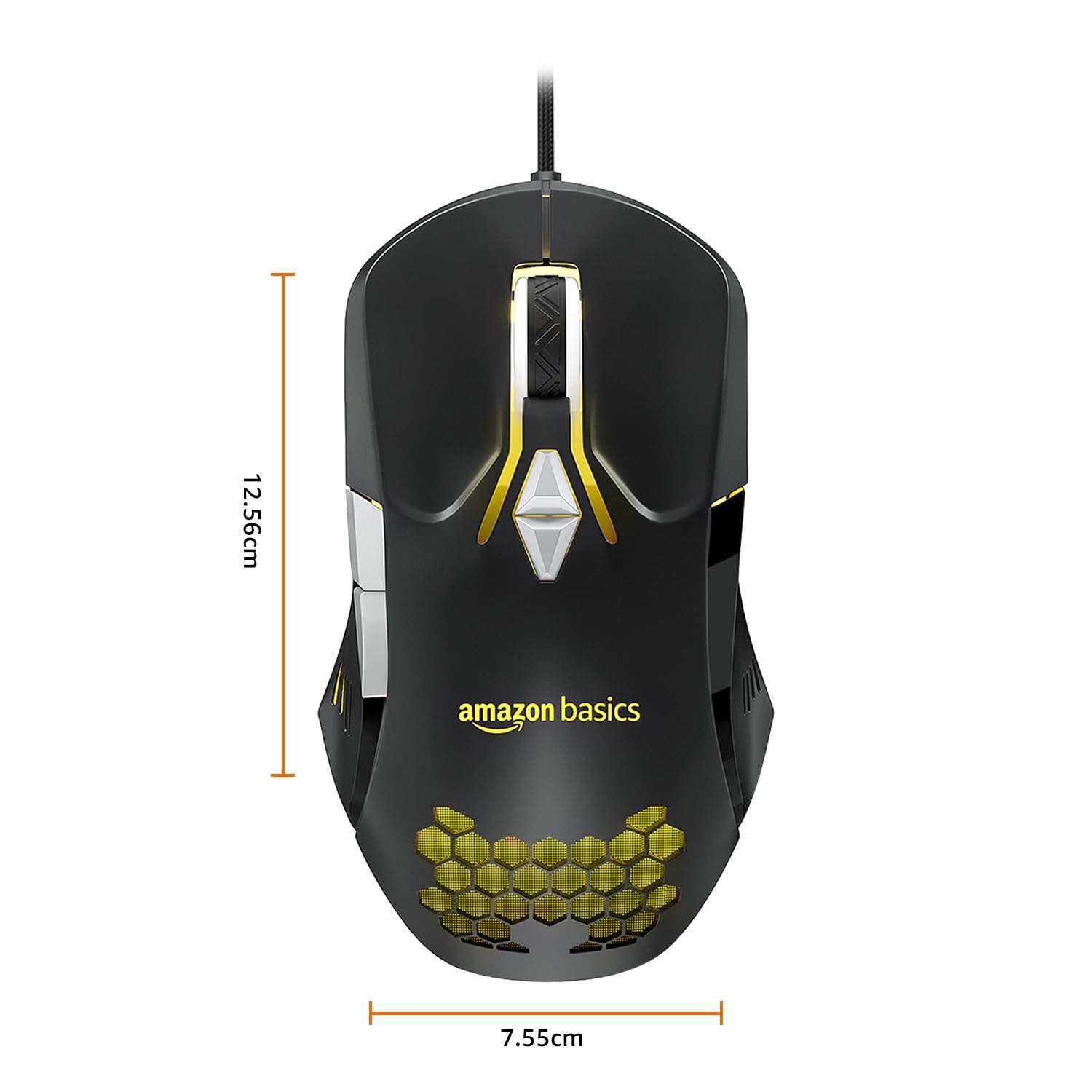
Image: The amazon basics Wired Gaming Mouse with its length (12.56cm) and width (7.55cm) dimensions indicated.
8. Enfòmasyon sou Garanti
This amazon basics Wired Gaming Mouse comes with a 1 ane garanti from the date of purchase. This warranty covers manufacturing defects and issues arising from normal use. It does not cover damage caused by misuse, accidents, unauthorized modifications, or normal wear and tear. Please retain your proof of purchase for warranty claims.
9. Sipò
For further assistance, technical support, or warranty claims, please visit the official amazon basics support page or contact customer service through your purchase platform. Ensure you have your product model number (ABIM03) and proof of purchase ready when contacting support.
Resous sou entènèt:
- Paj pwodwi: amazon.in/dp/B0BTD2YN6Y
- amazon basics Store: amazon basics Store


