Entwodiksyon
This manual provides detailed instructions for the installation, operation, and maintenance of your CP PLUS CP-V41A 4MP Wi-Fi Camera. Please read this manual thoroughly before using the product to ensure correct usage and optimal performance. Keep this manual for future reference.
Pwodwi souview
The CP PLUS CP-V41A is a 4MP Wi-Fi camera designed for home security and surveillance. It features high-resolution imaging, night vision capabilities, and smart integration options.
Karakteristik kle:
- 4MP CMOS Image Sensor: Bay videyo klè ak detaye footage.
- 3.6mm Lantiy: Ofri yon lajè jaden view pou yon pwoteksyon konplè.
- Konpresyon videyo H.265: Efficiently compresses video to save storage space without compromising quality.
- Sipò Wi-Fi: Enables wireless connectivity for flexible placement.
- IR Distance of 15 Mtr.: Ensures clear night vision up to 15 meters.
- Evalyasyon IP65: Suitable for both indoor and outdoor use, offering protection against dust and water jets.
- Entegrasyon kay entelijan: Works with Google Assistant and Amazon Alexa for voice control and smart automation.
Ki sa ki nan bwat la:
- CP PLUS CP-V41A 4MP Wi-Fi Camera
- Adaptè pouvwa
- Vis ak ploge pou monte
- Gid pou kòmanse rapidman (gade manyèl sa a pou tout detay yo)

Image: The CP PLUS CP-V41A 4MP Wi-Fi Camera, highlighting its model and key features.
Enstalasyon
1. Enstalasyon Fizik
- Chwazi yon kote: Select a suitable location for your camera, considering the desired viewing area, Wi-Fi signal strength, and power source accessibility. The camera is rated IP65, making it suitable for both indoor and outdoor environments.
- Monte kamera a:
- Make pwen perçage yo sou miray la oswa plafon an lè l sèvi avèk baz montaj kamera a kòm modèl.
- Fè twou epi mete ploge miray yo bay la.
- Secure the camera's mounting base with the screws.
- Ajiste ang kamera a jan sa nesesè.
- Konekte pouvwa: Plug the power adapter into the camera's power input and then into a power outlet. The camera will power on and initiate its startup sequence.
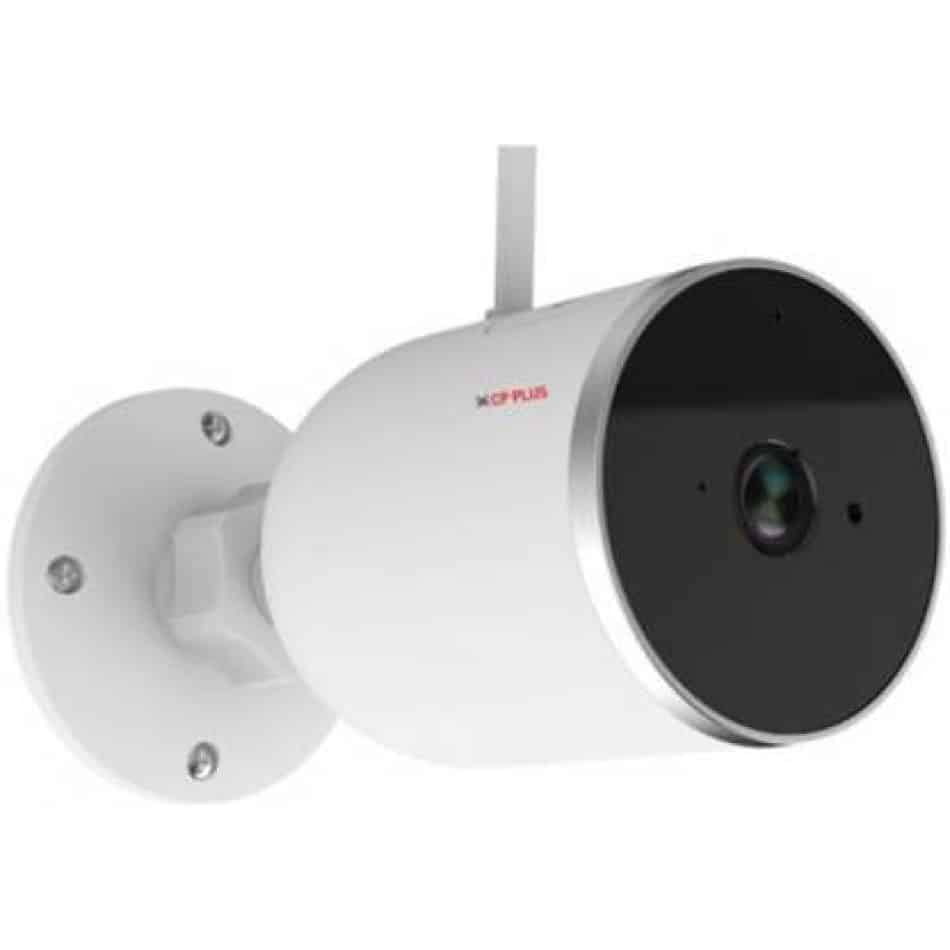
Imaj: Bò kote view of the CP PLUS CP-V41A camera showing its mounting base and antenna, illustrating physical installation.
2. Koneksyon Rezo (Wi-Fi)
- Telechaje App a: Chèche pou the official CP PLUS mobile application on your smartphone's app store (iOS or Android) and install it.
- Kreye yon kont: Louvri aplikasyon an epi kreye yon nouvo kont oubyen konekte si ou deja genyen youn.
- Ajoute Aparèy: Follow the in-app instructions to add your new camera. This typically involves:
- Scanning a QR code on the camera.
- Connecting your phone to the camera's temporary Wi-Fi hotspot.
- Selecting your home Wi-Fi network and entering its password.
- Konplete: Once connected, the camera's status indicator will change, and you will see the camera online in your app.
Enstriksyon Operasyon
1. Viv View ak Anrejistreman
- Aksè Live View: Open the CP PLUS app and select your camera from the device list to view manje a ap viv.
- Anrejistreman manyèl: Tap the record button in the app to start or stop manual video recording.
- Snapshot: Use the snapshot button to capture still images from the live feed.
2. Deteksyon Mouvman ak Alèt
- Aktive Deteksyon Mouvman: Navigate to the camera settings in the app and enable motion detection.
- Ajiste sansiblite: Set the motion detection sensitivity to minimize false alarms.
- Set Alert Schedule: Configure specific times or days for receiving motion alerts.
- Resevwa Notifikasyon: The app will send push notifications to your smartphone when motion is detected.
3. Vizyon lannwit
The camera automatically switches to night vision mode in low-light conditions, utilizing its infrared (IR) LEDs to provide clear black-and-white video up to 15 meters. Ensure no obstructions block the IR lights for optimal performance.
4. Smart Home Integration (Google Assistant / Amazon Alexa)

Image: The CP PLUS CP-V41A camera integrated into a smart home environment, indicating compatibility with Google Assistant.
- Kont lyezon: In your Google Home or Amazon Alexa app, search for the CP PLUS skill/service and link your CP PLUS account.
- Dekouvri Aparèy: Once linked, ask your smart assistant to discover new devices.
- Kòmandman vwa: You can now use voice commands to view your camera feed on compatible smart displays (e.g., "Hey Google, show me the front door camera" or "Alexa, show me the living room camera").
Antretyen
- Netwayaj:
- Siye lantiy kamera a ak kò a dousman avèk yon twal mou epi sèk.
- Pa sèvi ak pwodwi chimik piman bouk oswa pwodui netwayaj abrazif.
- Asire w kamera a etenn anvan ou netwaye li.
- Mizajou mikrolojisyèl: Regularly check the CP PLUS app for available firmware updates. Updates often include performance improvements, new features, and security enhancements. Follow the in-app instructions to perform updates.
- Jesyon Depo: If using a local storage (e.g., microSD card, not included), periodically review ak jere anrejistre footage to ensure sufficient space.
Depanaj
| Pwoblèm | Kòz posib | Solisyon |
|---|---|---|
| Kamera a pa limen. | Adaptè kouran an pa konekte oswa li gen pwoblèm. | Ensure the power adapter is securely connected to the camera and a working power outlet. Try a different outlet. |
| Pa ka konekte ak Wi-Fi. | Incorrect Wi-Fi password, weak signal, or camera too far from router. | Verify Wi-Fi password. Move the camera closer to the router. Ensure your router is broadcasting a 2.4GHz network (5GHz is not supported by many smart devices). Reset the camera and try pairing again. |
| Poor image quality or blurry video. | Protective film on lens, dirty lens, or insufficient lighting. | Remove any protective film. Clean the lens with a soft cloth. Ensure adequate lighting or check night vision functionality. |
| Deteksyon mouvman pa travay. | Motion detection disabled, sensitivity too low, or incorrect schedule. | Check app settings to ensure motion detection is enabled, sensitivity is appropriate, and the schedule is correctly configured. |
| No sound or poor audio. | Microphone/speaker blocked, app volume low, or network issues. | Ensure nothing is obstructing the microphone or speaker. Check volume settings in the app and on your phone. Verify stable network connection. |
Espesifikasyon
| Karakteristik | Detay |
|---|---|
| Nimewo Modèl | CP-V41A |
| Capteur Imaj | 1/2.8” 4MP CMOS (0.9071cm) |
| Lantiy | 3.6mm |
| Konpresyon videyo | H.265 |
| Koneksyon | Wi-Fi, Ethernet |
| Distans IR | 15 mèt. |
| Pwoteksyon Ingress | IP65 |
| Konpatibilite Asistan Entelijan | Asistan Google, Amazon Alexa |
| Sous pouvwa | Fil elektrik |
| Itilizasyon Andedan kay la / Deyò | Andedan kay la, deyò |
| Pwa atik | 460 g |
| Dimansyon (LxWxH) | 20 x 10 x 5 santimèt |
| Konpozan ki enkli | Adaptè |

Image: An office setting with the CP PLUS CP-V41A camera mounted, illustrating its 4MP CMOS image sensor capability.
Garanti ak sipò
Pwodwi CP PLUS yo fèt pou fyab ak pèfòmans. Pou enfòmasyon sou garanti a, tanpri al gade kat garanti ki vini ak pwodwi ou a oswa vizite sit entènèt ofisyèl CP PLUS la. website. For technical support, troubleshooting assistance, or service inquiries, please contact CP PLUS customer support through their official channels.
Remak: Espesifikasyon ak karakteristik pwodwi yo ka chanje san avètisman alavans.


