1. Entwodiksyon
This manual provides detailed instructions for the setup, operation, maintenance, and troubleshooting of your KOORUI 15.6-inch Portable Monitor, model 15B1. Please read this manual thoroughly before using the product to ensure optimal performance and longevity.

Image 1.1: KOORUI 15.6-inch Portable Monitor 15B1.
2. Pake kontni
Verifye ke tout atik ki nan lis anba a yo enkli nan pakè ou a. Si gen nenpòt atik ki manke oswa ki domaje, tanpri kontakte sèvis kliyan.
- KOORUI 15.6-inch Portable Monitor (15B1)
- Protective Case / Stand
- USB-C pou USB-C kab
- Mini HDMI kab HDMI
- USB-A to USB-C Power Cable (for external power supply)
- Manyèl itilizatè
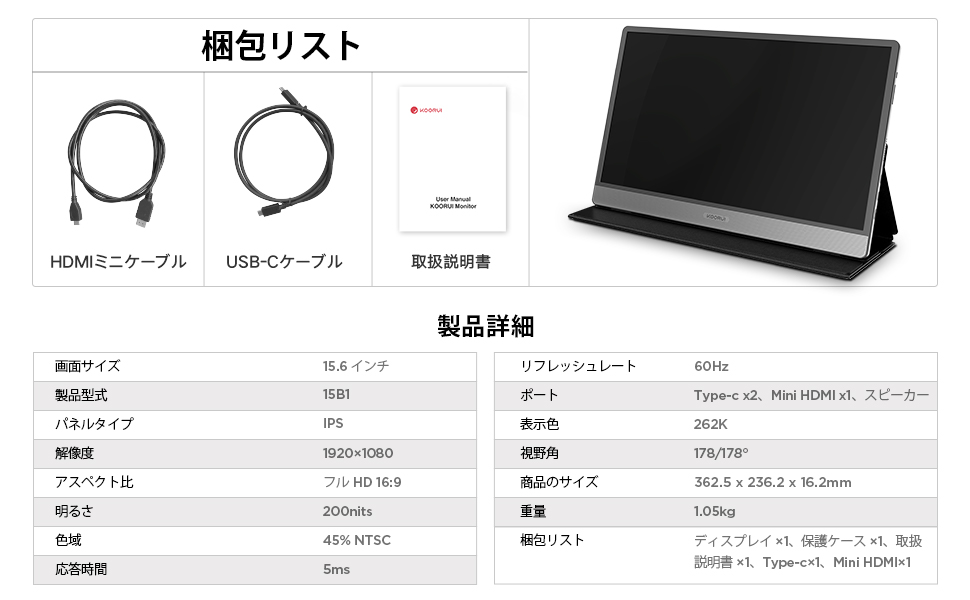
Image 2.1: Included accessories and monitor.
3. Pwodwi souview
3.1. Monitor Features
- 15.6-inch Full HD (1920x1080) IPS Panel
- Lajè 178° Viewing Ang
- Slim and Lightweight Design (approx. 10mm thick, 1.05kg)
- Entegrasyon Oratè Stereo
- Multiple Connectivity Options: 2x USB Type-C, 1x Mini HDMI
3.2. Pò ak Kontwòl
Familiarize yourself with the ports and controls located on the side of the monitor:
- Pouvwa switch: Limen / fèmen monitè a.
- Menu / Volume Buttons: Used to navigate the On-Screen Display (OSD) menu and adjust volume.
- Pò USB Kalite-C (x2): For power, video, and data transmission (depending on device compatibility).
- Mini HDMI Port: Pou antre videyo ki soti nan aparèy konpatib.
- Oratè: Oratè stereo entegre pou pwodiksyon odyo.

Image 3.1: Monitor ports and controls with device compatibility.

Image 3.2: Monitor dimensions and weight.
4. Enstalasyon
The KOORUI 15B1 monitor offers flexible connection options to suit various devices.
4.1. Single USB Type-C Connection (Power & Video)
For devices with a full-featured USB Type-C port (supporting DisplayPort Alternate Mode and power delivery), a single USB Type-C cable can provide both power and video signal to the monitor.
- Connect one end of the provided USB Type-C cable to a full-featured USB Type-C port on your device (e.g., laptop, smartphone).
- Connect the other end of the USB Type-C cable to either of the USB Type-C ports on the portable monitor.
- The monitor should automatically detect the signal and power on.
Nòt:
- If the monitor's brightness is set above 50%, or if your device cannot provide sufficient power, an external power supply (5V/2.0A or higher, connected via the second USB Type-C port) may be required for stable operation and full brightness.
- Ensure your device's USB Type-C port supports video output (DisplayPort Alt Mode).

Image 4.1: Single USB Type-C connection.
4.2. Mini HDMI and USB Type-C Power Connection
For devices that do not have a full-featured USB Type-C port but have an HDMI output, you can use the Mini HDMI port for video and a USB Type-C port for power.
- Connect one end of the provided Mini HDMI to HDMI cable to the Mini HDMI port on the portable monitor.
- Connect the other end of the HDMI cable to the HDMI output port on your device (e.g., laptop, game console).
- Connect the provided USB-A to USB Type-C power cable to a power source (e.g., wall adapter, laptop USB-A port) and the other end to one of the USB Type-C ports on the monitor for power.
- The monitor should power on and display the video signal.

Image 4.2: Mini HDMI and USB Type-C power connection.
5. Operasyon Enstriksyon
5.1. Power On/Off
Peze a Chanjman pouvwa located on the side of the monitor to turn it on or off.
5.2. Meni sou ekran an (OSD).
Sèvi ak la Menu / Volume Buttons to access and navigate the OSD menu. The OSD allows you to adjust various settings such as brightness, contrast, color temperature, input source, and audio volume.
5.3. Display Modes
Monitè a sipòte plizyè mòd ekspozisyon lè li konekte ak yon òdinatè:
- Mòd kopi: The monitor displays the same content as your primary screen.
- Pwolonje mòd: The monitor extends your desktop, providing additional screen space.
- Mòd Dezyèm Ekran Sèlman: Only the portable monitor displays content, while your primary screen is off.
Anjeneral, ou ka konfigire mòd sa yo atravè paramèt ekspozisyon sistèm operasyon ou an (pa egzanp, Paramèt Ekspozisyon Windows, Preferans Sistèm macOS).

Image 5.1: Display Modes.
5.4. Aparèy konpatibilite
The KOORUI 15B1 portable monitor is compatible with a wide range of devices, including:
- Laptops (Windows, macOS)
- Smartphones (with full-featured USB Type-C)
- Tablèt
- Gaming Consoles (PS4, PS5, Nintendo Switch, Xbox)

Image 5.2: Versatile device connections.
6. Antretyen
Proper care and maintenance will help extend the life of your portable monitor.
- Netwaye ekran an: Siye ekran an dousman avèk yon twal mou ki pa gen pousyè. Pou mak ki difisil pou retire, siye l dousman.ampRense twal la avèk dlo oswa yon solisyon pou netwaye ekran. Evite pwodui chimik ki agresif oswa materyèl abrazif.
- Netwayaj C aasing: Sèvi ak yon twal mou epi sèk pou netwaye monitè a.asing.
- Depo: When not in use, store the monitor in its protective case to prevent scratches and damage. Avoid exposing the monitor to extreme temperatures or humidity.
- Manyen: Manyen monitè a avèk prekosyon. Evite lage l oswa mete twòp presyon sou ekran an.
NAN. Depanaj
Si ou rankontre pwoblèm ak monitè ou a, gade pwoblèm ak solisyon komen sa yo:
7.1. Pa gen Ekran / Ekran Nwa
- Tcheke Câbles: Ensure all cables (USB Type-C, Mini HDMI) are securely connected to both the monitor and your device.
- Pwovizyon pou pouvwa: Confirm the monitor is receiving adequate power. If using a single USB Type-C cable, try connecting an external power adapter to the second USB Type-C port on the monitor.
- Sous Antre: Use the OSD menu to manually select the correct input source (USB Type-C or Mini HDMI).
- Device Output: Verify that your connected device is configured to output video to an external display.
7.2. Dim Screen
- Ekstèn pouvwa: If using a single USB Type-C connection, the monitor may operate at reduced brightness. Connect an external power adapter (5V/2.0A or higher) to the monitor's second USB Type-C port to achieve full brightness.
- Anviwònman klète: Adjust the brightness level through the OSD menu.
7.3. Pa gen son oswa volim ki ba
- Anviwònman Volim: Adjust the volume level using the monitor's OSD menu and ensure your connected device's volume is also turned up.
- Sòti odyo: Check your device's audio settings to ensure sound is being routed to the external monitor.
- Fonksyonalite Oratè: While the monitor has built-in speakers, their output may be limited. For higher quality or louder audio, consider using external speakers or headphones.

Image 7.1: Built-in speaker details.
8. Espesifikasyon
| Karakteristik | Spesifikasyon |
|---|---|
| Mak | KOORUI |
| Modèl | 15B1 |
| Gwosè ekran | 15.6 pous |
| Kalite Panel | IPS |
| Rezolisyon | 1920 x 1080 piksèl (Full HD) |
| Aspè rapò | 16:9 |
| Rafrechisman pousantaj | 60 Hz |
| Viewing Ang | 178° |
| Pwodwi Dimansyon (W x H x D) | 416 x 275 x 49 mm (overall), approx. 363 x 236 x 10 mm (display area) |
| Pwa pwodwi | 1.05 kg (approx. 1.46 kg with packaging) |
| Koneksyon | 2x USB Type-C, 1x Mini HDMI |
| Oratè ki entegre yo | Wi |
9. Garanti ak sipò
For warranty information, please refer to the warranty card included with your product or visit the official KOORUI website. If you require technical assistance or have questions not covered in this manual, please contact KOORUI customer support through their official channels.


