Entwodiksyon
Thank you for choosing the sonoro Primus Internet Radio with Bluetooth. This manual provides essential information for setting up, operating, and maintaining your device to ensure optimal performance and longevity. Please read it thoroughly before use.
Enstriksyon Sekirite Enpòtan
- Sous pouvwa: Sèvi ak adaptè kouran espesifye a sèlman. Asire w ke vòl latage matche ak ekipman pou kouran lokal ou a.
- Vantilasyon: Pa bloke okenn ouvèti vantilasyon. Kenbe ase espas otou aparèy la pou yon bon sikilasyon lè.
- Dlo ak imidite: Do not expose the unit to rain, moisture, dripping, or splashing. Keep liquids away from the device.
- Chalè: Pa enstale tou pre okenn sous chalè tankou radyatè, rejis chalè, recho, oswa lòt aparèy (tankou amplifiers) ki pwodui chalè.
- Netwayaj: Unplug the unit before cleaning. Use a dry cloth only.
- Sèvis: Pa eseye fè sèvis pwodui sa a tèt ou. Refere tout sèvis yo bay pèsonèl sèvis kalifye.
- Pwodwi lazè: This product contains a Class 1 laser. Do not open the casing.
Kontni pake
Tanpri verifye ke tout atik yo prezan:
- sonoro Primus Internet Radio Unit
- Adaptè pouvwa
- Kontwòl Remote (ak pil)
- Manyèl Itilizatè (dokiman sa a)
Enstalasyon
1. Debalaj ak Plasman
Carefully remove the unit from its packaging. Place the sonoro Primus on a stable, flat surface, ensuring adequate ventilation around the device. Avoid placing it near strong magnetic fields or direct sunlight.
2. Konekte pouvwa
Connect the provided power adapter to the AC IN port on the rear of the unit. Plug the other end into a suitable wall outlet. The unit will enter standby mode.
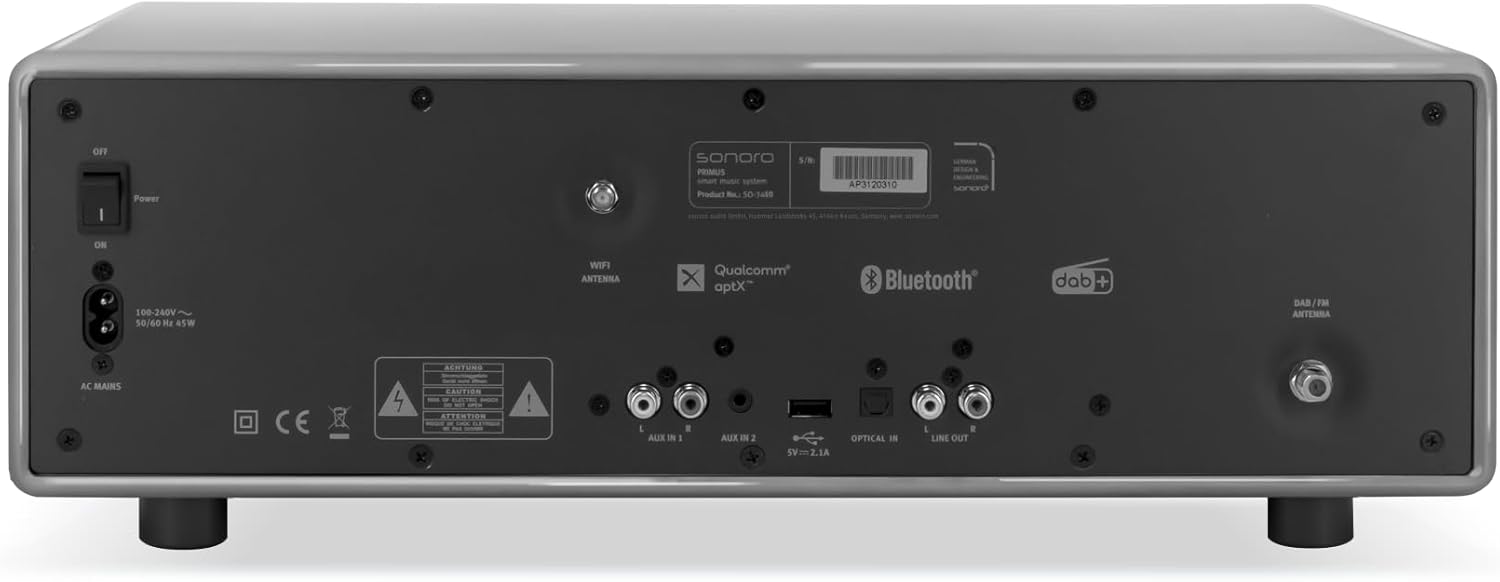
Imaj: Rear panel of the sonoro Primus, highlighting the power input and other connectivity options like AUX-in, Optical-in, and antenna connections.
3. Koneksyon antèn
For optimal FM and DAB+ reception, connect the included antenna to the appropriate antenna input on the rear panel. Extend the antenna fully for best signal quality.
4. Premye Limen
Press the Power button on the front panel or the remote control to turn on the unit. Follow the on-screen instructions for initial setup, including language selection and network configuration.

Imaj: Devan view of the sonoro Primus, displaying the central screen, control knobs, and various buttons for media playback and source selection.
Enstriksyon Operasyon
Kontwòl debaz yo
The sonoro Primus features intuitive controls on the front panel and a comprehensive remote control. Key controls include:
- Bouton pouvwa: Turns the unit on/off or into standby mode.
- Volim bouton: Ajiste nivo volim prensipal la.
- Bouton Sintonizasyon/Seleksyon: Navige nan meni yo epi chwazi opsyon yo.
- Bouton Sous: Selects input sources (Internet Radio, DAB+, FM, Bluetooth, CD, AUX-in, Optical-in).
- Kontwòl Lekti: Play/Pause, Skip Forward/Backward for CD and streaming.
Internet Radio and Podcasts
Access over 25,000 internet radio stations and numerous podcasts worldwide. Ensure your device is connected to a stable Wi-Fi network. Navigate through the menu using the Tune/Select knob to find and save your favorite stations.
DAB+ and FM Radio
Switch to DAB+ or FM mode using the source buttons. The unit will automatically scan for available stations. You can manually tune or save presets for quick access to your preferred channels.
Koneksyon Bluetooth
To connect a Bluetooth device (smartphone, tablet, laptop):
- Select the Bluetooth source on the sonoro Primus.
- Pèmèt Bluetooth sou aparèy ekstèn ou.
- Chèche pou "sonoro Primus" in your device's Bluetooth settings and pair.
- Yon fwa konekte, ou ka difize odyo san fil nan inite a.
Lektur CD
Insert an audio CD into the CD slot. The unit will automatically detect and begin playback. Use the playback controls to manage your music.
Streaming Services (Spotify Connect, Amazon Music, Deezer)
The sonoro Primus supports various streaming services. To use Spotify Connect, Amazon Music, or Deezer, ensure your device is connected to Wi-Fi and you have an active subscription to the respective service. Follow the instructions within the service's app to connect to your sonoro Primus.
AUX-in and Optical-in
Connect external audio devices using the AUX-in (3.5mm jack) or Optical-in ports on the rear panel. Select the corresponding source on the unit to play audio from these inputs.
Antretyen
Netwaye inite a
To clean the exterior of the unit, unplug it from the power source. Use a soft, dry, lint-free cloth. Do not use abrasive cleaners, waxes, or solvents as they may damage the finish.
Swen Jwè CD
Handle CDs by their edges to avoid fingerprints. If a CD is dirty, wipe it gently with a soft, dry cloth from the center outwards. Do not use solvents or abrasive cleaners on CDs.
Mizajou lojisyèl
Periodically check for software updates via the unit's menu (if available). Updates can improve performance and add new features. Ensure a stable internet connection during updates.
Depanaj
| Pwoblèm | Kòz posib | Solisyon |
|---|---|---|
| Pa gen pouvwa | Kab kouran an pa konekte; priz kouran an gen pwoblèm. | Tcheke koneksyon kab kouran an; eseye yon lòt priz kouran. |
| Pa gen son | Volume too low; wrong input source selected; mute activated. | Increase volume; select correct input source; deactivate mute. |
| Resepsyon radyo pòv | Antenna not properly connected or extended; interference. | Adjust antenna position; move unit away from other electronic devices. |
| Aparèy Bluetooth echwe | Aparèy la twò lwen; Bluetooth pa aktive sou aparèy ekstèn lan; inite a pa an mòd koneksyon. | Ensure devices are close; enable Bluetooth; put sonoro Primus in pairing mode. |
| CD a pa ap jwe | CD a pa byen mete; CD a sal oswa grate; fòma disk la pa sipòte. | Reinsert CD correctly; clean or replace CD; ensure it's an audio CD. |
| Pwoblèm koneksyon Wi-Fi | Incorrect password; router too far; network interference. | Verify Wi-Fi password; move unit closer to router; restart router. |
Si pwoblèm nan pèsiste, tanpri kontakte sèvis kliyan.
Espesifikasyon
- Mak: sonoro
- Modèl: e60a53a9-4d44-4a55-b129-3386e8f3e186
- Teknoloji sentonizè: FM, DAB +
- Audio Sòti Mode: Stereo
- Fòma odyo sipòte: MP3, AAC, WAV
- Konfigirasyon Oratè: 2.1 (Two coaxial speakers and a powerful 5.25 inch subwoofer)
- Koneksyon: Optical, Auxiliary, Bluetooth, WLAN
- Aparèy konpatib: Laptop, MP3 player, Smartphone, Tablet
- Sous pouvwa: Fil elektrik
- Kalite ekspozisyon: LCD oswa dirije
- Eleman ki enkli: Power adapter, Remote control (with Lithium-metal batteries)
- Dimansyon (pake): 52.6 x 33.2 x 27.4 cm
- Pwa (Pakè): 9.45 kg
- Koulè: Chalk Grey (Note: Other colors may be available for different models)
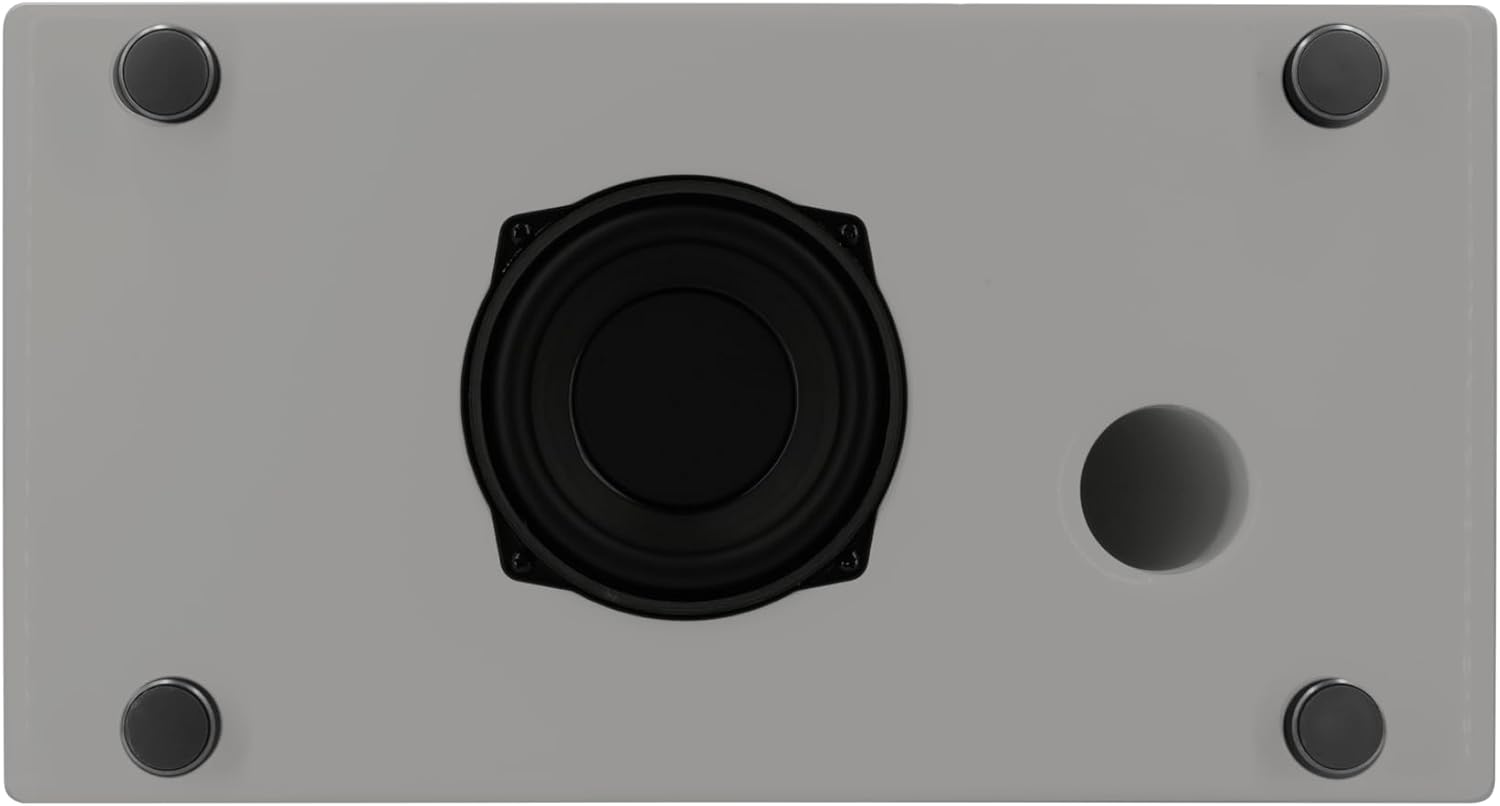
Imaj: Underside of the sonoro Primus, revealing the integrated 5.25-inch subwoofer for enhanced bass performance.
Garanti ak sipò
The sonoro Primus comes with a standard manufacturer's warranty. Please refer to the warranty card included in your package for specific terms and conditions. For technical support, service, or warranty claims, please contact sonoro audio GmbH customer service through their official websit oswa enfòmasyon kontak yo bay ak acha w la.
Manifakti: sonoro odyo GmbH
Premye dat disponib: 2 janvye 2023


