1. Entwodiksyon
Thank you for choosing the KLIM Tandem Wireless Keyboard and Mouse Set. This product is designed to provide a seamless and responsive wireless experience for both gaming and office use. This manual will guide you through the installation, operation, and maintenance of your new device.

Image 1: The KLIM Tandem wireless keyboard and mouse set, featuring RGB backlighting and a compact USB receiver.
2. Pake kontni
Tanpri asire w ke tout atik yo prezan nan pakè w la:
- KLIM Tandem Wireless Keyboard
- KLIM Tandem Wireless Mouse
- USB Wireless Receiver (located in the mouse battery compartment)
- USB Charging Cable (for both keyboard and mouse)
- Manyèl itilizatè
3. Enstriksyon Enstalasyon
3.1 Konekte Aparèy yo
- Jwenn reseptè san fil USB a. Li anjeneral estoke nan yon konpatiman anba sourit la.
- Branche reseptè san fil USB a nan yon pò USB ki disponib sou òdinatè w la.
- Turn on the keyboard using the power switch, usually located on the top edge.
- Turn on the mouse using the power switch, usually located on the underside.
- Your computer should automatically detect and install the necessary drivers. The devices are ready for use once detected.

Image 2: Close-up of the KLIM Tandem mouse and its USB receiver, ready for connection.
3.2 Premye chaj
For optimal performance, it is recommended to fully charge both the keyboard and mouse before first use. Use the provided USB charging cable to connect the devices to your computer or a USB wall adapter. An indicator light will typically show charging status and turn off or change color when fully charged.
4. Operasyon Enstriksyon
4.1 Fonksyon klavye
- Kontwòl ekleraj: The keyboard features RGB backlighting. Use the dedicated backlight key (often labeled with a lightbulb icon or combined with Fn key) to cycle through brightness levels or turn the backlight on/off. Note that the keyboard's colors are fixed in a rainbow pattern.
- Kle Fonksyon (Fn): The keyboard includes a special Function (Fn) key. Press and hold the Fn key, then press the corresponding F1-F12 keys to access multimedia controls and other shortcuts (e.g., volume control, media playback).
- Mòd dòmi otomatik: To conserve battery, the keyboard backlight will automatically turn off after a period of inactivity. Press any key to reactivate it.
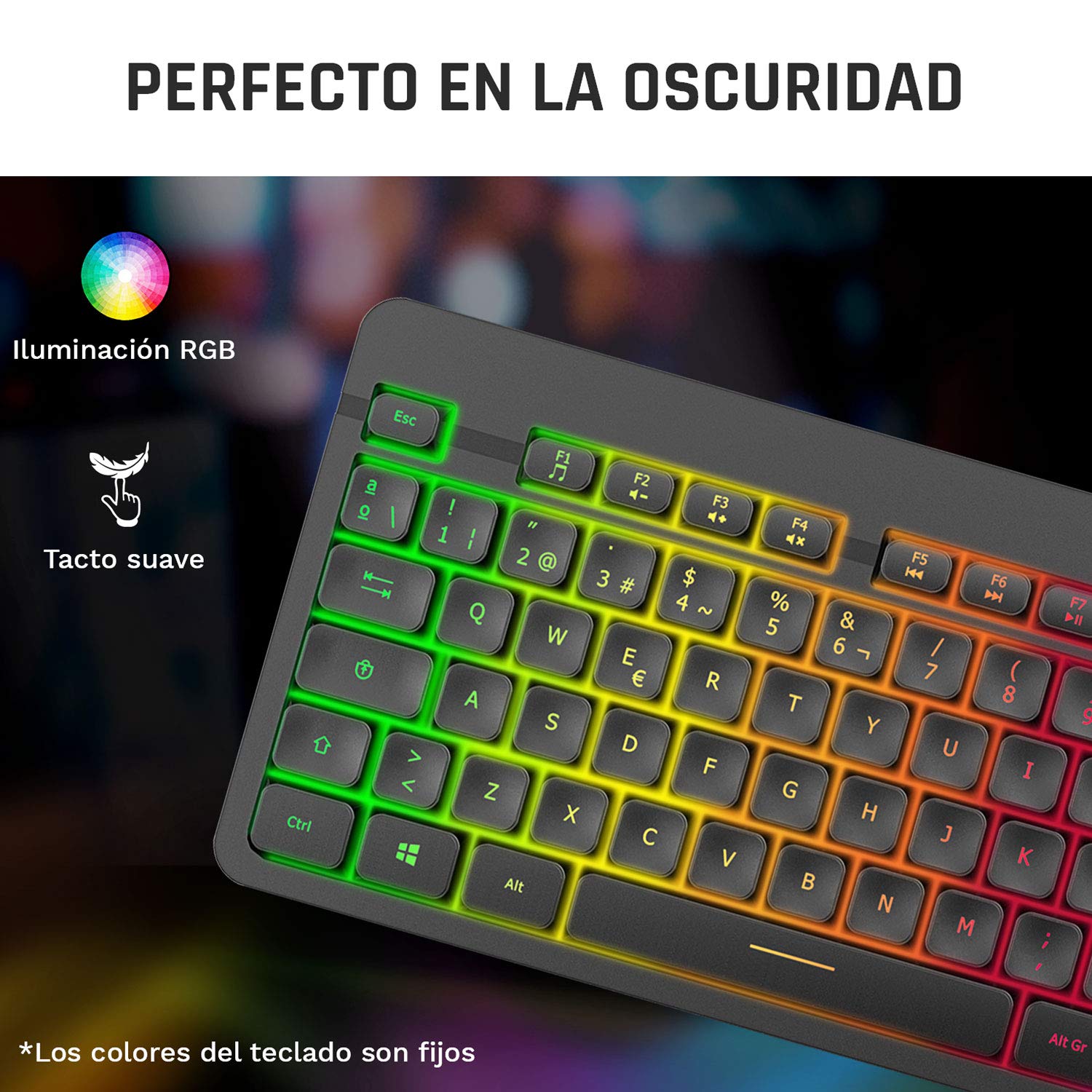
Image 3: Close-up of the KLIM Tandem keyboard showcasing its RGB illumination and soft-touch keys.
4.2 Fonksyon Sourit
- Ajisteman DPI: The mouse features adjustable DPI (Dots Per Inch) settings, allowing you to change cursor sensitivity. Use the dedicated DPI button (usually located behind the scroll wheel) to cycle through different sensitivity levels.
- Bouton bò: The mouse includes side buttons, typically used for forward and backward navigation in web browsers or customizable for gaming.
- Illuminated Logo: The mouse features an illuminated KLIM logo. This lighting can usually be toggled on or off via a switch on the underside of the mouse, separate from the main power switch.
- Konsepsyon ergonomique: The mouse is designed for an ergonomic grip, recommended for right-hand users.
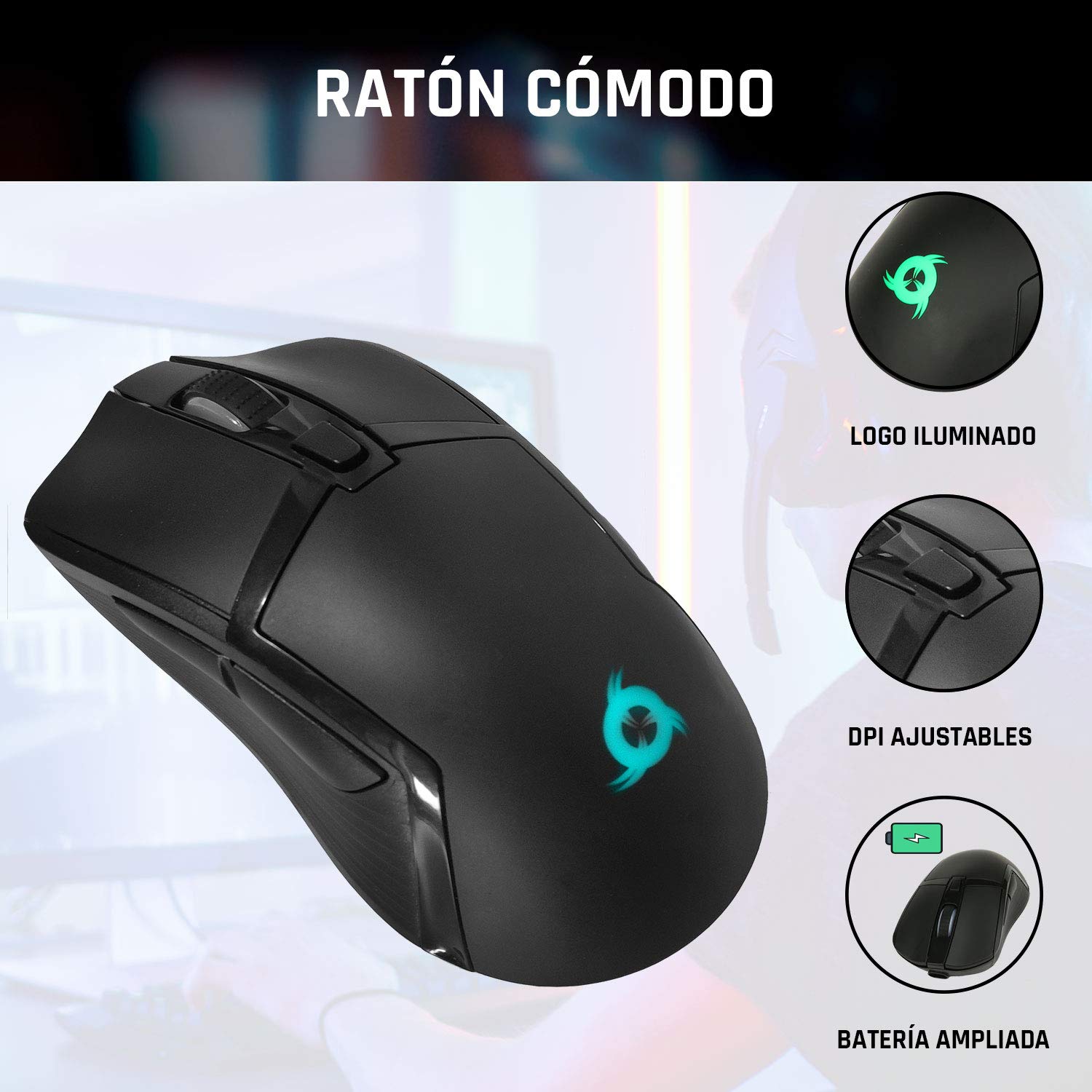
Image 4: The KLIM Tandem mouse highlighting its illuminated logo, adjustable DPI settings, and extended battery capacity.
5. Chaje ak Dire Batri
Both the KLIM Tandem keyboard and mouse are equipped with built-in rechargeable batteries. Use the provided USB cable to charge them. You can continue to use the devices while they are charging.
- Endikatè chaje: A small LED light on each device will indicate charging status. Refer to the device for specific light behavior (e.g., red for charging, off for full).
- Optimizasyon lavi batri: Lowering the keyboard's backlight brightness or turning it off will significantly extend battery life. The mouse's illuminated logo can also be toggled off to save power.
- Avètisman batri ki ba: Devices will typically provide a visual cue (e.g., flashing indicator light) when the battery is low, signaling that charging is required.
6. Antretyen
To ensure the longevity and optimal performance of your KLIM Tandem set, follow these maintenance guidelines:
- Netwayaj: Sèvi ak yon twal mou epi sèk pou siye klavye a ak sourit la. Pou pousyè tè ki difisil pou retire, siye yon ti kras.amp cloth with mild soap can be used, ensuring no liquid enters the device. Avoid harsh chemicals.
- Depo: Sere aparèy yo nan yon kote ki fre epi sèk, lwen limyè solèy dirèk ak tanperati ekstrèm.
- Evite devèsman: While the keyboard is designed to be resistant to minor spills, it is best to avoid liquid contact to prevent damage.
- Reseptè USB: When not in use, the USB receiver can be stored in the mouse's dedicated compartment to prevent loss.
NAN. Depanaj
If you encounter any issues with your KLIM Tandem set, please refer to the following table:
| Pwoblèm | Kòz posib | Solisyon |
|---|---|---|
| Klavye/Sourit pa reponn | Low battery; Devices turned off; USB receiver disconnected; Driver issue. | Charge devices; Ensure power switches are ON; Re-plug USB receiver; Restart computer. |
| Backlight pa travay | Backlight turned off; Low battery; Brightness set to minimum. | Press backlight key; Charge keyboard; Adjust brightness. |
| Mouse cursor erratic or slow | Dirty sensor; Incompatible surface; Low DPI setting. | Clean mouse sensor; Use a mouse pad; Adjust DPI setting. |
| Kout lavi batri | High backlight brightness; Frequent use. | Reduce backlight brightness; Ensure full charge before use. |
8. Espesifikasyon
Key technical specifications for the KLIM Tandem Wireless Keyboard and Mouse Set:
- Koneksyon: 2.4 GHz Wireless (single USB receiver)
- Ranje san fil: Jiska 10 mèt
- Keyboard Key Type: Manbràn
- Klavye ekleraj: Fixed RGB (rainbow pattern)
- Klavye pou tout lavi: Over 10 million clicks
- DPI sourit: Adjustable (multiple levels)
- Mouse Lifetime: Over 10 million clicks
- Batri: Built-in rechargeable (long-lasting)
- Materyèl: ABS dirab
- Konpatibilite: PC, Mac, PS4, Xbox One (check specific game/system compatibility)

Image 5: Multilingual specifications sheet for the KLIM Tandem wireless keyboard and mouse set.
9. Garanti ak sipò
KLIM Technologies offers a 5-ane garanti on the KLIM Tandem Wireless Keyboard and Mouse Set, demonstrating confidence in product quality. For any questions, technical assistance, or warranty claims, please contact KLIM Customer Service. Our team is available to assist you and aims to respond within 24 hours.
For further support, please visit the official KLIM websit la oubyen gade enfòmasyon kontak ki vini ak anbalaj pwodwi a.


