1. Entwodiksyon
This manual provides essential information for the safe and efficient operation of your KLIM K9000 Portable Air Conditioner. Please read it thoroughly before use and retain it for future reference. The KLIM K9000 is a versatile 3-in-1 unit offering cooling, dehumidification, and fan functions.
2. Enstriksyon Sekirite
To reduce the risk of fire, electrical shock, or injury, always follow these basic precautions:
- Li tout enstriksyon yo anvan ou sèvi ak aparèy la.
- Asire ke ekipman pou pouvwa a matche ak voltage espesifye sou etikèt evalyasyon an.
- Pa opere aparèy la ak yon kòd oswa ploge ki domaje.
- Kenbe aparèy la lwen sous chalè ak limyè solèy la dirèk.
- Pa bloke antre oswa priz lè.
- Toujou debranche aparèy la anvan w netwaye oswa fè sèvis.
- Aparèy sa a pa fèt pou itilize pa moun (ki gen ladan timoun) ki gen kapasite fizik, sansoryèl oswa mantal redwi, oswa ki pa gen eksperyans ak konesans, sof si yo te ba yo sipèvizyon oswa enstriksyon konsènan itilizasyon aparèy la pa yon moun ki responsab sekirite yo.
- Pa sèvi ak aparèy la nan anviwònman mouye oswa toupre dlo.
- Sèvi ak sèlman Pwodwi pou Telefòn rekòmande pa manifakti a.
3. Pake kontni
Verifye ke tout atik yo prezan nan pakè a:
- KLIM K9000 Air Conditioner Unit
- Kontwòl Remote
- Kawoutchou echapman
- Pò echapman
- Kawoutchou D 'Connecteur
- Kawoutchou drenaj
- Window Seal Fixing Plate
- Window Cover Extension
- 2 AAA Alkaline Batteries (for remote control, if included)
4. Pwodwi souview
The KLIM K9000 is a compact and efficient portable air conditioner designed to provide comfort in various environments. It integrates three primary functions: cooling, dehumidification, and fan operation.

Figi 4.1: KLIM K9000 Portable Air Conditioner unit with remote control, illustrating air circulation.
Its 3-in-1 functionality allows it to cool rooms, circulate air as a fan, and reduce humidity levels, making it suitable for various climate control needs.

Figi 4.2: The KLIM K9000 offers 3-in-1 comfort: cooling, dehumidifying, and fan functions, with a 9000 BTU cooling capacity.
5. Enstalasyon ak Enstalasyon
Proper installation is crucial for optimal performance. Follow these steps for quick setup:
- Pozisyon: Place the unit on a flat, stable surface, ensuring at least 30 cm (12 inches) of space around it for proper airflow.
- Atache tiyo echapman an: Connect the exhaust hose to the unit's exhaust port. Extend the hose and connect the window seal fixing plate or window cover extension.
- Enstalasyon fenèt: Secure the window seal fixing plate or extension in a compatible window opening (sliding windows). For tilt windows, a separate seal kit is required and sold separately. Ensure the hot air is expelled outdoors.
- Koneksyon pouvwa: Ploge kòd elektrik la nan yon priz elektrik ki gen tè.
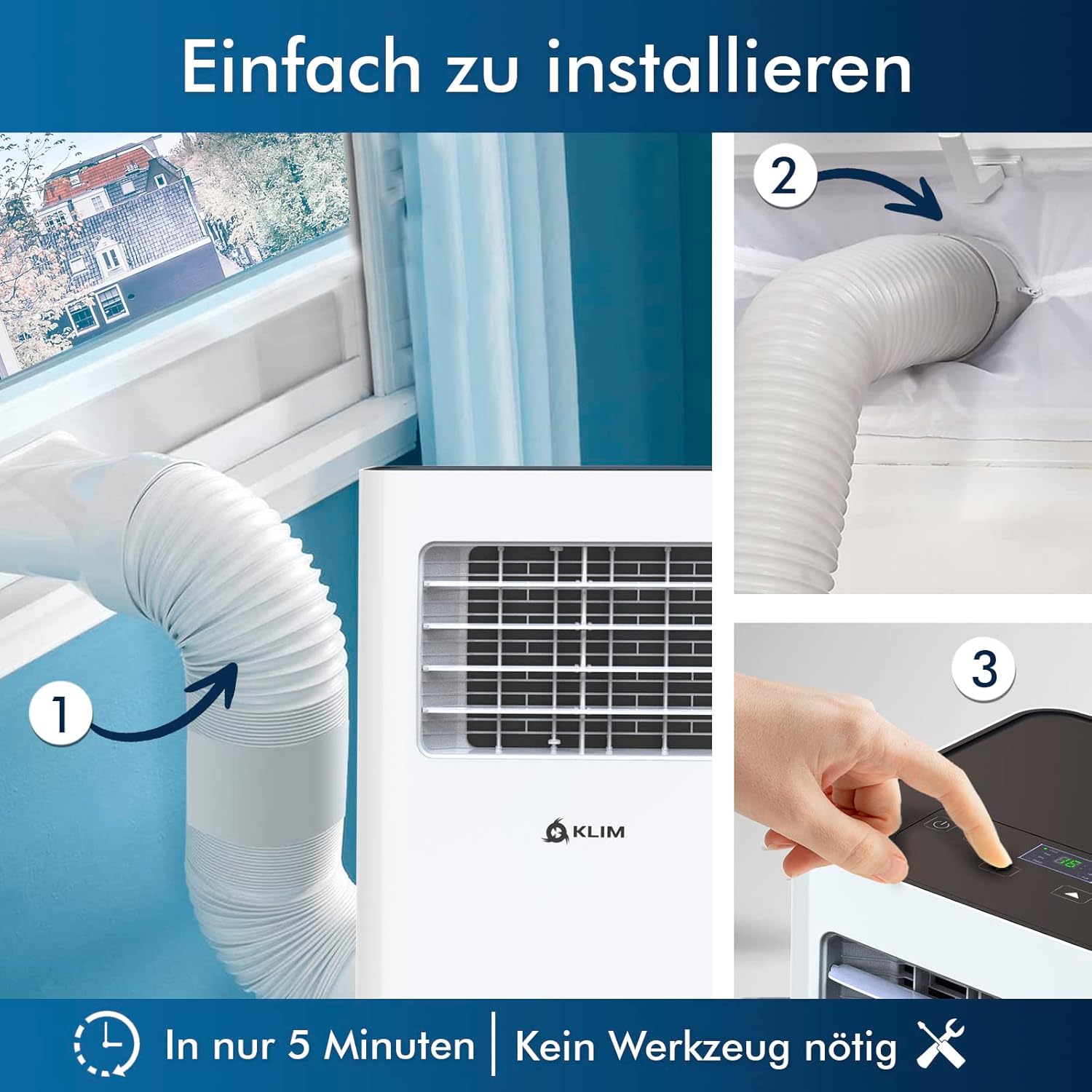
Figi 5.1: Visual guide for quick installation, typically completed in 5 minutes without special tools.

Figi 5.2: Illustration of window kit compatibility, showing options for sliding windows and mentioning a separate seal for tilt windows.
6. Operasyon Enstriksyon
The KLIM K9000 can be operated via the control panel on the unit or the included remote control.
6.1. Panèl kontwòl ak kontwòl remote
The remote control allows convenient operation from a distance. Ensure AAA batteries are correctly inserted. The control panel on the unit provides direct access to all functions.
6.2. Operasyon Modes
- Mòd refwadisman: Activates the compressor to cool the room. Set your desired temperature (down to 16°C). This mode is effective for rooms up to 20 m² (80 m³).
- Mòd fanatik: Circulates air without cooling. Adjustable fan speeds are available.
- Mòd dezimidifikatè: Removes excess moisture from the air. In this mode, the unit collects water, which will need to be drained.
- Mòd dòmi: Designed for quiet operation during rest. The unit operates at a reduced noise level (approx. 65 dB) and may adjust temperature settings automatically for comfort.

Figi 6.1: The sleep mode provides a cool and quiet environment for restful sleep, operating at approximately 65 dB.
To switch between modes, press the "Mode" button on the control panel or remote control.
7. Antretyen
Regular maintenance ensures the longevity and efficiency of your KLIM K9000.
7.1. Netwaye filtè lè a
The air filter should be cleaned every two weeks or more frequently depending on usage. A dirty filter can reduce cooling efficiency and airflow.
- Debranche èkondisyone a nan priz kouran an.
- Jwenn epi retire filtè lè a (anjeneral li nan dèyè oswa sou kote aparèy la).
- Lave filtè a avèk dlo tyèd savon. Rense l byen epi kite l seche nèt nan lè a anvan ou mete l tounen.
- Remete filtè sèk la epi branche aparèy la ankò.
7.2. Drenaj Dlo
The unit features an auto-evaporation system in cooling mode, reducing the need for frequent drainage. However, in high humidity or dehumidifier mode, water will accumulate and needs to be drained.
- Drenaj kontinyèl: For continuous dehumidification, attach the drainage hose to the drain outlet and direct it to a suitable container or floor drain.
- Manyèl Drenaj: When the internal water tank is full, the unit may stop operating and display an indicator. To drain manually, unplug the unit, place a shallow pan or tray under the drain plug, and remove the plug. Be aware that the internal water container can be cumbersome to empty, and it may require two people to safely tilt the unit for complete drainage if using the bottom drain.
NAN. Depanaj
Gade seksyon sa a pou pwoblèm komen ak solisyon yo.
| Pwoblèm | Kòz posib | Solisyon |
|---|---|---|
| Inite pa limen. | Pa gen kouran, disjonktè a deklanche, tank dlo a plen. | Check power cord, reset breaker, drain water tank. |
| Refwadisman ensifizan. | Dirty air filter, blocked air intake/outlet, open windows/doors, room too large, exhaust hose not properly installed. | Clean filter, clear obstructions, close windows/doors, ensure proper exhaust hose installation. |
| Inite a fè bwi. | Normal operation sound (compressor/fan), unit not on a level surface. | The unit operates at approximately 65 dB, which is normal. Ensure it is on a flat surface. |
| Dlo flit. | Drain plug not securely closed, drainage hose improperly connected. | Check drain plug, ensure drainage hose is securely attached and not kinked. |
Si pwoblèm nan pèsiste apre ou fin eseye solisyon sa yo, tanpri kontakte sèvis kliyan.
9. Espesifikasyon
| Mak | KLIM |
| Nimewo Modèl | K9000WH |
| Kapasite refwadisman | 9000 BTU |
| Gwosè chanm rekòmande | Jiska 20 m² (80 m³) |
| Fonksyon | Refwadisman, dezumidifikateur, fanatik |
| Klas efikasite enèji | A |
| Konsomasyon Elektrisite Anyèl | 960 Watts |
| Nivo bri | 65 Desibèl |
| Refrijeran | R-290 (Natural Refrigerant) |
| Dimansyon (L x W x H) | 29.5 x 32.5 x 70.4 cm |
| Pwa | 25.58 kg |
| Materyèl | ABS |
| Sous pouvwa | Kab elektrik |

Figi 9.1: The KLIM K9000's high energy efficiency (Class A) contributes to cost savings and environmental protection.
10. Garanti ak sipò
The KLIM K9000 Portable Air Conditioner comes with a 5-ane garanti, pou asire lapè lespri konsènan kalite ak pèfòmans li.
For technical assistance, warranty claims, or any questions not covered in this manual, please contact KLIM customer support through their official website or the retailer where the product was purchased. Please have your model number (K9000WH) and purchase date ready.


