Entwodiksyon
This manual provides comprehensive instructions for the RC4WD Warn 1/10 Advanced Wireless Remote/Receiver Winch, Model Z-E0130. It covers essential information regarding product safety, installation, operation, and maintenance to ensure optimal performance and longevity of your device. Please read this manual thoroughly before using the product.
Enfòmasyon sou Sekirite
AVÈTISMAN:
- This product is intended for external use only in its designated application.
- Always ensure proper electrical connections to prevent damage to the unit or connected components. Refer to the wiring diagram for correct polarity and voltage.
- Keep the remote and receiver away from water and extreme temperatures unless specified as waterproof.
- Do not attempt to modify or disassemble the unit. Unauthorized modifications can void the warranty and cause malfunction.
- Ensure the winch is securely mounted and the cable is properly spooled before operation.
- Keep hands and loose clothing clear of moving parts during winch operation.
Kontni pake
Verifye ke tout atik yo prezan nan pakè a:
- RC4WD Warn 1/10 Advanced Wireless Remote/Receiver Winch Unit (Model Z-E0130)
- Manyèl Enstriksyon (dokiman sa a)
- (Additional included items, if any, would be listed here based on product packaging)
Pwodwi souview
The RC4WD Warn 1/10 Advanced Wireless Remote/Receiver Winch system provides remote control functionality for compatible RC winches. It features a compact handheld remote and a receiver unit designed for easy integration into your RC vehicle.
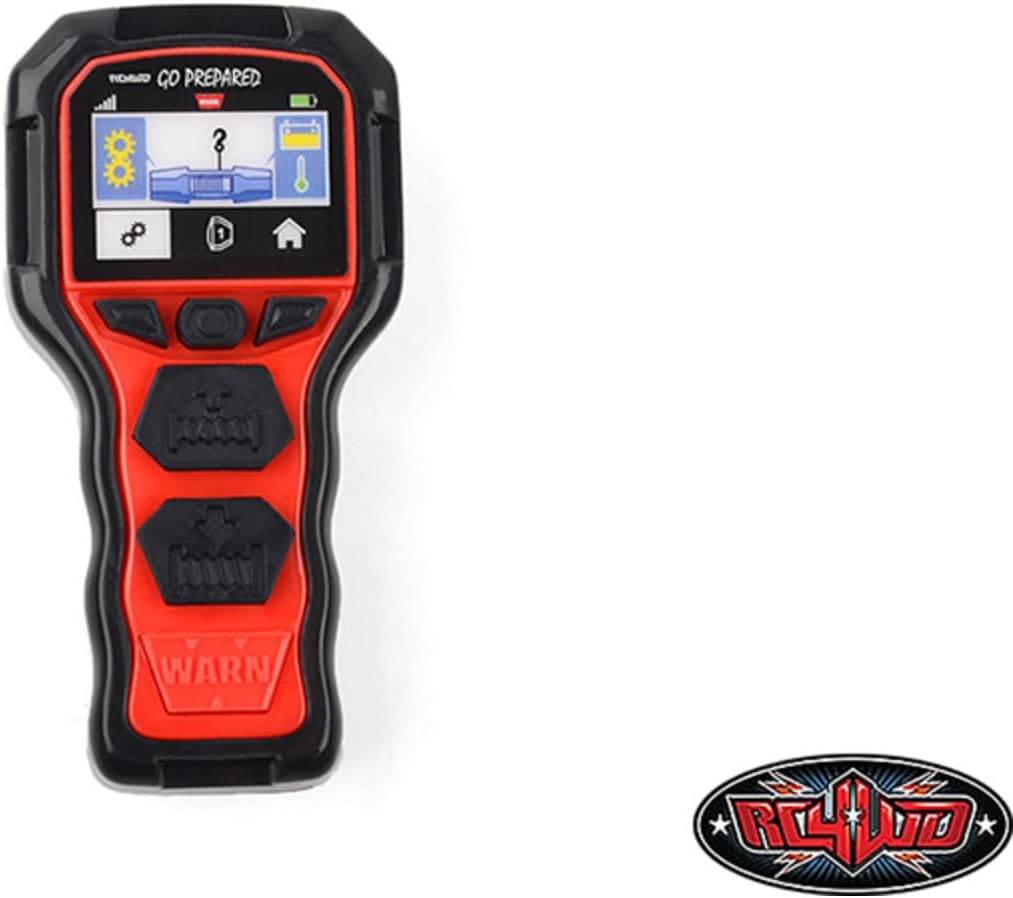
Figi 1: The RC4WD Warn 1/10 Advanced Wireless Remote/Receiver Winch. This image displays the handheld remote control unit, featuring a black and red casing. The top section includes a small digital display showing various icons such as signal strength, settings (gears), a question mark, battery level, and temperature. Below the display are several control buttons, including two larger black buttons labeled with winch-in and winch-out symbols, and a prominent red "WARN" logo at the bottom.
Enstalasyon ak Enstalasyon
- Plasman reseptè: Identify a suitable location within your RC vehicle for the receiver unit. Ensure it is protected from moisture and excessive vibration.
- Koneksyon fil elektrik:
- Connect the receiver to your RC vehicle's power source (e.g., battery or ESC BEC) ensuring correct polarity. Refer to your vehicle's manual for power specifications.
- Connect the winch motor to the designated output ports on the receiver. Consult the winch's manual for specific wiring requirements.
- Ensure all connections are secure to prevent intermittent operation or damage.
- Enstalasyon Remote Battery: Open the battery compartment on the handheld remote and insert the required batteries (typically AAA or similar, not specified in input, so keep it general). Observe correct polarity.
- Koneksyon (si sa nesesè): Some wireless systems require pairing the remote with the receiver. Refer to the specific instructions provided with the product for pairing procedures. Typically, this involves pressing a bind button on the receiver and then powering on the remote.
- Tès Inisyal: Before full operation, perform a low-power test to ensure the winch responds correctly to remote commands (winch in/out).
Enstriksyon Operasyon
Once the receiver is installed and powered, and the remote is paired, you can operate your winch wirelessly.
- Pouvwa sou: Ensure your RC vehicle's power is on, which will power the receiver. Turn on the handheld remote. The remote's display should illuminate, indicating readiness.
- Winch In: Press and hold the "Winch In" button (typically indicated by an arrow pointing inwards or a similar symbol) to retract the winch cable.
- Winch Out: Press and hold the "Winch Out" button (typically indicated by an arrow pointing outwards or a similar symbol) to extend the winch cable.
- Ekspozisyon siveyans: The remote's display may show information such as battery level, signal strength, and potentially winch status or temperature. Monitor these indicators during operation.
- Sispann sekirite: Release the winch button to stop the winch operation immediately.
Important Operating Tips:
- Avoid continuous winching under heavy load to prevent overheating. Allow the winch motor to cool down between heavy pulls.
- Always maintain a clear line of sight to your RC vehicle and the winch during operation.
- Do not exceed the maximum rated load capacity of your winch.
Antretyen
- Netwayaj: Periodically clean the remote and receiver with a soft, dry cloth. Avoid using harsh chemicals or solvents.
- Ranplasman batri: Replace remote batteries when the low battery indicator appears or when performance degrades.
- Enspeksyon kab: Regularly inspect the winch cable for fraying, kinks, or damage. Replace damaged cables immediately.
- Depo: Store the unit in a dry, cool place away from direct sunlight and extreme temperatures when not in use. Remove batteries from the remote if storing for extended periods.
Depanaj
| Pwoblèm | Kòz posib | Solisyon |
|---|---|---|
| Winch does not respond to remote. |
|
|
| Winch operates intermittently. |
|
|
| Ekran adistans lan vid. |
|
|
Espesifikasyon
| Karakteristik | Detay |
|---|---|
| Nimewo Modèl | Z-E0130 |
| Dimansyon pwodwi | 4.75 x 3.25 x 1 pous |
| Pwa atik | 5.6 ons |
| Manifakti | RC4WD |
| Konpatibilite | 1/10 Scale RC Winches (check specific winch compatibility) |
| Teknoloji san fil | Advanced Wireless Remote/Receiver System |
Garanti ak sipò
RC4WD products are manufactured to high standards. For warranty information, technical support, or service inquiries, please visit the official RC4WD websit la oubyen kontakte depatman sèvis kliyan yo. Kenbe prèv acha ou pou reklamasyon garanti.
Pou plis asistans, ou ka vizite RC4WD Store on Amazon.


