1. Entwodiksyon
Thank you for choosing the Nexxt Indoor Smart Camera. This manual provides essential information for the safe and efficient use of your new device. Please read it thoroughly before installation and operation, and retain it for future reference.
This 1080p HD fixed room camera is designed to provide reliable indoor surveillance with features such as night vision, two-way audio communication, motion detection, and seamless integration with smart home ecosystems like Amazon Alexa and Google Assistant.
2. Enfòmasyon sou Sekirite
- Ensure the camera is powered by the provided power adapter. Using unauthorized adapters may damage the device and void the warranty.
- Do not expose the camera to water, moisture, or extreme temperatures. It is designed for indoor use only.
- Evite mete kamera a anba limyè solèy dirèk oswa toupre sous chalè.
- Pa eseye demonte oswa repare kamera a tèt ou. Konfye tout antretyen bay pèsonèl kalifye.
- Kenbe kamera a ak akseswa li yo lwen timoun ak bèt kay.
- Ensure stable Wi-Fi connectivity for optimal performance.
3. Pake kontni
Verifye ke tout atik yo prezan nan pakè a:
- NEXXT Indoor Smart Camera (NHC-I710)
- Adaptè pouvwa
- Kanpe
- Manyèl Itilizatè (dokiman sa a)

Image: The retail packaging of the NEXXT Indoor Smart Camera, showing the camera and key features.
4. Pwodwi souview
The Nexxt Indoor Smart Camera offers a range of features for comprehensive home monitoring:
- Full HD 1080p Rezolisyon: Bay videyo klè ak detaye footage.
- Automatic Night Vision: Integrated infrared LEDs enable clear monitoring in low-light conditions up to 30 feet.
- Kominikasyon nan de-fason: Built-in microphone and speaker allow for real-time audio interaction.
- Deteksyon Mouvman: Avèti ou lè yo detekte yon mouvman nan chan mayetik kamera a. view.
- Depo lokal ak nwaj: Supports microSD cards (sold separately) and Microsoft Azure cloud storage (subscription sold separately) for recording.
- Entegrasyon kay entelijan: Compatible with Amazon Alexa and Google Assistant for voice control and integration into smart routines.
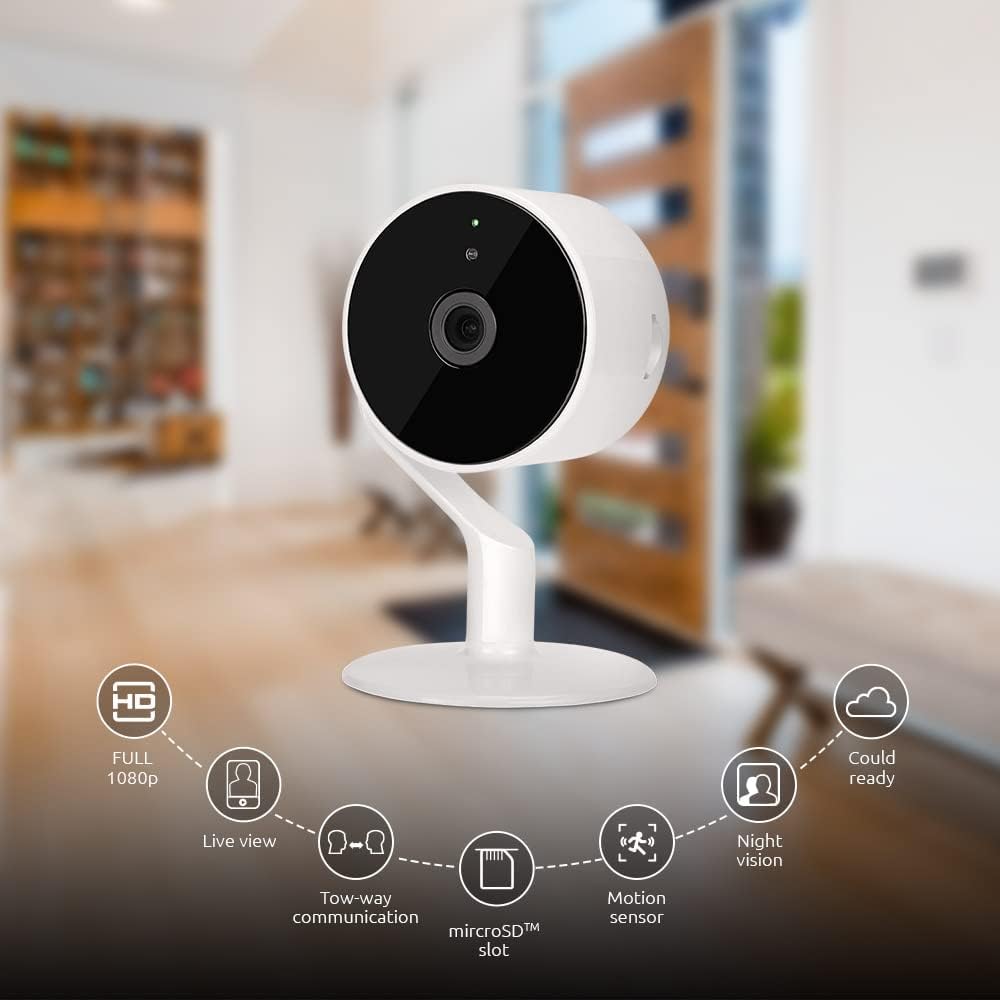
Image: The NEXXT Indoor Smart Camera highlighting its key features: Full HD 1080p, Live View, Two-way communication, microSD slot, Motion sensor, Night vision, and Cloud ready.
5. Enstalasyon
5.1 Limen
- Place the camera on a stable, flat surface or mount it using appropriate hardware (not included).
- Konekte adaptè kouran an nan pò antre kouran kamera a.
- Plug the power adapter into a standard electrical outlet. The camera will power on and its indicator light will begin to flash, indicating it's ready for pairing.
5.2 Enstalasyon ak koneksyon aplikasyon an
To control and monitor your camera, you need to download the Nexxt Home App:
- Telechaje la Nexxt Kay App soti nan Google Play Store (pou aparèy Android) oubyen Apple App Store (pou aparèy iOS).
- Open the Nexxt Home App and create a new account or log in if you already have one.
- Tape ikòn "+" la oubyen "Ajoute Aparèy" pou kòmanse pwosesis koneksyon an.
- Select "Camera" or the specific camera model from the list of devices.
- Follow the on-screen instructions in the app to connect the camera to your home Wi-Fi network. This typically involves scanning a QR code displayed on your phone with the camera.
- Once connected, the camera's indicator light will turn solid, and you will see the camera added to your app.

Image: Illustration showing the NEXXT Indoor Smart Camera being set up to function as a webcam, connecting to a laptop.
6. Operasyon Enstriksyon
6.1 Viv View
From the Nexxt Home App, tap on your camera's name to access the live video feed. You can view foo an tan reyèltage of your monitored area.

Image: The NEXXT Indoor Smart Camera on a desk, with text indicating "Full HD resolution" and its ability to provide 1080p high-quality video day or night.
6.2 Pale Bidireksyonèl
Pandan w ap viv la view, tap the microphone icon in the app to enable two-way audio. You can speak through your phone, and your voice will be projected through the camera's speaker. Tap the icon again to end communication.

Image: An illustration depicting communication between a person using a phone and another person near the camera, symbolizing the two-way talk feature.
6.3 Vizyon lannwit
The camera automatically switches to night vision mode in low-light conditions. You can also manually toggle night vision on/off within the app settings for the camera.

Image: A split image showing a room in daylight on one side and the same room in night vision on the other, demonstrating the camera's night vision capability.

Image: A smartphone screen displaying the Nexxt Home app interface with a night vision toggle switch, overlaid on a room scene, indicating active night vision monitoring.
6.4 Deteksyon Mouvman ak Alèt
Configure motion detection sensitivity and alert preferences in the app. When motion is detected, you will receive notifications on your smartphone.

Image: A person sleeping in bed with a motion detection icon overlaid, indicating advanced motion detection with an effective range of up to 30 feet.

Image: A woman holding a smartphone displaying the Nexxt Home app, with text indicating that advanced human identification technology helps reduce false alarms and unwanted notifications.
6.5 Anrejistreman ak Depo
The camera supports local storage via a microSD card (up to 128GB, not included) and cloud storage via Microsoft Azure (subscription required, sold separately). Insert the microSD card into the designated slot on the camera. Manage recording settings and view anrejistre footage through the Nexxt Home App.
6.6 Pataje Aksè
You can securely share your camera's security feed with multiple approved devices, allowing family members or trusted individuals to also monitor your home.

Image: Two smartphones displaying the Nexxt Home app, with text stating "Everyone Can Keep Watch" and explaining that the security feed can be securely shared with multiple approved devices.
6.7 Entegrasyon Kay Entelijan
The Nexxt Indoor Smart Camera is compatible with Amazon Alexa and Google Assistant. Follow the instructions in your Alexa or Google Home app to link your Nexxt Home account and enable voice commands for your camera.
7. Antretyen
- Netwayaj: Sèvi ak yon twal mou epi sèk pou netwaye lantiy kamera a ak kò a. Pa sèvi ak pwodui netwayaj likid oswa ayewosòl.
- Depo: If storing the camera for an extended period, disconnect it from power and store it in a cool, dry place.
- Mizajou mikrolojisyèl: Regularly check the Nexxt Home App for available firmware updates to ensure optimal performance and security.
NAN. Depanaj
- Kamera a pa konekte ak Wi-Fi a:
- Asire w ke rezo Wi-Fi ou a se 2.4GHz. Kamera a pa sipòte Wi-Fi 5GHz.
- Tcheke modpas Wi-Fi ou a pou wè si li kòrèk.
- Deplase kamera a pi pre routeur Wi-Fi ou a.
- Rekòmanse routeur ou a ak kamera a.
- Pa gen viv view or choppy video:
- Tcheke vitès koneksyon entènèt ou an.
- Ensure the camera has a strong Wi-Fi signal.
- Close and reopen the Nexxt Home App.
- Alèt mouvman pa resevwa:
- Verifye ke deteksyon mouvman an aktive nan paramèt aplikasyon an.
- Check your phone's notification settings for the Nexxt Home App.
- Ajiste sansiblite deteksyon mouvman an.
- Odyo bidireksyonèl la pa fonksyone:
- Ensure your phone's microphone is enabled for the Nexxt Home App.
- Tcheke paramèt volim yo sou telefòn ou ak nan aplikasyon an.
9. Espesifikasyon
| Karakteristik | Spesifikasyon |
|---|---|
| Non modèl | NHC-I710 |
| Rezolisyon Capture Videyo | 1080p HD |
| Itilizasyon Andedan kay la / Deyò | Andedan kay la |
| Koneksyon Teknoloji | San fil (Wi-Fi) |
| Pwotokòl Koneksyon | Wi-Fi (2.4GHz) |
| Sous pouvwa | Fil elektrik |
| Vizyon lannwit Range | 30 pye |
| Kalite kontwolè | Amazon Alexa, Google Asistan |
| Kalite aliye | Tabletop mòn |
| Dimansyon atik (L x W x H) | 3 x 7 x 3 pous |
| Pwa atik | 6.7 ons (0.19 kilogram) |
| UPC | 798302056152 |
| Rating Pwoteksyon Entènasyonal | IP65 |
10. Garanti ak sipò
The Nexxt Indoor Smart Camera comes with a 2-ane garanti apati dat acha a. Tanpri konsève prèv acha ou pou reklamasyon garanti.
For technical support, troubleshooting assistance, or warranty inquiries, please visit the official Nexxt Solutions website or contact their customer support through the Nexxt Home App.
Nexxt Solutions Websit: www.nexxtsolutions.com


