1. Entwodiksyon
Thank you for choosing the ENDORFY Signum 300 Air ATX PC Case. This manual provides essential information for the proper assembly, operation, and maintenance of your new PC case. Please read these instructions carefully before beginning the installation process to ensure optimal performance and longevity of your system.
Karakteristik kle:
- Sikilasyon lè optimize: Features a mesh front panel and support for up to eight fans, including four pre-installed ENDORFY Stratus 120 PWM fans, ensuring efficient cooling.
- Pwoteksyon pousyè: Equipped with removable magnetic dust filters for easy cleaning and protection against dust accumulation.
- Panèl bò an vè apeze: A durable tempered glass side panel provides a clear view of your internal components.
- Enteryè Spacious: Accommodates GPUs up to 325mm in length, CPU coolers up to 161mm in height, and liquid cooling radiators up to 360mm (front) or 240mm (top).
- Opsyon Depo: Supports two 3.5-inch hard drives and up to four 2.5-inch drives.
2. Pake kontni
Tanpri verifye ke tout konpozan yo prezan nan pake a:
- ENDORFY Signum 300 Air PC Case
- 4x ENDORFY Stratus 120 PWM Fans (pre-installed)
- Accessory Box (screws, cable ties, standoffs, etc.)
- Manyèl Itilizatè (dokiman sa a)

Figi 2.1: Eksploze view showing all components included with the ENDORFY Signum 300 Air case, including the chassis, panels, fans, and accessory box.
3. Konpozan souview
Familiarize yourself with the various parts of your ENDORFY Signum 300 Air PC case.

Figi 3.1: An jeneral view of the ENDORFY Signum 300 Air PC case, showcasing the mesh front panel and tempered glass side panel.

Figi 3.2: Devan view of the case, highlighting the hexagonal mesh design for optimal airflow.

Figi 3.3: Close-up of the top I/O panel, featuring USB 3.0 ports, audio jacks, and power/reset buttons.
4. Enstalasyon ak Enstalasyon
4.1. Preparasyon
- Asire w ou gen yon espas travay pwòp e byen eklere.
- Gather necessary tools: Phillips head screwdriver, cable ties (some included).
- Discharge static electricity by touching a grounded metal object before handling components.
4.2. Opening the Case
- Mete bwat la sou yon sifas plat epi ki estab.
- Carefully remove the four thumb screws securing the tempered glass side panel.
- Gently lift and remove the tempered glass panel, setting it aside on a soft, non-abrasive surface to prevent scratches.
- Remove the solid metal side panel by unscrewing its two thumb screws and sliding it backward.
4.3. Enstalasyon mèr
- Install the I/O shield into the rear opening of the case.
- Align your motherboard with the pre-installed standoffs. Ensure the motherboard type (Mini ATX, ATX) is compatible.
- Secure the motherboard with the appropriate screws from the accessory box.
4.4. Enstalasyon Inite Alimantasyon (PSU)
- Mete PSU a nan konpatiman espesyal ki anba dèyè bwat la.
- Ensure the PSU fan faces downwards (if there's a filtered vent) or upwards, depending on your cooling preference.
- Secure the PSU with screws from the accessory box.
4.5. Enstalasyon Disk Depo
The case supports both 3.5-inch HDDs and 2.5-inch SSDs.
- 3.5-inch HDDs: Install into the drive cage located beneath the PSU shroud. Slide the drive into the tray and secure it.
- 2.5-inch SSDs: Mount SSDs to the dedicated brackets behind the motherboard tray or on top of the PSU shroud. Secure with screws.
4.6. Enstalasyon Kat Grafik (GPU)
- Retire kouvèti fant PCIe ki nesesè yo nan dèyè bwat la.
- Insert your GPU into the appropriate PCIe slot on the motherboard.
- Secure the GPU with screws. The case supports GPUs up to 325mm in length.
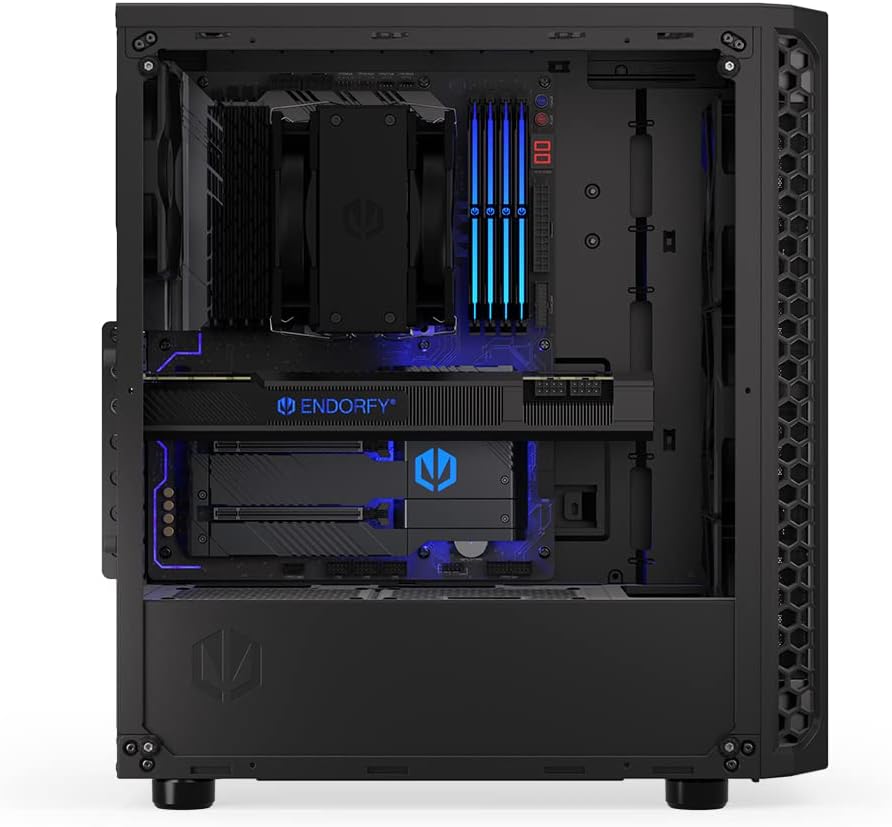
Figi 4.1: Entèn view illustrating the ample space for installing a long graphics processing unit (GPU).
4.7. Fan and Cooling Installation
The Signum 300 Air comes with four pre-installed Stratus 120 PWM fans. Additional fans or liquid cooling radiators can be installed.
- Devan: Supports up to 3x 120mm or 2x 140mm fans, or a 240/360mm radiator.
- Top: Supports up to 2x 120mm or 2x 140mm fans, or a 240mm radiator.
- Dèyè: Supports 1x 120mm fan (one pre-installed).

Figi 4.2: Illustration of the pre-installed fans and potential locations for additional cooling components within the case.
4.8. Jesyon kab
Utilize the cutouts and tie-down points behind the motherboard tray to route and secure cables. This improves airflow and aesthetics.

Figi 4.3: View from the rear side, demonstrating the space and routing options for effective cable management.
5. Operasyon
5.1. Limen
Once all components are installed and cables are connected, press the power button on the top I/O panel to start your system.
5.2. Konsiderasyon sou koule lè a
The Signum 300 Air is designed for optimal airflow. Ensure that the front mesh panel is unobstructed to allow for maximum air intake. The pre-installed PWM fans adjust their speed based on system temperature, providing a balance between cooling performance and noise levels.

Figi 5.1: Visual representation of the optimal airflow design, illustrating how air moves through the case for efficient cooling.
6. Antretyen
6.1. Netwayaj Filtè Pousyè
The Signum 300 Air features removable magnetic dust filters on the top, front, and bottom. Regular cleaning is crucial for maintaining optimal airflow and preventing dust buildup inside your PC.
- Gently pull off the magnetic dust filters.
- Clean the filters using a soft brush, vacuum cleaner, or by rinsing them with water. Ensure they are completely dry before reattaching.
- Reattach the filters to their respective positions.
6.2. Netwayaj jeneral
- Sèvi ak yon mou, damp cloth to wipe down the exterior surfaces of the case. Avoid harsh chemicals.
- For the tempered glass panel, use a glass cleaner and a microfiber cloth to avoid streaks.
- Periodically use compressed air to clear dust from internal components and fan blades.
NAN. Depanaj
7.1. No Power After Assembly
- Check all power connections: PSU to wall outlet, PSU to motherboard (24-pin and CPU 8-pin), and GPU power cables.
- Ensure the front panel power switch cable is correctly connected to the motherboard's front panel header.
- Verify the PSU switch is in the 'ON' position.
7.2. Bri twòp
- Identify the source of the noise (fans, HDD, etc.).
- Ensure all fans are securely mounted and free from cable obstructions.
- Check if fan speeds are set appropriately in your motherboard's BIOS/UEFI or operating system software.
7.3. Overheating Components
- Verify that all case fans are spinning and oriented correctly for optimal airflow (intake at front, exhaust at rear/top).
- Clean any clogged dust filters.
- Ensure CPU cooler and GPU fans are functioning correctly.
8. Espesifikasyon
| Karakteristik | Spesifikasyon |
|---|---|
| Non modèl | Signum 300 Air |
| Nimewo Modèl Atik | EY2A005 |
| Mak | ENDORFY |
| Kalite Ka | Mid Tower |
| Mèr konpatibilite | Mini ATX, ATX |
| Materyèl | Metal, Vè apeze |
| Koulè | Nwa |
| Dimansyon pwodwi (LxWxH) | 8.5 x 17.6 x 16.26 pous |
| Pwa atik | 11.55 liv |
| GPU Clearance | Jiska 325mm |
| CPU Cooler Wotè | Jiska 161mm |
| Sipò Radyatè (Devan) | 240mm / 360mm |
| Sipò Radyatè (Anlè) | 240mm |
| Fanatik pre-enstale | 4x Stratus 120 PWM Fans |
| Gwosè fanatik | 120 Milimèt |
| Espas pou kondwi (3.5") | 2 |
| Espas pou kondwi (2.5") | Jiska 4 |
| Pò USB 3.0 | 2 |
9. Garanti ak sipò
9.1. Enfòmasyon sou Garanti
ENDORFY products are manufactured to high-quality standards. For specific warranty terms and conditions, please refer to the warranty card included with your product or visit the official ENDORFY websit la. Kenbe prèv acha ou pou reklamasyon garanti.
9.2. Sipò teknik
If you encounter any issues or have questions regarding your ENDORFY Signum 300 Air PC case, please contact ENDORFY customer support through their official website. Provide your product model number (EY2A005) and a detailed description of the issue for efficient assistance.


