1. Entwodiksyon
This manual provides essential information for the safe and correct operation of your Vonyx VMM100 4-Channel DJ Mixer. Please read this manual thoroughly before using the device to ensure optimal performance and to prevent damage. Keep this manual for future reference.
2. Enstriksyon Sekirite
- Asire ekipman pou pouvwa a voltage matches the requirements specified for the device.
- Do not expose the device to rain or moisture to avoid electric shock.
- Evite mete aparèy la toupre sous chalè oswa nan limyè solèy la dirèk.
- Pa ouvri c laasing; pa gen pyès ki ka sèvi ak men itilizatè a anndan an. Konfye tout antretyen bay pèsonèl kalifye.
- Dekonekte adaptè kouran an pandan loraj oswa lè w pa itilize li pou yon bon bout tan.
- Kenbe aparèy la lwen timoun yo.
3. Pwodwi Features
- Compact 4-channel analog mixer.
- Koneksyon Bluetooth pou difizyon odyo san fil.
- Integrated USB MP3 player with digital display.
- Adjustable delay effect with dedicated volume control.
- Effect send/return on channels 1 and 2.
- High and low tone controls for each channel.
- USB power supply (5V) for mobile use, compatible with power banks.
- Channels 1 and 2 feature +48V phantom power for condenser microphones.
- LED VU meter and peak indicators for signal monitoring.
- Includes USB power adapter and USB cable.
4. Pake kontni
Tanpri verifye ke tout atik yo prezan lè w ap debale l:
- Vonyx VMM100 4-Channel DJ Mixer
- USB pouvwa adaptè
- USB kab
- Manyèl Itilizatè (dokiman sa a)
5. Kontwòl ak Fonksyon
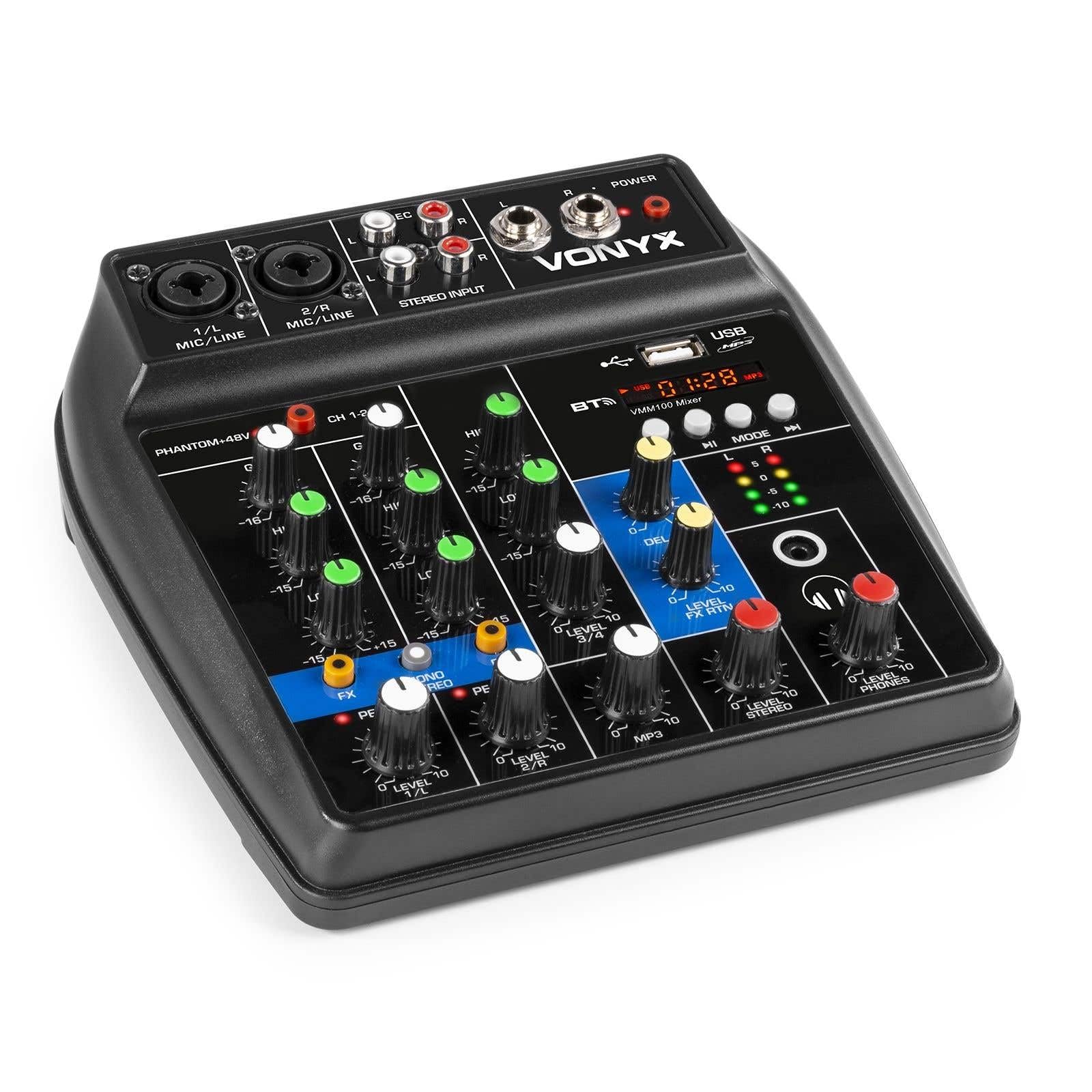
Figi 1: An jeneral view of the Vonyx VMM100 mixer, highlighting the layout of all controls, inputs, and outputs.

Figi 2: Close-up of the mixer's control panel, showing individual channel controls, EQ, gain, and effect knobs.
5.1 Chanèl Antre (1 & 2)
- Combi XLR / 6.3mm Jack: Connect microphones (XLR) or line-level instruments (6.3mm jack).
- Phantom +48V Switch: Activates phantom power for condenser microphones on channels 1 and 2.
- Bouton GAIN: Adjusts the input sensitivity for the connected device.
- Bouton HIGH: Adjusts the high-frequency (treble) level for the channel.
- Bouton BA: Adjusts the low-frequency (bass) level for the channel.
- Bouton FX: Controls the amount of delay effect applied to the channel.
- PEAK LED: Illuminates when the input signal is too high, indicating potential clipping. Adjust GAIN to prevent this.
- Bouton NIVO: Ajiste nivo pwodiksyon jeneral kanal la.
5.2 Stereo Input (Channel 3)
- Antre RCA (G/D): Connect external stereo audio sources such as CD players or other line-level devices.
- Bouton NIVO: Adjusts the output level of the stereo input.
5.3 MP3/Bluetooth Channel (Channel 4)

Figi 3: USB port with a USB drive, demonstrating media playback capability.

Figi 4: Bluetooth and USB player section, showing the display and control buttons.
- Pò USB: Insert a USB flash drive for MP3 playback.
- Ekspozisyon: Shows track information, playback time, and mode.
- Control Buttons (Play/Pause, Skip, Mode): Navigate tracks and switch between USB and Bluetooth modes.
- Bluetooth (BT) Indicator: Li limen lè Bluetooth la aktif epi li konekte.
- Bouton NIVO: Adjusts the output level of the MP3/Bluetooth channel.
5.4 Seksyon Mèt la
- Bouton RETA: Adjusts the overall intensity of the delay effect.
- LEVEL FX RTN Knob: Controls the return level of the delay effect.
- LEVEL STEREO Knob: Master volume control for the main stereo output.
- LEVEL PHONES Knob: Ajiste volim pou pwodiksyon kas ekoutè a.
- VU Meter (LED): Displays the main output level.
- Main Output (6.3mm Jack L/R): Konekte ak amplifiers oswa oratè ki mache ak pisans.
- Record Output (RCA L/R): Connects to recording devices.
- Headphone Output (6.3mm Jack): Connects stereo headphones.
- Pouvwa ki ap dirije: Indicates when the mixer is powered on.
5.5 Pouvwa Antre

Figi 5: Side view of the mixer, illustrating the 5V DC USB power input port.
- 5V DC USB Input: Connect the provided USB power adapter or a compatible USB power source (e.g., power bank) to power the mixer.
6. Enstalasyon
6.1 Koneksyon pouvwa
- Connect the supplied USB cable to the 5V DC USB input on the mixer.
- Connect the other end of the USB cable to the provided USB power adapter.
- Plug the USB power adapter into a suitable wall outlet. The POWER LED on the mixer will illuminate.
6.2 Konekte Sous Odyo yo
- Microphones/Line Instruments: Connect microphones via XLR or line-level instruments via 6.3mm jack to channels 1 and 2. If using condenser microphones, activate the +48V phantom power switch.
- Stereo Line Devices: Connect devices like CD players to the RCA inputs of channel 3.
- Kondwi USB: Mete yon kondwi flash USB ki gen MP3 files into the USB port on channel 4.
6.3 Konekte Sòti yo
- Main Sòti: Connect the 6.3mm jack main outputs (L/R) to your amplifier, powered speakers, or PA system.
- kas ekoutè: Connect your headphones to the 6.3mm headphone jack.
- Aparèy Anrejistreman: Connect the RCA record outputs (L/R) to an external recording device if desired.
7. Operasyon Enstriksyon
7.1 Melanj debaz
- Ensure all LEVEL and GAIN knobs are set to their minimum positions before powering on.
- Power on the mixer and any connected audio equipment.
- Gradually increase the GAIN knob for each active input channel until the PEAK LED flashes only occasionally during the loudest parts of the signal.
- Adjust the HIGH and LOW EQ knobs for each channel to shape the tone as desired.
- Use the individual LEVEL knobs to balance the volume of each channel.
- Adjust the main STEREO LEVEL knob to control the overall output volume. Monitor the VU meter to avoid clipping.
- Adjust the PHONES LEVEL knob for comfortable headphone monitoring.
7.2 Operasyon Bluetooth
- Press the MODE button on the MP3/Bluetooth channel until the display shows "BT" or the Bluetooth indicator flashes.
- On your smartphone, tablet, or PC, search for Bluetooth devices and select "Vonyx VMM100".
- Once paired, the Bluetooth indicator will glow steadily. You can now stream audio wirelessly to the mixer.
- Use the playback controls on the mixer or your device to manage audio.
7.3 USB MP3 Lekti
- Mete yon kondwi flash USB ki gen MP3 files nan pò USB a.
- Press the MODE button on the MP3/Bluetooth channel until the display shows track information.
- Use the playback controls (Play/Pause, Skip) to navigate and play tracks.
7.4 Itilizasyon Efè yo
- Turn the FX knob on channels 1 and 2 to send a portion of that channel's signal to the internal delay effect.
- Adjust the main DELAY knob to control the overall intensity and characteristics of the delay.
- Use the LEVEL FX RTN knob to control how much of the processed effect signal is mixed back into the main output.
8. Anrejistreman
The VMM100 mixer allows for easy recording of your mix. Connect the RCA record outputs (L/R) to the input of a suitable recording device (e.g., computer audio interface, dedicated recorder). Ensure your recording software or device is configured to receive audio from the connected inputs. The signal sent to the record output is a stereo mix of all active channels, post-fader.
9. Antretyen
- Netwayaj: Sèvi ak yon twal mou epi sèk pou netwaye deyò mixer la. Pa sèvi ak pwodui netwayaj abrazif oswa solvan.
- Depo: Sere mixer a nan yon kote ki fre epi sèk, lwen limyè solèy dirèk ak tanperati ekstrèm.
- Manyen: Evite lage mixer a oswa soumèt li a gwo enpak.
NAN. Depanaj
| Pwoblèm | Kòz posib | Solisyon |
|---|---|---|
| Pa gen pouvwa | Adaptè kouran an pa konekte oswa li gen pwoblèm. | Check power connections. Try a different USB port or adapter. |
| Pa gen pwodiksyon son | Incorrect cable connections; volume knobs too low; incorrect input selection. | Verify all audio cables are securely connected. Increase channel LEVEL and STEREO LEVEL knobs. Ensure correct input mode (e.g., USB/BT). |
| Son defòme | Input GAIN too high; output level too high. | Reduce GAIN for the affected channel until the PEAK LED stops flashing excessively. Lower STEREO LEVEL. |
| Bluetooth pa asosye | Mixer not in Bluetooth mode; device too far; previously paired device connected. | Ensure mixer is in BT mode. Move device closer. Disconnect from other Bluetooth devices. |
| Lektur USB pa travay | Kle USB a pa fòma byen; li pa sipòte file type; mixer not in USB mode. | Asire w ke kle USB a gen fòma FAT32 epi li gen MP3 ladan l. files. Press MODE to select USB. |
11. Espesifikasyon
- Antre:
- Channels 1 & 2: Combi XLR / 6.3mm Jack (Line or Microphone)
- Channel 3: RCA (Stereo)
- Channel 4: Bluetooth or USB MP3 Player
- Sòti:
- Main: 6.3mm Jack (Stereo)
- Record: RCA (Stereo)
- Headphone: 6.3mm Jack
- Gamme frekans: 20 Hz - 20,000 Hz
- Revolve: 2-band (High, Low) per channel
- Phantom pouvwa: +48V (Channels 1 & 2)
- Koneksyon Voltage: 5V DC (via USB)
- Dimansyon (L x W x H): 18 x 19.5 x 5.8 cm (7.09 x 7.68 x 2.28 pous)
- Pwa: 0.5 kg (1.1 liv)
- Materyèl: Nylon
12. Garanti ak sipò
Vonyx products are designed and manufactured to the highest quality standards. In the unlikely event of a problem with your product, please contact your retailer for warranty service. Please retain your proof of purchase. For technical support or further inquiries, refer to the official Vonyx websit oswa kontakte depatman sèvis kliyan yo.


