1. Entwodiksyon ak souview
The SINOTIMER TM610 is a versatile programmable digital timer switch designed for precise control of various electrical appliances and systems. It allows for automated power ON/OFF cycles based on pre-set weekly or daily schedules, enhancing convenience and energy efficiency. Its compact 18mm DIN rail design makes it suitable for integration into standard electrical panels.
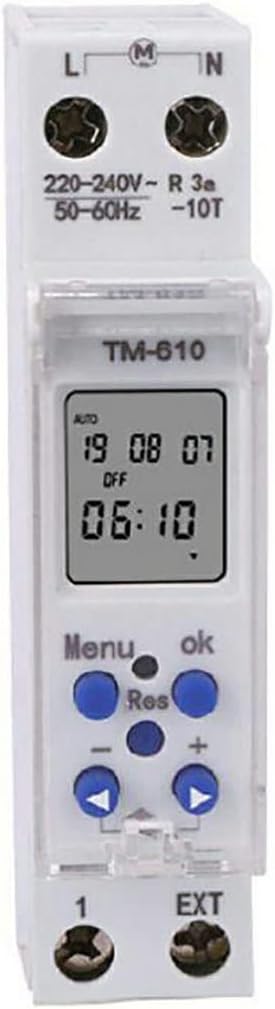
Figi 1: Devan view of the TM610 Digital Timer Switch, displaying its LCD screen and control interface.
2. Karakteristik kle
- Aplikasyon lajè: Ideal for controlling street lights, neon signs, lamps, water heaters, air conditioners, advertising boards, electric cookers, boosters, sprayers, bottlers, pre-heaters, agricultural facilities, and broadcasting equipment.
- Pwoteksyon echèk pouvwa: Equipped with an internal replaceable 3V CR2032 battery to maintain settings during power outages.
- Konsomasyon pouvwa ki ba: Features a high-accuracy CMOS chip with strong anti-jamming capabilities, ensuring reliable and efficient operation. Certified by IEC 60367ECEC.
- External Trigger Control: Supports an external trigger switch (external pin) with a cable length of up to 100 meters for flexible control options.
- Pwogramasyon Fleksib: Offers advanced pre-setting up to a week in advance, with weekly and daily cyclic operation from one minute to 168 hours.
- Konsepsyon kontra enfòmèl ant: 18mm DIN rail mount for easy installation in electrical distribution boxes.
3. Enstalasyon ak Enstalasyon
Installation should be performed by a qualified electrician to ensure safety and proper functionality. The TM610 is designed for DIN rail mounting.
3.1 Dyagram fil elektrik
Refer to the markings on the device for correct wiring. Typically, 'L' is for Live input, 'N' for Neutral input, and '1' and '2' (or similar) for the load output terminals. The 'EXT' terminals are for the external trigger switch.

Figure 2: Terminal connections on the TM610 for power input, load output, and external trigger.
3.2 Premye pouvwa-up
Once wired, apply power. The LCD display will illuminate. If the display is blank, check the power supply and wiring. The internal battery ensures the clock and programmed settings are retained even if main power is disconnected.

Figure 3: The TM610 integrated into an electrical panel, demonstrating its application.
4. Operasyon Enstriksyon
The TM610 features an intuitive interface with an LCD display and several buttons for programming.
4.1 Mete Lè Aktyèl la
- Peze a MENI bouton pou antre nan meni prensipal la.
- Navigate to the 'Time Setting' option using the arrow buttons.
- Peze OK pou konfime.
- Adjust the hour, minute, and day of the week using the arrow buttons and confirm each with OK.
4.2 Programming ON/OFF Schedules
The timer supports multiple ON/OFF programs. Each program can be set for specific days of the week or daily cycles.
- From the main menu, select 'Program Setting'.
- Choose an empty program slot (e.g., '1 ON').
- Set the desired ON time (hour and minute) and the days of the week for this program to be active.
- Repeat for the corresponding OFF time (e.g., '1 OFF').
- Continue for additional programs as needed.
4.3 Manyèl Override
The device typically has a manual override function (often labeled 'MANUAL' or similar) to temporarily switch the output ON or OFF, irrespective of the programmed schedule. Consult the on-screen prompts or a dedicated button for this feature.
5. Antretyen
The SINOTIMER TM610 is designed for low maintenance. Regular checks include:
- Netwayaj: Wipe the exterior with a dry, soft cloth. Do not use abrasive cleaners or solvents.
- Ranplasman batri: The internal CR2032 battery (Figure 4) should be replaced if the display shows signs of dimming or if settings are lost frequently during brief power interruptions. Ensure power is disconnected before replacing the battery.
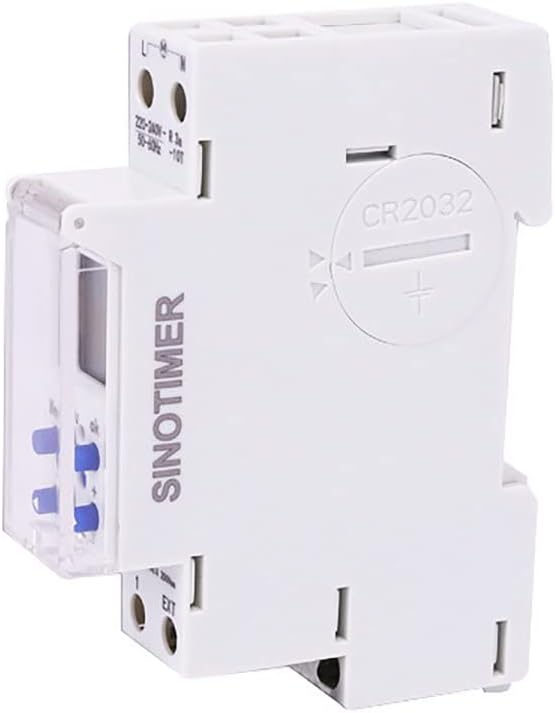
Figi 4: Dèyè view of the TM610, highlighting the CR2032 battery compartment.
NAN. Depanaj
| Pwoblèm | Kòz posib | Solisyon |
|---|---|---|
| Ekspozisyon an vid | No power supply; faulty wiring; dead internal battery. | Check main power supply. Verify wiring connections. Replace CR2032 battery. |
| Programmed events not executing | Incorrect time setting; program not activated; manual override engaged. | Verify current time and day. Ensure programs are enabled. Check manual override status. |
| Settings lost after power outage | Internal battery is weak or dead. | Replace the CR2032 internal battery. |
7. Espesifikasyon
| Paramèt | Valè |
|---|---|
| Mak | SINOTIMER |
| Modèl | TM610 |
| Kontakte chaj | 3600W |
| Chanje Kouran | 16A |
| Chanje Voltage | 220V AC |
| Rated aktyèl | 16A |
| Coil Power Source | 220V AC |
| Enstalasyon | 18mm DIN Rail mòn |
| Entèn batri | 3V CR2032 (replaceable) |
| Entèval minimòm | 1 minit |
| Maximum Interval | 168 èdtan |
8. Avètisman Sekirite
To ensure safe operation and prevent damage, please observe the following warnings:
- Do not place the device near high temperatures.
- Pa jete aparèy la nan dife.
- Pa plonje aparèy la nan dlo.
- Se sèlman pèsonèl kalifye ki ta dwe fè enstalasyon ak antretyen.
9. Garanti ak sipò
Information regarding product warranty and customer support was not provided in the available product data. Please refer to the product packaging or contact the manufacturer directly for details on warranty coverage and support services.


