1. Entwodiksyon
The Accsoon SeeMo is a compact and versatile HDMI to USB-C video transmitter adapter designed to transform your iOS device (iPhone or iPad) into a high-grade monitor for your camera or other HDMI sources. It enables real-time monitoring, recording, and streaming, enhancing your filmmaking workflow with portability and advanced features.

Image 1.1: Accsoon SeeMo adapter connected to a camera, with an iPhone mounted for monitoring.
Karakteristik kle:
- High-Grade Monitoring: Connects your camera or HD HDMI source to your iPhone or iPad for professional monitoring.
- Konsepsyon pòtab: Compact and lightweight, ideal for on-the-go filmmakers using handheld cameras, gimbals, or studio setups.
- iOS konpatibilite: Features a built-in clamp for recent iPhones and connects via an included right-angle Lightning to USB-C cable.
- Flexible Power: Powered by rechargeable Sony NP-F type batteries (NP-F550/F750/F970), offering up to 8 hours of operation with an NP-F 970 battery.
- Accessory Power Output: A useful 5V 2A USB-C output port allows powering of external devices like microphones or small on-camera lights.
- iPad Integration: Can connect to a recent iPad or iPad Pro using an Accsoon PowerCage (sold separately) for a larger director's monitor setup.
2. Ki sa ki nan bwat la
Upon unboxing your Accsoon SeeMo, please ensure all the following items are present:

Image 2.1: Accsoon SeeMo package contents.
- Accsoon SeeMo Unit x1
- Accsoon Cold Shoe Adapter x1
- USB-C to Lightning Cable x1
- USB-C pou USB-C kab x1
Note: Sony NP-F type batteries are not included and must be purchased separately.
3. Enstalasyon
3.1 Mounting the SeeMo
- Attach the Accsoon Cold Shoe Adapter to your camera's hot shoe or a compatible mounting point on your camera rig. Secure it firmly.
- Slide the Accsoon SeeMo unit onto the cold shoe adapter until it clicks into place.
- Adjust the angle of the SeeMo unit as needed using the cold shoe adapter's articulation.
- Extend the built-in clamp on the SeeMo unit and carefully insert your iPhone (5.5–6.7 inches wide) into the clampAsire w ke li byen kenbe.
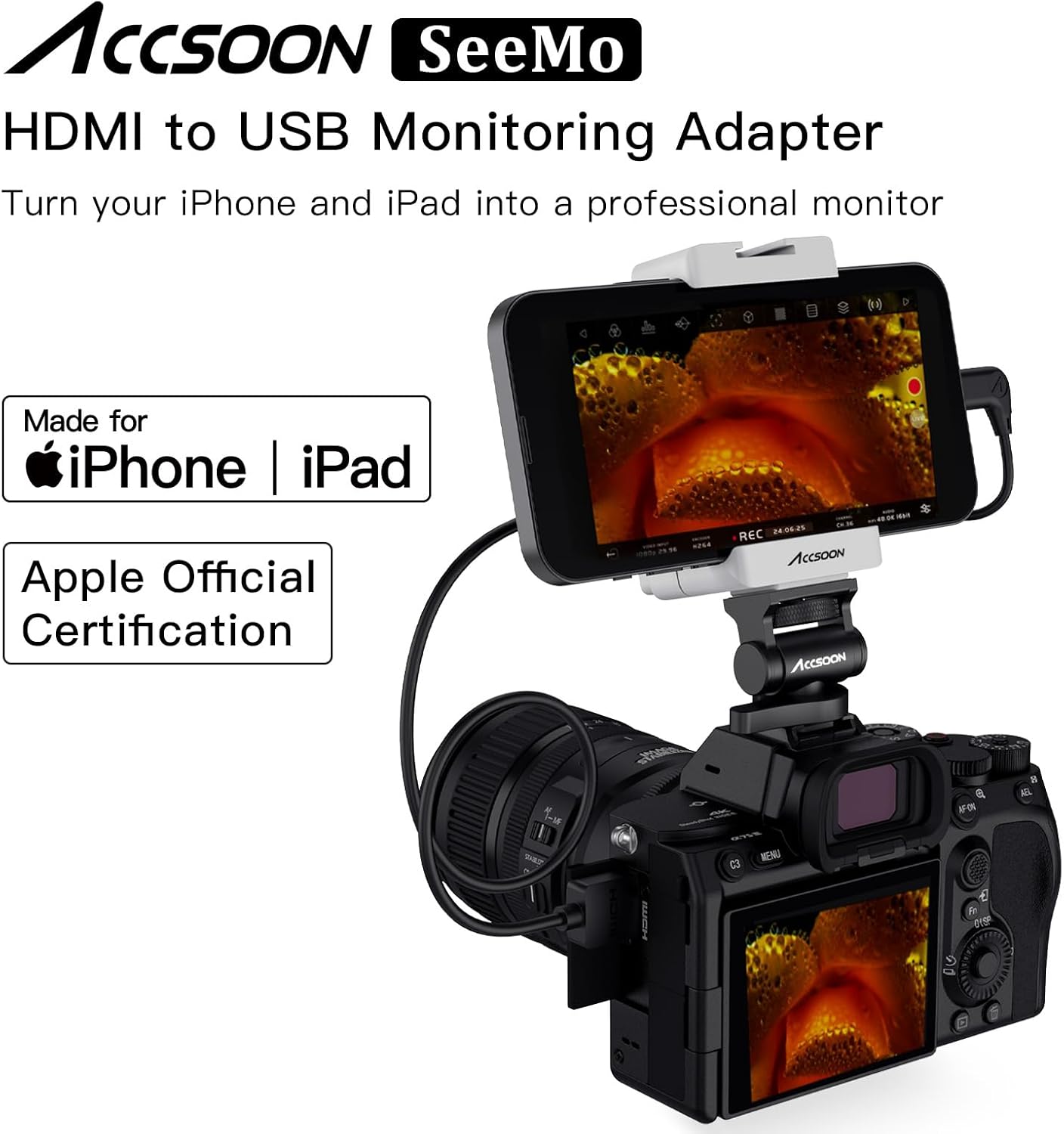
Image 3.1: Accsoon SeeMo mounted on a camera with an iPhone.
3.2 Powering the SeeMo
- Insert a fully charged Sony NP-F type battery (NP-F550/F750/F970) into the battery holder on the back of the SeeMo unit.
- Press the 'ON/OFF' button on the side of the SeeMo unit to power it on. The LED indicators will light up to show the battery level.
3.3 Connecting to Your Camera and iOS Device
- Connect your camera's HDMI output port to the HDMI-A input port on the Accsoon SeeMo using a compatible HDMI cable.
- Connect the USB-C output port on the Accsoon SeeMo to your iPhone's Lightning or USB-C port using the appropriate included cable (USB-C to Lightning or USB-C to USB-C).
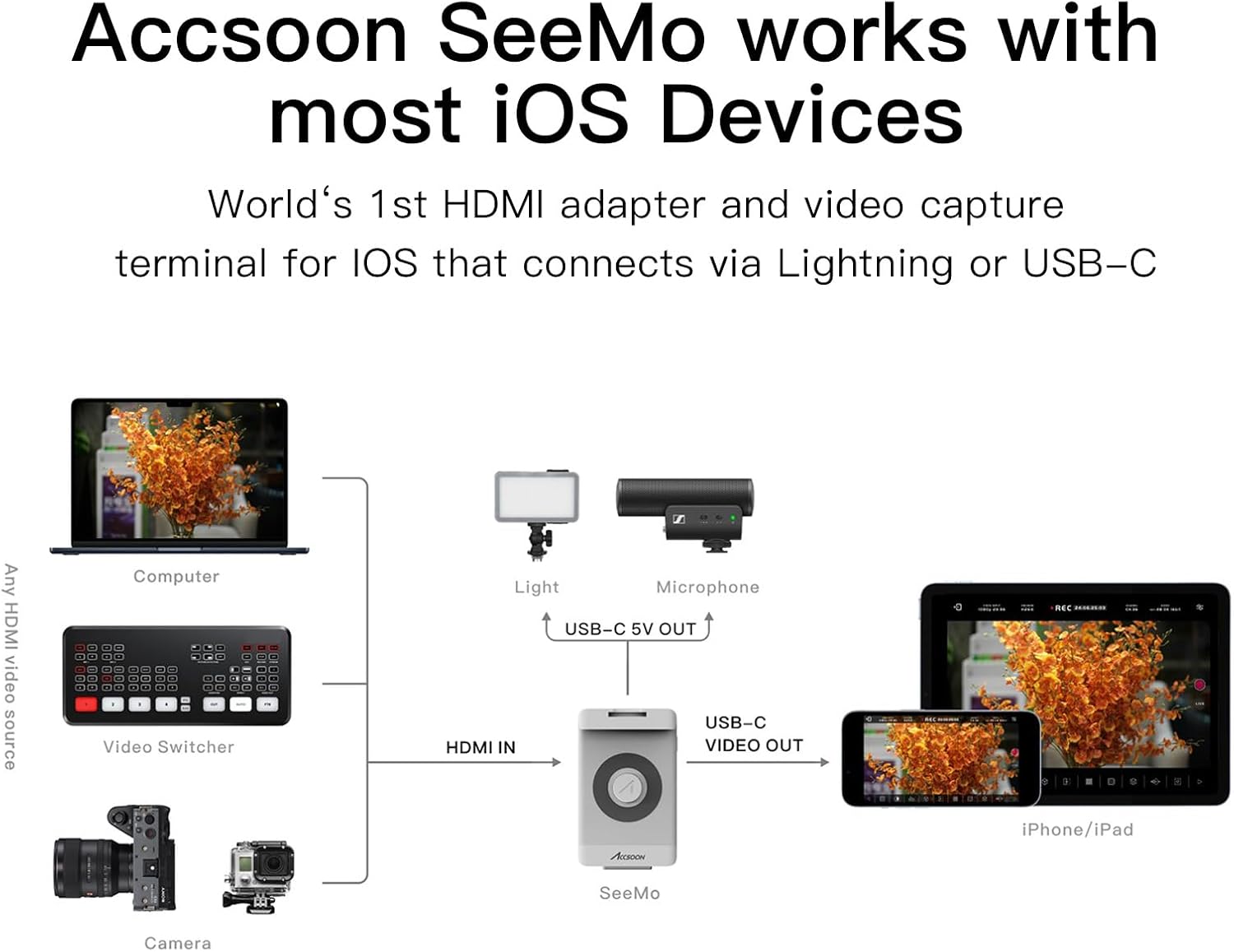
Image 3.2: Connection diagram for Accsoon SeeMo with various devices.
3.4 Enstalasyon App
The Accsoon SeeMo requires the Accsoon SEE app (iOS 12.0 or later) to function. Upon connecting the SeeMo to your iOS device, you may receive a prompt to download the app from the App Store. If not, search for 'Accsoon SEE' in the App Store and install it.
Video 3.1: Accsoon SeeMo 4K Guide & Tutorial - Installation. This video demonstrates the physical installation and connection process of the Accsoon SeeMo with a camera and iPhone.
4. Operasyon Enstriksyon
Once the Accsoon SEE app is launched and connected, your iOS device will display the live feed from your camera. The app provides a comprehensive interface for monitoring, recording, and streaming.

Image 4.1: Accsoon SEE app interface on an iPhone.
4.1 Karakteristik siveyans
The Accsoon SEE app offers a suite of professional monitoring tools:
- Asistans konsantre: Tools like focus peaking to ensure sharp focus.
- Exposure Tools: Waveforms, histograms, and false color for accurate exposure control.
- Framing Guides: Grids, aspect ratio guides, and safe areas.
- LUT yo: Apply custom Look Up Tables in real-time for creative previews.
- De-squeeze: For anamorphic lens monitoring.
- Glas / Flip: Adjust the image orientation as needed.
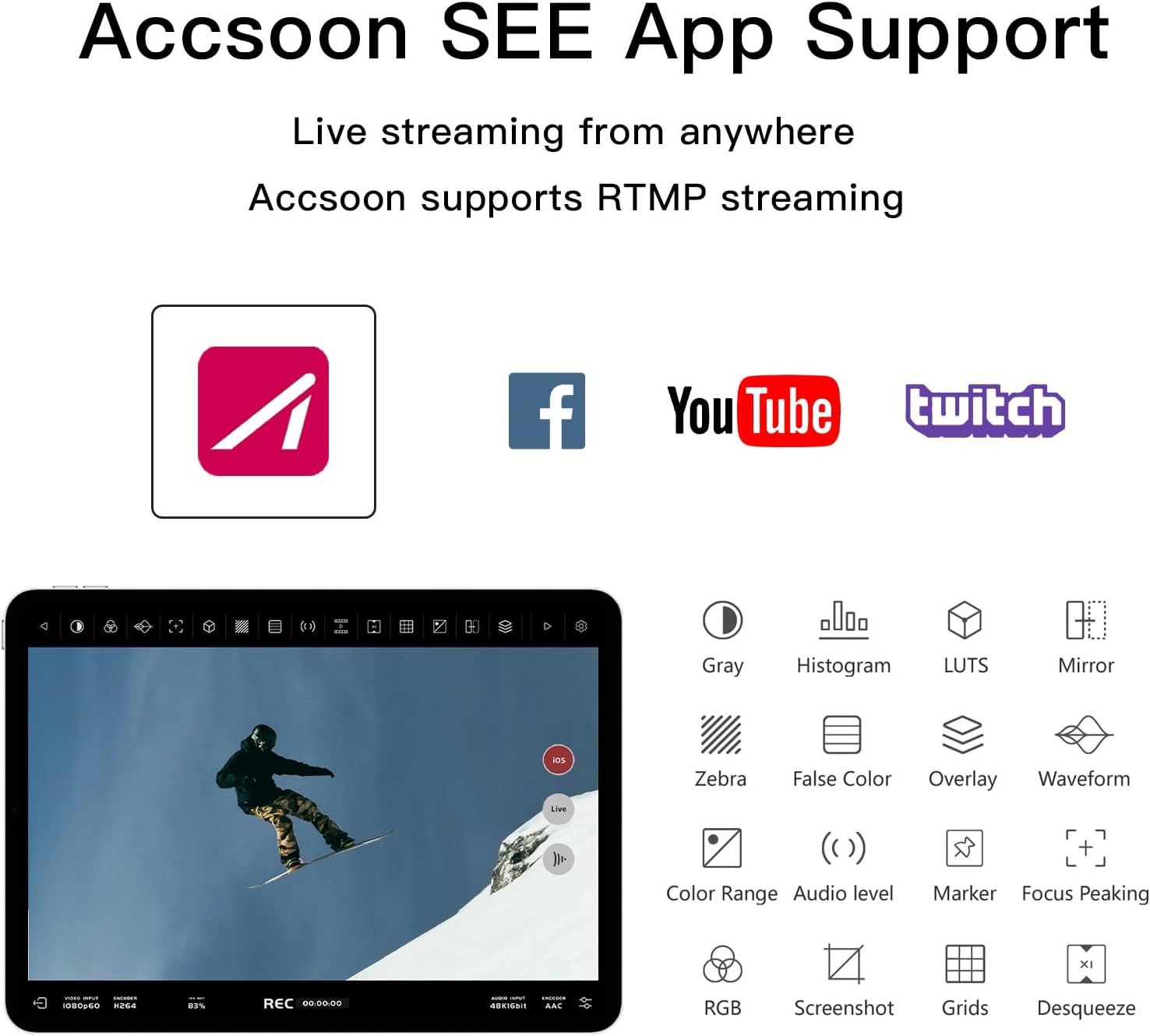
Image 4.2: Accsoon SEE app monitoring tools.
4.2 Anrejistreman
You can record the video feed directly to your iOS device. The app supports recording in 1080p at up to 60fps, providing a convenient backup or quick-share option for your footage.
4.3 Difizyon
The Accsoon SEE app supports RTMP/SRT streaming, allowing you to live stream your camera's feed to various platforms like YouTube, Facebook, and Twitch directly from your iOS device.

Image 4.3: Accsoon SEE app live streaming features.
Video 4.1: What is the Accsoon SeeMo 4K. This video provides an overview of the Accsoon SeeMo's capabilities for monitoring, recording, and streaming.
Video 4.2: Accsoon SeeMo 4K HDMI Transmission Video Capture Terminal for iPhone and for iPad. This video highlights the features and benefits of using the SeeMo for video capture and monitoring.
Video 4.3: Accsoon SeeMo HDMI to USB C Video Capture Adapter. This video demonstrates the adapter's functionality and ease of use.
5. Antretyen
5.1 Mizajou Firmware
Accsoon regularly releases firmware updates to improve performance and add new features. To update the firmware:
- Ensure your SeeMo unit is fully charged (battery level above 50%).
- Connect your SeeMo to your iOS device and launch the Accsoon SEE app.
- Navigate to the 'Firmware' section within the app's menu.
- Follow the on-screen instructions to download and install the latest firmware. Do not interrupt the update process, as this can cause permanent damage to the device.
Video 5.1: SeeMo Series Upgrade Tutorial. This video guides users through the firmware update process for the Accsoon SeeMo.
5.2 Swen Batri
- Always use genuine Sony NP-F type batteries or reputable third-party alternatives.
- Sere pil yo nan yon kote ki fre, sèk lè yo pa itilize yo.
- Avoid fully discharging batteries to prolong their lifespan.
NAN. Depanaj
- Pa gen siyal videyo:
- Asire w tout kab HDMI ak USB-C yo byen konekte.
- Verify that your camera's HDMI output is active and configured correctly.
- Check if the Accsoon SeeMo unit is powered on and has sufficient battery.
- Confirm that the Accsoon SEE app is open and running on your iOS device.
- App Not Recognizing SeeMo:
- Restart the Accsoon SEE app and reconnect the SeeMo.
- Ensure your iOS device is running iOS 12.0 or later.
- Try a different USB-C to Lightning/USB-C cable.
- Kout lavi batri:
- Use higher capacity NP-F batteries (e.g., NP-F970).
- Ensure external accessories are not drawing excessive power from the 5V USB-C output.
7. Espesifikasyon

Image 7.1: Accsoon SeeMo physical features and specifications.
| Karakteristik | Spesifikasyon |
|---|---|
| Dimansyon pwodwi | 4.13 x 2.7 x 1.18 pous |
| Pwa atik | 11.3 ons |
| Nimewo Modèl | SEEMO |
| Aparèy konpatib | Devices with HDMI output |
| Kalite Connector | USB Kalite C |
| Koulè | Blan |
| Fòma Antre Videyo | 1080p 60/59.94/50/30/29.97/25/24/23.98fps, 720p 60/59.94/50fps |
| Fòma Sòti Videyo | 1080p 60/50/30/25/24fps 720p |
| Port Antre Videyo | HDMI-A |
| Videyo Sòti Port | USB-C |
| Adjustable Width (Phone Clamp) | 65mm-90mm |
| Size Compatibility (Phone Clamp) | 5.5-6.7 pous |
| Konpatibilite batri | NP-F550/F750/F970 |
| Port chaje | USB-C 5V/1A Out |
| Konsomasyon pouvwa | 2.0 Watt |
| iOS vèsyon | iOS 12.0 oswa pita |
8. Garanti ak sipò
For warranty information and technical support, please refer to the official Accsoon websit la oubyen kontakte distribitè lokal ou a. Kenbe prèv acha ou pou reklamasyon garanti.


