1. Entwodiksyon
This manual provides essential information for setting up, operating, and maintaining your realme C30 smartphone. Please read it carefully to ensure optimal performance and longevity of your device.

Image: realme C30 smartphone in Lake Blue, showcasing its rear design and camera.
2. Ki sa ki nan bwat la
Asire w tout atik yo prezan nan pakè a:
- realme C30 Smartphone
- Adaptè
- USB kab
- SIM Plato Ejector
- Chajè machin rapid
3. Aparèy souview
Karakteristik Fizik
- Dimansyon: 1.97 x 3.31 x 6.65 pous
- Pwa atik: 6 ons
- Koulè: Lak Ble
Karakteristik kle
- Ekspozisyon: 6.5" HD+ Fullscreen with 88.7% Screen-to-body Ratio, 120Hz Touch Sampling Rate, 16.7M Screen Colors
- Processeur: Unisoc T612 Octa-core, 12nm, up to 1.82GHz, ARM Mali-G57 GPU
- RAM: 2 GB (Remak: Gen kèk varyant ki ka gen 4GB RAM)
- Depo: 32 GB
- Kamera dèyè: 8MP AI Camera with f/2.0 aperture, 4P lens
- Kamera devan: 5MP
- Batri: 5000mAh (Typical) Massive Battery, 4890mAh (Minimum)
- Sistèm operasyon: realme UI R Edition Based on Android 11
Layout aparèy
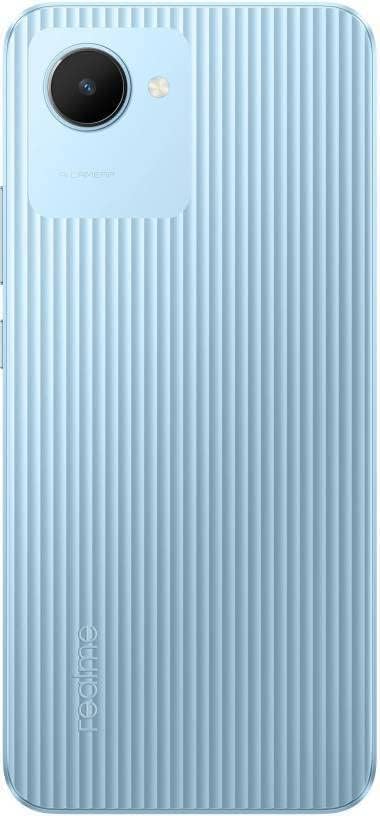
Imaj: Dèyè view of the realme C30, highlighting the single camera and textured back panel.

Image: Top and bottom edges of the realme C30, showing the 3.5mm headset jack, Micro USB port, and speaker grille.

Imaj: Bò kote views of the realme C30, illustrating the power button, volume rockers, and SIM tray slot.
4. Enstalasyon
4.1. Enstalasyon Kat SIM ak Micro SD
- Locate the SIM tray slot on the side of your device.
- Mete zouti pou retire plato SIM lan nan ti twou ki akote plato a.
- Pouse dousman jiskaske plato a soti.
- Place your Nano SIM cards (supports Dual SIM) and Micro SD card into the designated slots on the tray.
- Ak anpil atansyon reinserte plato a nan aparèy la.
4.2. Premye Limen ak Konfigirasyon
- Peze epi kenbe bouton Power la jiskaske logo realme a parèt.
- Swiv enstriksyon yo sou ekran an pou chwazi lang ak rejyon ou prefere a.
- Konekte ak yon rezo Wi-Fi pou kontinye ak konfigirasyon an epi telechaje mizajou nesesè yo.
- Review epi aksepte Akò Lisans Itilizatè Final la ak Règleman sou enfòmasyon prive a.
- Konekte avèk kont Google ou a oubyen kreye yon nouvo.
- Set up your preferred screen lock method (PIN, Password, Pattern, Face recognition, or Fingerprints).
- Choose your display mode (Light or Dark).
- Complete the remaining setup steps to access your device's home screen.
5. Opere aparèy ou an
5.1. Navigasyon debaz
Navigate your device using intuitive touch gestures. Swipe up, down, left, or right to move between screens and menus. Tap to select items, and long-press for additional options.
5.2. Jesyon batri
Your realme C30 is equipped with a 5000mAh massive battery for extended usage. To optimize battery life:
- Pèmèt Ultra Saving Mode from the Quick Settings panel for prolonged standby time at low power levels.
- Ajiste klète ekran an ak paramèt tan ekran an.
- Close background applications when not in use.
5.3. Itilizasyon kamera
Launch the Camera app to capture photos and videos. The 8MP AI rear camera and 5MP front camera offer various modes and features.
- Tape bouton deklanchè a pou pran yon foto.
- Chanje ant mòd foto ak videyo.
- Utilize AI features for enhanced image quality.
5.4. Koneksyon
Aparèy ou an sipòte plizyè opsyon koneksyon:
- 4G LTE: Enjoy fast mobile data speeds. (Note: Not for USA Market. Supports Latin Europe bands.)
- Wi-Fi: Konekte sou rezo san fil pou jwenn aksè a entènèt.
- Bluetooth: Pair with compatible accessories like headphones or speakers.
- GPS/GLONASS/GALILEO: For accurate location services.
- Mikwo USB: Pou chaje ak transfè done.
- Jack Headset 3.5mm: Pou akseswa odyo filaire.
6. Antretyen
6.1. Chaje
Use the provided 10W charging adapter and USB cable to charge your device. Connect the Micro USB end to your phone and the adapter to a power outlet.
6.2. Mizajou lojisyèl
Keep your device's software up to date to ensure optimal performance and security. Go to Settings > About phone > realme UI version pou tcheke epi enstale mizajou yo.
6.3. Netwayaj
Gently wipe your device with a soft, lint-free cloth. Avoid using harsh chemicals or abrasive materials that could damage the screen or body.
NAN. Depanaj
7.1. Aparèy la pa limen
- Ensure the battery is charged. Connect the device to the charger for at least 15 minutes before attempting to power on.
- Peze epi kenbe bouton Pouvwa a pandan 10-15 segonn pou fòse rekòmanse.
7.2. Apps Freezing or Crashing
- Fèmen aplikasyon ki gen pwoblèm nan epi ouvri li ankò.
- Efase kach ak done aplikasyon an atravè Anviwònman > Aplikasyon > [Non Aplikasyon an] > Depo.
- Ensure your device's software and all apps are updated to their latest versions.
7.3. Batri a pa dire lontan
- Diminye klète ekran an epi fikse yon tan pou ekran an pa fonksyone byen.
- Dezaktive Wi-Fi, Bluetooth, ak GPS lè w pa ap itilize yo.
- Identify and close power-consuming background apps.
- Enable Ultra Saving Mode for critical situations.
8. Espesifikasyon
| Karakteristik | Spesifikasyon |
|---|---|
| Non modèl | RMX3511 |
| Dimansyon pwodwi | 1.97 x 3.31 x 6.65 pous |
| Pwa atik | 6 ons |
| Sistèm operasyon | realme UI R Edition Based on Android 11 |
| CPU vitès | 1820 MHz (1.82GHz) |
| RAM | 2 GB (Note: Some variants may have 4GB) |
| Kapasite Depo memwa | 32 GB |
| Gwosè ekran | 6.5 pous |
| Rezolisyon | 1280 x 720 (HD+) |
| Kapasite batri | 5000 MiliampOrè (mAh) |
| Tan pou pale nan telefòn | 45.3 èdtan |
| Kamera dèyè | 8MP AI Kamera |
| Kamera devan | 5MP |
| Karakteristik espesyal | 4K Video Recording, Dual SIM, Fast Charging Support |
| Koneksyon teknoloji | USB, Cellular (LTE) |
| Audio Jack | 3.5 mm |
9. Garanti ak sipò
For warranty information and customer support, please refer to the documentation included with your product or visit the official realme websit. Ou ka vizite tou realme Store on Amazon pou plis detay sou pwodwi a ak resous sipò.


