Entwodiksyon
This manual provides detailed instructions for the proper use and maintenance of your Cellularline FINE Transparent TWS Wireless In-Ear Earbuds. Please read this manual thoroughly before using the product to ensure optimal performance and longevity.
The Cellularline FINE Transparent TWS Wireless In-Ear Earbuds feature a distinctive transparent design, showcasing the internal components of both the earbuds and their charging case. Designed for comfort and high-quality audio, these earbuds offer up to 3.5 hours of playtime per charge, extended to a total of 10 hours with the charging case. They include intuitive touch controls for managing calls and music, and an auto-pairing function for effortless connection. The Double Master function allows for independent use of either earbud.
Enfòmasyon sou Sekirite
- Pa ekspoze ekoutè yo oswa bwat chaje a nan tanperati, imidite, oswa likid ekstrèm.
- Avoid dropping, impacting, or disassembling the device. This may void the warranty.
- Kenbe lwen timoun ak bèt kay.
- Sèvi sèlman ak kab chaje ki vini ak li a oswa yon kab ekivalan sètifye.
- Koute nan yon volim modere pou evite domaj nan zòrèy ou.
- Pa sèvi ak ekoutè yo nan sitiyasyon kote li ka danjere si ou pa ka tande son anbyen yo (pa egzanp, lè w ap kondui, lè w ap monte bisiklèt, lè w ap mache nan trafik).
Kontni pake
Tanpri tcheke pake a pou atik sa yo:
- Cellularline FINE Transparent TWS Wireless In-Ear Earbuds (Left and Right)
- Ka chaje
- USB Chaje Kab
- Manyèl itilizatè
Pwodwi souview
The Cellularline FINE earbuds are designed for ease of use and a distinctive aesthetic. Below is an overview nan konpozan prensipal yo.
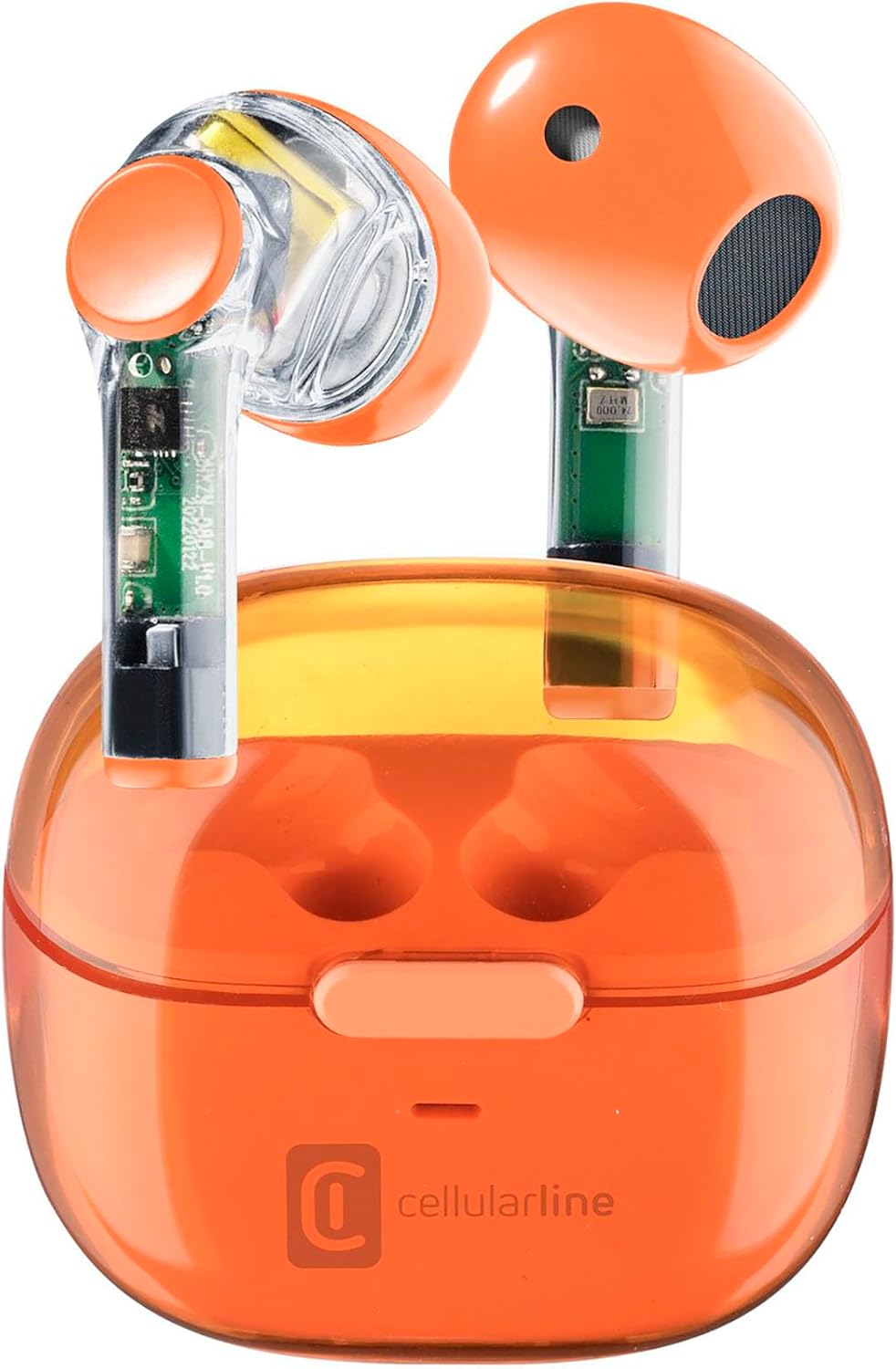
Image: Cellularline FINE Transparent TWS Wireless In-Ear Earbuds in their charging case. The earbuds and case feature a transparent orange design, revealing internal circuitry.

Imaj: Gwo plan view highlighting the transparent design of the Cellularline FINE earbuds, showing the internal components.
Eleman:
- Ekouteur: Left and Right, with touch control surfaces and microphones.
- Ka chaje: Houses and charges the earbuds, with a charging port and LED indicator.
- Zòn kontwòl manyen: Sitiye sou sifas ekstèn chak ekoutè pou plizyè fonksyon.
- Mikwofòn: Integrated into each earbud for calls.
Enstalasyon
1. Chaje ekoutè yo ak bwat la
Anvan premye itilizasyon an, chaje ekoutè yo ak bwat chaje a nèt.
- Mete tou de ekoutè yo nan bwat chaje a. Asire w yo byen chita.
- Konekte kab chaje USB a nan pò chaje ki sou bwat la epi nan yon sous kouran USB konpatib (pa egzanp, òdinatè, adaptè miray).
- Endikatè LED ki sou bwat chaje a ap montre eta chaj la. Yon fwa li fin chaje nèt, endikatè a ap chanje oswa etenn.
- A full charge provides approximately 3.5 hours of playtime for the earbuds, and the case can provide up to 4 additional charges, totaling 10 hours of playtime.

Image: Illustration showing the earbuds and charging case, indicating 3.5 hours of playtime per single charge and 10 hours of total playtime with the charging case.
2. Pairing with Your Device (Auto-Pairing)
The earbuds feature an auto-pairing function for quick and easy connection.
- Asire w ke Bluetooth aparèy ou an limen.
- Louvri bwat chaje a epi retire tou de ekoutè yo. Y ap limen otomatikman epi antre nan mòd koneksyon.
- On your device, search for Bluetooth devices and select "Cellularline FINE" (or similar name) from the list.
- Yon fwa konekte, w ap tande yon konfimasyon sonab, epi ekoutè yo ap pare pou itilize.
- Pou itilizasyon apre sa, ekoutè yo ap konekte otomatikman ak dènye aparèy ki te konekte a lè yo retire yo nan bwat la.

Image: A smartphone displaying a music player interface, with the Cellularline FINE earbuds and charging case nearby, illustrating the fast Bluetooth pairing process.
3. Mete ekoutè yo
Pou yon bon jan kalite son ak yon konfò optimal, asire w ke ekoutè yo byen chita nan zòrèy ou.
- Mete chak ekoutè dousman nan zòrèy ki koresponn lan (G pou gòch, R pou dwat).
- Adjust the earbud until it feels secure and comfortable.

Image: A woman smiling while wearing the Cellularline FINE earbuds, demonstrating comfort and stability during use.
Enstriksyon Operasyon
Kontwòl manyen
The Cellularline FINE earbuds feature intuitive touch controls on each earbud. The specific functions may vary slightly depending on your device and operating system.
| Aksyon | Fonksyon |
|---|---|
| Single Tap (Ekoutè gòch oswa dwa) | Jwe/Poz mizik, Reponn/Fen apèl |
| Double Tap (Ekoutè dwat) | Next Track |
| Double Tap (Ekoutè gòch) | Previous Track |
| Triple Tap (Ekoutè gòch oswa dwa) | Aktive Asistan Vwa |
| Long Press (Ekoutè dwat) | Ogmante Volim |
| Long Press (Ekoutè gòch) | Diminye Volim |
| Peze pandan yon apèl k ap antre | Rejte apèl |
Single Earbud Use (Double Master Function)
The Double Master function allows you to use either the left or right earbud independently. This is useful for calls or when you need to be aware of your surroundings.
- Simply remove one earbud from the charging case. It will automatically connect to your device.
- The other earbud can remain in the case or be used later.
- To switch back to stereo mode, simply remove the second earbud from the case.
Antretyen
Netwayaj
- Netwaye ekoutè yo ak bwat chaje a regilyèman avèk yon twal mou, sèk, epi ki pa gen pousyè.
- Pa sèvi ak pwodui netwayaj abrazif, alkòl, oswa solvan chimik.
- Retire dousman nenpòt sir oswa debri ki sou pwent ekoutè yo ak may oratè a avèk yon ti bwòs mou oswa yon koton.
- Asire w ke kontak chaje yo sou tou de ekoutè yo ak sou bwat la pwòp epi san pousyè.
Depo
- Lè w pa ap itilize ekoutè yo, toujou mete yo nan bwat chaje yo pou pwoteje yo epi kenbe yo chaje.
- Sere aparèy la nan yon kote ki fre epi sèk, lwen limyè solèy dirèk ak tanperati ekstrèm.
Depanaj
If you encounter any issues with your Cellularline FINE earbuds, refer to the following common solutions:
| Pwoblèm | Solisyon posib |
|---|---|
| Ekoutè yo pa konekte oswa konekte |
|
| Se yon sèl ekoutè k ap travay |
|
| Volim ki ba oswa kalite son ki pa bon |
|
| Ekoutè pa chaje |
|
Espesifikasyon
| Karakteristik | Detay |
|---|---|
| Mak | Cellularline |
| Nimewo Modèl | BTFINETWSO |
| Koulè | Orange transparan |
| Plasman Zòrèy | Nan-zòrèy |
| Faktè fòm | Nan-zòrèy |
| Izolasyon bri | Izolasyon Acoustic |
| Koneksyon Teknoloji | San fil (Bluetooth) |
| Konpozan ki enkli | Ekoutè |
| Batri rechargeable | Yes (Lithium-ion) |
| Karakteristik espesyal | Volume Control, Microphone Included |
| Metòd kontwòl | Manyen |
| Itilizasyon Rekòmande | Music Listening, Phone Calls, Sports, Outdoor Leisure |
| Aparèy konpatib | Laptops, Tablets, Mobile Phones, Music Production Equipment |
| Materyèl | Plastik |
| Ekoutè Playtime | Jiska 3.5 èdtan |
| Tan total pou jwe (ak bwat) | Jiska 10 èdtan |
Garanti ak sipò
Cellularline products are designed and manufactured to the highest quality standards. For information regarding warranty coverage, technical support, or service, please refer to the official Cellularline websit la oubyen kontakte sèvis kliyan yo dirèkteman. Kenbe prèv acha ou pou reklamasyon garanti.
Pou plis asistans, tanpri vizite: www.cellularline.com


