1. Entwodiksyon
This manual provides essential information for the safe and effective operation, setup, maintenance, and troubleshooting of your YESWELDER 205A MMA/Lift TIG Arc Welder. Please read this manual thoroughly before operating the machine to ensure proper use and to prevent injury or damage.

Imaj 1.1: Devan view of the YESWELDER 205A MMA/Lift TIG Arc Welder, showcasing konsepsyon kontra enfòmèl ant li yo ak panèl kontwòl li yo.
2. Enfòmasyon sou Sekirite
Welding operations involve significant risks. Always prioritize safety to prevent electric shock, burns, fire, and other hazards. Adhere to all local and national safety regulations.
Prekosyon Sekirite Jeneral:
- Mete ekipman pwoteksyon pèsonèl (PPE) ki apwopriye, tankou yon kas soude ak lonbray apwopriye, rad ki reziste flanm dife, gan soude, ak soulye sekirite.
- Ensure the welding area is well-ventilated to avoid inhaling fumes.
- Kenbe materyèl ki ka pran dife lwen zòn soude a.
- Always disconnect power before performing maintenance or adjustments.
- Pa opere soudeur a nan damp oswa kondisyon mouye.
Karakteristik sekirite entegre:
The YESWELDER 205A is equipped with several safety mechanisms:
- Otomatik Voltage Fluctuation Compensation: Helps maintain stable welding performance despite input power variations.
- Pwoteksyon Surkouran: Automatically shuts down the machine if current exceeds safe limits.
- Pwoteksyon Surcharge: Prevents damage from excessive load.
- Kontwòl Tanperati: Monitors internal temperature and initiates automatic shutdown if overheating occurs.
- IP21 Protection Standard: Provides protection against solid objects over 12mm and vertically falling water drops.
- Electrostatic Coating: Unique coating designed to prevent shock transfer.

Imaj 2.1: Plis paseview of the YESWELDER 205A's built-in safety features.
3. Pwodwi souview
The YESWELDER 205A is a versatile 2-in-1 welding machine offering both Stick (MMA) and Lift TIG welding capabilities. It features an advanced IGBT inverter technology for stable arc performance and a user-friendly interface.
Karakteristik kle:
- Dual Welding Modes: Supports Stick (MMA) and Lift TIG welding.
- Segondè pwodiksyon: Jiska 205 amperes, suitable for various welding tasks.
- Fonksyon avanse: Includes Hot Start, Arc Force, and Anti-Stick for improved arc ignition and stability.
- Gwo ekspozisyon dirije: Provides clear visibility of current, electrode size, and welding mode.
- Konsepsyon pòtab: Weighs approximately 3.8 kg (8.4 lbs) for easy transport.
- Konstriksyon dirab: Features an additional plastic casing for enhanced protection.
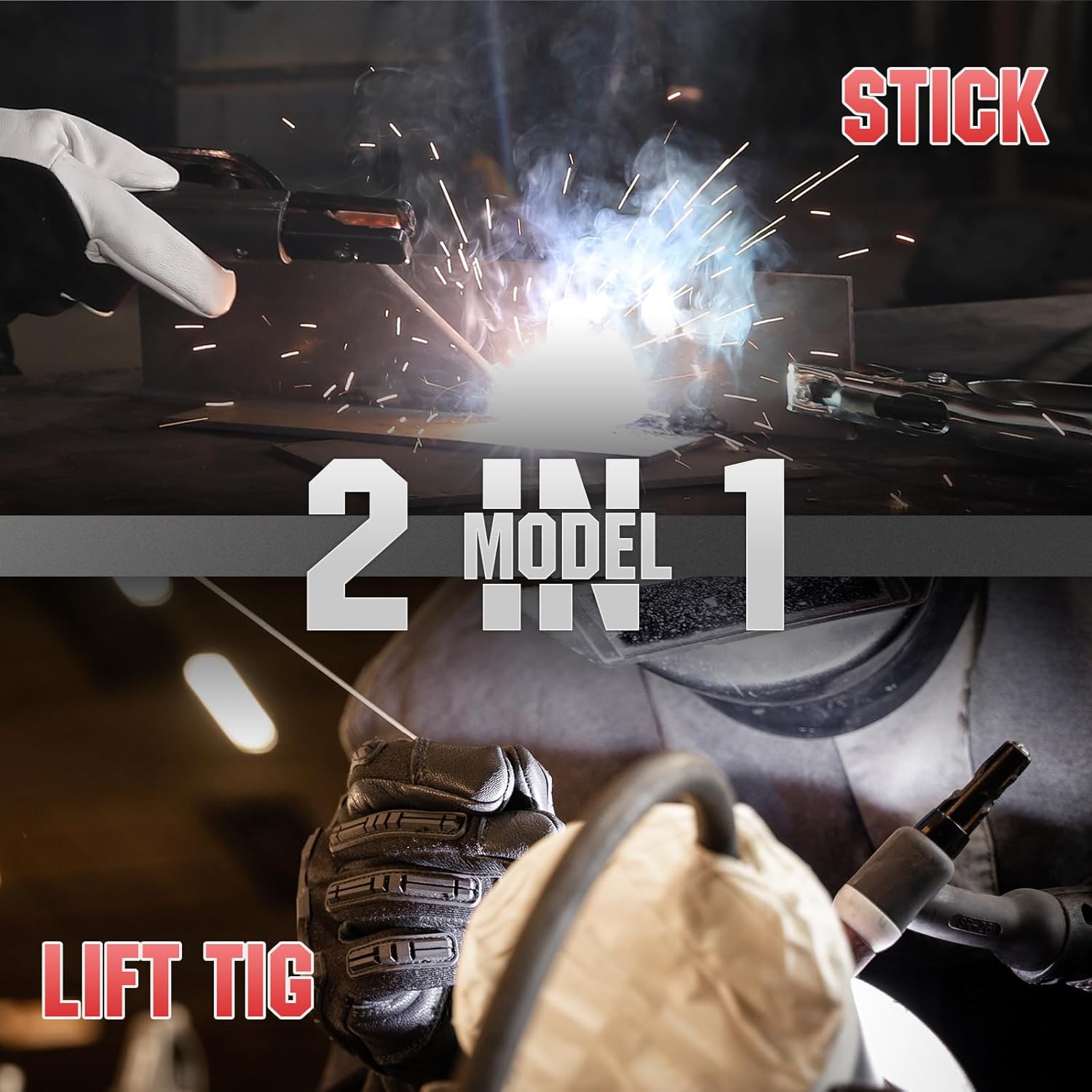
Image 3.1: The YESWELDER 205A supports both Stick (MMA) and Lift TIG welding modes.
Entwodiksyon panèl kontwòl:
Familiarize yourself with the control panel components for efficient operation.
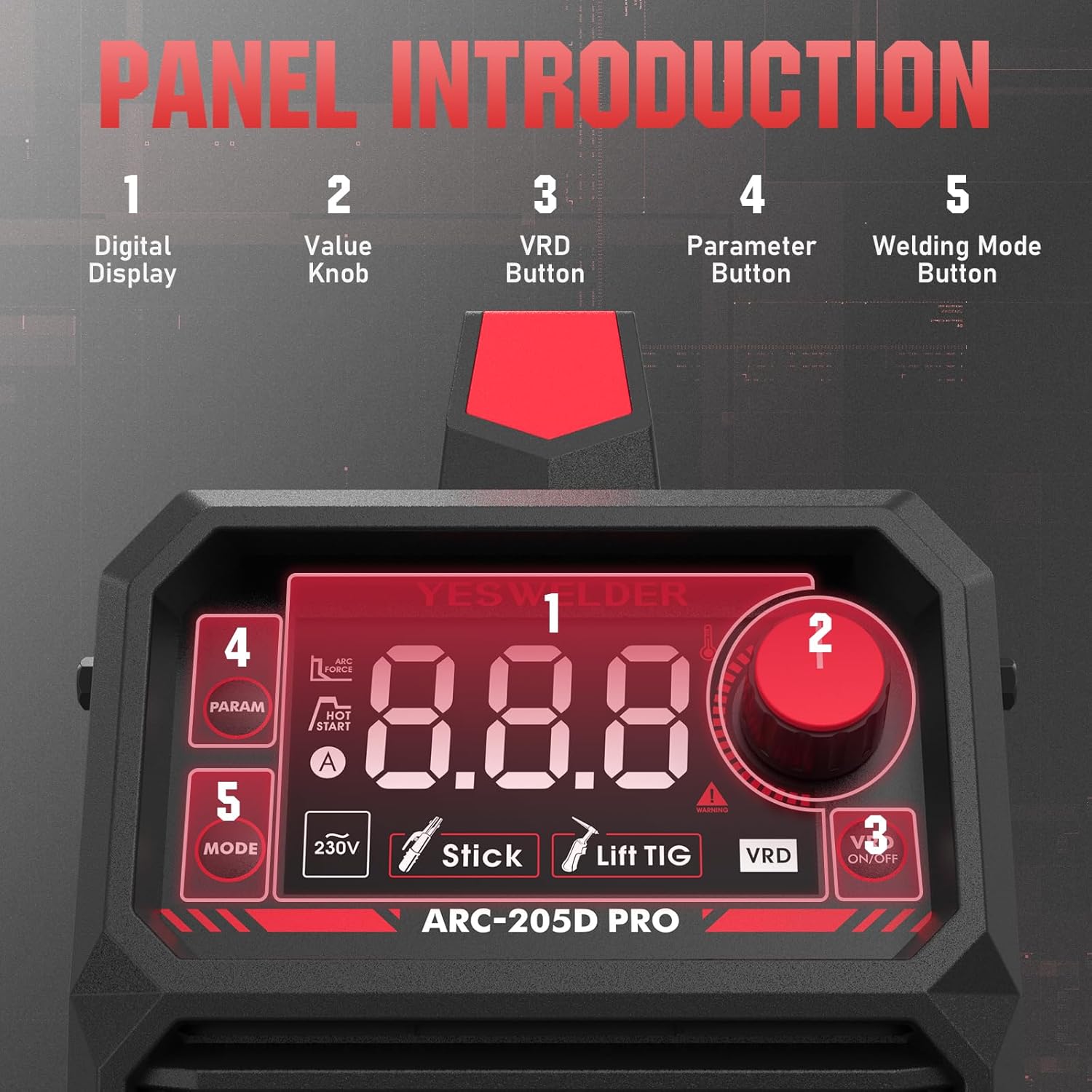
Imaj 3.2: Detaye view of the control panel, indicating the digital display, value knob, VRD button, parameter button, and welding mode button.
- Ekspozisyon dijital: Shows welding parameters such as current, electrode size, and selected mode.
- Value Knob: Adjusts welding current and other parameters.
- VRD Button: Activates or deactivates Voltage Reduction Device for enhanced safety in certain environments.
- Parameter Button: Cycles through adjustable parameters (e.g., Hot Start, Arc Force).
- Welding Mode Button: Selects between Stick (MMA) and Lift TIG welding modes.

Image 3.3: The upgraded large LED display provides clear and comprehensive information during operation.
4. Enstalasyon
Proper setup is crucial for safe and effective welding. Follow these steps carefully.
4.1 Debalaj ak enspeksyon:
- Remove the welder and all accessories from the packaging.
- Inspect for any shipping damage. Contact your supplier immediately if damage is found.
- Asire w ke tout konpozan ki nan lis anbalaj la prezan.
4.2 Connecting Accessories:

Image 4.1: Electrode holder and ground clamp koneksyon.
- Tè Clamp Koneksyon: Konekte tè a clamp cable to the negative (-) output terminal on the welder. Securely attach the ground clamp sou pyès la oswa tab soude a, pou asire bon kontak elektrik.
- Electrode Holder Connection (for MMA/Stick): Connect the electrode holder cable to the positive (+) output terminal on the welder. Insert the welding electrode into the holder.
- TIG Torch Connection (for Lift TIG - torch sold separately): If performing Lift TIG welding, connect the TIG torch cable to the negative (-) output terminal. Connect the gas hose from the TIG torch to your argon gas regulator.
4.3 Koneksyon pouvwa:
- Asire w ke switch pouvwa soudeur a nan pozisyon OFF (Off).
- Connect the power input cable to a suitable 230V power outlet. Verify that the power source meets the welder's requirements.
5. Operasyon Enstriksyon
The YESWELDER 205A offers two primary welding modes: Stick (MMA) and Lift TIG.
5.1 Starting the Welder:
- After connecting all cables and ensuring safety, turn the power switch to the ON position.
- The LED display will illuminate, showing the default welding mode and current.
5.2 Stick (MMA) Welding:

Image 5.1: Visual representation of Stick welding (left) and Lift TIG welding (right).
- Chwazi mòd: Press the 'Welding Mode Button' until 'Stick' (MMA) is indicated on the display.
- Mete Kouran: Use the 'Value Knob' to adjust the welding current (amperes) according to the electrode type and material thickness. The machine supports up to 205A.
- Adjust Parameters (Optional): Press the 'Parameter Button' to cycle through Hot Start and Arc Force settings. Adjust these using the 'Value Knob' as needed for optimal arc ignition and stability.
- Kòmanse Soude: Strike the arc by lightly touching the electrode to the workpiece and quickly lifting it slightly. Maintain a consistent arc length and travel speed.
5.3 Lift TIG Welding:
For Lift TIG welding, a TIG torch with a gas valve is required (not included).
- Chwazi mòd: Press the 'Welding Mode Button' until 'Lift TIG' is indicated on the display.
- Mete Kouran: Use the 'Value Knob' to adjust the welding current (amperes) based on the material and tungsten electrode size.
- Koule gaz: Open the gas valve on the TIG torch to establish argon gas flow.
- Inisye Arc: Gently touch the tungsten electrode to the workpiece and then lift it slightly (1-2mm) to initiate the arc. The arc will start at a low current and ramp up to the set current.
- Perform Weld: Maintain a short arc length and feed filler rod manually if required.
6. Antretyen
Antretyen regilye asire lonjevite ak pèfòmans optimal soudeur ou a.
6.1 Antretyen chak jou:
- Clean the exterior of the machine with a dry, soft cloth.
- Inspect all cables and connections for damage or loose fittings.
- Check the electrode holder and ground clamp pou mete.
6.2 Periodic Maintenance (Monthly/Quarterly):
- Netwayaj Entèn: Disconnect power. Open the machine casing and use compressed air to blow out dust and debris from the cooling fins and internal components. Ensure no moisture enters.
- Verifikasyon Vantilatè: Verify that the cooling fan operates freely and is not obstructed.
- Enspeksyon Tèminal: Check all power terminals for corrosion or looseness. Tighten if necessary.
Caution: Only qualified personnel should perform internal maintenance. Always disconnect power before opening the machine.
NAN. Depanaj
Gade tablo ki anba a pou pwoblèm komen ak solisyon potansyèl yo.
| Pwoblèm | Kòz posib | Solisyon |
|---|---|---|
| Soudeur a pa limen | No power from outlet; Power switch off; Internal fuse blown | Check power supply; Turn power switch ON; Contact service for fuse replacement |
| Pa gen ark oswa ark fèb | Poor ground connection; Incorrect current setting; Wet or old electrodes; Damaged cables | Asire bon kontak ak tè a; Ajiste kouran an; Sèvi ak elektwòd sèk; Enspekte epi ranplase kab yo |
| Overheat indicator on | Exceeded duty cycle; Insufficient ventilation; Fan malfunction | Allow machine to cool down; Ensure clear airflow; Check fan operation |
| Arc enstab | Move kouran/voltage; Contaminated workpiece; Improper electrode angle | Adjust settings; Clean workpiece; Correct electrode technique |
8. Espesifikasyon
Technical specifications for the YESWELDER ARC-205D-EU model.

Image 8.1: Detailed technical specifications for the ARC-205D model.
| Spesifikasyon | Valè |
|---|---|
| Nimewo Modèl | ARC-205D-EU |
| Antre Voltage (U1) | 230V |
| Max Input Current (I1 max) | 29A |
| Effective Input Current (I1 eff) | 22.4A |
| Kouran Sòti (I2) | 205A (MMA), 158A (TIG) |
| Sòti Voltage (U2) | 18.2V (MMA), 16.3V (TIG) at 60% duty cycle |
| Pa gen chaj Voltage (U0) | 65V |
| Sik Devwa (X) | 60% nan 205A, 100% nan 158A |
| Dimansyon (L x W x H) | 31.5 x 12 x 20.8 cm |
| Pwa | 3.8 kg (8.4 liv) |
| Metòd refwadisman | Refwadisman fanatik |
| Klas izolasyon | F |
| Klas pwoteksyon | IP21S |
9. Garanti ak sipò
For warranty information, technical support, or service inquiries, please contact YESWELDER customer service. Keep your purchase receipt as proof of purchase.
For further assistance, visit the official YESWELDER websit la oubyen kontakte sant sèvis otorize yo.


