1. Pwodwi souview
The Point Wired Mini Keyboard Pt-350 is a compact and versatile keyboard designed for both gaming and general typing. It features a high-quality build and a modern design, adhering to industry standards for reliable performance. This keyboard is an ideal choice for users seeking a durable and efficient input device.
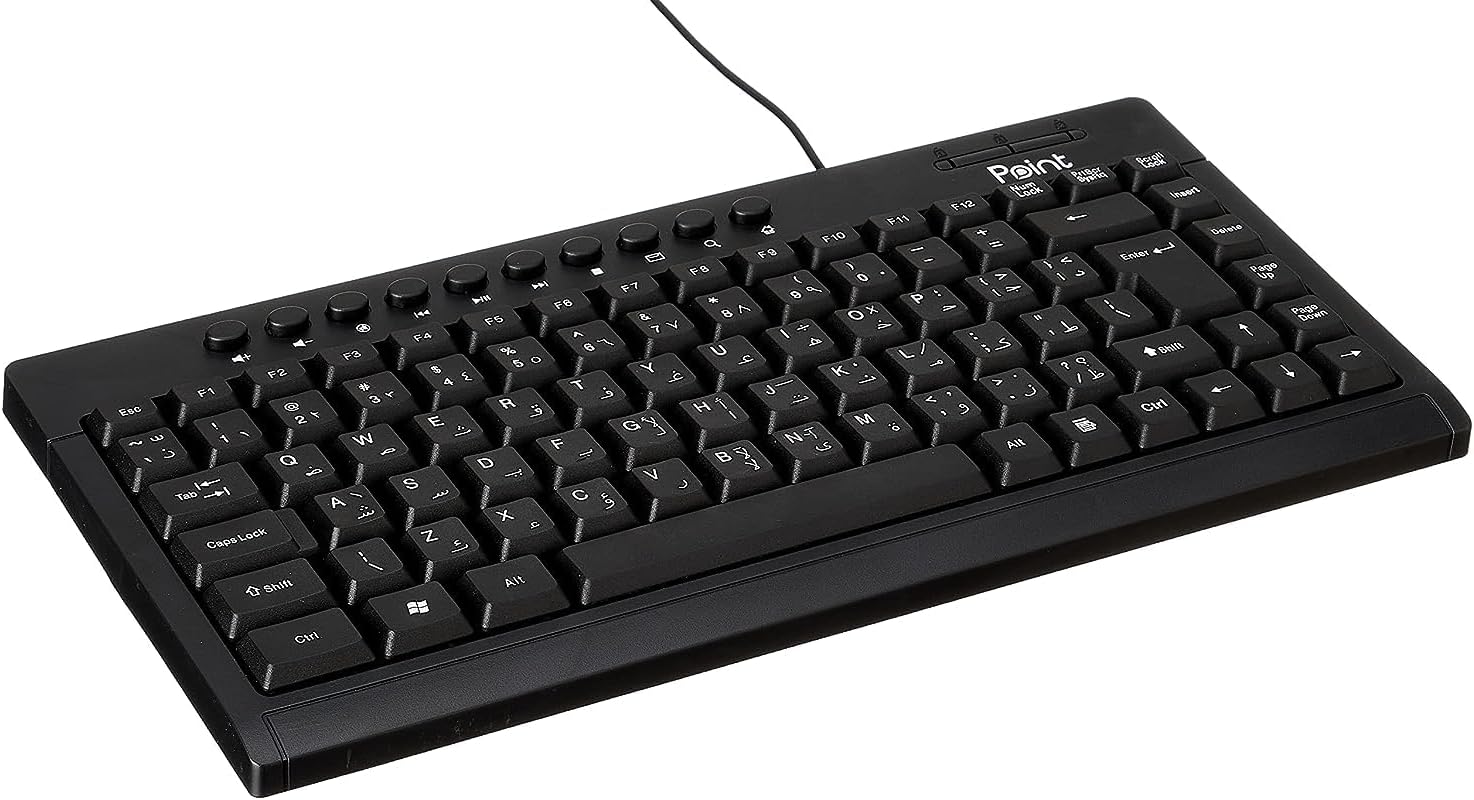
Figi 1.1: Angle view of the Point Wired Mini Keyboard Pt-350, showcasing konsepsyon kontra enfòmèl ant li yo ak layout kle yo.
Karakteristik kle:
- Wired connectivity for stable performance.
- Compact design suitable for various setups.
- Durable construction from high-quality plastic materials.
- Designed for both gaming and typing applications.
2. Pake kontni
Tanpri verifye pake a ak anpil atansyon pou asire w ke tout bagay yo la:
- Point Wired Mini Keyboard Pt-350
- Manyèl Itilizatè (dokiman sa a)
3. Enstalasyon
Follow these steps to set up your Point Wired Mini Keyboard Pt-350:
- Depake klavye a: Retire klavye a nan anbalaj li avèk prekosyon.
- Idantifye konektè USB a: The keyboard comes with an integrated USB cable.
- Konekte ak òdinatè w lan: Locate an available USB port on your computer (desktop PC, laptop, etc.). Insert the keyboard's USB connector firmly into the USB port.
- Enstalasyon Chofè (Plug & Play): The keyboard is plug-and-play compatible. Your operating system (Windows, macOS, Linux) should automatically detect and install the necessary drivers. This process usually takes a few seconds.
- Verifye Fonksyonalite: Once connected, open a text editor or any application that accepts text input and test the keys to ensure proper operation.

Figi 3.1: Anwo-anba view of the keyboard, illustrating the key layout and integrated cable for connection.
4. Operasyon Enstriksyon
The Point Wired Mini Keyboard Pt-350 operates like a standard computer keyboard. Below are general instructions and tips for use:
Tape debaz:
- Simply press the desired keys to input characters, numbers, and symbols into your active application.
- Sèvi ak la Chanjman key for uppercase letters and alternative symbols on keys.
- La Majik key toggles permanent uppercase typing.
- La Backspace key deletes characters to the left of the cursor.
- La Antre key confirms input or moves to the next line.
Kle Fonksyon (F1-F12):
The function keys (F1 through F12) perform various tasks depending on the active program or operating system. Some common uses include:
- F1: Often opens help for the active program.
- F2: Renames a selected item.
- F5: Rafrechi a web page or document.
- F11: Toggles full-screen mode in many browsers.
Kle miltimedya:
The keyboard may include dedicated multimedia keys or secondary functions on the F-keys (accessed via the Fn key, if present). These typically control:
- Volume control (Mute, Volume Up, Volume Down)
- Media playback (Play/Pause, Stop, Previous Track, Next Track)
5. Antretyen
Proper maintenance ensures the longevity and optimal performance of your keyboard:
- Netwayaj: Regularly clean the keyboard to prevent dust and debris buildup. Use a soft, lint-free cloth slightly dampLave avèk dlo oswa yon solisyon netwayaj dou. Evite pwodui chimik ki agresif oswa materyèl abrazif.
- Retire pousyè: Use compressed air to blow out dust and crumbs from between the keys.
- Evite devèsman: Kenbe likid lwen klavye a pou anpeche domaj nan konpozan entèn yo. Si likid ta koule, dekonekte klavye a imedyatman epi kite l sèk nèt anvan ou rekonekte li.
- Depo: Lè w pa ap itilize klavye a, sere l nan yon anviwònman pwòp epi sèk, lwen tanperati ekstrèm.
NAN. Depanaj
If you encounter issues with your Point Wired Mini Keyboard Pt-350, refer to the following common problems and solutions:
Klavye a pa reponn:
- Tcheke koneksyon USB a: Asire w kab USB a byen branche nan yon pò USB ki fonksyone sou òdinatè w la. Eseye yon lòt pò USB.
- Rekòmanse òdinatè: Yon senp rekòmanse ka souvan rezoud pwoblèm koneksyon.
- Tès sou yon lòt òdinatè: Connect the keyboard to another computer to determine if the issue is with the keyboard or your computer's setup.
- Tcheke Manadjè Aparèy (Windows): In Windows, go to Device Manager and check if the keyboard is listed under 'Keyboards' and if there are any error symbols. You might need to update or reinstall the driver.
Keys Not Working or Sticky:
- Kle Netwaye: Dust, crumbs, or liquid residue can cause keys to stick or malfunction. Refer to the Maintenance section for cleaning instructions.
- Domaj Fizik: Inspect the keys for any visible physical damage.
Sòti karaktè ki pa kòrèk:
- Check Language Settings: Ensure your operating system's keyboard language settings match the physical layout of your keyboard.
- Pwoblèm Chofè: Reinstalling the keyboard driver might resolve this.
Si pwoblèm nan pèsiste apre ou fin eseye etap sa yo, tanpri kontakte sèvis kliyan.
7. Espesifikasyon
Technical specifications for the Point Wired Mini Keyboard Pt-350:

Figi 7.1: Side view of the keyboard, highlighting its profile and compact form factor.
| Karakteristik | Detay |
|---|---|
| Non mak | Pwen |
| Modèl | Pt-350 |
| Koneksyon Teknoloji | Branche |
| Aparèy konpatib | Odinatè |
| Deskripsyon klavye | Multifonksyonèl |
| Itilizasyon Rekòmande | PC Gaming |
| Karakteristik espesyal | Gaming |
| Koulè | Nwa |
| Style | Modèn |
| Materyèl | Plastik |
| Dimansyon Shipping | 34.5 x 26.4 x 3 cm |
| Pwa | 800 gram |
| Premye Dat ki disponib | 4 septanm 2022 |
| ASIN | B0BD2DM9ZJ |
8. Garanti ak sipò
This product is covered by a standard manufacturer's warranty. Please refer to the warranty card included with your purchase for specific terms and conditions, including the warranty period and coverage details.
For technical support, troubleshooting assistance, or warranty claims, please contact Point customer service through the contact information provided on the product packaging or the official Point website. When contacting support, please have your product model (Pt-350) and purchase details ready.


