1. Entwodiksyon
This manual provides detailed instructions for the setup, operation, maintenance, and troubleshooting of your AULA F812 Wired Gaming Mouse. Please read this manual thoroughly to ensure proper use and to maximize your gaming experience.
The AULA F812 is a high-performance wired gaming mouse featuring 7 customizable macro keys, adjustable DPI settings up to 4800, and vibrant RGB backlit effects. It is designed for precision and responsiveness in gaming environments.
2. Pake kontni
- AULA F812 Wired Gaming Mouse
- Manyèl Itilizatè (dokiman sa a)
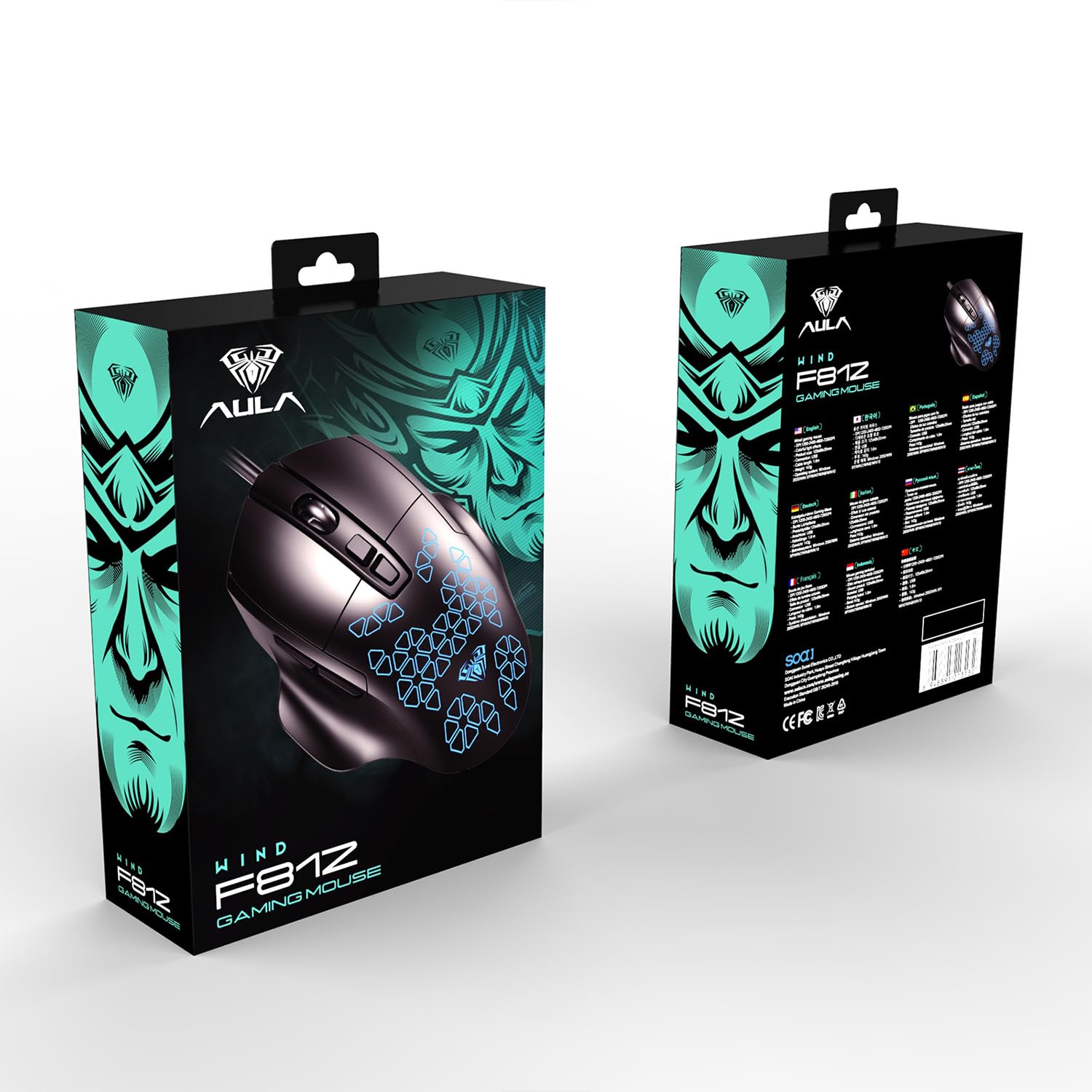
Image: Retail packaging of the AULA F812 Wired Gaming Mouse, showing the product box.
3. Pwodwi souview
Familiarize yourself with the various parts of your AULA F812 Gaming Mouse.

Imaj: Anwo-anba view of the AULA F812 Gaming Mouse with key buttons labeled. Labels include Left Button, Right Button, Scroll Wheel, DPI+, DPI-, Forward Button, and Back Button.
- Bouton Goch: Fonksyon klike gòch estanda.
- Dwa bouton: Fonksyon estanda klike sou bò dwat la.
- wou woulo liv: Scrolls content up/down, also functions as a middle-click button.
- DPI + Bouton: Ogmante sansiblite DPI.
- DPI - Bouton: Diminye sansiblite DPI.
- Bouton Avant: Navige pi devan nan web navigatè oswa file eksploratè.
- Bouton tounen: Navige bak nan web navigatè oswa file eksploratè.
4. Enstriksyon Enstalasyon
- Konekte sourit la: Plug the USB connector of the AULA F812 Gaming Mouse into an available USB port on your computer.
- Enstalasyon chofè: The mouse is typically plug-and-play. Your operating system (Windows XP, Windows 7, Linux, etc.) should automatically detect and install the necessary drivers. If prompted, follow the on-screen instructions.
- Enstalasyon lojisyèl (Si ou vle): For advanced customization, including macro programming and detailed RGB lighting control, dedicated software may be available from the AULA website. Refer to the official AULA support resources for software downloads and instructions.
5. Operasyon Enstriksyon
5.1. Ajisteman DPI
The AULA F812 mouse features adjustable DPI settings to change cursor sensitivity. There are 4 preset DPI levels, ranging from 800 to 4800 DPI.
- Peze a DPI + button to increase the DPI level.
- Peze a DPI - button to decrease the DPI level.
- The current DPI level is often indicated by a change in the mouse's LED lighting color or pattern (refer to software for specific indications).
5.2. RGB Backlit Lighting
The mouse features RGB gradient lighting with various effects. The lighting can be controlled directly on the mouse or through dedicated software.
- Specific instructions for cycling through lighting modes or turning off the backlight are typically found in the accompanying software or through specific button combinations (e.g., a combination of DPI and another button). Consult the software manual for detailed control.
5.3. Pwogramasyon kle makro
The AULA F812 includes 7 customizable macro keys. These keys can be programmed to perform complex actions or sequences of commands with a single press.
- Macro programming requires the installation of the official AULA gaming software.
- Once the software is installed, open it to access the macro editor.
- Select the desired key (e.g., Forward, Back, or other programmable buttons).
- Record or input the sequence of keystrokes and mouse clicks for your macro.
- Save the macro to the selected key.
- Refer to the software's help section for detailed instructions on macro creation and assignment.
6. Antretyen
Bon antretyen asire lonjevite ak pèfòmans optimal sourit jwèt ou a.
- Netwayaj:
- Dekonekte sourit la nan òdinatè w la anvan ou netwaye li.
- Sèvi ak yon twal mou epi sèk pou siye sifas sourit la.
- Pou pousyè tè ki difisil pou retire, yon ti kras dampRense twal la avèk dlo oswa yon solisyon netwayaj dou. Evite pwodui chimik ki agresif.
- Sèvi ak yon ti koton oswa lè konprese pou netwaye ozalantou wou woulo liv la ak zòn detèktè a.
- Depo:
- Sere sourit la nan yon kote ki fre epi sèk, lwen limyè solèy dirèk ak tanperati ekstrèm.
- Avoid placing heavy objects on the mouse or its cable.
- Swen kab:
- Do not sharply bend or twist the USB cable.
- Avoid pulling the cable forcefully when disconnecting the mouse; always grasp the USB connector.
NAN. Depanaj
| Pwoblèm | Kòz posib | Solisyon |
|---|---|---|
| Sourit la pa reponn. |
|
|
| DPI adjustment not working. |
|
|
| RGB lighting not functioning. |
|
|
| Macro keys not working. |
|
|
8. Espesifikasyon
| Karakteristik | Detay |
|---|---|
| Mak | AULA |
| Modèl | F812 |
| Koneksyon Teknoloji | USB filaire |
| Teknoloji deteksyon mouvman | Optik |
| Nivo DPI | Reglabl (800-4800 DPI) |
| Kantite bouton | 7 (Customizable Macro Keys) |
| Karakteristik espesyal | RGB LED Backlit |
| Koulè | Nwa |
| Dimansyon pwodwi (LxWxH) | 12.5 x 6.8 x 3.5 cm |
| Pwa atik | 143 g |
| Sistèm operasyon konpatibilite | Linux, Windows 7, Windows XP (ak vèsyon Windows ki pi resan yo) |
| Manifakti | Dongguan Suoai Elektwonik co, Ltd. |
9. Garanti ak sipò
9.1. Enfòmasyon sou Garanti
The AULA F812 Wired Gaming Mouse typically comes with a manufacturer's warranty. Please refer to the warranty card included with your product or visit the official AULA websit la pou plis detay sou tèm ak kondisyon garanti a. Kenbe resi acha ou kòm prèv acha pou reklamasyon garanti.
9.2. Sipò pou Kliyan
For technical assistance, troubleshooting, or warranty inquiries, please contact AULA customer support:
- Kontak Enpòtatè a: Odio Zone Private Limited, S-4/63, 2nd Floor, Agasthya Complex, Shettihalli Main Road, Jalahalli West, Bengaluru 560015, Karnataka, India.
- Sipò Imèl: support@odiozone.com
- Kontakte manifakti: Dongguan Suoai Electronics Co., Ltd, info@aulapro.in
- Resous sou entènèt: Visit the official AULA website for FAQs, driver downloads, and additional support resources.