1. Pwodwi souview
The ErGear Electric Standing Desk is designed to provide a versatile and ergonomic workspace, allowing users to easily switch between sitting and standing positions. It features a robust steel frame and an efficient electric lifting system for smooth height adjustments.

Image: The ErGear Electric Standing Desk in a home office setting, showcasing biwo laj li yo ak plato klavye entegre a.
Karakteristik kle:
- Estabilite eksepsyonèl: Konstwi ak yon ankadreman asye solid ak konektè kolòn leve klas ayewospasyal, ki asire estabilite menm nan wotè maksimòm.
- Ajisteman Wotè Lis: Electric height adjustment from 28.35" to 46.46" with memory settings for preferred heights.
- Motè amelyore: Powerful lifting performance (Max 176 lb load) with reliable long-term operation.
- Spacious Keyboard Tray: Bay ample space for a large keyboard and mouse, supporting up to 22 lbs.
- More Ergonomic: The keyboard tray positions your keyboard 4.3'' lower than the desktop for optimal typing posture.
2. Enstalasyon ak Asanble
Before assembly, ensure all components are present and undamaged. Refer to the detailed Installation Manual (PDF) for step-by-step instructions. A link to the digital manual is provided below.
Enfòmasyon enpòtan sou sekirite: Always follow assembly instructions carefully. Do not exceed the maximum weight limit of 176 pounds. Be cautious when adjusting the desk's height to prevent injury.
The desk includes all necessary basic assembly tools and spare parts. Key components include the Standing Desk frame, Keyboard Tray, and two Storage Hooks.
For a visual guide to the assembly process, please refer to the official installation manual:
3. Operasyon Enstriksyon
Ajisteman Wotè
The ErGear Electric Standing Desk allows for smooth and quiet height adjustments. Use the control panel located on the underside of the desktop to raise or lower the desk.

Image: Demonstrating the wide height range of the desk, from sitting to standing positions.
Prereglaj memwa:
The control panel features three customizable memory height settings. To save a preferred height:
- Ajiste biwo a nan wotè ou vle a avèk flèch monte/desann yo.
- Press the 'M' button, then press one of the numbered preset buttons (1, 2, or 3) within a few seconds. The display will confirm the setting.
- Pou sonje yon wotè ki anrejistre, tou senpleman peze bouton nimewote ki koresponn lan.

Image: The desk's control panel, showing the digital height display and memory preset buttons.
Itilizasyon plato klavye a
The integrated keyboard tray slides out smoothly, providing an ergonomic typing position. It can be retracted when not in use to save space.
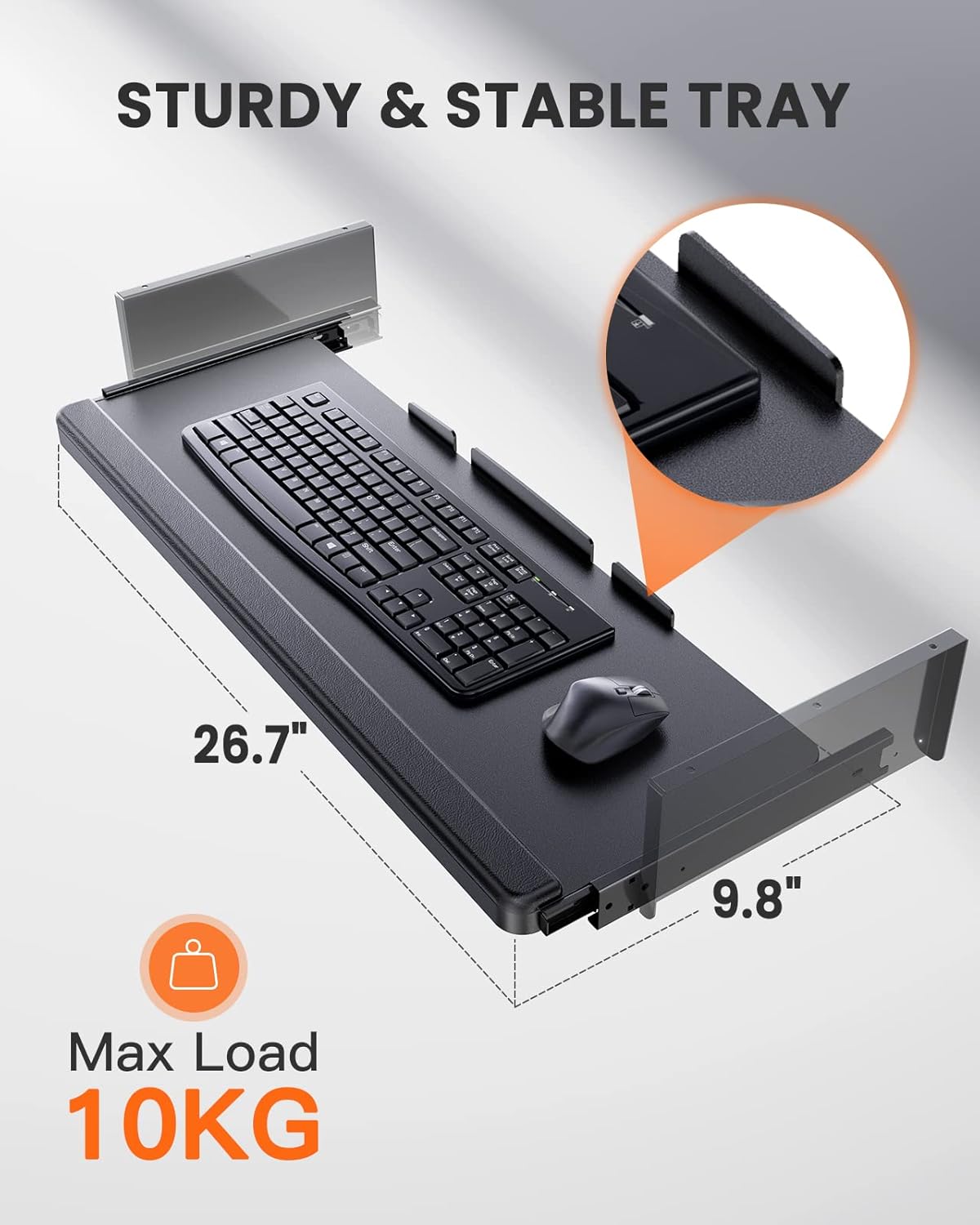
Imaj: Yon imaj detaye view of the spacious and sturdy keyboard tray, designed to hold a full-size keyboard and mouse.
Videyo pwodwi:
Video: Official ErGear video demonstrating the electric standing desk's smooth height adjustment, spacious keyboard tray, and overall stability during use.
4. Antretyen
To ensure the longevity and optimal performance of your ErGear Electric Standing Desk, regular maintenance is recommended:
- Netwayaj: Siye biwo a ak ankadreman an avèk yon twal mou.amp twal. Evite pwodui chimik ki agresif oswa pwodui netwayaj abrazif ki ka domaje fini an.
- Tcheke Koneksyon: Enspekte tout vis ak boulon yo detanzantan pou asire yo byen sere. Sere yo ankò si sa nesesè.
- Jesyon kab: Ensure power cables and other cords are properly managed to prevent entanglement during height adjustments.
- Distribisyon pwa: Distribute weight evenly across the desktop to prevent strain on the lifting mechanism.
NAN. Depanaj
Si ou rankontre nenpòt pwoblèm ak Biwo Kanpe Elèktik ErGear ou a, tanpri al gade konsèy depanaj komen sa yo:
- Biwo pa deplase: Check if the power cord is securely plugged into both the desk and a working power outlet. Ensure no objects are obstructing the desk's movement.
- Mouvman inegal: If the desk moves unevenly, ensure the weight on the desktop is balanced. Refer to the manual for calibration or reset procedures if available.
- Kòd erè: If the control panel displays an error code, consult the detailed Installation Manual (PDF) for specific instructions related to that code.
- Wobbling at Full Height: A slight wobble may occur at maximum height, which is typical for standing desks. Ensure the desk is on a flat, stable surface and all connections are tight.
If the problem persists after attempting these steps, please contact ErGear customer support for further assistance.
6. Espesifikasyon
Detailed specifications for the ErGear Electric Standing Desk (Model: EGESD5B-4):
| Karakteristik | Detay |
|---|---|
| Mak | ErGear |
| Nimewo Modèl | EGESD5B-4 |
| Dimansyon pwodwi | 24"D x 48"W x 28.5"H |
| Koulè | Nwa |
| Wotè Minimòm | 28.35 pous |
| Wotè maksimòm | 46.46 Inches (Note: Max height in spec is 50.98, but feature bullet says 46.46. Using feature bullet for consistency with operation) |
| Rekòmandasyon pwa maksimòm | 176 liv |
| Materyèl de baz | Alloy Steel |
| Kalite Materyèl Top | Bwa |
| Keyboard Tray Max Load | 22 liv (10 KG) |
| Konpozan ki enkli | Assembly Instructions, Basic Assembly Tools, Keyboard Tray, Standing Desk, Storage Hooks (2pcs) |
| Asanble obligatwa | Wi |

Image: Desk dimensions diagram, illustrating the overall size and height adjustability.
7. Garanti ak sipò
Enfòmasyon sou garanti:
The ErGear Electric Standing Desk comes with a limited manufacturer's warranty. For specific details regarding coverage and duration, please refer to the warranty information provided with your purchase or contact ErGear customer support.
Returns and Protection Plans:
This product is eligible for 30-day easy returns. Additionally, extended protection plans may be available for purchase to provide additional coverage beyond the standard manufacturer's warranty.
- Plan Pwoteksyon 2 Ane: Disponib pou achte.
- Plan Pwoteksyon 3 Ane: Disponib pou achte.
- Pwoteksyon konplè: Yon plan mansyèl ki kouvri acha pase ak acha nan lavni ki kalifye.
For inquiries regarding product support, warranty claims, or technical assistance, please contact ErGear customer service through the retailer where the product was purchased or visit the official ErGear websit.


