1. Entwodiksyon
The LogiLink 4K 2x2 port bidirectional HDMI switch allows you to connect two (2) HDMI sources, such as a video camera, Blu-ray player, satellite receiver, digital video recorder, set-top boxes, or game consoles, to two (2) HDMI-compatible displays. This switch can simultaneously route one of the two HDMI input signals to two (2) UHD displays. The integrated Downscaler function supports displaying 4K content on Full HD screens, and both 4K and Full HD screens can operate simultaneously. This smart switch ensures no compromise on image and sound quality. 4K/UHD image signals are transmitted without loss, with HDCP 2.2/1.4, HDR, and 3D support. Audio transmission in LPCM 7.1, DTS, Dolby Digital, DTS-HD Master Audio, and Dolby TrueHD meets all your audio needs.
2. Pwodwi Features
- Allows switching between two HDMI signal sources to two displays/TVs simultaneously.
- Compliant with HDMI 2.0, offering a bandwidth of 6 Gbit/s at 600 MHz per line (18 Gbit/s total).
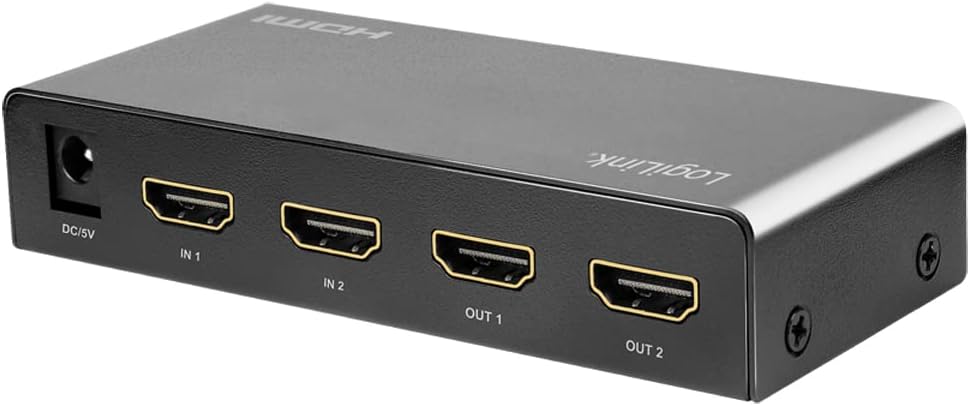
- Connections: 2 x HDMI A inputs, 5V DC power input; Outputs: 2 x HDMI A.
- Supports Ultra HD 4K/60 Hz YUV 4:4:4 and Full 3D.
- Supports 36-bit Deep Color (12 bits per channel).
- Supports EDID Pass-Through.
- Supports HDCP 1.4/2.2, HDR, and Downscaler functionality.
- Supports uncompressed audio like LPCM 7.1.
- Supports compressed audio data such as DTS, Dolby Digital (including DTS-HD Master Audio and Dolby TrueHD).
- C metal dirabasing, dimensions: 11.6 x 5.2 x 2.3 cm.
3. Pake kontni
Tanpri tcheke pake a pou atik sa yo:
- LogiLink HD0039 2x2 Port Bidirectional HDMI Switch
- 5V DC pouvwa adaptè
- Manyèl itilizatè
4. Aparèy souview


5. Enstriksyon Enstalasyon
- Aparèy koupe pouvwa: Before making any connections, ensure all HDMI source devices (e.g., Blu-ray player, game console) and display devices (e.g., TV, monitor) are powered off.
- Konekte sous HDMI: Connect your HDMI source devices to the HDMI IN 1 and HDMI IN 2 ports on the LogiLink HD0039 switch using high-quality HDMI cables.
- Konekte ekran HDMI yo: Connect your HDMI display devices to the HDMI OUT 1 and HDMI OUT 2 ports on the switch using high-quality HDMI cables.
- Konekte adaptè pouvwa: Insert the 5V DC power adapter into the DC 5V port on the switch, then plug the adapter into a power outlet. The power LED on the switch should illuminate.
- Pouvwa sou aparèy: Power on your display devices first, then power on your HDMI source devices.
- Select Input/Output: Use the 'SOURCE' button on the front panel to select the desired input source (IN 1 or IN 2) and the 'SWITCH' button to toggle between output configurations.
6. Operasyon Enstriksyon
The LogiLink HD0039 switch offers flexible control for managing your HDMI signals.
6.1. Switching Inputs
- Peze a SOUS button on the front panel to cycle between HDMI IN 1 and HDMI IN 2. The corresponding LED indicator (IN 1 or IN 2) will light up to show the currently selected input.
6.2. Switching Outputs
- Peze a SWITCH button on the front panel to control which output ports receive the selected input signal. This switch allows you to send the selected input to OUT 1, OUT 2, or both simultaneously.
6.3. HDMI Version Selection
- A small switch labeled 1.4/2.0 is located on the front panel. This allows you to manually select the HDMI version. For 4K/60Hz content and HDR, ensure this switch is set to 2.0. For compatibility with older devices, you may switch to 1.4 si sa nesesè.
6.4. Seleksyon Mode Audio
- La ODYO button allows you to select the audio mode. Refer to the LED indicators (HIGH/LOW) for the current audio setting. This feature can be used to optimize audio output for different display capabilities.
7. Antretyen
- Netwayaj: Sèvi ak yon twal mou epi sèk pou netwaye aparèy la. Pa sèvi ak pwodui netwayaj likid oswa ayewosòl.
- Vantilasyon: Asire w ke aparèy la mete nan yon zòn ki byen ayere pou anpeche li chofe twòp. Pa bloke okenn ouvèti vantilasyon.
- Anviwònman: Kenbe aparèy la lwen chalè twòp, imidite twòp, pousyè ak limyè solèy dirèk.
- Pouvwa: Always use the provided 5V DC power adapter. Disconnect the power adapter if the device will not be used for an extended period.
NAN. Depanaj
| Pwoblèm | Kòz posib | Solisyon |
|---|---|---|
| No picture on display. |
|
|
| Poor picture quality or flickering. |
|
|
| Pa gen odyo. |
|
|
| 4K content not displaying correctly on Full HD screen. | Downscaler not active or issue. | Ensure the Downscaler function is enabled (it is integrated and should work automatically). If issues persist, try restarting all devices. |
9. Espesifikasyon
| Karakteristik | Spesifikasyon |
|---|---|
| Mak | LogiLink |
| Nimewo Modèl | HD0039 |
| Koulè | Nwa |
| Kalite Connector | HDMI |
| Kantite pò | 2 Antre, 2 Sorti |
| Aparèy konpatib | Camera, Blu-ray Player, DVD Player, Television |
| HDMI estanda | HDMI 2.0 (backward compatible with 1.4) |
| Bandwidth | 18 Gbit/s (6 Gbit/s per line at 600 MHz) |
| Sipò pou rezolisyon | Up to 4K/60 Hz YUV 4:4:4, Full 3D |
| Koulè Pwofondè | Koulè gwo twou san fon 36-bit (12 bit pou chak chanèl) |
| Sipò HDCP | HDCP 1.4 / 2.2 |
| Sipò HDR | Wi |
| Sipò EDID | EDID Pass-Through |
| Sipò odyo | LPCM 7.1, DTS, Dolby Digital, DTS-HD Master Audio, Dolby TrueHD |
| Downscaler Function | Integrated (4K to Full HD) |
| Pwovizyon pou pouvwa | 5V DC |
| CasinMateryèl g | Metal |
| Dimansyon (L x W x H) | 11.6 x 5.2 x 2.3 cm |
| Manifakti | 2direct GmbH |
| Peyi orijin | Lachin |
10. Garanti ak sipò
Pwodwi LogiLink yo fèt pou fyab ak pèfòmans. Pou enfòmasyon espesifik sou garanti a, tanpri al gade kat garanti ki vini ak pwodwi ou a oswa vizite sit ofisyèl LogiLink la. website. For technical support or assistance, please contact your retailer or LogiLink customer service.
Garanti disponiblite pyès rezèv ak mizajou lojisyèl pa disponib pou pwodui sa a.


