1. Pwodwi souview
The HP Pavilion 14" 2-in-1 Touchscreen FHD Laptop, Model ek0013dx, is a versatile computing device designed for various tasks. Its innovative 360-degree hinge allows for seamless transitions between laptop, tablet, tent, and stand modes, adapting to your needs. This model features a 14.0-inch Full HD (1920 x 1080) multitouch-enabled IPS display, providing clear visuals with wide-viewang ing.
Powered by a 12th Generation Intel Core i3-1215U processor and equipped with 8 GB DDR4-3200 MHz RAM and a 256 GB PCIe NVMe M.2 SSD, the laptop delivers responsive performance for everyday computing. Audio is enhanced by B&O with dual speakers, and connectivity includes 802.11a/b/g/n/ac (2x2) Wi-Fi and Bluetooth combo. The device also supports HP Fast Charge, allowing for quick battery replenishment.

Figure 1: HP Pavilion 14" 2-in-1 Laptop in traditional laptop mode.
Karakteristik kle:
- Ekspozisyon: 14.0-inch diagonal, FHD (1920 x 1080), multitouch-enabled, IPS, edge-to-edge glass, microedge.
- Processeur: 12th Generation Intel Core i3-1215U.
- memwa: 8 GB DDR4-3200 MHz RAM (onboard).
- Depo Entèn: 256 GB PCIe NVMe M.2 SSD.
- Grafik: Intel Iris Xe Graphics.
- San fil: 802.11a/b/g/n/ac (2x2) Wi-Fi and Bluetooth combo.
- Kamera: HP Wide Vision 720p HD camera with temporal noise reduction.
- Odyo: Audio by B&O with dual speakers.
- Batri: HP Fast Charge capable.
- Sistèm operasyon: Windows 11 Home in S mode.
2. Gid Enstalasyon
2.1 Debale ak Kontni Pakè a
Retire tout konpozan yo nan anbalaj la avèk prekosyon. Asire w ke atik sa yo la:
- HP Pavilion 14" 2-in-1 Laptop
- AC adaptè
2.2 Premye pouvwa sou
- Konekte adaptè AC a nan pò kouran laptop la epi answit nan yon priz kouran.
- Louvri kouvèti laptop la.
- Press the power button, typically located on the side or top right of the keyboard deck.
- Swiv enstriksyon ki sou ekran an pou konplete premye konfigirasyon Windows 11 lan.
2.3 Konekte ak yon rezo san fil
- During Windows setup or after logging in, click the Wi-Fi icon in the taskbar.
- Chwazi rezo san fil ou vle a nan lis la.
- Antre kle sekirite rezo a (modpas) si yo mande w.
- Klike sou 'Konekte'.
3. Operasyon Enstriksyon
3.1 Jesyon pouvwa
- Pouvwa sou: Peze bouton pouvwa a.
- Mòd dòmi: Close the lid or select 'Sleep' from the Start menu.
- Fèmen: Select 'Shut down' from the Start menu.
- Rekòmanse: Select 'Restart' from the Start menu.
3.2 Using the 2-in-1 Functionality
The HP Pavilion x360 features a 360-degree hinge, allowing it to transform into multiple modes:
- Mòd Laptop: Traditional laptop use with keyboard and touchpad.
- Mòd Tant: Fold the display back to form an inverted 'V' shape, ideal for watching videos or presentations in confined spaces.
- Mòd Kanpe: Fold the display back further, resting the keyboard face down, to use the screen as a display.
- Mòd tablèt: Fold the display completely back against the base, disabling the keyboard and touchpad, for full touchscreen tablet functionality.
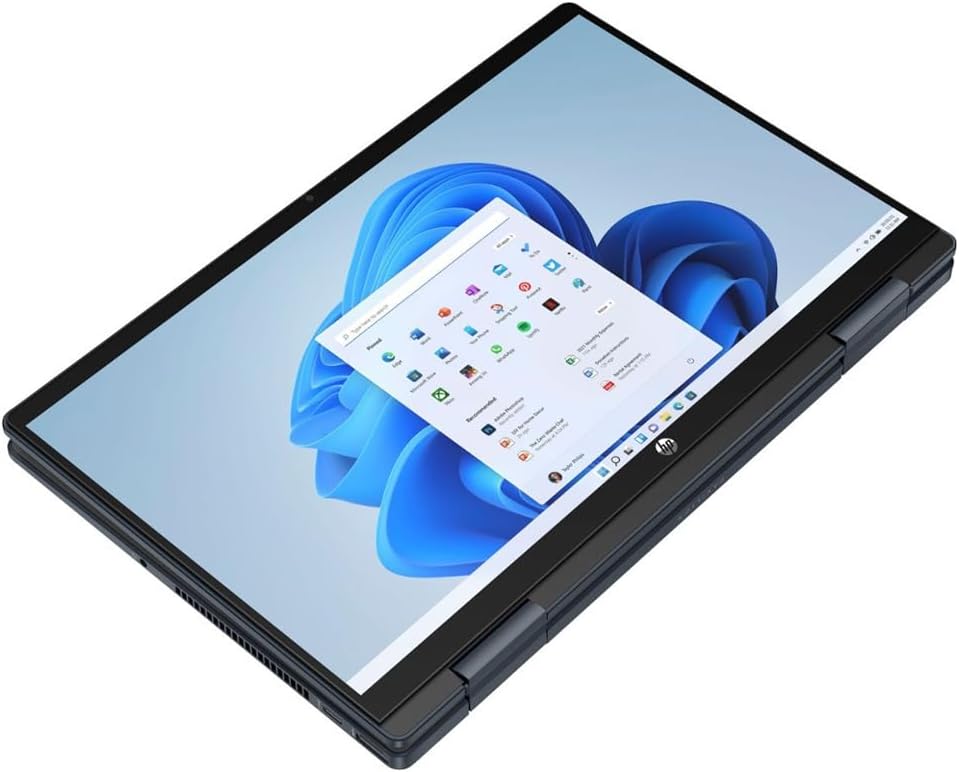
Figure 2: HP Pavilion 14" 2-in-1 Laptop in tablet mode.
3.3 Operasyon ekran taktil
The touchscreen supports multi-touch gestures for intuitive navigation:
- Tape: Ekivalan a yon klik sourit.
- Tape epi kenbe: Ekivalan a yon klike sou bò dwat la.
- Zoom-pou-Zoom: Sèvi ak de dwèt pou agrandi oswa diminye imaj la.
- Glise: Move across the screen to scroll or navigate.
3.4 Pò ak Koneksyon
Familiarize yourself with the available ports for connecting external devices:

Figi 3: Side view of the laptop with ports.
- Pò USB: Connect USB devices such as external drives, mice, or keyboards.
- HDMI Port: Konekte ak yon monitè ekstèn oswa yon televizyon.
- Jack konbine pou kas ekoutè/mikwofòn: Pou antre/soti odyo.
- Lektè kat SD: Insert SD cards for data transfer.
4. Antretyen
4.1 Netwaye òdinatè pòtab la
- Ekran: Sèvi ak yon ti moso twal mou, ki san pèl dampLave avèk dlo oswa yon pwodui netwayaj ekran. Evite pwodui chimik ki agresif.
- Klavye ak chasi: Sèvi ak yon twal mou epi sèk. Pou pousyè tè ki difisil pou retire, yon ti kras mouye.ampened cloth is acceptable. Ensure no liquid enters openings.
4.2 Swen Batri
- Pou pwolonje lavi batri a, evite dechaje batri a nèt souvan.
- Sere laptop la nan yon kote ki fre epi sèk lè w pa itilize li pou yon bon bout tan.
- Utilize HP Fast Charge for quick power-ups when needed.
4.3 Mizajou lojisyèl
Regularly update your Windows operating system and device drivers to ensure optimal performance, security, and compatibility. Windows Update typically handles this automatically, but you can manually check for updates in the Settings menu.
NAN. Depanaj
5.1 Pwoblèm komen ak solisyon
- Laptop la pa limen: Asire w adaptè AC a byen konekte epi priz kouran an fonksyone. Eseye yon lòt priz.
- Pwoblèm ekspozisyon (pa gen imaj, li tranble): Connect an external monitor to check if the issue is with the laptop's display. Restart the laptop.
- Pwoblèm koneksyon Wi-Fi: Check if Wi-Fi is enabled. Restart your router and modem. Ensure correct network password.
- Pèfòmans ralanti: Fèmen aplikasyon ki pa nesesè yo. Tcheke pou mizajou an background. Asire w ke gen ase espas depo lib.
- Ekran taktil la pa reponn: Restart the laptop. Ensure the screen is clean and free of debris.
5.2 Sipò Siplemantè
Pou pwoblèm ki pi konplèks, al gade sipò HP a. websit la oubyen kontakte sèvis kliyan HP la.
6. Espesifikasyon
| Karakteristik | Spesifikasyon |
|---|---|
| Non modèl | HP Pavilion (ek0013dx) |
| Gwosè ekspozisyon | 14.0 pous |
| Rezolisyon ekran | 1920 x 1080 piksèl (FHD) |
| Processeur | 12th Generation Intel Core i3-1215U (3.3 GHz) |
| RAM | 8 GB DDR4-3200 MHz |
| Disk Drive | SSD 256 GB PCIe NVMe M.2 |
| Koprosesè grafik | Intel Iris Xe Graphics |
| Kalite san fil | 802.11a/b/g/n/ac (2x2) Wi-Fi, Bluetooth |
| Sistèm operasyon | Windows 11 Kay nan mòd S |
| Pwa atik | 3.3 liv |
| Dimansyon pwodwi | 12.68 x 8.27 x 0.74 pous |
| Koulè | Ble |
| Batri | 1 batri ityòm Ion (enkli) |
7. Garanti ak sipò
7.1 Pwodwi Garanti
This HP Pavilion laptop is covered by a manufacturer's warranty. For detailed information regarding warranty terms, duration, and coverage, please refer to the warranty documentation included with your product or visit the official HP support websit.
7.2 Sipò pou Kliyan
Should you require technical assistance, troubleshooting guidance, or service, please contact HP customer support. Support options typically include online resources, phone support, and authorized service centers. Have your product model number (ek0013dx) and serial number ready when contacting support.
8. Videyo pwodwi yo
8.1 Laptop Overview
Videyo 1: Yon jeneral finiview of the HP Pavilion x360 laptop, highlighting its design and features. This video provides a visual introduction to the product's capabilities and physical attributes.