Pwodwi souview
The Ratakee Digital AM/FM Radio Alarm Clock (Model RA01SA) is designed for ease of use and clear readability, featuring large 1.4-inch LED digits. This versatile alarm clock offers multiple alarm sound options, an AM/FM radio with preset capabilities, a dimmable display, sleep timer, and snooze function. It operates via AC power with a battery backup for continued functionality during power outages.
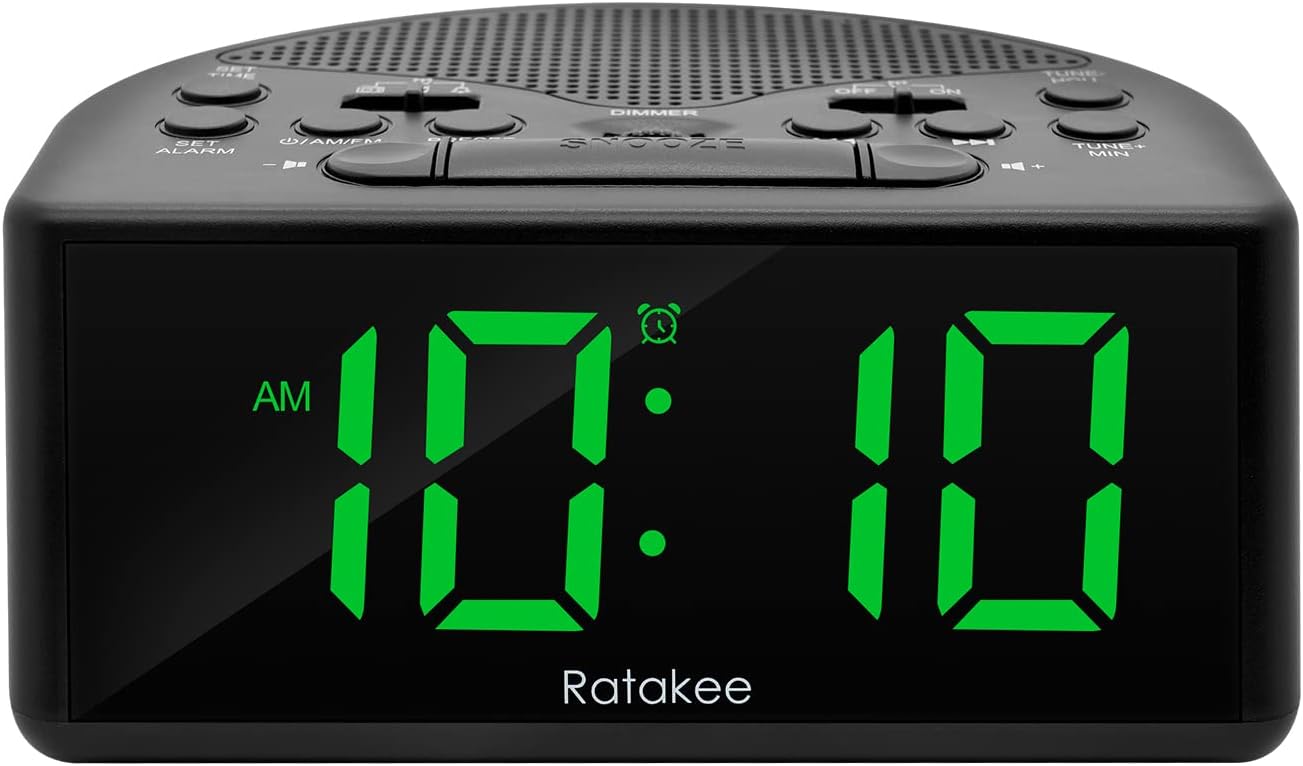
Figi 1: Devan view of the Ratakee Digital AM/FM Radio Alarm Clock displaying 10:10 AM.
Enstalasyon
Alimente revèy la
The alarm clock can be powered by an AC outlet or by batteries for backup.
- AC pouvwa: Connect the included power cord to the AC120V outlet and plug it into a wall socket. The display will light up, and the radio will be operational.
- Batri Backup: Pou pouvwa outage protection, insert 3 AA batteries (not included) into the battery compartment located on the bottom of the unit. When powered by batteries, the display will auto-dim after 20 seconds of no operation to conserve power, but the clock, alarm, and radio functions will remain active.

Figure 2: Illustration of the dual power methods: AC cord connection and battery compartment for 3 AA batteries.
Enstriksyon Operasyon
This section details the operation of your Ratakee alarm clock. Refer to Figure 3 for button and switch locations.

Figure 3: Top panel controls of the Ratakee Digital AM/FM Radio Alarm Clock.
Mete tan an
- Peze epi kenbe la METE TAN bouton an pou 2 segonn. Chif èdtan yo ap kòmanse flache.
- Sèvi ak la TUNE+ HOU bouton pou ajiste lè a.
- Sèvi ak la TUNE- MIN bouton pou ajiste minit la.
- Peze a METE TAN Peze bouton an ankò pou konfime epi sòti nan mòd reglaj tan an.
Mete Alam la
The alarm clock offers three selectable alarm sounds: AM/FM radio, music, or a classic beep.

Figure 4: The alarm clock offers three distinct alarm sound options.
- Peze epi kenbe la METE ALAM bouton an pou 2 segonn. Chif lè alam lan ap flache.
- Sèvi ak la TUNE+ HOU bouton pou mete lè alam lan.
- Sèvi ak la TUNE- MIN bouton pou mete minit alam lan.
- Slide the alarm tone switch (located near the METE ALAM button) to select your desired alarm sound: radio, music, or beep.
- Peze a METE ALAM button again to confirm the alarm time and sound.
- To turn the alarm ON or OFF, use the dedicated ON/OFF slide switch for the alarm (located on the top panel, near the right side).
Ajiste Volim Alam lan: The alarm volume is adjustable from 5 to 15 levels. When using the radio as an alarm, the clock will play the last station you listened to at the set volume level.
Operasyon radyo AM/FM
The radio allows you to store up to 20 AM and 20 FM stations.

Figure 5: The alarm clock features AM/FM radio with strong reception capabilities.
- Turn Radio On/Off: Peze a ON/AM/FM bouton pou limen oswa etenn radyo a.
- Switch Bands: Pandan radyo a ap limen, peze bouton an ON/AM/FM bouton pou chanje ant bann AM ak FM yo.
- Manyèl akor: Sèvi ak la TUNE+ HOU epi TUNE- MIN buttons to manually tune to your desired frequency.
- Auto Scan/Preset: Peze a PRESET button to scan and store available stations automatically.
- Rapèl Prereglaj: Sèvi ak la PRESET button to cycle through stored stations.
- Ajiste Volim: Sèvi ak la VOLIM + epi VOLIM - buttons to adjust the radio volume (1-16 levels).
Nòt: When listening to FM stations with earphones (via the earphone jack), stereo mode will automatically activate for enhanced sound.
Montre gradateur
The alarm clock features a full-range dimmable LED display (0-100% brightness).

Figure 6: Adjusting the display brightness from 0% to 100% for optimal viewing.
Vire a DIMMER knob (located on the top panel) to adjust the display brightness to your preferred level.
Revèy dòmi
Minitè pou dòmi an pèmèt radyo a jwe pou yon dire defini anvan li etenn otomatikman.
To activate the sleep timer, press the DOMÒM button. Each press will cycle through available sleep timer durations (e.g., 10, 20, 30, 60, 90 minutes). The radio will turn off automatically after the selected time.
Fonksyon Snooze
Lè alam lan sonnen, peze gwo bouton an SNOOZE button (located on the top center) to temporarily silence the alarm for an additional 9 minutes of sleep.

Figure 7: Easily activate the snooze function for a short delay in your alarm.
Jack ekoutè
A 3.5mm earphone jack is provided on the side of the unit for private listening. Plug in your earphones to enjoy radio content without disturbing others.
Antretyen
- Netwayaj: To clean the unit, wipe it with a soft, dry cloth. Do not use abrasive cleaners or solvents.
- Ranplasman batri: If using battery backup, replace the 3 AA batteries when the display dims significantly or the clock functions become unreliable during a power outage. Asire w ke polarite a kòrèk lè w ap mete nouvo pil.
- Depo: Si w ap sere aparèy la pou yon peryòd tan pwolonje, retire pil yo pou anpeche likid koule.
Depanaj
| Pwoblèm | Kòz posib / Solisyon |
|---|---|
| Ekran an fèb oswa etenn. |
|
| Alam lan pa sonnen. |
|
| Pòv resepsyon radyo oswa estatik. |
|
| Cannot set radio presets. |
|
Espesifikasyon
| Karakteristik | Detay |
|---|---|
| Mak | Ratakee |
| Nimewo Modèl | RA01SA |
| Kalite ekspozisyon | Digital LED (Green Digits) |
| Gwosè ekspozisyon | 1.4 inches (LED Digits) |
| Sous pouvwa | Corded Electric (AC120V) / Battery Powered (3 AA batteries, not included) |
| Dimansyon pwodwi | 5.4" lajè x 2.4" wotè |
| Pwa atik | 0.4 kilogram (14 ons) |
| Bann Radyo | AM/FM (20 AM, 20 FM presets) |
| Sonnerie Alam | 3 (AM/FM Radio, Music, Beep) |
| Volim Alam | Adjustable (5-15 levels) |
| Montre gradateur | 0-100% (Rotary Knob) |
| Revèy dòmi | 10-90 minit |
| Duration Snooze | 9 minit |
| Jack ekoutè | Wi |
| Materyèl | Plastik |
| Itilizasyon Andedan kay la / Deyò | Andedan kay la |
Garanti ak sipò
Kalite garanti: Garanti pou tout lavi
For technical support, troubleshooting assistance, or warranty claims, please contact Ratakee customer service. Refer to the product packaging or the official Ratakee websit la pou jwenn enfòmasyon kontak ki pi resan yo.
You may also find helpful resources and frequently asked questions on the manufacturer's support page.
