1. Entwodiksyon
Welcome to the user manual for your new HXSJ V600 96-Key Wired Gaming Keyboard. This manual provides essential information on setting up, operating, maintaining, and troubleshooting your device. Please read this manual thoroughly to ensure optimal performance and longevity of your keyboard.
2. Enfòmasyon sou Sekirite
Pou asire yon operasyon an sekirite epi pou anpeche domaj, tanpri swiv règ sekirite sa yo:
- Kenbe klavye a lwen likid ak imidite twòp.
- Evite ekspoze klavye a nan tanperati ekstrèm.
- Pa eseye demonte oswa modifye klavye a. Sa ka anile garanti a epi lakòz domaj.
- Sèvi sèlman ak kab USB ki vini ak li a pou koneksyon.
- Clean the keyboard with a soft, dry cloth. Avoid harsh chemicals.
3. Pwodwi souview
The HXSJ V600 is a high-performance 96-key wired gaming keyboard designed for an enhanced typing and gaming experience. It features a compact layout, vibrant RGB backlighting, and durable two-color injection keycaps.

Figi 3.1: Top view of the HXSJ V600 96-key wired gaming keyboard, showcasing its compact layout and keycap design.
4. Karakteristik kle
The HXSJ V600 keyboard offers a range of features designed for gamers and everyday users:
- Layout 96-Kle: A compact design that retains most essential keys, optimizing desk space.
- Koneksyon branche: Reliable USB connection for stable and responsive performance.
- Ekleraj RGB: Enjoy a wonderful RGB rainbow backlight via pudding keycaps, enhancing your gaming setup.
- Bouchon kle enjeksyon de koulè: Durable keycaps with legends that won't fade, providing a comfortable typing experience.
- Adjustable Tripod: Allows for ergonomic positioning to suit your preference.
- Water-like ABS Curved Keycap Design: Designed for comfortable and precise key presses.
- Plug & Play: No additional software or drivers required for basic functionality.
- Lajè konpatibilite: Supports operating systems including Win XP, Win7, Win8, Win10, Android, and Mac OS.
- WIN Key Lock Function: Peze WIN+L to lock the WIN and APP keys simultaneously, preventing accidental interruptions during gaming. Press again to unlock.
- 26-Key Conflict-Free Design: Ensures that multiple simultaneous key presses are registered accurately, crucial for gaming performance.

Figure 4.1: The HXSJ V600 keyboard highlighting its RGB lighting and 96-key layout.
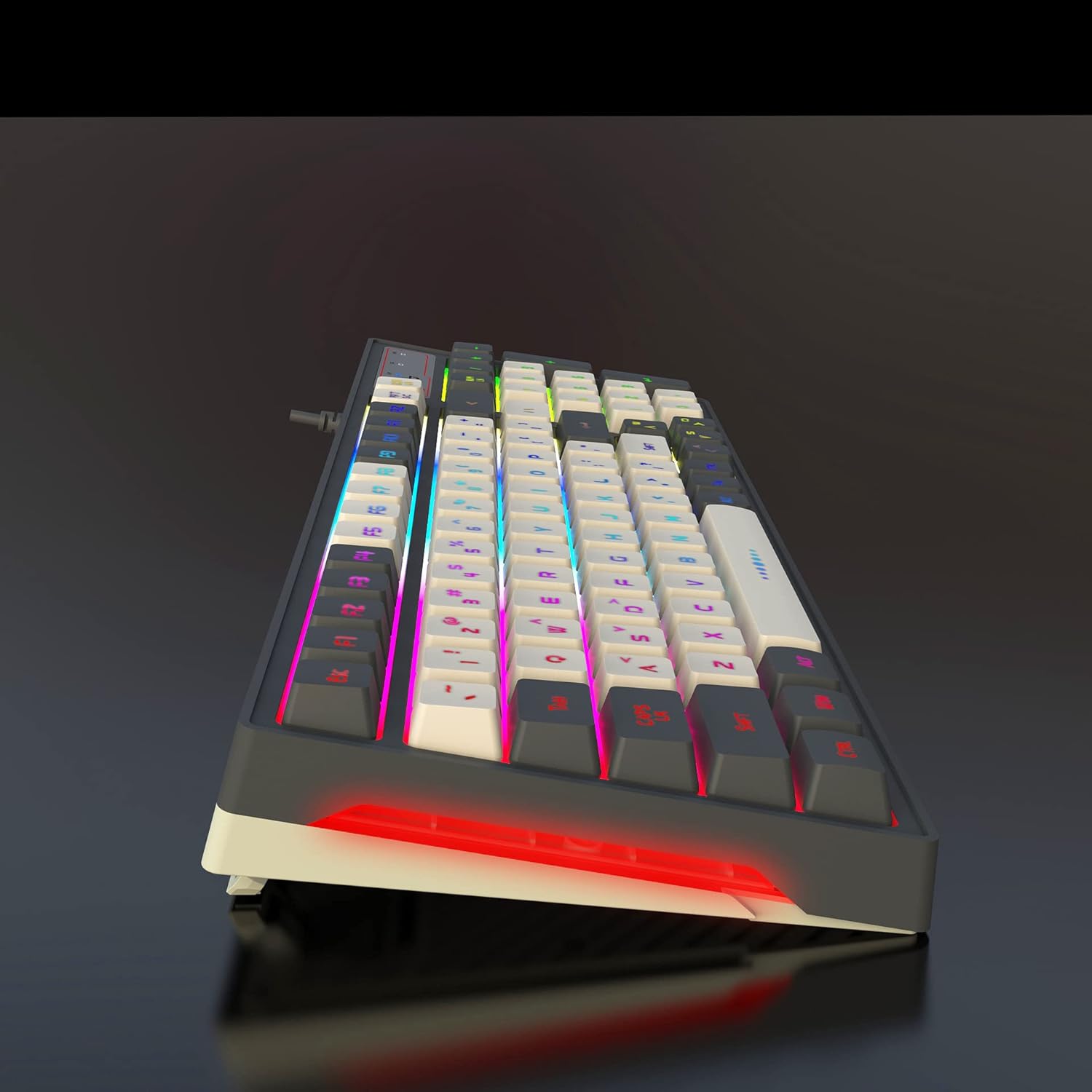
Figure 4.2: Illustration demonstrating the 26-key conflict-free design, ensuring accurate input during intense gaming sessions.
5. Pake kontni
Tanpri tcheke kare a pou atik sa yo:
- 1 x HXSJ V600 96-Key Wired Gaming Keyboard
- 1 x USB kab

Figure 5.1: The HXSJ V600 keyboard and its packaging, illustrating the contents included in the box.
6. Enstriksyon Enstalasyon
Follow these steps to set up your HXSJ V600 keyboard:
- Dekonpoze: Carefully remove the keyboard and USB cable from the packaging.
- Konekte: Insert the USB connector of the keyboard cable into an available USB port on your computer.
- Rekonesans Sistèm: Your operating system (Windows, Mac OS, Android) should automatically detect and install the necessary drivers. No additional software installation is required for basic functionality.
- Ajiste: Adjust the keyboard's tripod feet for your preferred typing angle.
7. Operasyon Enstriksyon
The HXSJ V600 keyboard operates as a standard QWERTY keyboard. Below are specific functions:
7.1 Kontwòl ekleraj
The keyboard features dynamic RGB backlighting. Specific key combinations for changing lighting modes or brightness are typically indicated on the keycaps themselves or in a quick start guide not provided in this manual. Experiment with the function keys (F1-F12) in combination with the 'Fn' key if present, or dedicated lighting keys, to cycle through effects.
7.2 Fonksyon espesyal
- Kle pou fèmen pòt WIN: To prevent accidental presses of the Windows key during gaming, press WIN+L. This will lock both the WIN key and the APP key. Press WIN+L again to unlock them.
8. Antretyen ak Swen
Proper care will extend the life of your keyboard:
- Netwayaj: Use a soft, lint-free cloth to wipe the surface of the keyboard. For dust between keys, use compressed air. Do not use liquid cleaners directly on the keyboard.
- Depo: When not in use, store the keyboard in a dry, cool place away from direct sunlight.
- Swen kab: Evite pliye oswa tòde kab USB a twòp pou anpeche domaj entèn.
NAN. Depanaj
If you encounter issues with your HXSJ V600 keyboard, refer to the table below for common problems and solutions:
| Pwoblèm | Kòz posib | Solisyon |
|---|---|---|
| Klavye pa reponn | Koneksyon USB ki lach; Pò USB ki gen pwoblèm; Pwoblèm chofè. | Asire w kab USB a byen branche. Eseye yon lòt pò USB. Rekòmanse òdinatè w la. |
| Backlight not working or flickering | Lighting mode off; Software glitch; Hardware issue. | Check keyboard lighting controls (Fn + specific keys). Restart computer. |
| Kle yo pa anrejistre oswa yo pa klere | Dust/debris under keycap; Software conflict. | Clean under keycaps with compressed air. Ensure no conflicting software is running. The 26-key conflict-free design minimizes this issue. |
| WIN key is locked | WIN key lock function activated. | Peze WIN+L again to unlock the WIN and APP keys. |
Si pwoblèm nan pèsiste apre ou fin eseye solisyon sa yo, tanpri kontakte sèvis kliyan.
10. Espesifikasyon teknik
| Karakteristik | Spesifikasyon |
|---|---|
| Mak | HXSJ |
| Modèl | V600 |
| Kantite kle | 96 |
| Koneksyon Teknoloji | Branche (USB) |
| Karakteristik espesyal | Backlit (RGB), 26-Key Conflict-Free |
| Materyèl Keycap | Acrylonitrile Butadiene Styrene (ABS) - Two-color injection |
| Longè kab | 1.8m (apeprè) |
| Aparèy konpatib | PC |
| Sistèm operasyon sipò | Win XP/Win7/Win8/Win10/Android/Mac OS |
| Pwa atik | 770 g |
| Dimansyon pake | 40.79 x 16.9 x 4.7 cm |
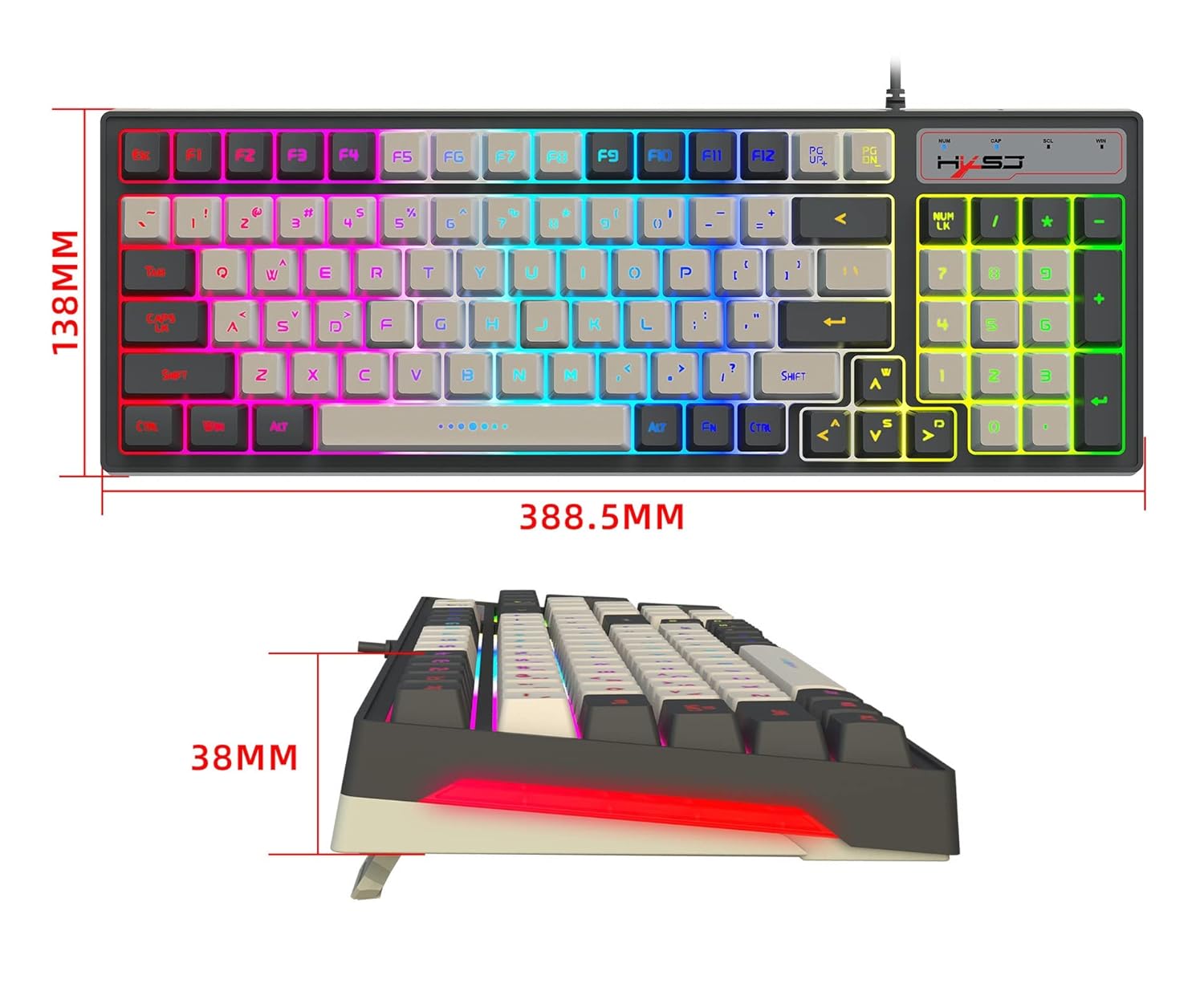
Figure 10.1: Diagram illustrating the dimensions of the HXSJ V600 keyboard.
11. Garanti ak sipò
Garanti: This product typically comes with a 10-day replacement policy from the date of purchase, subject to the terms and conditions of the retailer. Please retain your proof of purchase for any warranty claims.
Sipò: For further assistance, technical support, or warranty inquiries, please contact the retailer or manufacturer directly. Refer to your purchase documentation for specific contact details.


