Entwodiksyon
Thank you for choosing the ErGear Small Height Adjustable Electric Standing Desk. This manual provides essential information for the setup, operation, and maintenance of your new desk. Designed for comfort and productivity, this desk allows you to seamlessly switch between sitting and standing positions, promoting a healthier work environment.

Image: The ErGear Electric Standing Desk in a home office setup, showcasing its spacious black desktop and sturdy black legs.
Karakteristik kle
- Estabilite eksepsyonèl: Features a sturdy solid steel frame with aerospace-grade lifting column connectors, ensuring stability and security even after extensive use (tested 100,000 times).
- Ajisteman Wotè Lis: Freely select desk height from 28.35 inches to 46.46 inches. Save up to three favorite settings for quick and smooth transitions.
- Motè amelyore: Equipped with a powerful motor for efficient lifting performance and reliable long-term operation (tested 50,000 times).
- Materyèl ki an sekirite epi ki gen mwens COV: Constructed with materials that sharply reduce formaldehyde and other VOC emissions, meeting US federal and state safe air standards.

Image: A man working at the standing desk with a dog leaning on it, illustrating the desk's ultimate stability.
Enstalasyon (Enstriksyon Asanblaj)
For detailed assembly instructions, please refer to the official Installation Manual (PDF) provided with your product. The desk is designed for straightforward assembly, typically requiring one person.
Konsèy pou Asanble Jeneral la:
- Depake tout konpozan yo epi verifye yo avèk lis pyès ki nan manyèl la.
- Follow the step-by-step instructions carefully. Avoid using power drills for screwing into the desktop to prevent stripping holes; a hand screwdriver is recommended.
- Asire tout koneksyon yo an sekirite anvan ou itilize yo.

Image: Various components of the ErGear standing desk, including the desktop pieces, legs, and control panel, ready for assembly.
Enstriksyon Operasyon
Your ErGear Electric Standing Desk features an intuitive control panel for easy height adjustment and memory settings.
Ajisteman wotè:
- Sèvi ak la Anlè (▲) epi Desann (▼) arrow buttons on the control panel to manually adjust the desk height. The current height is displayed on the digital screen.
- The desk adjusts smoothly and quietly, allowing for seamless transitions between sitting and standing positions.
Prereglaj memwa:
- To save a preferred height, adjust the desk to your desired level, then press the 'S' button followed by one of the numbered preset buttons (1, 2, oswa 3). The height will be saved to that number.
- To recall a saved height, simply press the corresponding numbered preset button (1, 2, oswa 3). Biwo a ap deplase otomatikman nan pozisyon li te sove a.

Imaj: Yon imaj detaye view of the desk's control panel, showing the digital height display and buttons for manual adjustment and memory presets.
Smart Anti-Collision System:
- The desk is equipped with a smart anti-collision system that automatically stops and slightly reverses if it encounters an obstacle during height adjustment, preventing damage to the desk or other objects.
Handy Features:
- Integrated cable access holes help manage wires for a clean and organized workspace.
- Two included storage hooks provide convenient places to hang headphones or bags.
Video: An official ErGear video demonstrating the smooth and quiet height adjustment of the standing desk, showcasinfonksyonalite li nan yon anviwònman biwo lakay.
Antretyen
To keep your ErGear Electric Standing Desk in optimal condition, follow these simple maintenance guidelines:
- Netwayaj: Siye sifas biwo yo ak piblisiteamp cloth, then dry thoroughly with a clean, dry cloth. Avoid harsh chemicals or abrasive cleaners.
- Tèks regilye: Tcheke tout vis ak koneksyon yo detanzantan pou asire yo rete sere epi byen fèm.
Depanaj
Si ou rankontre nenpòt pwoblèm ak Biwo Kanpe Elektrik ErGear ou a, tanpri al gade solisyon komen sa yo:
| Pwoblèm | Kòz posib / Solisyon |
|---|---|
| Biwo a ap tranble oswa li pa estab. | Ensure all assembly screws are tightened. Check that the adjustable feet are evenly balanced on the floor. |
| Motor makes humming noise or is not responding. | Unplug the desk from the power outlet for a few minutes, then plug it back in. This can reset the motor. Ensure all cables are securely connected. |
| Desktop holes are stripped during assembly. | Avoid using power drills for assembly, especially when attaching the desktop. Use a hand screwdriver and do not overtighten screws. |
| Desk does not lift or lowers with heavy items. | Ensure the total weight on the desk does not exceed the maximum weight recommendation of 176 pounds. |
Espesifikasyon
| Spesifikasyon | Detay |
|---|---|
| Mak | ErGear |
| Nimewo Modèl | EGESD4B |
| Dimansyon pwodwi | 24"D x 40"W x 46.46"H |
| Koulè | Nwa |
| Style | Modèn |
| Materyèl de baz | Alloy Steel |
| Fini Kalite | Steel |
| Karakteristik espesyal | Sit and Standing Desk |
| Itilizasyon Rekòmande | Working, Drafting, Writing, Indoor, Gaming |
| Kalite aliye | Mount Floor |
| Rekòmandasyon pwa maksimòm | 176 liv |
| Epesè Tabletop | 0.67 pous |
| Wotè maksimòm | 46.46 pous |
| Wotè Minimòm | 28.35 pous |
| Kantite Pozisyon Wotè | 3 |
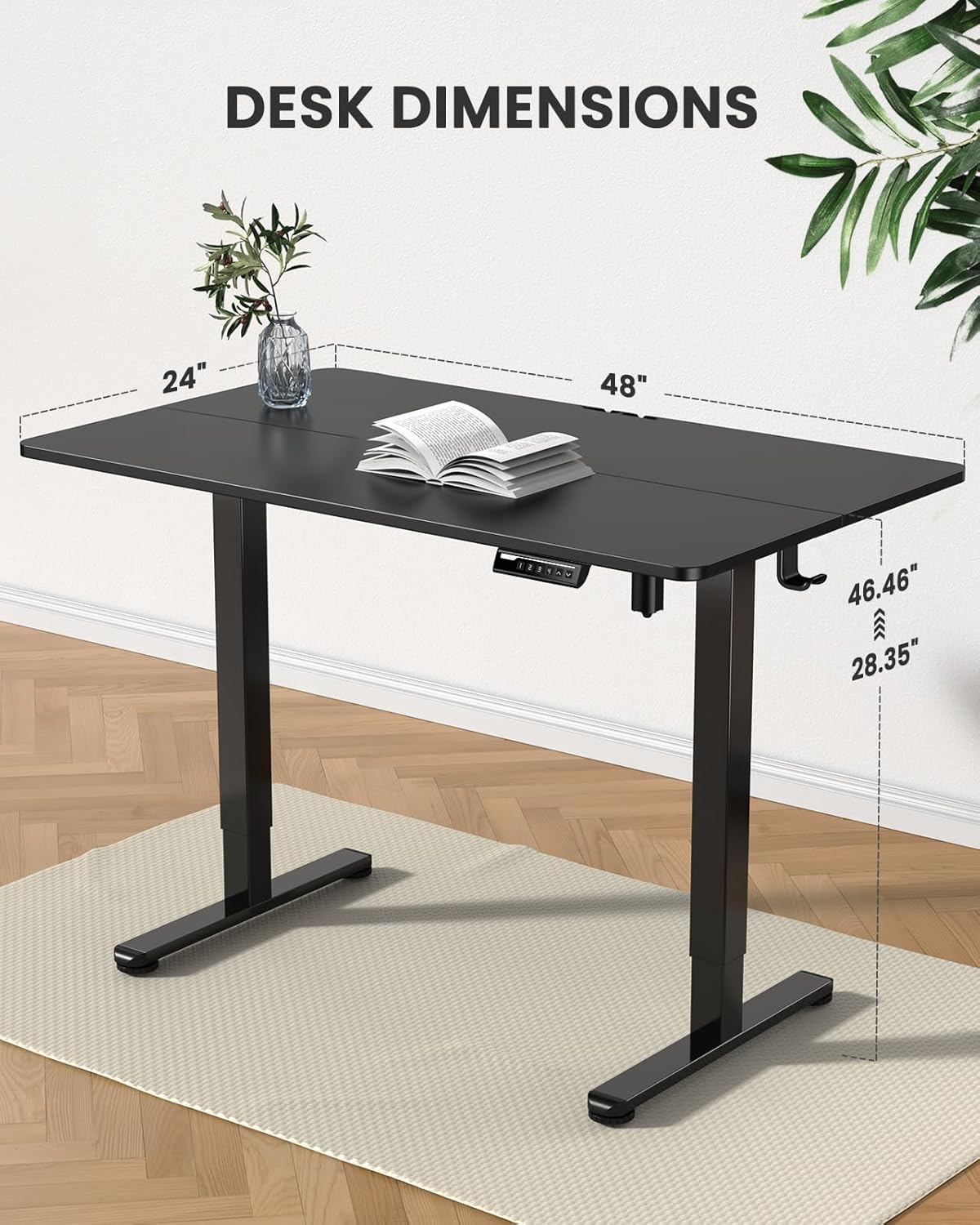
Image: A visual representation of the desk's dimensions, including height range and desktop size.
Enfòmasyon sou Sekirite
Please adhere to the following safety guidelines to ensure safe operation and longevity of your desk:
- Ensure proper assembly as per the instruction manual.
- Pa depase limit pwa maksimòm lan ki se 176 liv.
- Manage cables securely to prevent tripping hazards and ensure smooth movement of the desk.
- Kenbe timoun ak bèt kay yo lwen pati k ap deplase biwo a pandan w ap itilize li.
Garanti ak sipò
The ErGear Electric Standing Desk comes with a Limited Warranty. For specific terms and conditions, please refer to the warranty information included with your purchase.
For further assistance, technical support, or to access the full installation manual, please refer to the official PDF document:
For any other inquiries, please contact ErGear customer support.


