Entwodiksyon
This manual provides essential instructions for the safe and efficient use of your HTC TWS6 Wireless Earbuds. Please read it thoroughly before using the product and retain it for future reference.
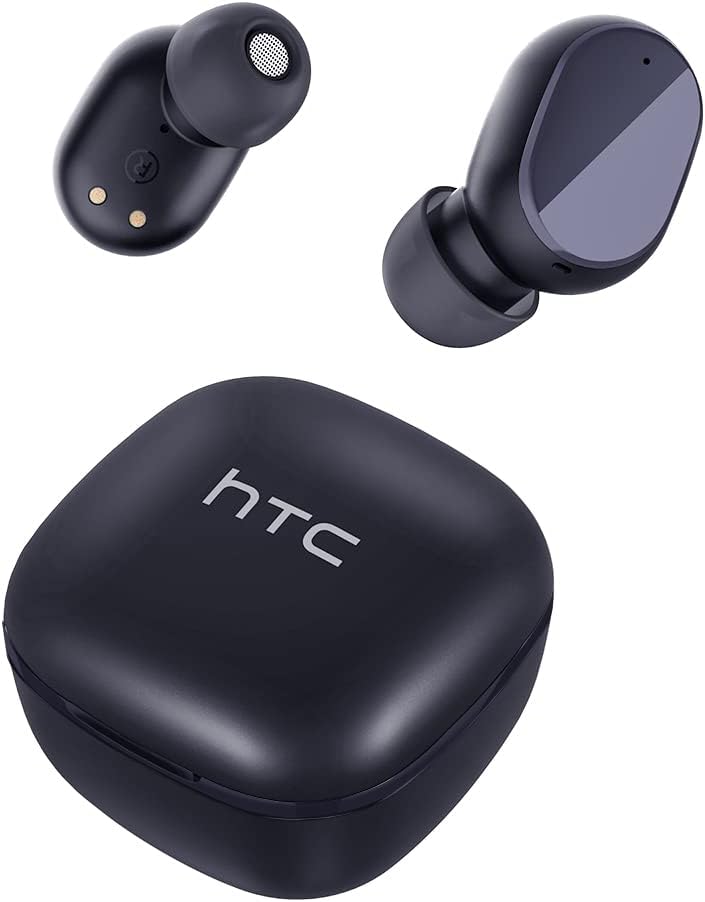
Image: The HTC TWS6 Wireless Earbuds, featuring two earbuds and their compact charging case, presented in a solid carbon black finish.
Kontni pake
Asire w tout atik yo prezan nan pakè a:
- HTC TWS6 Wireless Earbuds (Left and Right)
- Ka chaje
- USB-C Chaje Kab
- Rubber Eartips (S/L sizes)
- Gid pou kòmanse rapidman (Manyèl sa a sèvi kòm yon gid konplè)

Image: All components included in the HTC TWS6 package: the earbuds in their charging case, a USB-C cable, two additional pairs of rubber eartips, and a quick start guide.
Enstalasyon
1. Chaje ekoutè yo ak bwat la
Anvan premye itilizasyon an, chaje ekoutè yo ak bwat chaje a nèt.
- Mete ekoutè yo nan bwat chaje a. Asire w yo byen chita.
- Konekte kab chaje USB-C a nan pò chaje ki sou bwat la epi lòt bout la nan yon sous kouran USB (pa egzanp, òdinatè, adaptè miray).
- The indicator light on the case will show charging status. A full charge typically takes approximately 5 hours for the case.

Image: An illustration detailing the battery life of the HTC TWS6 Earbuds: up to 5 hours of listening time on a single charge, up to 20 hours total with the charging case, and the case has a 300 mAh capacity.
2. Pairing ak yon Aparèy
The earbuds utilize Bluetooth 5.3 for fast and stable connections.
- Louvri bwat chaje a. Ekoutè yo ap antre otomatikman nan mòd koneksyon.
- Sou aparèy ou an (telefòn entelijan, tablèt, elatriye), aktive Bluetooth.
- Chèche pou available Bluetooth devices and select "HTC TWS6" from the list.
- Yon fwa konekte, w ap tande yon son konfimasyon, epi ekoutè yo ap pare pou itilize.

Image: Demonstrates the fast pairing capability and wide compatibility of the HTC TWS6 Earbuds, showing them connected to a smartphone playing music.
3. Mete ekoutè yo
Choose the correct eartip size for optimal comfort and sound quality. Gently insert the earbuds into your ears and rotate them slightly to secure a snug fit.
Enstriksyon Operasyon
The HTC TWS6 earbuds feature smart touch controls on each earbud.

Image: A diagram illustrating the smart touch controls on the HTC TWS6 Earbuds, showing single tap for play/pause music and answer/end calls, triple tap for voice assistant, and long press for 2 seconds to reject a call.
Lèktur Klas Mizik
- Jwe/Poz: Tape yon sèl sou chak ekoutè.
- Pwochen Track: Tape doub ekoutè dwat la.
- Track Previous: Tape doub ekoutè gòch la.
- Volim moute: Tape twa fwa ekoutè dwat la.
- Volim desann: Tape twa fwa ekoutè gòch la.
Jesyon Rele
- Reponn/Fen Apèl: Tape yon sèl sou chak ekoutè.
- Rejte apèl: Peze epi kenbe swa ekoutè pou 2 segonn.
Asistan vwa
- Aktive Asistan Vwa: Triple tap on either earbud (if not used for volume control).
Antretyen
Netwayaj
Netwaye ekoutè ou yo ak bwat chaje ou yo regilyèman pou asire pèfòmans ak ijyèn optimal.
- Sèvi ak yon twal mou, sèk, ki pa gen pousyè pou siye ekoutè yo ak kouvèti a.
- Retire bout zòrèy yo epi netwaye yo avèk savon dou ak dlo, apresa seche yo byen anvan ou mete yo ankò.
- Pa sèvi ak pwodui netwayaj abrazif epi pa plonje ekoutè yo oswa bwat la nan dlo.
Rezistans dlo
The HTC TWS6 earbuds are IPX5 sweatproof, meaning they are resistant to splashes and sweat. They are not designed for submersion in water.

Image: The HTC TWS6 Earbuds and charging case are shown with water droplets, illustrating their IPX5 water and sweat resistance, which protects against light rain and sweat.
Depo
Lè w pa ap itilize ekoutè yo, sere yo nan bwat chaje yo pou pwoteje yo epi kenbe yo chaje.
Depanaj
Si ou rankontre pwoblèm, eseye solisyon sa yo:
- Ekoutè yo pa konekte:
- Asire w ke ekoutè yo chaje.
- Etenn epi aktive Bluetooth sou aparèy ou an.
- Forget "HTC TWS6" from your device's Bluetooth list and try pairing again.
- Mete ekoutè yo tounen nan bwat la, fèmen l, tann kèk segond, epi ouvri l ankò pou antre nan mòd koneksyon an ankò.
- Pa gen son ki soti nan youn nan ekoutè yo:
- Asire ke tou de ekoutè yo chaje.
- Try resetting the earbuds (refer to manufacturer's specific reset instructions if available, otherwise re-pair).
- Pwoblèm chaj:
- Tcheke kab USB-C a ak adaptè kouran an. Eseye yon lòt kab oswa adaptè.
- Asire w ke kontak chaje yo sou ekoutè yo ak anndan bwat la pwòp epi san debri.
- Kalite son pòv:
- Ensure earbuds are properly seated in your ears with the correct eartip size.
- Clean the earbud mesh to remove any wax or debris.
- Pwoche pi pre aparèy ki konekte a pou evite entèferans.
Espesifikasyon
| Karakteristik | Detay |
|---|---|
| Non modèl | TWS6 |
| Mak | HTC |
| Koneksyon Teknoloji | San fil (Bluetooth) |
| Bluetooth vèsyon | 5.3 |
| Nivo rezistans dlo | IPX5 (Rezistan a swè) |
| Dire batri (ekoutè) | Jiska 5 èdtan |
| Tan total pou jwe (ak bwat) | Jiska 22 èdtan |
| Tan chaje (Ka) | Apeprè 5 èdtan |
| Kalite kontwòl | Kontwòl manyen |
| Mikwofòn | Entegre ak ENC (Anilasyon Bri Anviwònman) |
| Aparèy konpatib | iOS and Android Smartphones, Gaming Devices |
| Pwa | 3.17 ons |
| UPC | 734257974554 |
Garanti ak sipò
Your HTC TWS6 Wireless Earbuds come with a 360-day warranty extension. For any product-related inquiries, technical assistance, or warranty claims, please contact HTC customer support.
Sipò Kliyan:
- 7*24 Live Chat Support is available. Please refer to the official HTC website or your purchase platform for specific contact details.
- For online support, visit the HTC Store on Amazon.


