1. Entwodiksyon
This manual provides comprehensive instructions for the Naxa NDS-6501 Portable Dual 6.5-inch Bluetooth Speaker. Please read this manual thoroughly before operating the device to ensure proper use and to maximize your experience. Keep this manual for future reference.
2. Pake kontni
Verifye ke tout atik ki nan lis anba a yo enkli nan pakè ou a:
- Naxa NDS-6501 Portable Bluetooth Speaker
- Mikwofòn branche
- USB Chaje Kab
- Manyèl Itilizatè (dokiman sa a)
3. Pwodwi Features
The Naxa NDS-6501 speaker offers a range of functionalities designed for portable audio entertainment:
- Dual 6.5-inch full-frequency speakers for clear audio output.
- Bluetooth connectivity for wireless audio streaming from compatible devices.
- Integrated multi-color flame lights with various lighting effects.
- True Wireless Stereo (TWS) function for connecting two NDS-6501 speakers wirelessly.
- Wired microphone input for vocal use.
- Built-in FM radio tuner for local station access.
- USB port and MicroSD/TF card slot for playing audio files soti nan depo ekstèn.
- Auxiliary (3.5mm) input for wired audio connections.
- Rechargeable battery providing up to 2 hours of playback time.
4. Kontwòl ak pò
The speaker features various controls and input/output ports. A typical layout includes a power button, volume controls, mode selection, playback controls (play/pause, skip tracks), microphone input, USB port, MicroSD card slot, auxiliary input, and a charging port. Refer to the diagram below for specific locations.
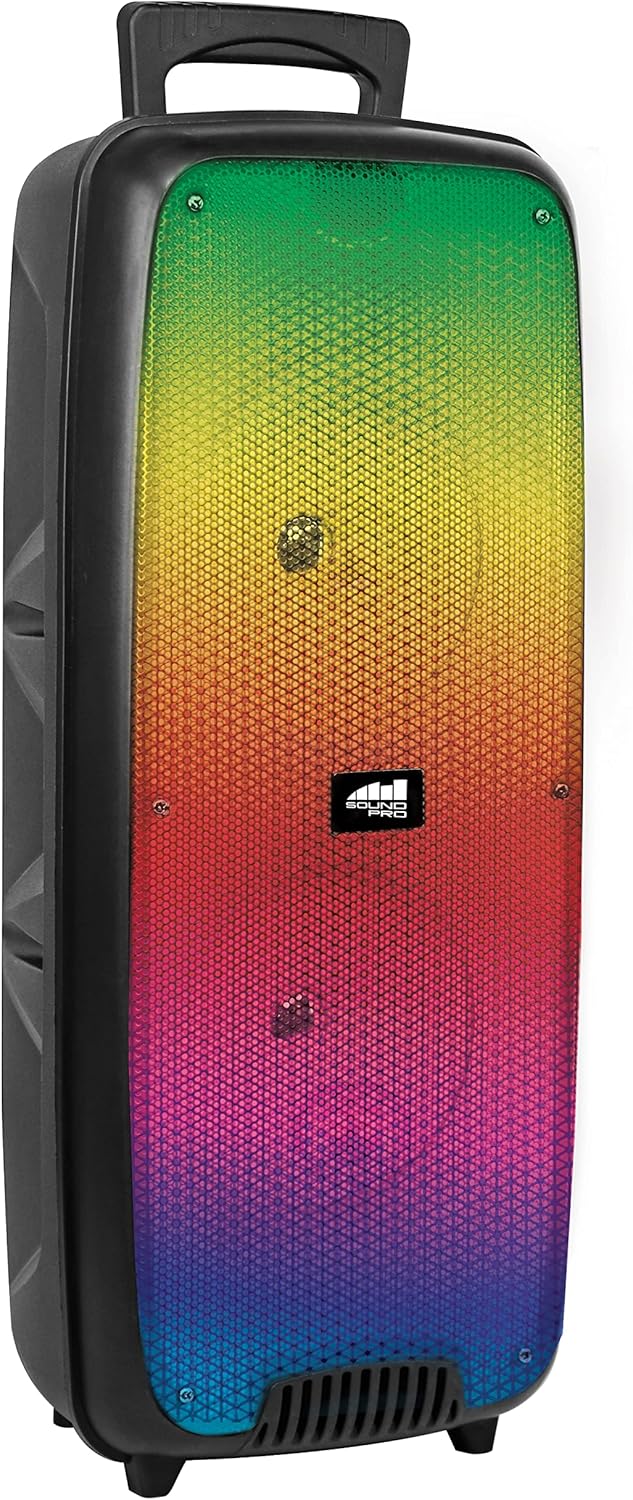
Figi 4.1: Devan view of the Naxa NDS-6501 speaker, showcasing the dual 6.5-inch drivers and multi-color flame lights.

Figi 4.2: Side view of the Naxa NDS-6501 speaker, illustrating its portable design with an integrated handle.
5. Enstalasyon
5.1 Chaje Oratè a
- Connect the supplied USB charging cable to the speaker's charging port.
- Konekte lòt bout kab USB a nan yon adaptè kouran USB konpatib (pa enkli) oubyen nan yon pò USB òdinatè.
- Limyè endikatè chaje a ap limen, anjeneral an wouj, pandan y ap chaje.
- Once fully charged, the indicator light will change color or turn off (refer to specific LED behavior in your product). A full charge provides approximately 2 hours of playback.
5.2 Limen/Etenyen
- To power on: Press and hold the Power button for a few seconds until the speaker activates.
- To power off: Press and hold the Power button again until the speaker shuts down.
6. Operasyon Enstriksyon
6.1 Bluetooth Pairing
- Ensure the speaker is powered on and in Bluetooth mode. If not, press the Mode button to switch to Bluetooth. The speaker will indicate it is ready for pairing (e.g., a flashing LED or an audible prompt).
- Sou aparèy ou ki gen Bluetooth la (telefòn entelijan, tablèt, elatriye), ale nan paramèt Bluetooth yo.
- Chèche pou available devices. You should see "NDS-6501" or a similar name in the list.
- Select "NDS-6501" to initiate pairing.
- Yon fwa li byen konekte, oratè a ap bay yon konfimasyon sonab, epi limyè endikatè Bluetooth la ap vin fiks.
6.2 Vrèman san fil stereo (TWS) koneksyon
The TWS function allows you to connect two NDS-6501 speakers for a stereo sound experience.

Figi 6.1: Illustration of the True Wireless Stereo (TWS) function, enabling two speakers to connect wirelessly from a single Bluetooth source.
- Ensure both NDS-6501 speakers are powered on and in Bluetooth mode, but not yet paired to any device.
- On one of the speakers (this will be the primary speaker), press and hold the TWS button (or a designated pairing button) for a few seconds.
- The primary speaker will search for the secondary speaker. Once connected, both speakers will provide an audible confirmation.
- Now, pair your Bluetooth device to the primary speaker as described in Section 6.1. Audio will play through both speakers in stereo.
6.3 Operasyon Radyo FM
- Peze bouton Mòd la pou chanje nan mòd Radyo FM.
- Peze bouton Jwe/Pòz la pou otomatikman eskane epi sove estasyon FM ki disponib yo.
- Use the Previous/Next track buttons to navigate between saved stations.
6.4 Lekti USB/MicroSD
- Insert a USB flash drive or a MicroSD/TF card (with audio files) into the corresponding port.
- The speaker should automatically switch to USB or MicroSD mode and begin playing audio. If not, press the Mode button to select the correct input.
- Use the playback controls (Play/Pause, Previous/Next) to manage your music.
6.5 Itilizasyon Mikwofòn
- Connect the wired microphone to the microphone input jack on the speaker.
- Adjust the microphone volume control (if available) on the speaker to your desired level.
- The microphone audio will be mixed with any music playing through the speaker.
6.6 Efè ekleraj
- The speaker features integrated multi-color flame lights.
- Press the Light button (if available) to cycle through different lighting modes or to turn the lights on/off.
- The lights may synchronize with the music playback.
7. Antretyen
- Netwayaj: Sèvi ak yon twal mou epi sèk pou netwaye deyò oratè a. Pa sèvi ak pwodui netwayaj abrazif, sir, oswa solvan.
- Depo: Lè w pa itilize oratè a pou yon bon bout tan, sere l nan yon kote ki fre epi sèk, lwen limyè solèy dirèk ak tanperati ekstrèm.
- Swen batri: Pou pwolonje lavi batri a, evite dechaje batri a nèt souvan. Chaje oratè a regilyèman, menm si w pa ap itilize l.
- Ekspozisyon dlo: Oratè sa a pa enpèmeyab. Evite ekspoze li nan dlo oswa imidite twòp.
NAN. Depanaj
| Pwoblèm | Kòz posib | Solisyon |
|---|---|---|
| Oratè a pa limen. | Batri ap vide. | Chaje oratè a lè l sèvi avèk kab USB yo bay la. |
| Pa gen son ki soti nan oratè a. | Volume is too low; incorrect input mode; device not paired. | Increase volume; press Mode button to select correct input; re-pair Bluetooth device. |
| Bluetooth device cannot find speaker. | Oratè a pa nan mòd koneksyon; aparèy la twò lwen; entèferans. | Ensure speaker is in Bluetooth pairing mode; move device closer; avoid obstacles. |
| Koneksyon TWS la echwe. | Oratè yo deja konekte ak yon aparèy; yo twò lwen youn ak lòt. | Ensure both speakers are unpaired from other devices; place speakers within 33 feet of each other. |
| Mikwofòn pa mache. | Microphone not fully plugged in; microphone volume low. | Ensure microphone is securely connected; adjust microphone volume. |
9. Espesifikasyon
| Karakteristik | Spesifikasyon |
|---|---|
| Nimewo Modèl | NDS-6501 |
| Gwosè Oratè | Doub 6.5 pous |
| Koneksyon Teknoloji | Bluetooth, USB, MicroSD, Aux (3.5mm) |
| Antre odyo | Mikwofòn branche |
| Audio Sòti Mode | Stereo |
| Maksimòm Sorti pouvwa | 3 Watts |
| Oratè AmpKalite lifikasyon | Aktif |
| Kalite batri | Lithium Ion (rechargeable, included) |
| Lavi Mwayèn Batri | Jiska 2 èdtan |
| Dimansyon pwodwi (L x W x H) | 24.13 x 19.05 x 57.91 cm (9.5 x 7.5 x 22.8 pous) |
| Pwa atik | 2.81 kg (6.2 liv) |
| Koulè | Nwa |
| UPC | 840005017555 |
10. Garanti ak sipò
For warranty information or technical support, please refer to the warranty card included with your product or visit the official Naxa Electronics websit la. Kenbe resi acha ou kòm prèv acha pou nenpòt reklamasyon garanti.


