1. Pwodwi souview
The AZZA CSAZ-280B Spectra Black is an ATX Mid Tower gaming case designed to house various computer components. It features a tempered glass side panel and a steel right panel. This manual provides instructions for the proper installation and maintenance of your computer components within this case.

Imaj 1.1: Devan-gòch view of the AZZA CSAZ-280B Spectra Black case, showcasing the tempered glass side panel and the front panel design with integrated RGB lighting.
Karakteristik kle:
- Left Panel: Tempered glass with rubber mounts for secure installation.
- Right Panel: Solid steel panel.
- Motherboard Compatibility: Supports ATX, Micro-ATX, and ITX motherboards.
- Drive Bays: Up to three 2.5" drive bays and up to two 3.5" drive bays.
- Maximum CPU Cooler Height: Up to 170 mm.
- Maximum Video Card Length: Up to 290 mm.
2. Enstalasyon ak Konpozan
Follow these steps for proper installation of your computer components into the AZZA CSAZ-280B case. Ensure the system is powered off and unplugged before beginning any installation.
2.1 Koneksyon Panèl Antre/Sòti Devan an
The top panel of the case features various input/output ports and controls for convenient access.

Imaj 2.1: Anwo-anba view of the case's front I/O panel, indicating the Power button, LED control button, Audio jacks (Mic and Headphone), two USB 2.0 ports, and one USB 3.0 port.
- Bouton pouvwa: Press to power on or off the system.
- Bouton ki ap dirije: Controls the RGB lighting effects of the case.
- Pak odyo: Separate ports for microphone and headphones.
- Pò USB 2.0: Two ports for connecting USB 2.0 devices.
- USB 3.0 pò: One port for connecting USB 3.0 devices, offering faster data transfer speeds.
2.2 Enstalasyon kondwi
The case supports both 3.5" HDDs and 2.5" SSDs. Refer to the images below for drive bay locations.

Imaj 2.2: Entèn view showing the lower drive cage, capable of holding one 3.5" HDD or one 2.5" SSD, and an additional dedicated 3.5" HDD bay.

Imaj 2.3: Entèn view showing two dedicated 2.5" SSD mounting brackets located behind the motherboard tray.
- For 3.5" HDDs: Install drives into the designated 3.5" drive cage located at the bottom front of the case. Secure with screws.
- For 2.5" SSDs: Install drives into the dedicated 2.5" mounting brackets behind the motherboard tray or in the lower drive cage. Secure with screws.
2.3 Enstalasyon Kat Grafik
Bwat la sipòte kat grafik ki rive jiska 290mm longè.

Imaj 2.4: Entèn view illustrating the maximum supported length for a video card, which is 290mm.
- Retire kouvèti fant PCI-E ki nesesè yo nan dèyè bwat la.
- Carefully insert the graphics card into the PCI-E slot on your motherboard.
- Fikse kat grafik la sou bwat la ak vis.
2.4 Fan Installation and Airflow
Proper fan placement ensures optimal cooling performance. The case supports various fan configurations:
- Devan: Supports 3 x 120mm fans or 2 x 140mm fans.
- Top: Sipòte 2 fanatik 120mm.
- Dèyè: Supports 1 x 120mm fan.
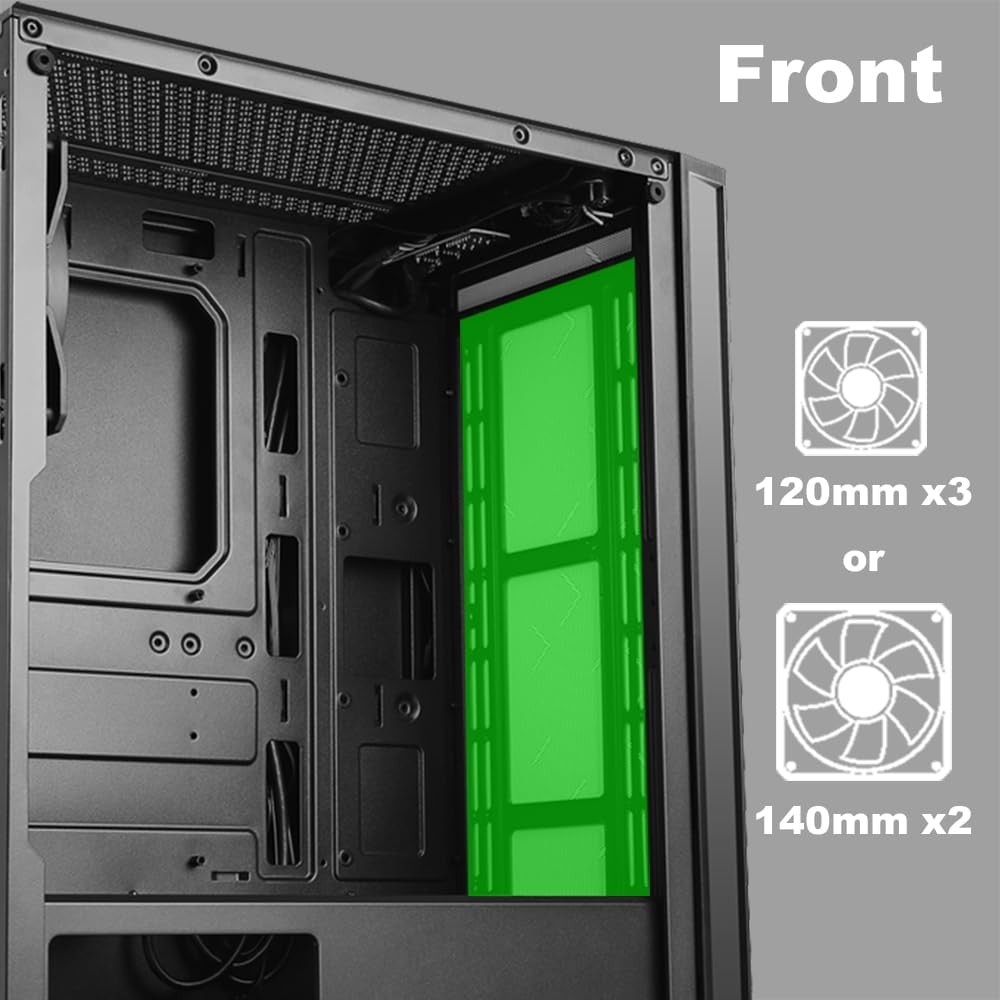
Imaj 2.5: Entèn view of the front panel, highlighting the mounting locations for up to three 120mm fans or two 140mm fans.

Imaj 2.6: Entèn view of the top panel, showing the mounting locations for up to two 120mm fans.

Imaj 2.7: Entèn view of the rear panel, indicating the mounting location for one 120mm fan.
- Identify the desired fan mounting locations (front, top, rear).
- Secure fans to the case using appropriate fan screws.
- Connect fan power cables to the motherboard or a fan controller.
2.5 Enstalasyon ekipman pou pouvwa a
The power supply unit (PSU) mounts at the bottom of the case.
- Slide the PSU into the designated compartment at the bottom rear of the case.
- Fikse PSU a nan bwat la avèk vis ki nan dèyè a.
- Route power cables through the cable management cutouts to reach your components.
3. Operasyon Enstriksyon
3.1 Power On/Off
To power on your system, press the power button located on the top I/O panel. To power off, either shut down through your operating system or press and hold the power button for several seconds.
3.2 ki ap dirije kontwòl
Use the dedicated LED button on the top I/O panel to cycle through various lighting modes and colors for the integrated RGB elements of the case.
4. Antretyen
Antretyen regilye ede asire pèfòmans optimal ak lonjevite konpozan PC ou yo.
- Netwayaj pousyè: Periodically clean dust filters and internal components using compressed air. Ensure the system is powered off and unplugged before cleaning.
- Jesyon kab: Ensure cables are neatly routed to prevent obstruction of airflow and to maintain a clean interior.
- Swen Panèl: Clean the tempered glass panel with a soft, lint-free cloth and a mild glass cleaner. Avoid abrasive materials.
NAN. Depanaj
Seksyon sa a adrese pwoblèm komen ou ka rankontre.
- Sistèm nan pa limen:
- Verify all power cables (24-pin ATX, 8-pin CPU, GPU power) are securely connected to the motherboard and components.
- Ensure the power supply switch is in the 'ON' position.
- Check that the front panel power button cable is correctly connected to the motherboard's front panel header.
- Fans Not Spinning / LEDs Not Lighting Up:
- Confirm fan power cables are properly connected to the motherboard or fan controller.
- Ensure LED cables are correctly connected to the motherboard's RGB header or the case's LED controller.
- Press the LED button on the top I/O panel to cycle through modes or turn on the lighting.
- Pò USB yo pa fonksyone:
- Check that the USB 2.0 and USB 3.0 headers from the front panel are correctly plugged into the corresponding ports on your motherboard.
- Jack odyo yo pa fonksyone:
- Ensure the HD Audio cable from the front panel is securely connected to the HD Audio header on your motherboard.
6. Espesifikasyon
Detailed technical specifications for the AZZA CSAZ-280B Spectra Black case.
| Karakteristik | Spesifikasyon |
|---|---|
| Non modèl | CSAZ-280B SPECTRA BLACK |
| Kalite Ka | Mid Tower |
| Mèr konpatibilite | ATX, Mikwo-ATX, ITX |
| Materyèl | Plastik, Vè apeze |
| Koulè | Nwa |
| Dimansyon (L x W x H) | 19.69 x 17.32 x 9.84 pous |
| Pwa atik | 11 liv |
| Bò pou kondwi 2.5" | Jiska 3 |
| Bò pou kondwi 3.5" | Jiska 2 |
| Max CPU Cooler Wotè | 170 mm |
| Max Longè Kat Videyo | 290 mm |
| Front I / O pò | 2 x USB 2.0, 1 x USB 3.0, Audio, Mic, Power, LED Control |
| Sipò fanatik devan | 3 x 120mm oswa 2 x 140mm |
| Top Fan Support | 2 x 120mm |
| Rear Fan Support | 1 x 120mm |
| Power Supply Mounting | Anba mòn |
7. Garanti ak sipò
7.1 Règleman pou retounen
This product is subject to a 30-day return policy for refund or replacement, as per the retailer's terms.
7.2 Sipò teknik
For technical assistance or inquiries regarding your AZZA product, please visit the official AZZA website or contact their customer support channels. You can find more information and contact details by visiting the AZZA Store on Amazon.


