1. Entwodiksyon
This manual provides essential instructions for the setup, operation, maintenance, and troubleshooting of your Noise ColorFit Icon 2 Smartwatch. Please read this manual thoroughly before using your device to ensure proper function and longevity.
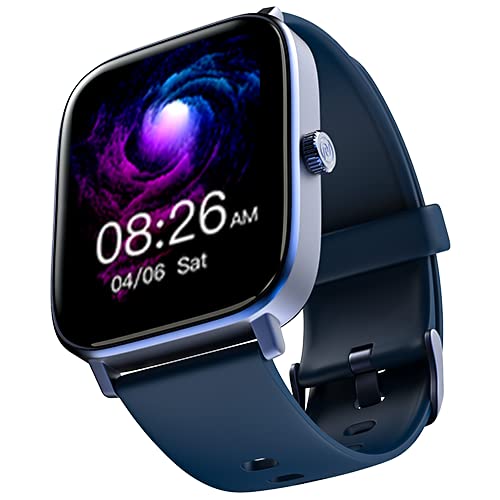
Imaj: Devan view of the Noise ColorFit Icon 2 Smartwatch, displaying its rectangular screen and strap.
2. Ki sa ki nan bwat la
Verify that all the following items are present in your product packaging:
- Noise ColorFit Icon 2 Smartwatch
- Charger mayetik
- Manyèl Itilizatè (dokiman sa a)
- Kat Garanti
3. Enstalasyon
3.1 Chaje mont entelijan an
Before initial use, fully charge your smartwatch. Connect the magnetic charger to the charging points on the back of the smartwatch and plug the USB end into a compatible power adapter (not included) or a computer's USB port. The watch display will indicate charging status.
3.2 Limen/Etenyen
- Pou limen: Press and hold the side button until the Noise logo appears.
- Pou etenn: Navigate to the settings menu on the smartwatch, select "Power Off," and confirm. Alternatively, press and hold the side button and select "Power Off" from the options.
3.3 Konekte ak telefòn entelijan ou
- Download the official NoiseFit application from your smartphone's app store.
- Asire w ke Bluetooth aktive sou smartphone ou.
- Open the NoiseFit app and follow the on-screen instructions to create an account or log in.
- Select "Add Device" or a similar option within the app and choose "ColorFit Icon 2" from the list of available devices.
- Konfime demann koneksyon an sou tou de smartphone ou ak smartwatch la.
- Your smartwatch is compatible with devices running iOS 8 & + or Android 4.4 & +.
4. Operasyon Enstriksyon
4.1 Navigasyon debaz
- Glise anlè/desann: Defile nan meni yo ak notifikasyon yo.
- Glise agoch/dwat: Access quick widgets or different screens.
- Tape: Chwazi yon atik oubyen konfime yon aksyon.
- Bouton bò: Peze pou retounen nan ekran prensipal la oswa pou reveye aparèy la.
4.2 Karakteristik kle
The Noise ColorFit Icon 2 Smartwatch offers various features accessible through its interface and the connected NoiseFit app. These include:
- Activity Tracking (steps, distance, calories)
- Siveyans batman kè
- Suivi dòmi
- Notification Alerts (calls, messages, app notifications)
- Kontwòl Mizik
- Enfòmasyon sou move tan
For detailed instructions on specific features, refer to the NoiseFit application's help section.
5. Antretyen
5.1 Netwayaj
Netwaye mont entelijan ou ak braslè ou regilyèman pou anpeche iritasyon po epi kenbe pèfòmans aparèy la an bon eta. Sèvi ak yon twal mou ki pa gen pousyè. Si sa nesesè, siye yon ti kras.ampen the cloth with water. Avoid using harsh chemicals, abrasive materials, or strong detergents.
5.2 Pi bon pratik pou chaje
- Use only the provided magnetic charger.
- Avoid exposing the charging contacts to water or sweat. Ensure they are dry before charging.
- Do not leave the smartwatch charging for extended periods after it is fully charged.
5.3 Depo
When not in use for an extended period, store the smartwatch in a cool, dry place away from direct sunlight and extreme temperatures. Ensure it has a partial charge to prevent battery degradation.
NAN. Depanaj
| Pwoblèm | Solisyon posib |
|---|---|
| Smartwatch does not power on. | Ensure the device is fully charged. Connect to the magnetic charger and wait a few minutes before attempting to power on again. |
| Pa ka konekte ak telefòn entelijan an. |
|
| Suivi aktivite ki pa egzak. | Ensure the smartwatch is worn snugly on your wrist, about one finger's width above your wrist bone. Calibrate the device through the NoiseFit app if available. |
| Notifikasyon yo pa resevwa. |
|
If you encounter issues not listed here, please refer to the support section of the NoiseFit application or contact customer support.
7. Espesifikasyon
| Karakteristik | Detay |
|---|---|
| Mak | Bri |
| Seri modèl | ColorFit Icon 2 |
| Nimewo Modèl Atik | wrb-sw-colorfiticon2-std-blu_blu |
| Dimansyon pwodwi | 4.7 x 3.9 x 1.2 cm |
| Pwa atik | 45 g |
| Kalite koneksyon | Bluetooth |
| Kalite san fil | Bluetooth |
| Sistèm operasyon konpatibilite | iOS 8 & + or Android 4.4 & + |
| Konpozan ki enkli | Smartwatch, Magnetic Charger, User Manual, Warranty Card |
| GPS | Pa gen GPS |
| Fòm | Rektangilè |
8. Garanti ak sipò
Your Noise ColorFit Icon 2 Smartwatch comes with a 1-year assured warranty from Noise, covering manufacturing defects from the date of purchase. Please retain your purchase receipt and warranty card for any warranty claims.
For technical support, warranty claims, or further assistance, please contact Noise customer service. Manufacturer and Importer details:
Nexxbase Marketing Pvt. Ltd.Khasra No-146/25/2/1, Jail Road Badshahpur,
Gurugram Haryana-122101, India
Telefòn: 8882-132-132
You can also visit the official Noise websit pou plis enfòmasyon ak resous sipò.


